
Overview
Siemens A5E00120261-02 Migration-Ready HMI Board: Legacy System Retrofit and Compatibility Upgrade
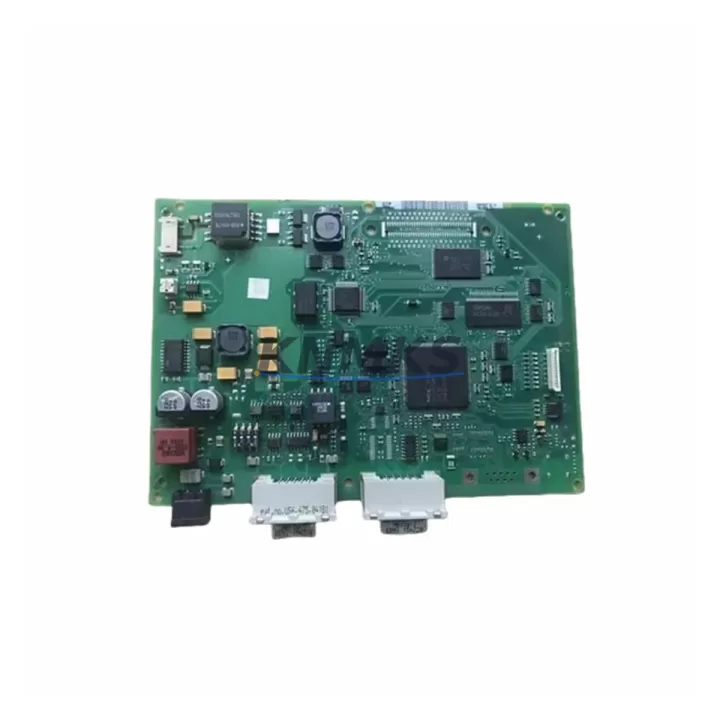
The Siemens A5E00120261-02 (order reference 6AV6545-0BA1) is a factory-specification HMI motherboard engineered for the SIMATIC OP270 operator panel series. As legacy Siemens HMI platforms approach end-of-support milestones, maintenance engineers and system integrators face increasing pressure to source verified replacement boards that preserve existing panel functionality without triggering full-system redesigns. This board addresses that challenge directly — providing a migration-ready, drop-in compatible solution for OP270 installations operating within SIMATIC S7-300, S7-400, and WinCC-based control architectures.
Whether your facility is managing a planned control cabinet upgrade, responding to an unplanned HMI failure, or executing a phased migration from legacy PROFIBUS-DP communication to modern PROFINET infrastructure, the A5E00120261-02 delivers the hardware continuity required to maintain production uptime. The board retains the original OP270 display interface, keypad matrix connections, and backplane communication logic, ensuring that existing ProTool or WinCC flexible HMI projects can be reloaded without screen reconfiguration or tag remapping.
Before installation, engineers should verify power supply compatibility — the OP270 panel requires a stable 24 VDC input, and any upstream SITOP power supply or panel-mount PSU should be confirmed against the current draw specifications of the replacement board. Terminal wiring for the MPI/PROFIBUS port, RS-422/RS-485 signal lines, and the 15-pin sub-D connector to the display assembly must be inspected and re-torqued to manufacturer specification. If the existing installation uses a CP 342-5 or CP 343-5 communications processor for PROFIBUS coordination, the module address assignment in the hardware configuration (HW Config in STEP 7) must be reviewed to confirm the OP270 station address remains consistent after board replacement.
For sites running SIMATIC S7-300 controllers with ET 200M distributed I/O racks, the HMI board replacement does not affect the I/O module addressing or the DP master configuration — however, the MPI network segment should be re-scanned post-installation using STEP 7 or TIA Portal to confirm the OP270 node is correctly recognized. Facilities that have already partially migrated to S7-1500 controllers with PROFINET should note that the OP270 panel communicates via MPI or PROFIBUS-DP; a PN/DP coupler or IE/PB Link PN IO may be required to bridge the communication gap if the controller no longer carries a native DP interface.
Firmware version compatibility is a critical checkpoint. The A5E00120261-02 board supports OP270 firmware versions consistent with ProTool 6.0 SP2 and WinCC flexible 2008 SP3 project files. If the site HMI project was compiled under an earlier ProTool version, a project migration step in WinCC flexible may be required before the project can be transferred to the replacement board via the MPI programming cable (PC Adapter USB or CP 5611). Installation space within the control cabinet should be confirmed — the OP270 panel cutout dimensions and mounting depth must accommodate the replacement unit without modification to the cabinet door or DIN rail layout.
Migration Compatibility Table
| Parameter | Details |
|---|---|
| Part Number | A5E00120261-02 |
| Order Number | 6AV6545-0BA1 |
| Compatible Panel | SIMATIC OP270 (6AV6545-0BA1-0AX0 series) |
| Communication Interface | MPI / PROFIBUS-DP (RS-485) |
| Compatible Controllers | S7-300, S7-400; S7-1500 via PN/DP coupler |
| HMI Software Compatibility | ProTool 6.0 SP2+, WinCC flexible 2008 SP3 |
| Power Supply Requirement | 24 VDC (SITOP or equivalent panel PSU) |
| Display Interface | 15-pin sub-D to TFT display assembly |
| Installation Format | Panel cutout mount, OP270 standard dimensions |
| Replacement Recommendation | Direct drop-in for failed or degraded OP270 motherboard |
| Commissioning Tool | STEP 7 v5.x / TIA Portal V15+, PC Adapter USB |
| Firmware Compatibility | OP270 firmware ≥ V5.1 |
| Origin | Germany |
| Support terms | support terms confirmed by quotation, pre-shipment function tested |
Retrofit Planning for Existing Automation Systems
A successful OP270 board retrofit requires coordinated planning across multiple system layers. The replacement A5E00120261-02 board must be integrated within the context of the broader control cabinet architecture — not treated as an isolated component swap. In a typical S7-300 installation, the OP270 panel shares the MPI bus with the CPU 315-2 DP or CPU 317-2 DP, and the MPI station address of the panel must be pre-configured on the replacement board before it is connected to the live network segment.
For cabinets that also house SM 321 digital input modules, SM 322 digital output modules, or SM 331 analog input modules within an ET 200M rack, the I/O configuration remains unaffected by the HMI board replacement — but the opportunity should be taken to inspect the IM 153-2 interface module and confirm that the DP address assignment is consistent with the current STEP 7 hardware configuration. If the cabinet includes a CP 343-1 Ethernet communications processor for SCADA connectivity, the HMI replacement window is also an appropriate time to verify that the CP module firmware is current and that the S7 connection table in NetPro reflects the correct OP270 station parameters.
Sites planning a longer-term migration toward SIMATIC Comfort Panels (such as the TP700 Comfort or TP900 Comfort) should treat the A5E00120261-02 replacement as a bridge solution — restoring immediate operational continuity while the WinCC flexible project is evaluated for migration to TIA Portal WinCC Advanced. During this interim period, the existing PROFIBUS-DP wiring, termination resistors, and bus connector (6ES7972-0BA52-0XA0 type) should be inspected and replaced if degraded, as bus integrity directly affects HMI communication reliability. A PC Adapter USB or CP 5611 card will be required for project transfer and online diagnostics during commissioning.
Downtime Control During System Migration
Minimizing unplanned downtime during an OP270 board replacement requires a structured pre-outage preparation protocol. Before the maintenance window begins, the existing HMI project should be backed up from the panel using WinCC flexible or ProTool — this backup preserves all screen configurations, tag assignments, alarm definitions, and recipe data. The backup file should be stored on a local engineering workstation and verified for completeness before the panel is powered down.
During the replacement window, the original program logic in the S7-300 or S7-400 CPU is not affected — the PLC continues to execute its control program independently of the HMI panel state. This means that process control continuity can be maintained through hardwired interlocks and local operator stations while the HMI is offline. The replacement board should be pre-configured with the correct MPI address and baud rate (typically 187.5 kbps for OP270 installations) before installation to reduce in-cabinet commissioning time.
After physical installation, the HMI project is transferred to the replacement board via the MPI programming cable. A full online test — including alarm acknowledgment, setpoint entry, trend display, and recipe transfer — should be completed before the maintenance window is closed. If the installation includes a SIMATIC WinCC SCADA server connected via the S7 OPC channel, the HMI node should be confirmed as visible in the WinCC tag browser before the system is returned to production. Pre-shipment function testing of the A5E00120261-02 board ensures that display output, keypad response, and communication interface are verified before the unit reaches site — reducing the risk of a second outage caused by a defective replacement part.
Retrofit Support FAQ
Q: Is the A5E00120261-02 a direct replacement for the original OP270 motherboard?
A: Yes. The A5E00120261-02 is a factory-specification replacement board for the SIMATIC OP270 panel. It retains the original display interface, keypad connections, and MPI/PROFIBUS-DP communication logic. No mechanical modification to the panel housing or cabinet cutout is required. The existing HMI project can be reloaded directly after board replacement.
Q: What commissioning steps are required after installing the replacement board?
A: After installation, configure the MPI station address on the replacement board to match the original OP270 network address. Transfer the backed-up HMI project via PC Adapter USB or CP 5611. Perform an MPI network scan in STEP 7 to confirm the panel is recognized. Complete a full functional test covering display output, alarm acknowledgment, and setpoint entry before returning the system to production.
Q: Can this board be used in an installation that has been partially migrated to PROFINET?
A: The A5E00120261-02 supports MPI and PROFIBUS-DP communication natively. For installations where the S7-1500 controller no longer carries a DP interface, a PN/DP coupler or IE/PB Link PN IO is required to bridge the PROFINET and PROFIBUS-DP segments. The HMI board itself does not require modification.
Q: What support terms and testing coverage is provided?
A: Every A5E00120261-02 unit is pre-shipment function tested — covering display output, communication interface, and keypad matrix — before dispatch. A support terms confirmed by quotation is provided from the date of shipment, covering manufacturing defects and functional failures under normal operating conditions. Stock is maintained for immediate dispatch to support emergency replacement requirements.
© 2026 KNMKS. All rights reserved.
Original Source: https://knmks.com
Contact: admin@knmks.com | +86 18359268345
Product Identification
- Brand / Ecosystem
-
Siemens
Siemens - Model / Series
-
A5E00120261-02 6AV6545-0BA1
SIMATIC Series - Product Family
- HMI & Displays
- Availability Status
- Available on request after model and quantity confirmation
- Inquiry Type
- B2B RFQ, replacement inquiry and project spare-part request
- Pre-Quote Check
- Exact SKU, brand, series, quantity, nameplate photos and destination country are checked before quotation
System Path
Where this product fits in the KNMKS automation structure.
Specification & Inquiry Focus
- Display range
- Operator panels and touch screens
- Common needs
- Screen size, interface and version matching
- Project support
- Retrofit, spare unit and panel replacement
Buyer Confirmation
Information KNMKS checks before replying.
- Exact model
- A5E00120261-02 6AV6545-0BA1
- Brand / ecosystem
- Siemens
- Product family
- HMI & Displays
- Application note
- Replacement, maintenance, project build or spare-part list
- Useful photos
- Nameplate, installed unit, cabinet layout or connector side
- Delivery details
- Quantity, destination country and target schedule
Document Support
Files and notes can be confirmed during quotation.
- Product photos or nameplate confirmation when available
- Packing and delivery notes before quotation confirmation
- Support scope and delivery terms confirmed per inquiry
- Export document coordination for qualified B2B requests
Inquiry Support
- Panel size and interface confirmation
- Replacement unit inquiry for discontinued HMIs
- Protective packaging for display shipment
What to Send Us
- Brand and exact model number: Siemens A5E00120261-02 6AV6545-0BA1
- Quantity and required delivery time
- Application, replacement requirement or nameplate photo
- Destination country and shipping preference
RFQ Preparation
This is a product inquiry page built for RFQ communication.
Fast Model Check
Send this model to KNMKS for confirmation.
Include quantity, destination country and photos if this is a maintenance replacement. The inquiry will be saved with a reference number after submission.
Brand & Compatibility Note
KNMKS displays automation product information for well-known industrial brand ecosystems and compatible replacement references. Brand names are used for product identification and compatibility reference only; final availability and commercial terms are confirmed per quotation.
 Manufacturing
 Machine Tools
 Packaging
 Energy & Power



 PLCs & Controllers
 Servo Systems
 Variable Frequency Drives
 Sensors