
Overview
Siemens 6AV2123-2GB03-0AX0 Migration-Ready HMI for Legacy Control Systems
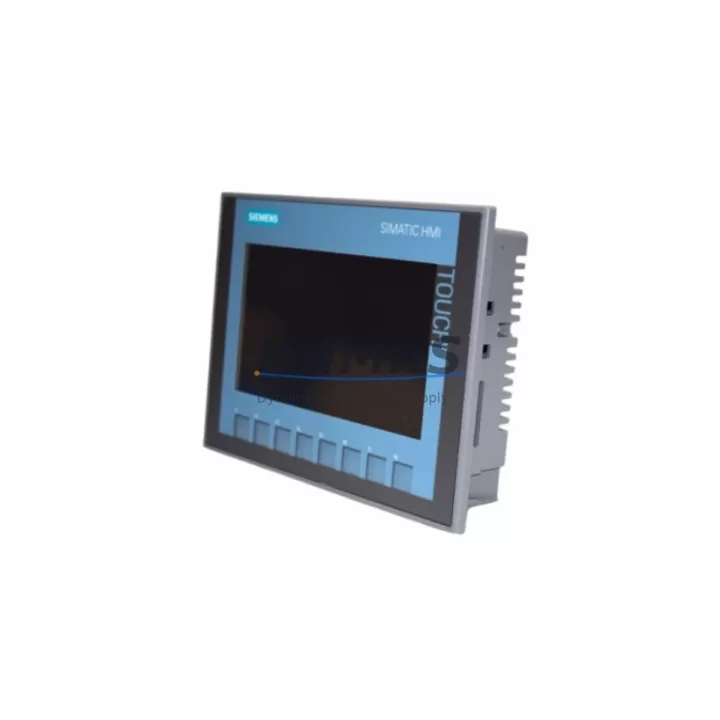
The Siemens 6AV2123-2GB03-0AX0 is a KTP700 Basic panel from the SIMATIC HMI KTP Basic series — a 7-inch key and touch operator panel designed for seamless integration into SIMATIC S7-1200 and S7-1500 control architectures via PROFINET. As legacy HMI platforms such as the OP77B, TP177B, and earlier MP270 series reach end-of-life, the 6AV2123-2GB03-0AX0 has become the preferred migration target for system integrators and maintenance engineers managing aging production lines, control cabinets, and distributed automation cells.
This unit supports TIA Portal V13 SP1 and above, enabling engineers to migrate existing WinCC flexible projects with structured conversion workflows. The 800 × 480 pixel widescreen display, integrated PROFINET port, and compact 214 × 158 mm front panel dimensions make it a practical drop-in candidate for most standard DIN-rail enclosures and control cabinet cutouts previously occupied by earlier-generation Siemens HMI hardware.
For facilities running SIMATIC S7-300 or S7-400 PLCs with legacy MPI or PROFIBUS communication, the migration path typically involves introducing a SIMATIC S7-1200 or S7-1500 controller alongside the 6AV2123-2GB03-0AX0, with the PROFINET backbone replacing older serial communication links. Engineers should verify backplane slot availability, power supply capacity from the existing PS 307 or PS 405 modules, and confirm that the control cabinet provides adequate depth clearance for the KTP700 Basic mounting depth of 33 mm behind the panel face.
Terminal wiring adaptation is a critical step in any retrofit. The 6AV2123-2GB03-0AX0 requires a 24 V DC supply via a 2-pin connector, and engineers migrating from older TP177B or OP77B installations must account for differences in power connector pinout and cable routing. Where the legacy panel used a 9-pin Sub-D connector for MPI communication, the KTP700 Basic relies entirely on the RJ45 PROFINET interface, requiring new structured cabling or patch panel reconfiguration within the control cabinet.
Program logic compatibility is another key consideration. Existing ladder logic or function block diagrams developed in STEP 7 Classic must be assessed for migration to TIA Portal. Siemens provides a STEP 7 project migration tool within TIA Portal, but engineers should plan for manual review of organization blocks, interrupt routines, and any hardware-specific configurations tied to legacy CPU modules such as the CPU 315-2 DP or CPU 416-3 PN/DP. HMI screen layouts built in WinCC flexible can be imported into WinCC (TIA Portal) using the integrated migration wizard, though screen object properties, alarm configurations, and recipe structures should be validated post-migration before live commissioning.
Communication link integrity must be confirmed during the retrofit planning phase. If the existing system uses a SIMATIC NET CP 343-1 or CP 443-1 Ethernet module for plant network connectivity, engineers should verify that the new PROFINET topology — including switch infrastructure and IP address assignments — does not conflict with existing network segments. The 6AV2123-2GB03-0AX0 supports a single PROFINET connection and does not include a built-in switch, so installations requiring daisy-chain topologies should plan for an external IE switch such as the SCALANCE X005 or X108.
Firmware version alignment is essential before field commissioning. The KTP700 Basic panel firmware must match the HMI runtime version configured in TIA Portal. Mismatched firmware versions will prevent project download and may trigger compatibility warnings during the transfer process. KNMKS supplies the 6AV2123-2GB03-0AX0 with factory firmware and recommends engineers confirm the target TIA Portal version before shipment to ensure alignment with site software environments.
All units supplied by KNMKS are subject to pre-shipment functional testing, including power-on verification, display integrity check, PROFINET port continuity, and touch calibration validation. Each unit ships with a support terms confirmed by quotation covering manufacturing defects and functional failures under normal operating conditions. In-stock inventory supports short lead times for urgent maintenance and unplanned downtime recovery scenarios.
Migration Compatibility Table
| Parameter | Legacy Unit (e.g. TP177B / OP77B) | 6AV2123-2GB03-0AX0 (KTP700 Basic) |
|---|---|---|
| Display Size | 5.7″ STN / TFT | 7″ Widescreen TFT |
| Resolution | 320 × 240 | 800 × 480 |
| Communication Interface | MPI / PROFIBUS DP (Sub-D 9-pin) | PROFINET (RJ45) |
| Engineering Software | WinCC flexible 2008 | TIA Portal V13 SP1 and above |
| Power Supply | 24 V DC (varies by model) | 24 V DC, 2-pin connector |
| Panel Cutout (W × H) | 196 × 141 mm (TP177B) | 214 × 158 mm |
| Mounting Depth | ~60 mm | 33 mm |
| Replacement Recommendation | Direct migration with cutout enlargement; new PROFINET cabling required | |
| Commissioning Focus | IP configuration, project download, screen validation, alarm verification | |
| Support terms | — | 12 months (KNMKS) |
Retrofit Planning for Existing Automation Systems
A successful retrofit of the 6AV2123-2GB03-0AX0 into an existing automation system requires coordinated planning across hardware, software, and network layers. Engineers typically begin by auditing the existing control cabinet layout to confirm available panel cutout dimensions, power rail capacity, and DIN-rail space for any supplementary components required by the new architecture.
Where the legacy system relied on a SIMATIC S7-300 CPU with a CP 343-1 communication processor for Ethernet connectivity, the migration to a PROFINET-native architecture may involve introducing a SIMATIC S7-1200 CPU 1214C or S7-1500 CPU 1511-1 PN as the new controller backbone. These CPUs integrate PROFINET natively, eliminating the need for separate communication modules in most standard applications. The 6AV2123-2GB03-0AX0 connects directly to the CPU’s PROFINET port, simplifying the network topology.
I/O infrastructure must also be evaluated. Legacy distributed I/O connected via PROFIBUS DP — such as ET 200M or ET 200S stations — can be retained in the new architecture using a DP/PN link coupler, or migrated to PROFINET-native ET 200SP or ET 200MP stations for a cleaner long-term solution. Signal isolators and marshalling terminals within the control cabinet should be reviewed to confirm compatibility with the new I/O module signal ranges and terminal block configurations.
Power supply sizing is a recurring consideration in retrofit projects. The existing PS 307 5A or PS 307 10A modules may need to be supplemented or replaced with SITOP PSU100S or PSU200M units if the new controller and HMI combination draws more current than the legacy system. Engineers should calculate the total 24 V DC load across all active components — including the KTP700 Basic panel, CPU, I/O modules, and any communication devices — before finalizing the power supply selection.
Programming cable and firmware update logistics should be planned before the maintenance window. The 6AV2123-2GB03-0AX0 is programmed via PROFINET using a standard RJ45 Ethernet connection from the engineering workstation running TIA Portal. No dedicated programming cable such as the PC Adapter USB is required for HMI project transfer, though a SIMATIC S7 USB/MPI adapter may still be needed if the legacy PLC requires parallel firmware updates during the same maintenance window.
Downtime Control During System Migration
Minimizing unplanned downtime is the primary operational constraint in any legacy HMI replacement project. For the 6AV2123-2GB03-0AX0 retrofit, the recommended approach is to complete all software preparation — including TIA Portal project migration, screen layout validation, and alarm configuration review — in a staging environment before the scheduled maintenance window begins.
Engineers should export and archive the existing WinCC flexible project and STEP 7 program before any hardware changes are made. This preserves the original control logic and HMI configuration as a recovery baseline. If the migration to TIA Portal introduces unexpected compatibility issues, the legacy hardware can be reinstated from the archived project without loss of production data or control continuity.
During the physical swap, the sequence should follow: power isolation, legacy panel removal, cutout modification if required, new panel mounting and wiring, power restoration, IP address assignment, and project download. The 6AV2123-2GB03-0AX0 supports fast project transfer over PROFINET, with typical download times under five minutes for standard HMI projects. Engineers should have the TIA Portal engineering station connected and ready before power is restored to minimize the time between hardware installation and operational validation.
Post-installation, the commissioning checklist should cover: PROFINET device name assignment, IP address confirmation, HMI runtime startup, screen navigation verification, alarm trigger testing, and operator acknowledgment of all active alarms carried over from the legacy system. Where the production process permits, a parallel run period — operating the new HMI alongside a temporary monitoring connection to the legacy system — provides an additional layer of confidence before full cutover.
Retrofit Support FAQ
Q: Can the 6AV2123-2GB03-0AX0 directly replace a TP177B or OP77B without modifying the control cabinet cutout?
A: The KTP700 Basic has a larger front panel dimension (214 × 158 mm) compared to the TP177B (196 × 141 mm), so the cabinet cutout will require enlargement. The mounting depth is significantly reduced at 33 mm, which typically improves clearance behind the panel. A cutout adapter frame is available from Siemens for some legacy panel sizes.
Q: Is the existing WinCC flexible project compatible with TIA Portal for the KTP700 Basic?
A: TIA Portal includes a WinCC flexible migration wizard that converts most standard screen objects, tags, and alarm configurations. Complex projects with custom scripts, third-party controls, or non-standard communication drivers should be reviewed manually. KNMKS recommends completing a full migration test in a staging environment before the live maintenance window.
Q: What communication wiring changes are required when replacing an MPI-connected HMI with the 6AV2123-2GB03-0AX0?
A: The KTP700 Basic uses PROFINET (RJ45) exclusively. MPI and PROFIBUS cabling cannot be reused. New Cat5e or Cat6 structured cabling must be run from the HMI panel to the nearest PROFINET switch or directly to the CPU’s PROFINET port. IP address assignment is performed via TIA Portal or the panel’s startup dialog.
Q: Does KNMKS provide pre-shipment testing and support terms coverage for the 6AV2123-2GB03-0AX0?
A: Yes. All units undergo pre-shipment functional testing including power-on verification, display check, PROFINET port continuity, and touch calibration. Each unit is covered by a support terms confirmed by quotation against manufacturing defects and functional failures under normal operating conditions. Expedited shipping is available for urgent maintenance and unplanned downtime recovery.
© 2026 KNMKS. All rights reserved.
Original Source: https://knmks.com
Contact: admin@knmks.com | +86 18359268345
Product Identification
- Brand / Ecosystem
-
Siemens
Siemens - Model / Series
-
6AV2123-2GB03-0AX0
SIMATIC Series - Product Family
- HMI & Displays
- Availability Status
- Available on request after model and quantity confirmation
- Inquiry Type
- B2B RFQ, replacement inquiry and project spare-part request
- Pre-Quote Check
- Exact SKU, brand, series, quantity, nameplate photos and destination country are checked before quotation
System Path
Where this product fits in the KNMKS automation structure.
Specification & Inquiry Focus
- Display range
- Operator panels and touch screens
- Common needs
- Screen size, interface and version matching
- Project support
- Retrofit, spare unit and panel replacement
Buyer Confirmation
Information KNMKS checks before replying.
- Exact model
- 6AV2123-2GB03-0AX0
- Brand / ecosystem
- Siemens
- Product family
- HMI & Displays
- Application note
- Replacement, maintenance, project build or spare-part list
- Useful photos
- Nameplate, installed unit, cabinet layout or connector side
- Delivery details
- Quantity, destination country and target schedule
Document Support
Files and notes can be confirmed during quotation.
- Product photos or nameplate confirmation when available
- Packing and delivery notes before quotation confirmation
- Support scope and delivery terms confirmed per inquiry
- Export document coordination for qualified B2B requests
Inquiry Support
- Panel size and interface confirmation
- Replacement unit inquiry for discontinued HMIs
- Protective packaging for display shipment
What to Send Us
- Brand and exact model number: Siemens 6AV2123-2GB03-0AX0
- Quantity and required delivery time
- Application, replacement requirement or nameplate photo
- Destination country and shipping preference
RFQ Preparation
This is a product inquiry page built for RFQ communication.
Fast Model Check
Send this model to KNMKS for confirmation.
Include quantity, destination country and photos if this is a maintenance replacement. The inquiry will be saved with a reference number after submission.
Brand & Compatibility Note
KNMKS displays automation product information for well-known industrial brand ecosystems and compatible replacement references. Brand names are used for product identification and compatibility reference only; final availability and commercial terms are confirmed per quotation.
 Manufacturing
 Machine Tools
 Packaging
 Energy & Power


 PLCs & Controllers
 Servo Systems
 Variable Frequency Drives
 Sensors