
Overview
Siemens 6AV2123-2DB03-0AX0 Migration-Ready HMI for Legacy Control Systems
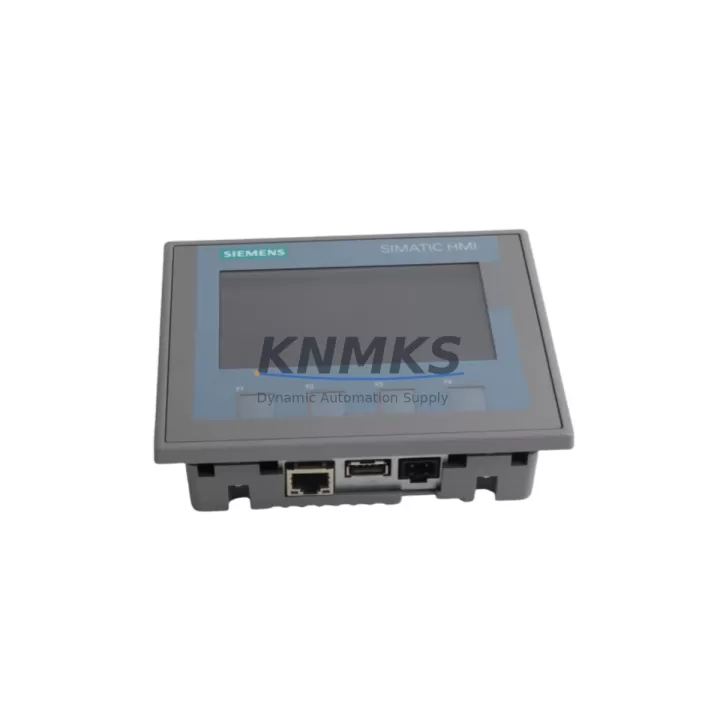
The Siemens 6AV2123-2DB03-0AX0 is a KTP400 Basic PN operator panel from the SIMATIC HMI KTP series, featuring a 4.3-inch TFT widescreen display with 480 × 272 pixel resolution, 4 function keys, and PROFINET interface. This unit is a direct migration-ready replacement for legacy SIMATIC OP/TP series panels — including the OP77B, TP177B, and TP177A — that have reached end-of-life or are no longer supported under current Siemens firmware cycles. It is fully compatible with SIMATIC S7-1200 and S7-1500 controllers via TIA Portal V13 SP1 and above, and supports legacy S7-300/400 integration through appropriate communication drivers.
For facilities managing aging control cabinets, the 6AV2123-2DB03-0AX0 provides a compact, cost-effective upgrade path that preserves existing panel cutout dimensions (in many retrofit scenarios), reduces spare part lifecycle risk, and eliminates dependency on discontinued HMI hardware. Each unit is pre-shipment tested, supplied with a support terms confirmed by quotation, and dispatched from verified stock.
Migration Compatibility Table
| Parameter | 6AV2123-2DB03-0AX0 (KTP400 Basic PN) | Legacy Reference (e.g. TP177B PN) |
|---|---|---|
| Display Size | 4.3″ TFT Widescreen | 5.7″ STN (TP177B) |
| Resolution | 480 × 272 px | 320 × 240 px |
| Communication Interface | PROFINET (RJ45) | PROFINET / MPI / PROFIBUS |
| Controller Compatibility | S7-1200, S7-1500, S7-300/400* | S7-200, S7-300, S7-400 |
| Engineering Tool | TIA Portal V13 SP1+ | WinCC flexible 2008 SP3 |
| Panel Cutout (W × H) | 130 × 100 mm | 214 × 158 mm (TP177B) |
| Supply Voltage | 24 V DC (20.4–28.8 V) | 24 V DC |
| Function Keys | 4 configurable | 8 configurable |
| Installation Depth | 33 mm | 55 mm |
| Replacement Recommendation | Direct drop-in for KTP400 DP; adapter plate may be required for TP177B | — |
| Commissioning Focus | IP address assignment, tag mapping, screen migration via TIA Portal | — |
| Support terms | 12 Months | — |
* S7-300/400 connectivity requires appropriate PROFINET communication configuration in TIA Portal.
Retrofit Planning for Existing Automation Systems
Successful integration of the 6AV2123-2DB03-0AX0 into a legacy control cabinet begins with a thorough pre-retrofit audit. Engineers should verify the available 24 V DC supply capacity at the panel terminal strip — the KTP400 Basic PN draws a maximum of 60 mA at 24 V, and the existing SITOP PSU100S or equivalent power supply module must have sufficient headroom after accounting for all connected I/O and communication loads.
Terminal wiring for the PROFINET port should be confirmed against the existing Ethernet switch or managed switch port configuration. In systems where the legacy panel communicated via MPI or PROFIBUS DP — common in older S7-300 installations — a protocol migration step is required: the controller’s communication module (such as a CP 343-1 or CP 443-1) must be reconfigured or replaced with a PROFINET-capable module to support the KTP400 Basic PN’s single RJ45 interface.
Before physical installation, the replacement panel’s IP address must be assigned using the TIA Portal device configuration or the Primary Setup Tool (PST). The panel’s device name must match the PROFINET device name defined in the controller project. Failure to align these parameters is the most common cause of communication faults during initial commissioning.
For facilities running SIMATIC S7-300 racks with ET 200M distributed I/O or IM 153-x interface modules, the HMI screen migration from WinCC flexible to TIA Portal WinCC (Basic) requires careful tag remapping. Variable tables, alarm classes, and recipe structures do not migrate automatically — each must be reviewed and re-linked to the new controller data blocks. Where the original system used a SIMATIC Panel PC or MP277 multi-panel, the screen layout may need to be redesigned to fit the KTP400’s 4.3-inch display area.
In control cabinets where space is constrained, the KTP400 Basic PN’s 33 mm installation depth and 130 × 100 mm cutout offer a significant advantage over larger legacy panels. An adapter plate (available as a Siemens accessory) can bridge the cutout gap when replacing a TP177B or OP177B, avoiding sheet metal rework and reducing installation time. The SIMATIC S7-1200 CPU module and associated SM 1221/SM 1222 digital I/O expansion modules can typically remain in place during the HMI swap, minimizing disruption to the control logic.
Downtime Control During System Migration
Minimizing production downtime during an HMI migration requires a structured changeover plan. The recommended approach is to complete all TIA Portal project preparation — including tag migration, screen design, and communication configuration — offline, using a simulation environment or a bench-tested controller, before the scheduled maintenance window begins.
During the changeover window, the sequence should follow: (1) power down the control cabinet and disconnect the legacy panel; (2) install the 6AV2123-2DB03-0AX0 and complete terminal connections; (3) power up and assign the PROFINET device name and IP address; (4) download the TIA Portal project to the panel; (5) verify all tag communications and alarm displays against the original HMI specification; (6) conduct a functional test of all operator inputs and outputs before returning the line to production.
Where the original PLC program logic is stored on a SIMATIC Memory Card or in the CPU’s internal load memory, no program changes are required on the controller side — the HMI replacement is transparent to the PLC. This is a key advantage of the KTP400 Basic PN migration path: the controller program, including all FB/FC/DB structures and safety interlocks, remains intact. Only the HMI project requires updating.
For sites with strict change management requirements, a parallel run period — where the new panel is installed and tested alongside the legacy unit before final cutover — can be arranged if cabinet space permits. Pre-shipment testing of the 6AV2123-2DB03-0AX0 at our facility ensures the unit arrives ready for immediate installation, with firmware pre-verified and display function confirmed. Stock is maintained for rapid dispatch, supporting planned maintenance schedules and emergency replacement scenarios alike.
Retrofit Support FAQ
Q1: Is the 6AV2123-2DB03-0AX0 a direct replacement for the SIMATIC TP177B PN/DP?
The KTP400 Basic PN is the recommended migration target for TP177B and OP77B panels. The panel cutout dimensions differ, so an adapter plate is required for a flush-mount installation. Communication protocol migration from MPI/PROFIBUS to PROFINET must be completed at the controller level. The TIA Portal project must be rebuilt from the WinCC flexible source — direct project import is not supported.
Q2: What commissioning steps are required after installation?
After physical installation, assign the PROFINET device name and IP address via TIA Portal or PST. Download the HMI project to the panel. Verify all PLC tags are correctly mapped and that alarm and event displays match the original specification. Conduct a full I/O test cycle before returning the system to automatic mode. Typical commissioning time for a prepared project is 1–2 hours.
Q3: Is the unit supplied with firmware pre-installed and tested?
Yes. Each 6AV2123-2DB03-0AX0 unit is pre-shipment tested at our facility. Display function, touch response (where applicable), PROFINET port integrity, and power supply input are verified before dispatch. The unit ships with the factory firmware version. Firmware updates can be applied via TIA Portal or the Automation License Manager if a specific version is required for your project.
Q4: What support terms and stock availability terms apply?
All units are supplied with a support terms confirmed by quotation covering manufacturing defects and functional failures under normal operating conditions. Stock is maintained for immediate dispatch to support both planned retrofit projects and emergency replacement requirements. Contact our sales team to confirm current lead times and reserve stock for scheduled maintenance windows.
© 2026 KNMKS. All rights reserved.
Original Source: https://knmks.com
Contact: admin@knmks.com | +86 18359268345
Product Identification
- Brand / Ecosystem
-
Siemens
Siemens - Model / Series
-
6AV2123-2DB03-0AX0
SIMATIC Series - Product Family
- HMI & Displays
- Availability Status
- Available on request after model and quantity confirmation
- Inquiry Type
- B2B RFQ, replacement inquiry and project spare-part request
- Pre-Quote Check
- Exact SKU, brand, series, quantity, nameplate photos and destination country are checked before quotation
System Path
Where this product fits in the KNMKS automation structure.
Specification & Inquiry Focus
- Display range
- Operator panels and touch screens
- Common needs
- Screen size, interface and version matching
- Project support
- Retrofit, spare unit and panel replacement
Buyer Confirmation
Information KNMKS checks before replying.
- Exact model
- 6AV2123-2DB03-0AX0
- Brand / ecosystem
- Siemens
- Product family
- HMI & Displays
- Application note
- Replacement, maintenance, project build or spare-part list
- Useful photos
- Nameplate, installed unit, cabinet layout or connector side
- Delivery details
- Quantity, destination country and target schedule
Document Support
Files and notes can be confirmed during quotation.
- Product photos or nameplate confirmation when available
- Packing and delivery notes before quotation confirmation
- Support scope and delivery terms confirmed per inquiry
- Export document coordination for qualified B2B requests
Inquiry Support
- Panel size and interface confirmation
- Replacement unit inquiry for discontinued HMIs
- Protective packaging for display shipment
What to Send Us
- Brand and exact model number: Siemens 6AV2123-2DB03-0AX0
- Quantity and required delivery time
- Application, replacement requirement or nameplate photo
- Destination country and shipping preference
RFQ Preparation
This is a product inquiry page built for RFQ communication.
Fast Model Check
Send this model to KNMKS for confirmation.
Include quantity, destination country and photos if this is a maintenance replacement. The inquiry will be saved with a reference number after submission.
Brand & Compatibility Note
KNMKS displays automation product information for well-known industrial brand ecosystems and compatible replacement references. Brand names are used for product identification and compatibility reference only; final availability and commercial terms are confirmed per quotation.
 Manufacturing
 Machine Tools
 Packaging
 Energy & Power


 PLCs & Controllers
 Servo Systems
 Variable Frequency Drives
 Sensors