
Overview
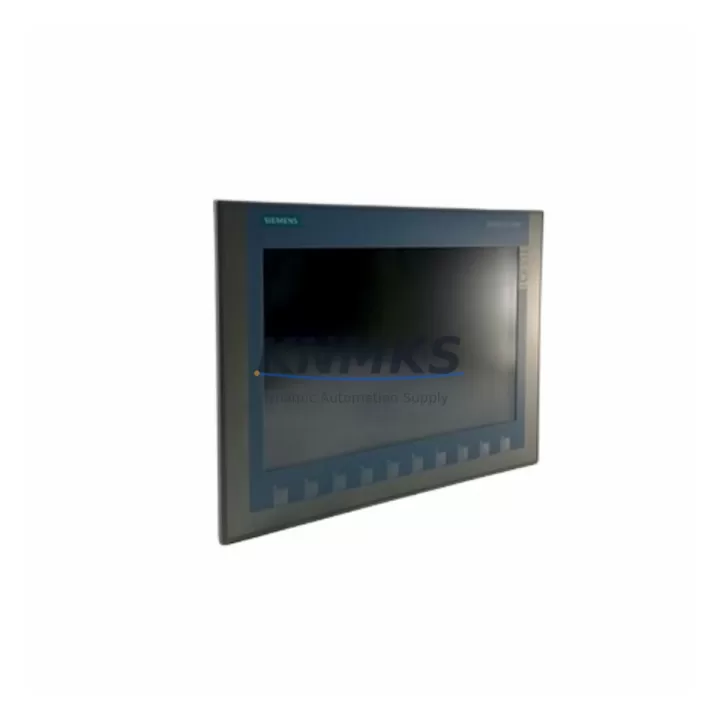
Siemens 6AV2123-2MB03-0AX0 KTP1200 Basic Spare Part: Maintenance-Proven HMI for Factory Uptime
The Siemens 6AV2123-2MB03-0AX0 is a 12-inch widescreen Key-Touch Panel from the SIMATIC KTP1200 Basic series — one of the most widely deployed operator panels in modern industrial automation. Designed for seamless integration with SIMATIC S7-1200 and S7-1500 PLCs via PROFINET, this HMI panel delivers reliable process visualization, operator input, and alarm management across demanding production environments. Holding a verified original spare in your maintenance inventory is the single most effective measure to minimize unplanned downtime when a panel fails on the line.
At KNMKS, every 6AV2123-2MB03-0AX0 unit is sourced from authorized supply channels, individually powered-on and function-tested before dispatch, and covered by a support terms confirmed by quotation. We support maintenance engineers and procurement teams with long-term supply continuity — including legacy system support for aging SIMATIC HMI fleets that are no longer in active production at Siemens.
Spare Maintenance Table
| Part Number | 6AV2123-2MB03-0AX0 |
| Series | SIMATIC KTP1200 Basic |
| Display Size | 12.1″ Widescreen TFT, 1280 × 800 px |
| Touch / Keys | Touch screen + 10 configurable function keys |
| Communication Interface | PROFINET (1× RJ45), MPI/PROFIBUS via adapter |
| PLC Compatibility | SIMATIC S7-1200, S7-1500, S7-300/400 (via adapter) |
| Engineering Software | TIA Portal V13 SP1 and above |
| Supply Voltage | 24 V DC (20.4–28.8 V) |
| Power Consumption | Approx. 18 W typical |
| Protection Rating | IP65 (front panel), IP20 (rear) |
| Operating Temperature | 0 °C to +50 °C |
| Storage Temperature | −20 °C to +60 °C |
| Mounting | Panel cutout installation, portrait or landscape |
| Country of Origin | Germany |
| Condition | Original, New or Tested Surplus |
| Support terms | 12 Months — covers functional defects from date of shipment |
| Shipping | ESD-safe packaging; global express available |
Maintenance Planning for Continuous Operation
When a KTP1200 Basic (6AV2123-2MB03-0AX0) fails or degrades in service, the root cause is rarely the panel alone. A structured maintenance review of the surrounding electrical cabinet and control loop is essential before and after replacement to prevent repeat failures and confirm system integrity.
24 V DC Power Supply: The KTP1200 Basic requires a stable 24 V DC rail within ±15% tolerance. Before installing a replacement panel, verify the cabinet’s SITOP PSU100S or equivalent power supply module is delivering clean, ripple-free voltage. A degraded PSU is a common hidden cause of HMI resets and display corruption.
PROFINET Network Infrastructure: Inspect the PROFINET switch (e.g., SCALANCE X series) and patch cables connected to the HMI’s RJ45 port. Damaged or loose connectors cause intermittent communication faults that are often misdiagnosed as panel failures. Replace Cat6 industrial Ethernet cables if continuity or shielding is suspect.
PLC CPU and Communication Modules: Confirm the connected S7-1200 or S7-1500 CPU is running the correct firmware version compatible with TIA Portal project configuration. If the project uses a CM 1241 RS422/485 communication module or a CP 1243-1 communications processor for remote access, verify these modules are fault-free before commissioning the replacement HMI.
I/O Modules and Signal Integrity: For panels used in process visualization tied to analog I/O, check SM 1231 analog input modules for signal drift or channel faults. Faulty analog signals displayed on a new HMI will appear as a panel problem when the source is upstream in the I/O rack.
Terminal Blocks and Wiring: Inspect 24 V DC terminal blocks (Phoenix Contact or Weidmüller type) for loose connections, corrosion, or thermal damage. Loose power terminals are a leading cause of intermittent HMI brownouts in high-vibration environments.
Fuses and Surge Protection: Verify the 24 V DC branch fuse protecting the HMI circuit is rated correctly (typically 2–4 A) and has not been replaced with an oversized substitute. Consider adding a DEHN or Phoenix Contact surge protection device on the 24 V rail if the cabinet is in a lightning-prone or high-EMI environment.
Maintaining a paired spare — one 6AV2123-2MB03-0AX0 panel alongside a backup 24 V PSU module — is a proven strategy for critical production lines where HMI downtime directly halts output. KNMKS supports long-term procurement agreements for facilities managing multi-cabinet SIMATIC HMI fleets.
Site Replacement Workflow
Step 1 — Isolate and Document: Before removing the failed panel, photograph the wiring, note the TIA Portal project version, and export the current HMI project backup from the engineering station if accessible. Confirm the 24 V supply is isolated at the branch fuse or circuit breaker.
Step 2 — Physical Removal: Release the panel mounting clamps from the rear, disconnect the 24 V DC power connector and PROFINET cable. Note the cable routing and label positions for reinstallation reference.
Step 3 — Inspect the Cabinet Opening: Check the panel cutout gasket for damage. The KTP1200 Basic relies on the front gasket for IP65 sealing. Replace the gasket if compressed or torn before installing the new unit.
Step 4 — Install Replacement Unit: Insert the 6AV2123-2MB03-0AX0 replacement, reconnect PROFINET and 24 V DC, and secure mounting clamps to the specified torque. Restore power and confirm the panel boots to the OS screen.
Step 5 — Project Download and Commissioning: Using TIA Portal, download the HMI project to the new panel via PROFINET. Verify all screen navigation, alarm pages, and PLC tag connections are functional. Conduct a 30-minute supervised run before returning the line to production.
Step 6 — Document and Update Spare Inventory: Record the replacement date, serial number of the removed unit, and new unit in the maintenance log. Reorder a replacement spare to restore buffer stock.
Spare Parts Support FAQ
Q1: Is the 6AV2123-2MB03-0AX0 compatible with older TIA Portal versions?
The KTP1200 Basic requires TIA Portal V13 SP1 as a minimum. Projects created in V13 SP1 through V19 are generally compatible, though Siemens recommends using the same TIA Portal version as the original project. KNMKS can advise on firmware version matching for your specific installation.
Q2: How is each unit tested before shipment?
Every 6AV2123-2MB03-0AX0 dispatched by KNMKS is powered on, display-tested for pixel uniformity and touch response, and communication-verified before packaging. Units are shipped in anti-static ESD bags with foam-lined cartons to prevent transit damage.
Q3: What does the support terms confirmed by quotation cover?
The support terms confirmed by quotation cover all functional defects including display failure, touch input malfunction, communication port failure, and power-on faults under normal operating conditions. It does not cover physical damage caused by incorrect installation voltage, liquid ingress beyond IP65 rating, or unauthorized modification.
Q4: Can KNMKS support long-term supply for fleet maintenance programs?
Yes. KNMKS maintains standing inventory and supplier relationships for SIMATIC KTP Basic series panels including the KTP400, KTP700, KTP900, and KTP1200 variants. We support annual procurement agreements, consignment stock arrangements, and priority allocation for facilities with critical uptime requirements. Contact our team to discuss a tailored spare parts supply program.
© 2026 KNMKS. All rights reserved.
Original Source: https://knmks.com
Contact: admin@knmks.com | +86 18359268345
Product Identification
- Brand / Ecosystem
-
Siemens
Siemens - Model / Series
-
6AV2123-2MB03-0AX0
SIMATIC Series - Product Family
- HMI & Displays
- Availability Status
- Available on request after model and quantity confirmation
- Inquiry Type
- B2B RFQ, replacement inquiry and project spare-part request
- Pre-Quote Check
- Exact SKU, brand, series, quantity, nameplate photos and destination country are checked before quotation
System Path
Where this product fits in the KNMKS automation structure.
Specification & Inquiry Focus
- Display range
- Operator panels and touch screens
- Common needs
- Screen size, interface and version matching
- Project support
- Retrofit, spare unit and panel replacement
Buyer Confirmation
Information KNMKS checks before replying.
- Exact model
- 6AV2123-2MB03-0AX0
- Brand / ecosystem
- Siemens
- Product family
- HMI & Displays
- Application note
- Replacement, maintenance, project build or spare-part list
- Useful photos
- Nameplate, installed unit, cabinet layout or connector side
- Delivery details
- Quantity, destination country and target schedule
Document Support
Files and notes can be confirmed during quotation.
- Product photos or nameplate confirmation when available
- Packing and delivery notes before quotation confirmation
- Support scope and delivery terms confirmed per inquiry
- Export document coordination for qualified B2B requests
Inquiry Support
- Panel size and interface confirmation
- Replacement unit inquiry for discontinued HMIs
- Protective packaging for display shipment
What to Send Us
- Brand and exact model number: Siemens 6AV2123-2MB03-0AX0
- Quantity and required delivery time
- Application, replacement requirement or nameplate photo
- Destination country and shipping preference
RFQ Preparation
This is a product inquiry page built for RFQ communication.
Fast Model Check
Send this model to KNMKS for confirmation.
Include quantity, destination country and photos if this is a maintenance replacement. The inquiry will be saved with a reference number after submission.
Brand & Compatibility Note
KNMKS displays automation product information for well-known industrial brand ecosystems and compatible replacement references. Brand names are used for product identification and compatibility reference only; final availability and commercial terms are confirmed per quotation.
 Manufacturing
 Machine Tools
 Packaging
 Energy & Power



 PLCs & Controllers
 Servo Systems
 Variable Frequency Drives
 Sensors