
Overview
Siemens 6GK1900-0AB10 Maintenance-Proven Spare Part for Factory Uptime
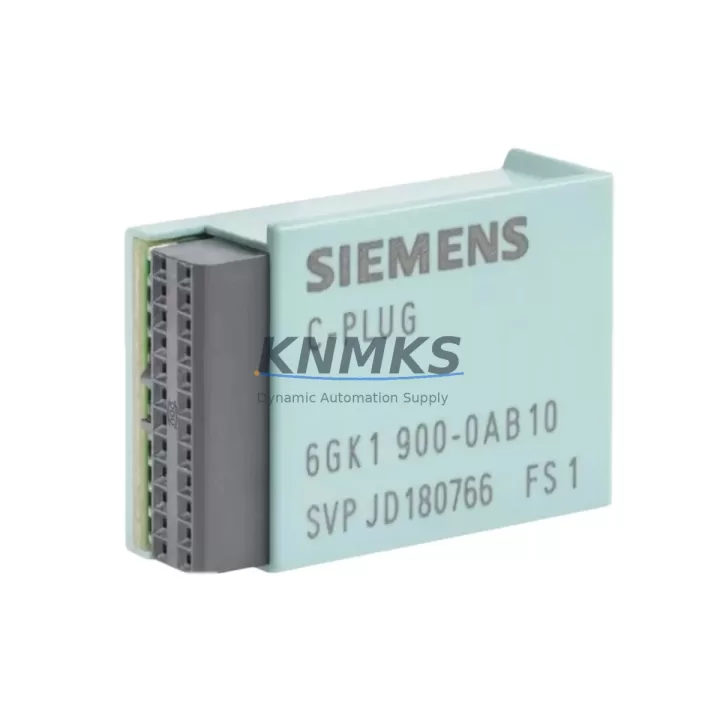
The Siemens 6GK1900-0AB10 C-PLUG (Configuration Plug) is a compact, removable storage medium designed for use across the SCALANCE and SIMATIC NET product families. It stores device configuration data locally, enabling rapid module replacement without the need for a programming device or network re-commissioning. In high-availability industrial environments — including automotive assembly lines, chemical processing plants, power distribution substations, and discrete manufacturing cells — the 6GK1900-0AB10 is a critical spare that directly determines how quickly a failed network device can be restored to service.
When a SCALANCE X managed switch, SCALANCE W wireless access point, or SCALANCE S security module fails in the field, the C-PLUG retains all configuration parameters: IP addressing, VLAN assignments, port mirroring rules, PROFINET device names, and security policies. Swapping the C-PLUG from the failed unit into a replacement device restores full network functionality within minutes — eliminating the hours typically required for manual reconfiguration or remote engineering support. For maintenance engineers managing distributed control networks with dozens of SCALANCE nodes, stocking at least one 6GK1900-0AB10 per cabinet cluster is a proven strategy for meeting aggressive MTTR targets.
Procurement engineers sourcing the 6GK1900-0AB10 should verify compatibility with their installed SCALANCE firmware revision. The C-PLUG is supported across SCALANCE X-200, X-300, X-400, W-700, and S-600 series devices, as well as selected SIMATIC NET CP modules. Each unit shipped by KNMKS undergoes pre-shipment functional verification and is covered by a support terms confirmed by quotation against manufacturing defects.
Spare Maintenance Table
| SKU / Part Number | 6GK1900-0AB10 |
| Description | C-PLUG, Removable Configuration Storage Medium |
| Brand | Siemens |
| Series | SCALANCE / SIMATIC NET |
| Compatible Devices | SCALANCE X-200, X-300, X-400, W-700, S-600; SIMATIC NET CP modules |
| Storage Function | Retains device configuration (IP, VLAN, PROFINET name, security policy) |
| Form Factor | Compact plug-in module, tool-free insertion/removal |
| Operating Temperature | -40 °C to +70 °C (device-dependent) |
| Origin | Germany |
| Weight | 27 g |
| Application | Industrial Ethernet, PROFINET, factory automation, process control networks |
| Maintenance Role | Rapid module swap, zero-reconfiguration replacement, MTTR reduction |
| Support terms | 12 Months — covers manufacturing defects, tested before shipment |
| Supply Availability | Long-term stock maintained; B2B bulk orders accepted |
Maintenance Planning for Continuous Operation
A C-PLUG failure or loss is rarely an isolated event — it typically surfaces during an emergency switch replacement, a cabinet audit, or a post-incident review. Maintenance planners should treat the 6GK1900-0AB10 as part of a broader SCALANCE spares kit. When inspecting or replacing a SCALANCE X managed switch that uses this C-PLUG, the following associated components should be checked simultaneously to prevent secondary failures and reduce repeat call-outs:
- SCALANCE X208 / X216 managed switches — the most common host devices for the 6GK1900-0AB10 in factory Ethernet rings; verify port LEDs, SFP transceivers, and ring redundancy status after C-PLUG swap.
- SCALANCE W788-2 wireless access points — also C-PLUG compatible; inspect antenna connections, RSSI levels, and SSID configuration retention after module replacement.
- SIMATIC NET CP 343-1 / CP 443-1 communication processors — frequently co-located in the same S7-300/400 control cabinet; confirm Ethernet link status and PROFINET IO controller assignments after any network maintenance event.
- 24 VDC SITOP PSU100S power supply modules — the SCALANCE X series requires stable 24 VDC input; measure supply voltage under load and inspect terminal block connections during any cabinet intervention.
- IE FC RJ45 Plug 180 / IE FC TP Standard Cable — Siemens Industrial Ethernet field-assembly connectors and structured cabling; inspect for crimping defects, bend radius violations, and shield continuity, particularly at cabinet entry points.
- SCALANCE S602 / S612 security modules — if the network segment includes a security appliance, verify firewall rule sets and VPN tunnel status are preserved after C-PLUG-assisted replacement of adjacent switches.
Annual cabinet inspections should include a C-PLUG inventory check: confirm each SCALANCE device has a C-PLUG installed and that a spare 6GK1900-0AB10 is held in the local spare parts kit. Configuration data on installed C-PLUGs should be backed up to SINEMA Server or STEP 7 / TIA Portal project archives at each firmware update cycle.
Site Replacement Workflow
The 6GK1900-0AB10 is engineered for zero-tool, zero-reconfiguration replacement — a key advantage in time-critical maintenance scenarios. The standard site replacement procedure is as follows:
- Isolate the failed device — switch the affected SCALANCE port to bypass or activate the ring redundancy path (MRP/HRP) to maintain network continuity for other nodes.
- Remove the C-PLUG — with the device powered down, extract the 6GK1900-0AB10 from the C-PLUG slot on the front panel. No tools required.
- Insert into replacement unit — install the C-PLUG into the same slot on the new SCALANCE device before powering it on. The device will automatically read and apply all stored configuration parameters on boot.
- Power on and verify — confirm port link LEDs, PROFINET IO device status in TIA Portal or STEP 7, and ring redundancy topology. The replacement device should appear with the correct PROFINET device name and IP address within 30 seconds.
- Update spare stock — order a replacement 6GK1900-0AB10 immediately to restore the local spare parts buffer. Do not operate a SCALANCE network without a C-PLUG spare on site.
This workflow is compatible with SCALANCE X-200, X-300, and X-400 series devices running current firmware. For legacy SCALANCE X-100 unmanaged switches (which do not support C-PLUG), a separate configuration backup strategy via SINEMA or manual IP assignment is required. KNMKS maintains long-term stock of the 6GK1900-0AB10 to support both emergency single-unit orders and planned annual maintenance bulk purchases.
Spare Parts Support FAQ
Q1: Is the 6GK1900-0AB10 compatible with all SCALANCE X series switches?
The C-PLUG is compatible with SCALANCE X-200, X-300, X-400, W-700, and S-600 series devices, as well as selected SIMATIC NET CP modules. It is not supported on SCALANCE X-100 unmanaged switches. Always verify the target device’s hardware manual or order data sheet to confirm C-PLUG slot availability before ordering.
Q2: What is included in the support terms confirmed by quotation and pre-shipment testing?
Every 6GK1900-0AB10 shipped by KNMKS is functionally verified before dispatch — including read/write integrity and physical connector inspection. The support terms confirmed by quotation cover manufacturing defects and functional failures under normal operating conditions. It does not cover damage from incorrect insertion, electrostatic discharge, or use outside the specified operating temperature range.
Q3: Can I order the 6GK1900-0AB10 in bulk for annual maintenance stock programs?
Yes. KNMKS supports B2B bulk orders and blanket stock programs for the 6GK1900-0AB10. Procurement engineers managing multi-site SCALANCE networks are encouraged to establish a standing order to ensure continuous availability. Contact our sales team to discuss volume pricing, lead time commitments, and consignment stock arrangements.
Q4: How do I verify that a used or refurbished C-PLUG contains valid configuration data before installation?
A C-PLUG can be read using STEP 7, TIA Portal, or SINEMA Server before installation. Connect the target SCALANCE device to a laptop via its management port, insert the C-PLUG, and use the device’s web interface or SNMP management tool to inspect stored parameters. KNMKS supplies only new, unused 6GK1900-0AB10 units — no refurbished or previously programmed C-PLUGs are shipped without explicit customer request and written confirmation.
© 2026 KNMKS. All rights reserved.
Original Source: https://knmks.com
Contact: admin@knmks.com | +86 18359268345
Product Identification
- Brand / Ecosystem
-
Siemens
Siemens - Model / Series
-
6GK1900-0AB10
SIMATIC Series - Product Family
- Cables & Connectors
- Availability Status
- Available on request after model and quantity confirmation
- Inquiry Type
- B2B RFQ, replacement inquiry and project spare-part request
- Pre-Quote Check
- Exact SKU, brand, series, quantity, nameplate photos and destination country are checked before quotation
System Path
Where this product fits in the KNMKS automation structure.
Specification & Inquiry Focus
- Cable range
- Sensor, servo, network and circular connectors
- Common needs
- Length, pin count, shielding and plug type
- Project support
- Machine wiring and installation kits
Buyer Confirmation
Information KNMKS checks before replying.
- Exact model
- 6GK1900-0AB10
- Brand / ecosystem
- Siemens
- Product family
- Cables & Connectors
- Application note
- Replacement, maintenance, project build or spare-part list
- Useful photos
- Nameplate, installed unit, cabinet layout or connector side
- Delivery details
- Quantity, destination country and target schedule
Document Support
Files and notes can be confirmed during quotation.
- Product photos or nameplate confirmation when available
- Packing and delivery notes before quotation confirmation
- Support scope and delivery terms confirmed per inquiry
- Export document coordination for qualified B2B requests
Inquiry Support
- Cable length and connector type confirmation
- Servo, sensor and network cable inquiry
- Accessory kits for installation teams
What to Send Us
- Brand and exact model number: Siemens 6GK1900-0AB10
- Quantity and required delivery time
- Application, replacement requirement or nameplate photo
- Destination country and shipping preference
RFQ Preparation
This is a product inquiry page built for RFQ communication.
Fast Model Check
Send this model to KNMKS for confirmation.
Include quantity, destination country and photos if this is a maintenance replacement. The inquiry will be saved with a reference number after submission.
Brand & Compatibility Note
KNMKS displays automation product information for well-known industrial brand ecosystems and compatible replacement references. Brand names are used for product identification and compatibility reference only; final availability and commercial terms are confirmed per quotation.
 Manufacturing
 Machine Tools
 Packaging
 Energy & Power
 PLCs & Controllers
 HMI & Displays
 Servo Systems
 Variable Frequency Drives