
Overview
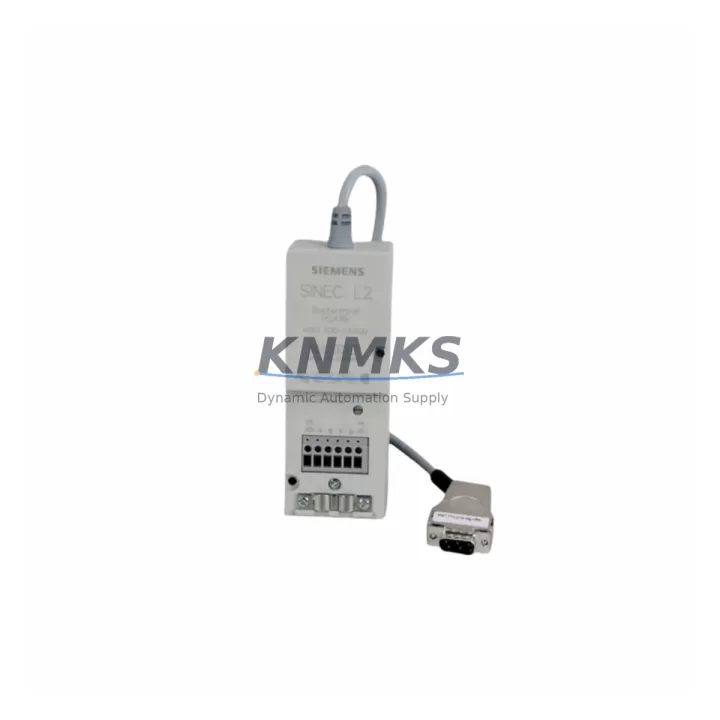
Siemens 6GK1500-0AA00 Migration-Ready PROFIBUS Connector for Legacy Control Systems
The Siemens 6GK1500-0AA00 is a 90° PROFIBUS DP bus connector designed for SIMATIC NET fieldbus architectures. As a migration-ready replacement for end-of-life and discontinued PROFIBUS infrastructure components, this connector supports direct drop-in installation into existing S7-300, S7-400, and ET 200 distributed I/O backplane environments without requiring cable re-routing or panel redesign. For engineering teams managing aging automation networks, the 6GK1500-0AA00 provides a verified, pre-tested path to restore fieldbus continuity and extend the operational life of legacy control systems by months or years before a full platform migration becomes necessary.
PROFIBUS DP remains the dominant fieldbus protocol across thousands of installed process and discrete manufacturing systems worldwide. When a bus connector fails or reaches end-of-support, the downstream impact is immediate: loss of communication between the PLC CPU and remote I/O stations, drive controllers, and field instruments. The 6GK1500-0AA00 is engineered to restore that link with minimal downtime. Its 90° cable exit angle is optimized for panel-mounted installations where straight connectors would create cable management conflicts, and its integrated termination resistor switch allows engineers to correctly terminate the PROFIBUS segment without additional components.
Before installation, engineers should confirm the following: the existing PROFIBUS cable is 12 Mbit/s rated (Type A, IEC 61158); the cable shield is properly grounded at the connector housing; the termination resistor is enabled only at the first and last physical node on the segment; and the connector’s screw terminals accept the existing wire gauge without re-crimping. In retrofit scenarios where the original connector has been in service for more than five years, it is also advisable to inspect the cable jacket for brittleness and the terminal screws for corrosion before reusing the existing cable run.
Migration Compatibility Table
| Parameter | Specification / Retrofit Guidance |
|---|---|
| SKU / Part Number | 6GK1500-0AA00 |
| Brand / Series | Siemens SIMATIC NET PROFIBUS |
| Connector Type | 90° Bus Connector, Sub-D 9-pin female |
| Protocol Compatibility | PROFIBUS DP / FMS / PA (DP physical layer) |
| Transmission Rate | 9.6 kbit/s – 12 Mbit/s |
| Cable Type | PROFIBUS Type A (IEC 61158), shielded twisted pair |
| Termination Resistor | Integrated, switchable (ON/OFF) |
| Compatible Controllers | SIMATIC S7-300, S7-400, S7-1500 (DP interface), ET 200M, ET 200S, ET 200SP DP |
| Replaces / Supersedes | 6GK1500-0AA00 (same SKU, current production); compatible with installations originally using 6GK1500-0EA02 in non-PG port positions |
| Installation Space | 90° exit; verify panel depth ≥ 60 mm behind connector face |
| Commissioning Notes | Confirm node address, termination position, and segment scan rate in STEP 7 / TIA Portal HW Config before powering up |
| Pre-Shipment Testing | Continuity and insulation verified; connector mechanically inspected |
| Support terms | 12 months from date of shipment |
Retrofit Planning for Existing Automation Systems
A successful PROFIBUS segment retrofit requires more than a connector swap. Engineering teams typically begin by auditing the full segment topology using a PROFIBUS diagnostic tool or the integrated diagnostics available in STEP 7 or TIA Portal. This audit identifies all active nodes, their configured addresses, and any existing communication errors that may have been masked by the failing connector. In many legacy S7-300 installations, the PROFIBUS segment connects the CPU 315-2 DP or CPU 317-2 DP directly to ET 200M remote I/O stations housing SM 321 digital input modules and SM 322 digital output modules. Replacing the bus connector at the CPU port without first documenting the segment configuration risks introducing address conflicts or termination errors that can take the entire segment offline.
In control cabinet environments where space is constrained, the 90° exit angle of the 6GK1500-0AA00 is particularly valuable. Straight connectors such as the 6GK1500-0FC10 require additional cable bend radius clearance that is often unavailable in densely populated cabinets. When planning the retrofit, engineers should also inspect the PROFIBUS DP cable itself — particularly at the connector entry point, where repeated flexing can cause internal wire fractures that are not visible externally. If the cable shows signs of wear, replacing it with a new PROFIBUS Type A cable during the same maintenance window eliminates a common source of intermittent communication faults.
For systems that include PROFIBUS PA field instruments — such as pressure transmitters or flow meters connected via a DP/PA coupler — the retrofit plan must account for the coupler’s power budget and the PA segment’s physical topology separately from the DP backbone. The 6GK1500-0AA00 is used on the DP side of the coupler; PA-side connections use a different connector standard. In larger installations, a CP 342-5 communications processor or CP 443-5 Extended may be present to offload PROFIBUS DP master functionality from the CPU, and these modules have their own connector ports that may also require inspection or replacement during a planned outage.
Where the retrofit is part of a broader migration from S7-300 to S7-1500, engineers should note that the S7-1500 CPU’s integrated PROFIBUS DP interface uses the same Sub-D 9-pin connector standard, making the 6GK1500-0AA00 directly compatible with the new platform. This allows the fieldbus infrastructure — cables, connectors, and node addresses — to be preserved during the CPU migration, significantly reducing the scope of the hardware change and the associated commissioning time.
Downtime Control During System Migration
Minimizing unplanned downtime during a PROFIBUS connector replacement requires a structured approach that begins well before the maintenance window opens. The first priority is to export and archive the current STEP 7 or TIA Portal project, including the hardware configuration, network configuration, and all program blocks. This ensures that if a commissioning error occurs during the retrofit, the original configuration can be restored without relying on memory or incomplete documentation.
During the physical replacement, the PROFIBUS segment should be powered down in a controlled sequence: first disable the DP master’s cyclic communication, then remove power from the affected segment, and finally disconnect the faulty connector. This sequence prevents the DP master from logging excessive diagnostic alarms that can complicate post-retrofit commissioning. After installing the 6GK1500-0AA00, verify the termination resistor position before restoring power — an incorrectly terminated segment will cause all nodes to report communication errors simultaneously, which can be misdiagnosed as a hardware fault.
Once power is restored, use the STEP 7 hardware diagnostics or TIA Portal’s online view to confirm that all expected nodes appear on the segment and that no diagnostic alarms are active. For critical process applications, it is advisable to perform a controlled test of each I/O point before returning the system to automatic mode. In facilities with a distributed control system (DCS) layer above the PLC — such as a Siemens PCS 7 installation — the DCS operator station should be monitored throughout the retrofit to confirm that all field signals are restored correctly and that no process interlocks have been triggered by the communication interruption.
By following this structured approach, most PROFIBUS connector replacements can be completed within a two-hour planned maintenance window, including pre-work, physical replacement, commissioning verification, and documentation update. Having a verified, pre-tested replacement connector such as the 6GK1500-0AA00 availability confirmed by RFQ before the maintenance window begins is the single most effective way to prevent a planned two-hour outage from becoming an unplanned multi-day shutdown.
Retrofit Support FAQ
Q1: Is the 6GK1500-0AA00 a direct replacement for the connector currently installed on my S7-300 CPU’s PROFIBUS DP port?
Yes. The 6GK1500-0AA00 uses the standard Sub-D 9-pin female connector interface specified for PROFIBUS DP and is compatible with all SIMATIC S7-300, S7-400, and S7-1500 CPU DP ports, as well as ET 200 distributed I/O stations and SIMATIC NET CP modules. No adapter or wiring modification is required for a direct replacement.
Q2: How do I confirm the correct termination resistor setting after installation?
The termination resistor should be switched ON only at the two physical endpoints of the PROFIBUS segment — the first and last nodes. All intermediate nodes must have the termination resistor switched OFF. After installation, use STEP 7 or TIA Portal’s online diagnostics to verify that all nodes are communicating correctly. If any node reports a communication error, check the termination settings at both ends of the segment before investigating other causes.
Q3: What pre-shipment testing is performed on the 6GK1500-0AA00 before dispatch?
Each unit undergoes continuity testing across all nine signal pins, insulation resistance verification between the shield and signal conductors, and a mechanical inspection of the connector housing, locking mechanism, and terminal screws. Units that do not pass all checks are not dispatched. All shipped units are covered by a support terms confirmed by quotation from the date of shipment.
Q4: Is stock available for immediate dispatch, and what lead time should I expect?
Yes, the 6GK1500-0AA00 is held in multi-region stock to support emergency replacement requirements. Standard orders are dispatched within one business day. For urgent requirements, contact our sales team directly to confirm current stock levels and expedited shipping options. The support terms confirmed by quotation applies to all units regardless of shipping method.
© 2026 KNMKS. All rights reserved.
Original Source: https://knmks.com
Contact: admin@knmks.com | +86 18359268345
Product Identification
- Brand / Ecosystem
-
Siemens
Siemens - Model / Series
-
6GK1500-0AA00
SIMATIC Series - Product Family
- Cables & Connectors
- Availability Status
- Available on request after model and quantity confirmation
- Inquiry Type
- B2B RFQ, replacement inquiry and project spare-part request
- Pre-Quote Check
- Exact SKU, brand, series, quantity, nameplate photos and destination country are checked before quotation
System Path
Where this product fits in the KNMKS automation structure.
Specification & Inquiry Focus
- Cable range
- Sensor, servo, network and circular connectors
- Common needs
- Length, pin count, shielding and plug type
- Project support
- Machine wiring and installation kits
Buyer Confirmation
Information KNMKS checks before replying.
- Exact model
- 6GK1500-0AA00
- Brand / ecosystem
- Siemens
- Product family
- Cables & Connectors
- Application note
- Replacement, maintenance, project build or spare-part list
- Useful photos
- Nameplate, installed unit, cabinet layout or connector side
- Delivery details
- Quantity, destination country and target schedule
Document Support
Files and notes can be confirmed during quotation.
- Product photos or nameplate confirmation when available
- Packing and delivery notes before quotation confirmation
- Support scope and delivery terms confirmed per inquiry
- Export document coordination for qualified B2B requests
Inquiry Support
- Cable length and connector type confirmation
- Servo, sensor and network cable inquiry
- Accessory kits for installation teams
What to Send Us
- Brand and exact model number: Siemens 6GK1500-0AA00
- Quantity and required delivery time
- Application, replacement requirement or nameplate photo
- Destination country and shipping preference
RFQ Preparation
This is a product inquiry page built for RFQ communication.
Fast Model Check
Send this model to KNMKS for confirmation.
Include quantity, destination country and photos if this is a maintenance replacement. The inquiry will be saved with a reference number after submission.
Brand & Compatibility Note
KNMKS displays automation product information for well-known industrial brand ecosystems and compatible replacement references. Brand names are used for product identification and compatibility reference only; final availability and commercial terms are confirmed per quotation.
 Manufacturing
 Machine Tools
 Packaging
 Energy & Power
 PLCs & Controllers
 HMI & Displays
 Servo Systems
 Variable Frequency Drives