
Overview
Siemens 6GK1415-2BA10 Migration-Ready Gateway for Legacy PROFIBUS Systems
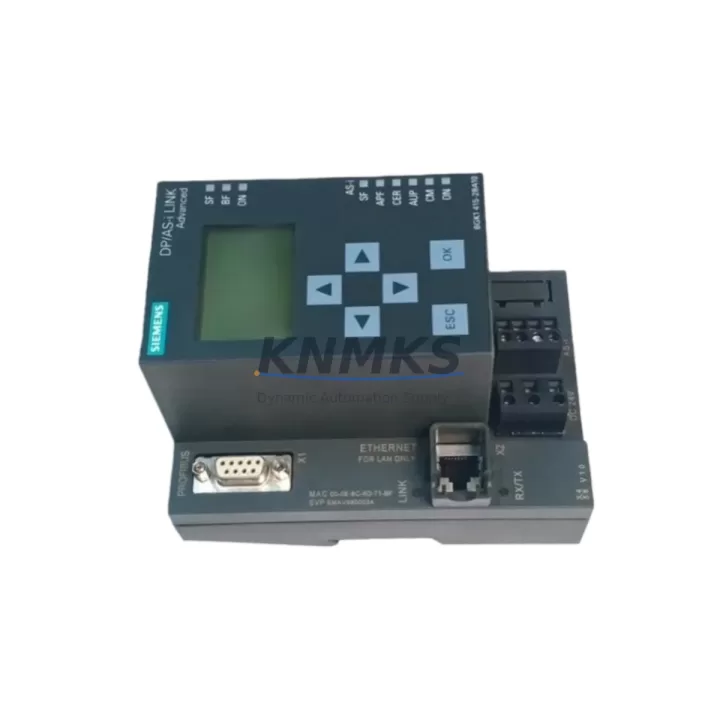
The Siemens 6GK1415-2BA10 DP/AS-i Link Advanced is a high-performance PROFIBUS DP to AS-Interface gateway engineered for industrial environments where legacy control architectures must be extended, modernized, or replaced without full system overhaul. As a migration-ready replacement module, the 6GK1415-2BA10 bridges existing PROFIBUS DP networks with AS-Interface field devices, enabling engineers to preserve upstream PLC logic while upgrading field-level communication infrastructure. This module is widely deployed in manufacturing, energy distribution, petrochemical processing, and infrastructure automation where PROFIBUS DP remains the backbone protocol but AS-i sensor/actuator networks require integration or expansion.
For facilities operating legacy Siemens S5 or early S7-300 control systems, the 6GK1415-2BA10 provides a validated migration path that avoids full rack replacement. Engineers can retain existing PROFIBUS DP cabling, GSD file configurations, and PLC address assignments while connecting up to 62 AS-Interface slaves per AS-i segment. This dramatically reduces retrofit scope, shortens commissioning time, and limits production downtime during system upgrades.
Migration Compatibility Table
| Parameter | Specification / Recommendation |
|---|---|
| Interface (PROFIBUS DP) | RS-485, 9.6 kbps – 12 Mbps, DP-V0/V1 slave |
| AS-Interface Segments | 2 independent AS-i segments, up to 62 slaves each |
| Power Supply | 24 V DC via AS-i power supply (e.g., Siemens 3RX9501-0BA00); verify rail capacity ≥ 8 A per segment |
| Replaces / Upgrades From | 6GK1415-2AA10 (single-segment predecessor), legacy DP/AS-i Link 20E |
| Compatible Controllers | Siemens S7-300, S7-400, S7-1500 (via PROFIBUS DP interface); ET 200M with IM 153-2 |
| GSD File | SI008F0E.GSD – must be imported into STEP 7 / TIA Portal before hardware configuration |
| Installation | DIN rail mount; 35 mm standard rail; 45 mm depth clearance required |
| Communication Compatibility | PROFIBUS DP-V0 (standard), DP-V1 (acyclic services for diagnostics) |
| Firmware | Verify firmware version via STEP 7 HW Config or TIA Portal device diagnostics before replacement |
| Commissioning Focus | AS-i slave address assignment, DP node address (default: 3), I/O mapping validation in PLC program |
| Support terms | support terms confirmed by quotation | Tested before shipment | Global stock available |
Retrofit Planning for Existing Automation Systems
Successful integration of the 6GK1415-2BA10 into a legacy control cabinet begins with a thorough audit of the existing PROFIBUS segment. Engineers should document the current DP node address map, confirm available addresses (the 6GK1415-2BA10 occupies one DP slave address, configurable from 1–125), and verify that the PROFIBUS master — typically a CP 342-5 communication processor or an integrated DP port on a CPU 315-2 DP — supports the module’s GSD profile.
On the AS-Interface side, the retrofit plan must account for the AS-i power supply capacity. Each AS-i segment requires a dedicated 30 V DC AS-i power supply; the Siemens 3RX9501-0BA00 or equivalent 8 A unit is recommended for segments with more than 20 slaves. If the existing cabinet uses a single-segment AS-i master and the upgrade requires dual-segment coverage, the 6GK1415-2BA10’s two independent AS-i ports eliminate the need for a second gateway device, reducing panel space and wiring complexity.
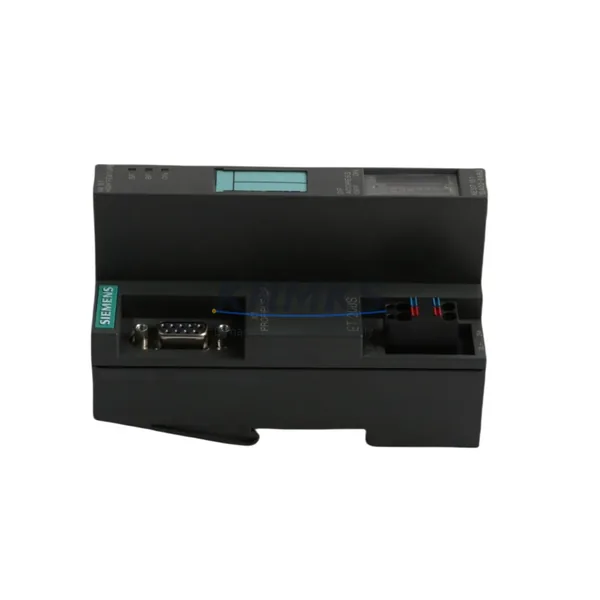
Terminal wiring adaptation is a critical step. The 6GK1415-2BA10 uses a standard 9-pin Sub-D connector for PROFIBUS DP and screw-terminal blocks for AS-i connections. When replacing a 6GK1415-2AA10 or a legacy DP/AS-i Link 20E, engineers must verify that existing AS-i flat cable or round cable terminations are compatible with the new terminal pitch. In many retrofits, the existing Siemens ASM 473 AS-i addressing unit is reused to reassign slave addresses on new AS-i modules without requiring a laptop connection.
For systems where the upstream controller is a Siemens ET 200M distributed I/O station using an IM 153-2 interface module, the 6GK1415-2BA10 integrates seamlessly as a PROFIBUS DP slave, with I/O data mapped directly into the ET 200M’s process image. This is particularly valuable in retrofit scenarios where the main CPU rack (e.g., a rack housing a CPU 315-2 DP alongside SM 321 digital input modules and SM 322 digital output modules) cannot be physically relocated but field-level AS-i devices must be expanded or replaced.
HMI screen updates are often overlooked during gateway replacements. If the plant uses a Siemens TP700 Comfort or MP377 panel connected via PROFIBUS DP, the HMI project must be reviewed to confirm that any diagnostic screens referencing the old gateway’s DP address or AS-i slave status bits are updated to reflect the new module’s data structure. Failure to update HMI variable mappings is a common cause of post-retrofit alarm nuisance and operator confusion.
Downtime Control During System Migration
Minimizing production downtime during a PROFIBUS gateway replacement requires a structured pre-commissioning approach. Before removing the legacy module, engineers should export the complete STEP 7 or TIA Portal project, including the hardware configuration, network view, and all OB/FB/FC program blocks. A full program backup to a memory card or engineering station ensures that the original control logic can be restored within minutes if the replacement encounters unexpected compatibility issues.
The recommended replacement sequence is: (1) power down the AS-i segment only, leaving the PROFIBUS DP network and PLC CPU running in STOP mode; (2) physically swap the gateway module on the DIN rail; (3) reconnect AS-i and PROFIBUS DP terminals; (4) power up the AS-i segment and verify slave detection using the 6GK1415-2BA10’s onboard LED diagnostics (PWR, AS-i 1, AS-i 2, BF, SF); (5) set the PLC CPU to RUN and monitor the PROFIBUS DP diagnostic buffer for any configuration mismatch errors.
If the replacement is performed in a live production environment with partial shutdown only, the PROFIBUS DP master should be configured to suppress the missing slave alarm for the gateway’s node address during the swap window. This prevents cascading fault responses in the PLC program and keeps other PROFIBUS slaves — such as Siemens ET 200S stations or SINAMICS G120 drives connected on the same DP segment — operating normally throughout the replacement procedure.
All units supplied by KNMKS are pre-tested under powered conditions before shipment. Firmware version, AS-i segment detection, and PROFIBUS DP communication are verified against factory specifications. This pre-shipment testing protocol reduces on-site commissioning time and supports the goal of completing gateway replacements within a single planned maintenance window.
Retrofit Support FAQ
Q1: Is the 6GK1415-2BA10 a direct replacement for the 6GK1415-2AA10?
The 6GK1415-2BA10 is the functional successor to the 6GK1415-2AA10, adding a second AS-Interface segment. The PROFIBUS DP interface, DIN rail mounting dimensions, and GSD file structure are compatible, but the hardware configuration in STEP 7 or TIA Portal must be updated to reflect the new module type. Existing single-segment AS-i wiring can be retained on AS-i port 1; the second port can be left unused or expanded as needed.
Q2: What commissioning steps are required after installation?
After physical installation, import the SI008F0E.GSD file into your engineering software, configure the DP node address using the onboard address switch, and download the updated hardware configuration to the PLC. Use the AS-i Control Center tool or STEP 7 diagnostics to verify that all expected AS-i slaves are detected on both segments. Confirm I/O data consistency in the PLC process image before switching the CPU to RUN mode.
Q3: Can the 6GK1415-2BA10 be used with a Siemens S7-1500 controller?
Yes. The S7-1500 CPU with a CM 1542-5 PROFIBUS communication module or a CP 1542-5 supports the 6GK1415-2BA10 as a standard DP-V0/V1 slave. The GSD file must be integrated into TIA Portal V13 SP1 or later. Ensure that the PROFIBUS DP baud rate is set consistently across all devices on the segment.
Q4: What support terms and supply terms apply?
All 6GK1415-2BA10 units supplied by KNMKS carry a support terms confirmed by quotation covering manufacturing defects and functional failures under normal operating conditions. Units are in-stock and available for immediate shipment globally. Pre-shipment functional testing is performed on every unit. For volume orders or long-term supply agreements covering critical spare parts lifecycle management, contact our sales team directly.
—
© 2026 KNMKS. All rights reserved.
Original Source: https://knmks.com
Contact: admin@knmks.com | +86 18359268345
Product Identification
- Brand / Ecosystem
-
Siemens
Siemens - Model / Series
-
6GK1415-2BA10
SIMATIC Series - Product Family
- Relays & Interface
- Availability Status
- Available on request after model and quantity confirmation
- Inquiry Type
- B2B RFQ, replacement inquiry and project spare-part request
- Pre-Quote Check
- Exact SKU, brand, series, quantity, nameplate photos and destination country are checked before quotation
System Path
Where this product fits in the KNMKS automation structure.
Specification & Inquiry Focus
- Interface range
- Relays, isolation and signal modules
- Common needs
- Coil voltage and contact rating
- Project support
- Panel wiring and signal protection
Buyer Confirmation
Information KNMKS checks before replying.
- Exact model
- 6GK1415-2BA10
- Brand / ecosystem
- Siemens
- Product family
- Relays & Interface
- Application note
- Replacement, maintenance, project build or spare-part list
- Useful photos
- Nameplate, installed unit, cabinet layout or connector side
- Delivery details
- Quantity, destination country and target schedule
Document Support
Files and notes can be confirmed during quotation.
- Product photos or nameplate confirmation when available
- Packing and delivery notes before quotation confirmation
- Support scope and delivery terms confirmed per inquiry
- Export document coordination for qualified B2B requests
Inquiry Support
- Relay base and module matching
- Signal isolation and protection options
- Panel accessory inquiry support
What to Send Us
- Brand and exact model number: Siemens 6GK1415-2BA10
- Quantity and required delivery time
- Application, replacement requirement or nameplate photo
- Destination country and shipping preference
RFQ Preparation
This is a product inquiry page built for RFQ communication.
Fast Model Check
Send this model to KNMKS for confirmation.
Include quantity, destination country and photos if this is a maintenance replacement. The inquiry will be saved with a reference number after submission.
Brand & Compatibility Note
KNMKS displays automation product information for well-known industrial brand ecosystems and compatible replacement references. Brand names are used for product identification and compatibility reference only; final availability and commercial terms are confirmed per quotation.
 Manufacturing
 Machine Tools
 Packaging
 Energy & Power
 PLCs & Controllers
 HMI & Displays
 Servo Systems
 Variable Frequency Drives