
Overview
Siemens 6ES7972-0BA42-0XA0 Migration-Ready PROFIBUS DP Connector for Legacy Control Systems
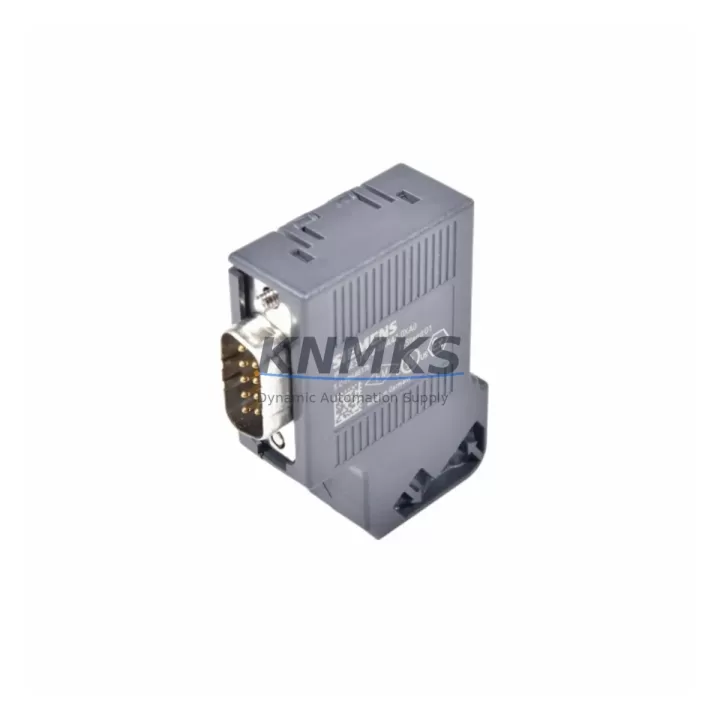
The Siemens 6ES7972-0BA42-0XA0 is a 90° PROFIBUS DP bus connector designed for direct integration with SIMATIC S7-300 and S7-400 PLCs, as well as ET 200 distributed I/O stations. As legacy automation lines approach end-of-life and original connectors become increasingly difficult to source, this unit serves as a verified drop-in replacement that preserves existing wiring topology, communication integrity, and fieldbus addressing without requiring program modification or panel redesign.
For maintenance engineers managing aging control cabinets, the 6ES7972-0BA42-0XA0 supports PROFIBUS DP networks operating at baud rates up to 12 Mbit/s. Its integrated terminating resistor switch allows the connector to serve as a network segment terminator when positioned at the end of the DP trunk, eliminating the need for external termination hardware. The cable entry angle of 90° is particularly suited to installations where vertical cable routing is constrained by adjacent modules, DIN rail density, or cabinet depth.
Migration Compatibility Table
| Parameter | Specification / Retrofit Note |
|---|---|
| Compatible Controllers | SIMATIC S7-300, S7-400, ET 200M, ET 200S, ET 200pro |
| PROFIBUS DP Baud Rate | Up to 12 Mbit/s |
| Cable Entry Angle | 90° |
| Terminating Resistor | Integrated switchable — enable at segment end nodes |
| Connector Interface | 9-pin Sub-D (DB9) male, standard PROFIBUS pinout |
| Replaces / Compatible With | 6ES7972-0BA41-0XA0, 6ES7972-0BA40-0XA0 (verify firmware and baud rate support) |
| Installation Space | Confirm cabinet depth ≥ 60 mm behind connector body for 90° cable bend radius |
| Communication Protocol | PROFIBUS DP (IEC 61158) |
| Commissioning Check | Verify DP address assignment, segment termination, and cable shielding continuity |
| Support terms | 12 months from shipment date |
| Pre-Shipment Testing | Functional and continuity tested before dispatch |
Retrofit Planning for Existing Automation Systems
When replacing PROFIBUS DP connectors in an active S7-300 or S7-400 control system, the migration sequence must account for more than the connector itself. The DP network topology — including the number of active nodes, segment length, and termination points — must be documented before any connector is removed. In multi-drop PROFIBUS segments, removing a mid-segment connector without proper termination management can cause communication faults across all downstream nodes, triggering fault states in associated CPU modules such as the CPU 315-2 DP or CPU 414-2 DP.
In systems using IM 153-2 interface modules for ET 200M remote I/O expansion, the PROFIBUS DP connector at the IM module is a frequent wear point due to repeated cable insertions during maintenance cycles. Replacing these connectors with the 6ES7972-0BA42-0XA0 restores reliable contact geometry and shielding continuity. Similarly, in control cabinets where SM 321 digital input modules or SM 331 analog input modules are mounted on S7-300 racks, the DP connector at the CPU or IM module is the primary fieldbus interface — its condition directly affects I/O scan cycle reliability.
For systems incorporating CP 342-5 or CP 443-5 PROFIBUS communication processors, the connector interface must maintain correct shielding and grounding to prevent EMI-induced communication errors, particularly in environments with variable-frequency drives or high-current switching equipment nearby. When upgrading from older 6ES7972-0BA40-0XA0 connectors, confirm that the replacement unit’s termination switch position matches the original — incorrect termination at non-endpoint nodes is a common commissioning error that causes intermittent DP faults.
In panel retrofit projects where the control architecture is being migrated from S7-300 to S7-1500 with PROFIBUS retained as the fieldbus (via CM 1542-5 communication module), the 6ES7972-0BA42-0XA0 remains compatible on the field device side, allowing phased migration without replacing all field wiring simultaneously. Programming cable connections using PC Adapter USB A2 or similar PROFIBUS programming interfaces should also be verified for connector compatibility during the transition period.
Downtime Control During System Migration
Minimizing unplanned downtime during connector replacement requires pre-staging the replacement unit, documenting the existing DP address map, and confirming the termination switch state of the connector being replaced before removal. In most S7-300 and S7-400 installations, the CPU can be placed in STOP mode while the DP connector is swapped, with the program retained in battery-backed RAM or load memory. After reconnection, a warm restart is typically sufficient to restore DP communication without reloading the user program.
For systems where continuous process control is required, coordinate the connector replacement with a scheduled maintenance window. Use STEP 7 or TIA Portal diagnostics to capture the current DP network status — including node addresses, baud rate, and any existing fault codes — before beginning work. After replacement, verify DP communication using the hardware diagnostics view and confirm that all I/O modules return to RUN state before releasing the system to production. Pre-shipment testing of the 6ES7972-0BA42-0XA0 ensures the connector arrives ready for installation, reducing on-site verification time and supporting downtime targets.
Retrofit Support FAQ
Q: Is the 6ES7972-0BA42-0XA0 a direct replacement for the 6ES7972-0BA41-0XA0?
A: Yes, in most S7-300 and S7-400 applications. Both are 90° PROFIBUS DP connectors with integrated terminating resistors. Verify that the baud rate and cable type are consistent with your existing DP segment configuration before installation.
Q: Does this connector require any firmware update on the connected CPU or IM module?
A: No. The 6ES7972-0BA42-0XA0 is a passive connector with no embedded firmware. It is compatible with all SIMATIC S7-300, S7-400, and ET 200 series devices that use the standard 9-pin Sub-D PROFIBUS DP interface.
Q: What pre-shipment testing is performed on this unit?
A: Each unit undergoes continuity testing across all signal pins and shielding contacts, and functional verification of the integrated terminating resistor switch, prior to dispatch. A support terms confirmed by quotation is provided from the shipment date.
Q: What is the lead time and stock availability?
A: Units are held availability confirmed by RFQ and available for immediate dispatch. Contact admin@knmks.com or +86 18359268345 to confirm current inventory and shipping options for your region.
© 2026 KNMKS. All rights reserved.
Original Source: https://knmks.com
Contact: admin@knmks.com | +86 18359268345
Product Identification
- Brand / Ecosystem
-
Siemens
Siemens - Model / Series
-
6ES7972-0BA42-0XA0
SIMATIC Series - Product Family
- Cables & Connectors
- Availability Status
- Available on request after model and quantity confirmation
- Inquiry Type
- B2B RFQ, replacement inquiry and project spare-part request
- Pre-Quote Check
- Exact SKU, brand, series, quantity, nameplate photos and destination country are checked before quotation
System Path
Where this product fits in the KNMKS automation structure.
Specification & Inquiry Focus
- Cable range
- Sensor, servo, network and circular connectors
- Common needs
- Length, pin count, shielding and plug type
- Project support
- Machine wiring and installation kits
Buyer Confirmation
Information KNMKS checks before replying.
- Exact model
- 6ES7972-0BA42-0XA0
- Brand / ecosystem
- Siemens
- Product family
- Cables & Connectors
- Application note
- Replacement, maintenance, project build or spare-part list
- Useful photos
- Nameplate, installed unit, cabinet layout or connector side
- Delivery details
- Quantity, destination country and target schedule
Document Support
Files and notes can be confirmed during quotation.
- Product photos or nameplate confirmation when available
- Packing and delivery notes before quotation confirmation
- Support scope and delivery terms confirmed per inquiry
- Export document coordination for qualified B2B requests
Inquiry Support
- Cable length and connector type confirmation
- Servo, sensor and network cable inquiry
- Accessory kits for installation teams
What to Send Us
- Brand and exact model number: Siemens 6ES7972-0BA42-0XA0
- Quantity and required delivery time
- Application, replacement requirement or nameplate photo
- Destination country and shipping preference
RFQ Preparation
This is a product inquiry page built for RFQ communication.
Fast Model Check
Send this model to KNMKS for confirmation.
Include quantity, destination country and photos if this is a maintenance replacement. The inquiry will be saved with a reference number after submission.
Brand & Compatibility Note
KNMKS displays automation product information for well-known industrial brand ecosystems and compatible replacement references. Brand names are used for product identification and compatibility reference only; final availability and commercial terms are confirmed per quotation.
 Manufacturing
 Machine Tools
 Packaging
 Energy & Power
 PLCs & Controllers
 HMI & Displays
 Servo Systems
 Variable Frequency Drives