
Overview
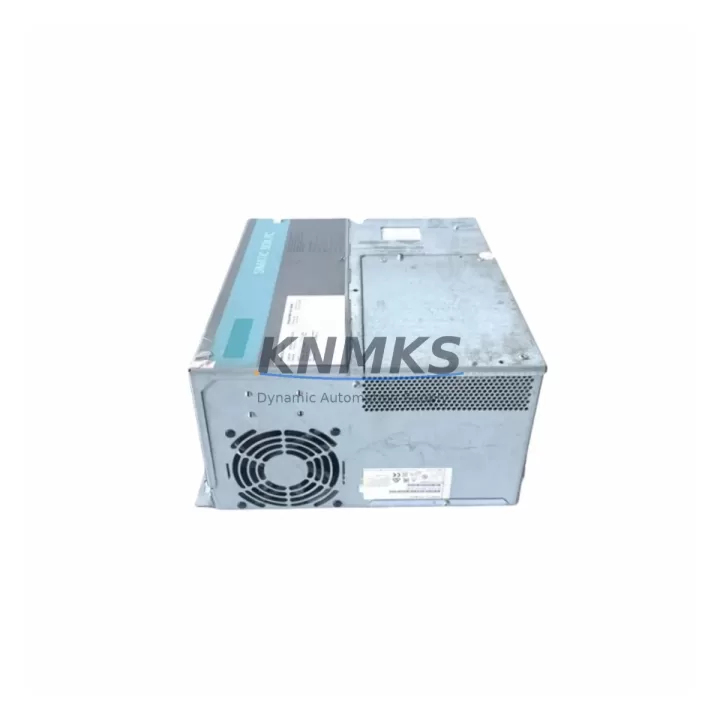
Siemens 6ES7647-6PA03-0AA0 Migration-Ready Panel PC IPC477E: Legacy System Migration and Compatible Upgrade
The Siemens 6ES7647-6PA03-0AA0 is a SIMATIC IPC477E 19-inch industrial Panel PC engineered for demanding process control environments. As legacy SIMATIC panel systems approach end-of-life, the IPC477E serves as the migration-ready successor for operators running older IPC477C, IPC477D, or earlier SIMATIC HMI platforms. This unit integrates seamlessly into existing SIMATIC S7-300, S7-400, and S7-1500 control architectures, making it a preferred choice for brownfield retrofit projects where minimizing downtime and preserving existing program logic are critical priorities.
Designed for continuous 24/7 industrial operation, the 6ES7647-6PA03-0AA0 supports Windows-based SCADA and HMI visualization environments, including WinCC Runtime and WinCC flexible. Its 19-inch widescreen multi-touch display, fanless or fan-cooled configurations, and robust aluminum front panel make it suitable for direct panel mounting in control cabinets across process industries, automotive assembly lines, and utility infrastructure.
Every unit supplied by KNMKS undergoes pre-shipment functional testing, covering display calibration, I/O port verification, communication link validation, and operating system integrity checks. A support terms confirmed by quotation is included as standard, with documented test records available upon request.
Migration Compatibility Table
| Parameter | Legacy Reference (IPC477C / IPC477D) | 6ES7647-6PA03-0AA0 (IPC477E) | Migration Notes |
|---|---|---|---|
| Display Size | 15″ / 19″ TFT | 19″ Widescreen Multi-Touch | Confirm panel cutout dimensions; widescreen ratio may require bezel adapter |
| Operating System | Windows XP / Windows 7 | Windows 10 IoT Enterprise (LTSB) | WinCC Runtime and WinCC flexible must be re-validated for OS compatibility |
| Communication Interfaces | PROFIBUS DP, MPI, Ethernet | PROFINET, Industrial Ethernet (2× RJ45), USB 3.0 | PROFIBUS/MPI requires CP 5622 or CP 5512 adapter card; verify slot availability |
| Mounting Standard | Panel cutout per SIMATIC IPC standard | Panel cutout per SIMATIC IPC477E standard | Measure existing cutout; adapter frames available for legacy openings |
| Power Supply | 24 V DC (external PSU) | 24 V DC (100–240 V AC internal PSU optional) | Verify existing PSU output capacity; IPC477E draws up to 90 W typical |
| HMI Software | WinCC flexible 2008 / WinCC V7.x | WinCC V7.5+ / TIA Portal WinCC Runtime | Project migration via TIA Portal Migration Tool recommended; test all screen templates |
| Expansion Slots | 1× PCI, 1× PCIe | 1× PCIe x4, 1× PCIe x1 | Legacy PCI cards not compatible; replace with PCIe equivalents |
| Support terms | — | 12 Months (KNMKS) | Includes pre-shipment test report |
Retrofit Planning for Existing Automation Systems
Successful deployment of the 6ES7647-6PA03-0AA0 in a brownfield environment requires a structured pre-migration audit. Engineers should begin by documenting all active communication links from the existing panel PC, including PROFIBUS DP segments, MPI connections to S7-300 CPUs, and any serial RS-232/RS-485 links to third-party field devices. Where PROFIBUS connectivity is required on the IPC477E, a Siemens CP 5622 PCIe communication processor can be installed in the available PCIe x4 slot to maintain legacy fieldbus continuity without rewiring the existing DP network.
Power distribution within the control cabinet must be reviewed before installation. The IPC477E’s 24 V DC supply rail should be verified against the existing cabinet PSU — typically a SITOP PSU8600 or equivalent — to confirm sufficient current headroom. If the cabinet also hosts a SIMATIC S7-1500 CPU rack, ET 200SP distributed I/O modules, or a SCALANCE X industrial switch, the aggregate load must be calculated to avoid supply instability during startup sequences.
HMI screen migration is frequently the most time-intensive phase. Existing WinCC flexible projects must be exported and imported into TIA Portal using the integrated migration wizard. All faceplates, trend displays, alarm screens, and user administration settings should be validated in a simulation environment before live commissioning. Where the legacy system used SIMATIC Panels such as TP1900 Comfort or MP377, the IPC477E can assume the same PROFINET device name and IP address, preserving PLC program references without requiring CPU download.
Terminal wiring at the panel rear should be photographed and documented prior to removal of the legacy unit. The IPC477E’s rear I/O layout differs from earlier IPC477C/D variants, so a wiring adapter or terminal block reassignment may be required for USB peripherals, serial printers, or barcode scanners connected to the operator station. A SIMATIC IPC DiagMonitor software installation on the new unit enables remote health monitoring and predictive maintenance alerting once the system is live.
Downtime Control During System Migration
Minimizing production interruption during an IPC477E retrofit requires parallel preparation before the scheduled maintenance window. The replacement unit should be pre-configured off-site: operating system patched, WinCC Runtime installed, HMI project loaded and tested in simulation, and all communication parameters pre-set to match the live system. This approach reduces on-site cutover time to a single planned shutdown, typically achievable within a four-to-eight-hour maintenance window depending on cabinet complexity.
Before powering down the legacy panel, a full backup of the existing WinCC project, including alarm logs, trend archives, and user management data, should be exported to an external storage device. The S7 CPU program should also be uploaded and archived using STEP 7 or TIA Portal to ensure the control logic is preserved independently of the HMI platform. This protects against data loss if the legacy panel PC fails during the transition period.
During cutover, the IPC477E should be powered on and communication links verified in sequence: first the PROFINET connection to the S7 CPU, then the SCADA server link if applicable, and finally any serial or USB peripheral connections. Alarm suppression should be activated in the DCS or SCADA system during the commissioning phase to prevent nuisance alerts from triggering while I/O is being re-established. Once all links are confirmed and the HMI displays are operating correctly, the system can be returned to automatic control mode and alarm suppression lifted.
Post-commissioning, a 24-hour monitored run-in period is recommended to confirm thermal stability, communication reliability, and display performance under normal operating load before the migration is formally closed out.
Retrofit Support FAQ
Q1: Is the 6ES7647-6PA03-0AA0 a direct drop-in replacement for the IPC477C or IPC477D?
The IPC477E shares the same product family and general form factor as the IPC477C and IPC477D, but it is not a direct plug-and-play replacement. Panel cutout dimensions, rear I/O layout, and operating system differ. A mechanical adapter frame may be required for the panel opening, and the HMI project must be migrated to a compatible WinCC version. Communication interfaces have also changed from PROFIBUS/MPI to PROFINET as the primary fieldbus, requiring a CP 5622 adapter card if PROFIBUS connectivity must be retained.
Q2: What pre-shipment testing does KNMKS perform on the 6ES7647-6PA03-0AA0?
Each unit undergoes a structured pre-shipment test covering power-on self-test, display calibration and touch response verification, all USB and Ethernet port functionality, operating system boot integrity, and a 48-hour burn-in cycle. A test report is issued with every shipment and is available for quality documentation purposes.
Q3: Can the existing WinCC flexible project be used directly on the IPC477E?
WinCC flexible projects must be migrated to WinCC Runtime or TIA Portal WinCC before use on the IPC477E running Windows 10 IoT. Siemens provides a migration tool within TIA Portal that automates the majority of the conversion, but manual validation of all screen templates, scripts, and communication drivers is required after migration. KNMKS recommends completing and testing the migration in a simulation environment before the scheduled cutover.
Q4: What is the support terms coverage and what does it include?
All 6ES7647-6PA03-0AA0 units supplied by KNMKS carry a support terms confirmed by quotation from the date of shipment. Coverage includes hardware defects, display faults, and communication interface failures under normal operating conditions. The support terms is supported by in-stock inventory for rapid exchange, and the pre-shipment test report provides a documented baseline for any support requests.
© 2026 KNMKS. All rights reserved.
Original Source: https://knmks.com
Contact: admin@knmks.com | +86 18359268345
Product Identification
- Brand / Ecosystem
-
Siemens
Siemens - Model / Series
-
6ES7647-6PA03-0AA0
SIMATIC Series - Product Family
- HMI & Displays
- Availability Status
- Available on request after model and quantity confirmation
- Inquiry Type
- B2B RFQ, replacement inquiry and project spare-part request
- Pre-Quote Check
- Exact SKU, brand, series, quantity, nameplate photos and destination country are checked before quotation
System Path
Where this product fits in the KNMKS automation structure.
Specification & Inquiry Focus
- Display range
- Operator panels and touch screens
- Common needs
- Screen size, interface and version matching
- Project support
- Retrofit, spare unit and panel replacement
Buyer Confirmation
Information KNMKS checks before replying.
- Exact model
- 6ES7647-6PA03-0AA0
- Brand / ecosystem
- Siemens
- Product family
- HMI & Displays
- Application note
- Replacement, maintenance, project build or spare-part list
- Useful photos
- Nameplate, installed unit, cabinet layout or connector side
- Delivery details
- Quantity, destination country and target schedule
Document Support
Files and notes can be confirmed during quotation.
- Product photos or nameplate confirmation when available
- Packing and delivery notes before quotation confirmation
- Support scope and delivery terms confirmed per inquiry
- Export document coordination for qualified B2B requests
Inquiry Support
- Panel size and interface confirmation
- Replacement unit inquiry for discontinued HMIs
- Protective packaging for display shipment
What to Send Us
- Brand and exact model number: Siemens 6ES7647-6PA03-0AA0
- Quantity and required delivery time
- Application, replacement requirement or nameplate photo
- Destination country and shipping preference
RFQ Preparation
This is a product inquiry page built for RFQ communication.
Fast Model Check
Send this model to KNMKS for confirmation.
Include quantity, destination country and photos if this is a maintenance replacement. The inquiry will be saved with a reference number after submission.
Brand & Compatibility Note
KNMKS displays automation product information for well-known industrial brand ecosystems and compatible replacement references. Brand names are used for product identification and compatibility reference only; final availability and commercial terms are confirmed per quotation.
 Manufacturing
 Machine Tools
 Packaging
 Energy & Power



 PLCs & Controllers
 Servo Systems
 Variable Frequency Drives
 Sensors