
Overview
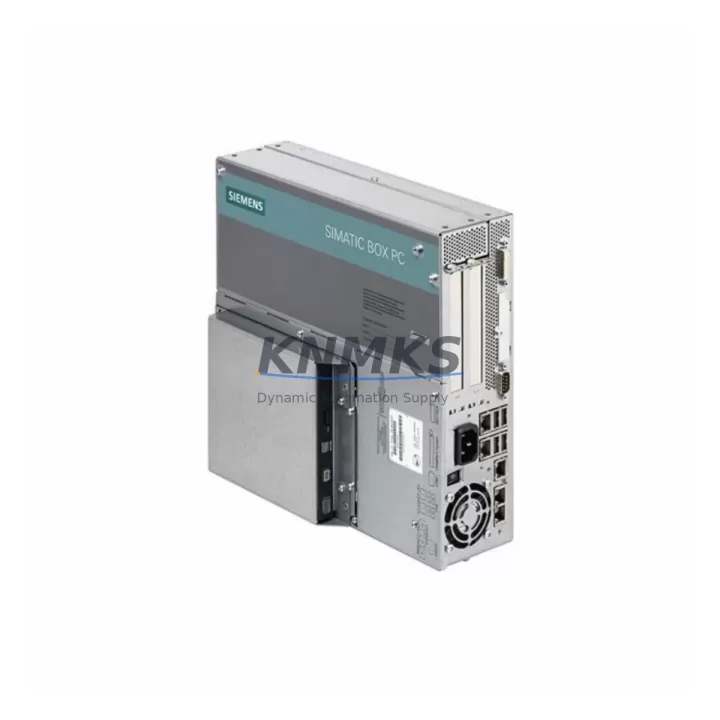
Siemens 6ES7647-6CH30-0AB0 Maintenance-Proven Spare Part for Factory Uptime
The Siemens 6ES7647-6CH30-0AB0 is a high-performance Industrial Box PC module designed for the SIMATIC IPC627C platform, widely deployed across process automation, discrete manufacturing, and critical infrastructure control environments. As a maintenance-proven spare part, this unit supports rapid replacement strategies that minimize unplanned downtime and protect production continuity. Whether you are managing a scheduled annual overhaul, responding to an emergency fault, or building a strategic spare parts inventory for aging SIMATIC IPC systems, the 6ES7647-6CH30-0AB0 delivers the compatibility, reliability, and verified performance that maintenance engineers and procurement teams demand.
Industrial facilities running SIMATIC IPC627C platforms depend on the stability of their embedded computing hardware to sustain HMI visualization, SCADA data acquisition, PLC communication, and real-time process control. When the core IPC module fails or degrades, the impact cascades across the entire control cabinet — affecting operator visibility, alarm management, historian logging, and field device communication. Stocking a verified original spare such as the 6ES7647-6CH30-0AB0 is the most effective risk mitigation strategy for facilities that cannot afford extended outages.
Each unit is sourced as an original Siemens component, subjected to pre-shipment functional testing, and backed by a support terms confirmed by quotation. Global dispatch capability ensures that emergency replacement orders reach maintenance teams within the shortest possible lead time, regardless of facility location.
Spare Maintenance Table
| Part Number | 6ES7647-6CH30-0AB0 |
| Brand | Siemens |
| Series | SIMATIC IPC627C |
| Product Type | Industrial Box PC / Embedded Controller Module |
| Form Factor | 19-inch rack-mount / panel-mount Industrial Box PC |
| Processor Platform | Intel Core i5/i7 (generation per order variant) |
| Operating System Support | Windows Embedded Standard 7 / Windows 7 / Windows 10 IoT |
| Communication Interfaces | PROFINET, Ethernet (RJ45), USB, serial (COM), PCIe expansion |
| Power Supply Input | 24 V DC (nominal), compatible with standard control cabinet PSU rails |
| Operating Temperature | 0 °C to +55 °C (ambient, forced air cooling) |
| Storage Temperature | -20 °C to +70 °C |
| Protection Class | IP20 (internal cabinet installation) |
| Origin | Germany |
| Compatibility | SIMATIC IPC627C; backward-compatible with IPC627B configurations where hardware interfaces match |
| Support terms | 12 Months — covers manufacturing defects and functional failure under normal operating conditions |
| Pre-Shipment Testing | Full functional verification prior to dispatch |
| Shipping | Global express dispatch; ESD-safe packaging |
Maintenance Planning for Continuous Operation
When replacing the 6ES7647-6CH30-0AB0 in a SIMATIC IPC627C control cabinet, a thorough site inspection of the surrounding electrical and communication infrastructure is essential to ensure a clean, stable restoration of operations. Maintenance engineers should treat the IPC replacement as an opportunity to audit the full control cabinet rather than a simple swap.
Begin with the 24 V DC power supply module feeding the IPC. Units such as the Siemens SITOP PSU100S or equivalent 24 V stabilized power supplies should be checked for output voltage stability, ripple, and thermal condition. A degraded PSU is a common root cause of IPC instability and should be replaced proactively if it shows signs of aging. Inspect the power distribution terminal blocks and fuse holders on the 24 V rail — blown or weakened fuses in the IPC power circuit can cause intermittent resets that are difficult to diagnose without a systematic inspection.
Review the PROFINET communication cabling connected to the IPC’s Ethernet ports. Industrial Ethernet patch cables, RJ45 connectors, and managed switches in the PROFINET ring should be inspected for physical damage, connector oxidation, and correct shielding termination. If the IPC communicates with a Siemens S7-300 or S7-400 PLC via PROFINET or MPI/DP, verify that the communication parameters and device names are correctly configured before powering up the replacement unit.
Check the I/O expansion modules connected via the IPC’s PCIe or USB interfaces — including any signal isolation modules or serial communication adapters used for legacy field device integration. These components are often overlooked during IPC replacements but can cause immediate post-replacement faults if they are not re-initialized correctly. Similarly, inspect any UPS (uninterruptible power supply) modules integrated into the cabinet to ensure the IPC receives clean, protected power during startup and shutdown sequences.
If the IPC drives an operator panel or HMI display — such as a Siemens TP or MP series panel connected via DVI or DisplayPort — verify the display cable integrity and confirm that the HMI project is correctly backed up and ready for restoration after the IPC replacement. Finally, review the CF card, SSD, or HDD storage media installed in the IPC for data integrity and ensure that the latest system image and application software backup are available before commencing the replacement procedure.
Site Replacement Workflow
A structured replacement workflow for the 6ES7647-6CH30-0AB0 reduces mean time to repair (MTTR) and minimizes the risk of secondary faults during the restoration process.
Step 1 — Pre-Replacement Preparation: Back up the existing IPC system image, application software, PROFINET device configuration, and any historian or SCADA project files stored on the unit. Document all cable connections, IP addresses, device names, and communication parameters before powering down.
Step 2 — Safe Isolation: Follow your site’s lockout/tagout (LOTO) procedure. Isolate the 24 V DC supply to the IPC and confirm zero energy state before disconnecting any cables or removing the unit from the cabinet.
Step 3 — Physical Replacement: Remove the faulty 6ES7647-6CH30-0AB0 unit. Install the verified replacement, ensuring correct seating in the rack or panel mount. Reconnect all cables in the documented sequence — power, PROFINET, USB, serial, and display connections.
Step 4 — Software Restoration: Restore the system image and application software from backup. Reconfigure PROFINET device names and IP addresses as documented. Verify communication with all connected PLCs, I/O modules, and field devices before releasing the system to operations.
Step 5 — Functional Verification: Perform a controlled startup sequence. Confirm HMI visualization, alarm management, historian logging, and PLC communication are fully restored. Document the replacement in the site maintenance log.
This workflow is compatible with both emergency replacement scenarios and planned maintenance windows, and supports the transition from aging IPC627B installations to the IPC627C platform where hardware interfaces are compatible.
Spare Parts Support FAQ
Q1: Is the 6ES7647-6CH30-0AB0 compatible with both IPC627C and IPC627B installations?
The 6ES7647-6CH30-0AB0 is specified for the SIMATIC IPC627C platform. Compatibility with IPC627B installations depends on the specific hardware revision and interface configuration of the existing cabinet. We recommend confirming the target system’s hardware revision and interface requirements before ordering. Our technical team can assist with compatibility verification.
Q2: What pre-shipment testing is performed on each unit?
Every 6ES7647-6CH30-0AB0 unit undergoes full functional verification prior to dispatch, including power-on testing, communication interface checks, and storage media verification. Units that do not pass testing are not shipped. A test report is available upon request.
Q3: What does the support terms confirmed by quotation cover?
The support terms confirmed by quotation cover manufacturing defects and functional failure under normal operating conditions from the date of receipt. It does not cover damage resulting from incorrect installation, overvoltage events, or physical mishandling. Support requests are processed with priority to minimize site downtime.
Q4: Can you support long-term supply for multiple units across a multi-site maintenance program?
Yes. We maintain multi-region stock of the 6ES7647-6CH30-0AB0 and can support scheduled procurement programs, blanket orders, and emergency call-off arrangements. Long-term supply agreements are available for facilities managing large SIMATIC IPC627C installed bases across multiple production sites.
© 2026 KNMKS. All rights reserved.
Original Source: https://knmks.com
Contact: admin@knmks.com | +86 18359268345
Product Identification
- Brand / Ecosystem
-
Siemens
Siemens - Model / Series
-
6ES7647-6CH30-0AB0
SIMATIC Series - Product Family
- Other Components
- Availability Status
- Available on request after model and quantity confirmation
- Inquiry Type
- B2B RFQ, replacement inquiry and project spare-part request
- Pre-Quote Check
- Exact SKU, brand, series, quantity, nameplate photos and destination country are checked before quotation
System Path
Where this product fits in the KNMKS automation structure.
Specification & Inquiry Focus
- Component range
- Breakers, terminals and cabinet accessories
- Common needs
- Model, photo and installation requirement
- Project support
- Maintenance and mixed spare-part inquiry
Buyer Confirmation
Information KNMKS checks before replying.
- Exact model
- 6ES7647-6CH30-0AB0
- Brand / ecosystem
- Siemens
- Product family
- Other Components
- Application note
- Replacement, maintenance, project build or spare-part list
- Useful photos
- Nameplate, installed unit, cabinet layout or connector side
- Delivery details
- Quantity, destination country and target schedule
Document Support
Files and notes can be confirmed during quotation.
- Product photos or nameplate confirmation when available
- Packing and delivery notes before quotation confirmation
- Support scope and delivery terms confirmed per inquiry
- Export document coordination for qualified B2B requests
Inquiry Support
- Mixed automation spare parts inquiry
- Cabinet component and accessory support
- Model identification from photos or labels
What to Send Us
- Brand and exact model number: Siemens 6ES7647-6CH30-0AB0
- Quantity and required delivery time
- Application, replacement requirement or nameplate photo
- Destination country and shipping preference
RFQ Preparation
This is a product inquiry page built for RFQ communication.
Fast Model Check
Send this model to KNMKS for confirmation.
Include quantity, destination country and photos if this is a maintenance replacement. The inquiry will be saved with a reference number after submission.
Brand & Compatibility Note
KNMKS displays automation product information for well-known industrial brand ecosystems and compatible replacement references. Brand names are used for product identification and compatibility reference only; final availability and commercial terms are confirmed per quotation.
 Manufacturing
 Machine Tools
 Packaging
 Energy & Power
 PLCs & Controllers
 HMI & Displays
 Servo Systems
 Variable Frequency Drives