
Overview
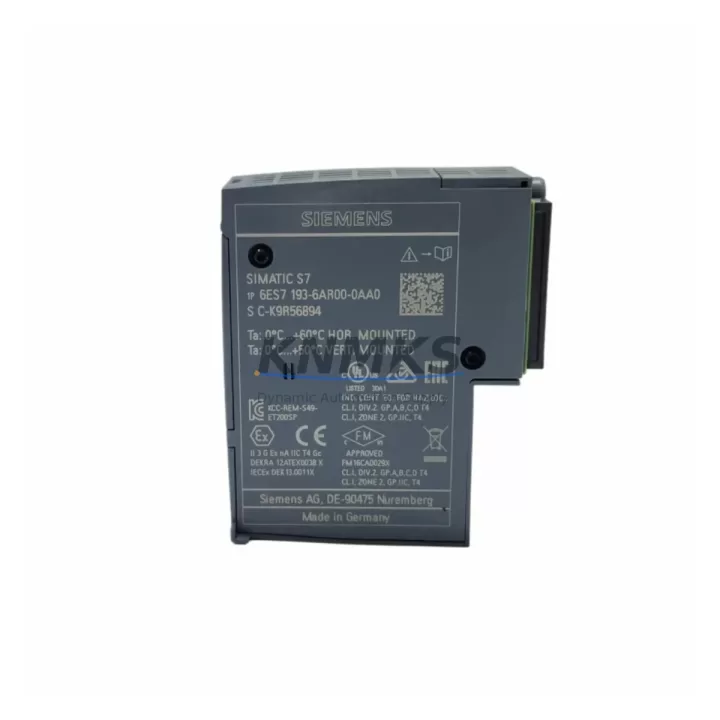
Siemens 6ES7193-6AR00-0AA0 Bus Adaptor ET 200SP: Migration-Ready Upgrade for Legacy Control Systems
The Siemens 6ES7193-6AR00-0AA0 is a BA 2×RJ45 bus adaptor designed for the ET 200SP distributed I/O system, providing a direct, migration-ready replacement path for aging PROFINET-based control architectures. As legacy ET 200SP installations approach end-of-life or require expansion, this bus adaptor serves as a critical interface component between the BaseUnit and the PROFINET backplane, enabling engineers to retrofit existing control cabinets without redesigning the entire I/O topology.
When planning a retrofit around the 6ES7193-6AR00-0AA0, the first step is confirming that the existing BaseUnit — typically a BU type A0, B0, or D0 — is mechanically and electrically compatible with the BA 2×RJ45 form factor. The adaptor’s dual RJ45 ports support standard PROFINET ring or line topologies, allowing it to slot into existing network segments without requiring additional managed switches in most configurations. Engineers should verify the PROFINET device name and IP address assignment in the TIA Portal project before swapping the adaptor, as the GSD file version may differ between the legacy unit and the replacement module.
Power budget verification is essential during any ET 200SP retrofit. The 6ES7193-6AR00-0AA0 draws its supply from the backplane bus; however, the total current consumption of all attached signal modules — including digital input modules such as the 6ES7131-6BF00-0CA0 and analog output modules like the 6ES7135-6GB00-0BA1 — must remain within the BaseUnit’s rated capacity. Exceeding this budget can cause intermittent faults that are difficult to diagnose in the field. A full I/O audit prior to installation is strongly recommended.
Terminal wiring compatibility is another key checkpoint. In older ET 200SP installations, the push-in terminal blocks on the BaseUnit may have been configured for specific wire gauges or ferrule types. When replacing the bus adaptor, technicians should inspect the terminal block condition and confirm that the existing field wiring — particularly for 24 VDC supply and PE connections — meets the torque and cross-section specifications documented in the Siemens ET 200SP system manual. If the installation also involves replacing a server module such as the 6ES7193-6PA00-0AA0, the wiring sequence must be re-validated against the updated slot assignment.
Migration Compatibility Table
| Parameter | Detail |
|---|---|
| SKU / Order Number | 6ES7193-6AR00-0AA0 |
| Product Series | Siemens ET 200SP |
| Module Type | Bus Adaptor BA 2×RJ45 |
| Communication Protocol | PROFINET IO |
| Interface | 2× RJ45 (PROFINET ring/line topology) |
| Compatible BaseUnit Types | BU type A0, B0, D0 (ET 200SP) |
| Installation Method | Snap-on to ET 200SP BaseUnit, DIN rail mount |
| Replacement Compatibility | Direct drop-in for legacy BA 2×RJ45 variants |
| Firmware / GSD Requirement | Verify GSD file version in TIA Portal before swap |
| Commissioning Note | Re-assign PROFINET device name and IP post-installation |
| Country of Origin | Germany |
| Support terms | 12 Months |
| Stock Status | availability confirmed by RFQ — Ships within 1–3 business days |
| Outgoing Test | Function-tested prior to shipment |
Retrofit Planning for Existing Automation Systems
A successful retrofit involving the 6ES7193-6AR00-0AA0 typically occurs within a broader system modernization effort. In many cases, the bus adaptor replacement is triggered by a failed PROFINET link, a damaged RJ45 port, or a planned migration from an older IM (interface module) generation to a current-generation IM 155-6 PN ST or IM 155-6 PN HF. When the interface module is also being upgraded, engineers must account for changes in the module address mapping and update the hardware configuration in TIA Portal accordingly before going live.
In control cabinets where space is constrained, the compact footprint of the ET 200SP system — including the 6ES7193-6AR00-0AA0 — is a significant advantage over older S7-300 or ET 200M distributed I/O architectures. Migrating from an ET 200M rack with IM 153-x interface modules to an ET 200SP station with the BA 2×RJ45 bus adaptor can reduce cabinet depth requirements substantially, freeing space for additional power supply modules or circuit breakers. The 6ES7138-6AA01-0BA0 power module is commonly added during such retrofits to provide a clean 24 VDC segment for newly added I/O slices.
For installations that include HMI panels — such as a TP700 Comfort or KTP900 Basic — the PROFINET topology change introduced by swapping the bus adaptor may require updating the network view in TIA Portal and re-downloading the HMI project to ensure that screen tags linked to ET 200SP I/O addresses remain valid. Signal isolators installed between field instruments and ET 200SP analog input modules should also be re-verified for loop power compatibility after the retrofit, particularly if the BaseUnit type changes during the process.
Where the existing installation uses a PROFIBUS DP backplane rather than PROFINET, a protocol migration is required. In this scenario, the 6ES7193-6AR00-0AA0 (PROFINET) replaces a legacy BA 2×FC bus adaptor (PROFIBUS), and the IM module must be changed to a PROFINET-capable variant. The PLC program logic typically remains intact, but all I/O symbolic addresses must be re-mapped and the hardware configuration rebuilt from scratch in TIA Portal. A pre-migration backup of the S7 project and a full I/O list export are non-negotiable steps before beginning this type of conversion.
Downtime Control During System Migration
Minimizing unplanned downtime is the primary concern during any live-system bus adaptor replacement. The recommended approach is to pre-configure the replacement 6ES7193-6AR00-0AA0 offline — assigning the correct PROFINET device name using a laptop running TIA Portal or the Siemens Primary Setup Tool — before the maintenance window begins. This eliminates the need for network configuration steps during the actual swap, reducing the physical replacement time to under 15 minutes in most cases.
Before powering down the ET 200SP station, engineers should capture a full diagnostic snapshot of the existing PROFINET topology, including port statistics and device status, using the TIA Portal online view or a PROFINET analyzer. This snapshot serves as a baseline for post-swap verification. The original program logic in the S7-1500 or S7-1200 CPU does not need to be modified for a like-for-like bus adaptor replacement; however, if the GSD file version changes, a hardware re-compilation and download may be required, which adds to the maintenance window duration.
After installation, the standard commissioning sequence involves powering up the ET 200SP station, confirming that the PROFINET link LEDs on both RJ45 ports illuminate correctly, and verifying that the CPU transitions from STOP to RUN without I/O faults. A structured I/O force test — cycling each digital output and reading each digital input in sequence — confirms that field wiring integrity has been maintained through the swap. All test results should be documented and retained as part of the site modification record.
Retrofit Support FAQ
Q1: Is the 6ES7193-6AR00-0AA0 a direct replacement for all BA 2×RJ45 variants in the ET 200SP range?
A: Yes, the 6ES7193-6AR00-0AA0 is the current standard BA 2×RJ45 bus adaptor for ET 200SP and is compatible with all standard BaseUnit types (A0, B0, D0). Always verify the GSD file version in your TIA Portal project to confirm firmware compatibility before installation.
Q2: What wiring changes are required when replacing the bus adaptor?
A: The bus adaptor itself does not carry field wiring — it connects to the BaseUnit mechanically and interfaces with the PROFINET network via RJ45. No terminal rewiring is required for the adaptor swap. However, inspect the BaseUnit terminal blocks and field wiring condition as part of the maintenance procedure.
Q3: How is the unit tested before shipment?
A: Every 6ES7193-6AR00-0AA0 unit is function-tested prior to dispatch to verify PROFINET link establishment and physical port integrity. Units are shipped with protective port covers and anti-static packaging. A support terms confirmed by quotation is included from the date of shipment.
Q4: What is the typical lead time and stock availability?
A: The 6ES7193-6AR00-0AA0 is held availability confirmed by RFQ and ships within 1–3 business days of order confirmation. For urgent requirements or bulk orders, contact our sales team directly to confirm allocation and expedited dispatch options.
© 2026 KNMKS. All rights reserved.
Original Source: https://knmks.com
Contact: admin@knmks.com | +86 18359268345
Product Identification
- Brand / Ecosystem
-
Siemens
Siemens - Model / Series
-
6ES7193-6AR00-0AA0
SIMATIC Series - Product Family
- Other Components
- Availability Status
- Available on request after model and quantity confirmation
- Inquiry Type
- B2B RFQ, replacement inquiry and project spare-part request
- Pre-Quote Check
- Exact SKU, brand, series, quantity, nameplate photos and destination country are checked before quotation
System Path
Where this product fits in the KNMKS automation structure.
Specification & Inquiry Focus
- Component range
- Breakers, terminals and cabinet accessories
- Common needs
- Model, photo and installation requirement
- Project support
- Maintenance and mixed spare-part inquiry
Buyer Confirmation
Information KNMKS checks before replying.
- Exact model
- 6ES7193-6AR00-0AA0
- Brand / ecosystem
- Siemens
- Product family
- Other Components
- Application note
- Replacement, maintenance, project build or spare-part list
- Useful photos
- Nameplate, installed unit, cabinet layout or connector side
- Delivery details
- Quantity, destination country and target schedule
Document Support
Files and notes can be confirmed during quotation.
- Product photos or nameplate confirmation when available
- Packing and delivery notes before quotation confirmation
- Support scope and delivery terms confirmed per inquiry
- Export document coordination for qualified B2B requests
Inquiry Support
- Mixed automation spare parts inquiry
- Cabinet component and accessory support
- Model identification from photos or labels
What to Send Us
- Brand and exact model number: Siemens 6ES7193-6AR00-0AA0
- Quantity and required delivery time
- Application, replacement requirement or nameplate photo
- Destination country and shipping preference
RFQ Preparation
This is a product inquiry page built for RFQ communication.
Fast Model Check
Send this model to KNMKS for confirmation.
Include quantity, destination country and photos if this is a maintenance replacement. The inquiry will be saved with a reference number after submission.
Brand & Compatibility Note
KNMKS displays automation product information for well-known industrial brand ecosystems and compatible replacement references. Brand names are used for product identification and compatibility reference only; final availability and commercial terms are confirmed per quotation.
 Manufacturing
 Machine Tools
 Packaging
 Energy & Power
 PLCs & Controllers
 HMI & Displays
 Servo Systems
 Variable Frequency Drives