
Overview
Siemens 6ES7634-2BF02-0AE3 Migration-Ready PLC HMI for Legacy Control Systems
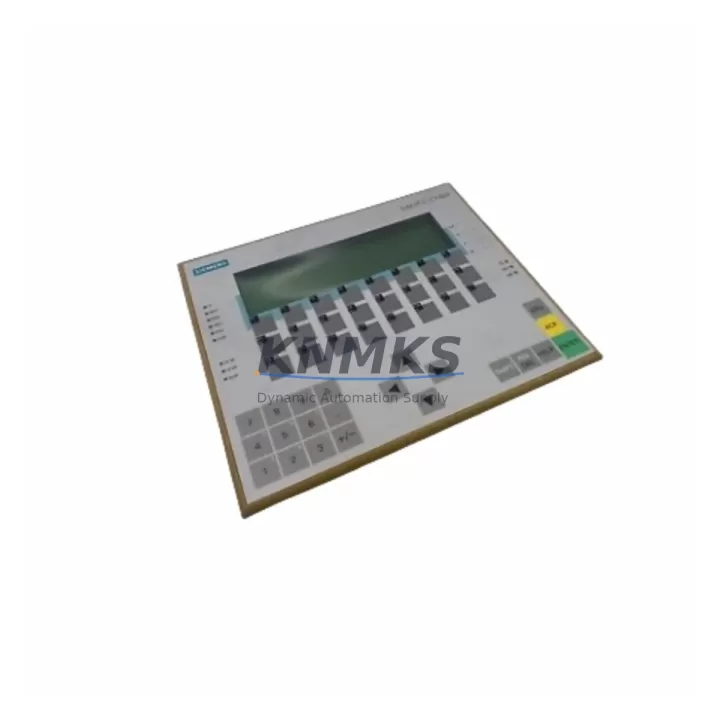
The Siemens 6ES7634-2BF02-0AE3 is a compact integrated PLC/HMI controller from the SIMATIC C7-634 DP series, combining operator panel and programmable logic control in a single unit. Designed for panel-mount installation in legacy automation cabinets, this unit supports PROFIBUS DP communication and is widely deployed in process control, machine automation, and discrete manufacturing environments. As Siemens phases out the C7-600 product family, the 6ES7634-2BF02-0AE3 has become a critical spare and migration reference point for engineers managing aging control infrastructure.
Our stock of the 6ES7634-2BF02-0AE3 is sourced from verified industrial channels, subject to pre-shipment functional testing, and covered by a support terms confirmed by quotation. Units are dispatched globally with full documentation support, making this an ideal solution for emergency replacements, planned retrofits, and system modernization projects where downtime must be minimized.
Migration Compatibility Table
| Parameter | Details |
|---|---|
| SKU / Part Number | 6ES7634-2BF02-0AE3 |
| Product Series | SIMATIC C7-634 DP |
| Form Factor | Integrated PLC + HMI (panel-mount) |
| Communication Interface | PROFIBUS DP (MPI compatible) |
| Display | Monochrome STN LCD with touch/key input |
| Power Supply | 24 V DC (verify cabinet PSU capacity before swap) |
| Installation | Panel cutout mount; confirm cutout dimensions match existing enclosure |
| Backplane / Rack | Standalone integrated unit; no separate backplane required |
| Replacement Compatibility | Direct replacement for C7-634 DP variants; verify firmware revision |
| Protocol Migration | PROFIBUS DP to PROFINET migration requires gateway (e.g., PN/DP coupler) |
| HMI Screen Migration | Existing ProTool/Lite screens must be validated; WinCC Flexible migration recommended |
| Commissioning Notes | Re-address PROFIBUS node, verify MPI baud rate, reload PLC program via STEP 7 |
| Pre-Shipment Testing | Yes — functional power-on and communication test performed |
| Support terms | 12 Months |
| Origin | Germany |
| Stock Status | Available — global dispatch |
Retrofit Planning for Existing Automation Systems
When integrating the 6ES7634-2BF02-0AE3 into an existing control cabinet, engineers must account for several interdependent system elements. The 24 V DC power supply feeding the C7-634 DP must be verified for adequate current capacity — particularly if the cabinet also powers SIMATIC ET 200S distributed I/O stations or additional IM 153-2 interface modules on the same PROFIBUS segment. Undersized power supplies are a common cause of intermittent faults after replacement.
Terminal wiring on the integrated I/O of the C7-634 DP follows a fixed layout. Before removal of the legacy unit, photograph and document all terminal assignments. If the existing installation uses SM 321 digital input modules or SM 331 analog input modules in an adjacent S7-300 rack for expanded I/O, confirm that the rack’s backplane bus and module addressing remain unaffected by the controller swap. Module slot addresses in STEP 7 hardware configuration must match the physical installation exactly.
For systems where the C7-634 DP communicates upstream to a SIMATIC S7-400 CPU or a WinCC SCADA station via MPI or PROFIBUS DP, the network topology must be preserved during the swap. Confirm the PROFIBUS DP station address assigned to the 6ES7634-2BF02-0AE3 matches the address previously configured in the master’s GSD file. If the project involves migrating from PROFIBUS DP to PROFINET, a CP 343-1 communications processor or a dedicated PN/DP coupler will be required to bridge the two networks without rewriting the entire control program.
HMI screen migration is a frequently underestimated task. Screens originally created in ProTool/Lite for the C7-634 DP must be reviewed for tag mapping compatibility. If the retrofit path leads toward a modern SIMATIC HMI panel such as the KTP700 Basic or TP900 Comfort, the project file must be migrated to TIA Portal and all variable connections re-validated. Retaining the original C7-634 DP with the 6ES7634-2BF02-0AE3 as a like-for-like replacement avoids this migration overhead entirely and is the preferred approach for short-term continuity.
Programming cable access is required for initial commissioning. A PC adapter USB or CP 5611 card connected via MPI is the standard interface for uploading the STEP 7 program to the replacement unit. Confirm the programming device’s STEP 7 version is compatible with the project’s CPU type and firmware revision before beginning the upload sequence.
Downtime Control During System Migration
Minimizing production downtime during a C7-634 DP replacement requires a structured pre-outage preparation phase. Before the scheduled maintenance window, back up the complete STEP 7 project — including hardware configuration, symbol tables, and all OB/FB/FC blocks — to a secure offline location. If the system includes a data block (DB) containing recipe or parameter data, export this separately and verify it can be reloaded independently of the program upload.
During the physical swap, label all PROFIBUS DP connectors and terminal wiring before disconnection. The 6ES7634-2BF02-0AE3’s integrated I/O terminals are fixed, so wiring re-termination is straightforward if the original terminal layout is documented. Power down the cabinet in the correct sequence — field devices first, then the controller — to avoid spurious output signals that could trigger downstream actuators or safety interlocks.
After installation, restore power and verify the PROFIBUS DP segment integrity using a bus diagnostic tool before uploading the program. Upload the STEP 7 project, set the CPU to RUN mode, and monitor the first scan cycle for any I/O faults or communication errors. HMI screens should be validated against live process values before handing control back to operations. A structured commissioning checklist — covering power-on, communication link, I/O verification, HMI screen validation, and alarm acknowledgment — reduces the risk of overlooked faults and supports a controlled return to production.
For sites with strict change management requirements, a parallel test run using a spare C7-634 DP unit loaded with the same program can validate the replacement configuration before the live cutover, further reducing risk and supporting audit documentation.
Retrofit Support FAQ
Q1: Is the 6ES7634-2BF02-0AE3 a direct drop-in replacement for other C7-634 DP variants?
The 6ES7634-2BF02-0AE3 is the standard C7-634 DP unit with PROFIBUS DP interface. It is compatible with existing panel cutouts and wiring from other C7-634 DP variants in the same series. Firmware revision differences may require a program re-upload via STEP 7. Always verify the hardware configuration in your STEP 7 project matches the replacement unit’s order number before commissioning.
Q2: What commissioning steps are required after installing the replacement unit?
After physical installation, set the PROFIBUS DP station address using the address switches on the unit. Connect a programming device via MPI or PROFIBUS DP and upload the backed-up STEP 7 project. Verify the hardware configuration download, set the CPU to RUN, and confirm all I/O channels are responding correctly. Validate HMI screen tag connections and test alarm functions before returning the system to production.
Q3: Has the unit been tested before shipment, and what support terms is provided?
Yes. Every 6ES7634-2BF02-0AE3 unit undergoes a pre-shipment functional test covering power-on, communication interface verification, and basic I/O checks. All units are covered by a support terms confirmed by quotation from the date of shipment. Support terms support includes technical assistance for installation and commissioning issues.
Q4: What is the typical lead time and stock availability?
Units are held availability confirmed by RFQ and available for immediate dispatch. Global shipping is supported with standard and expedited options. For urgent replacement requirements, contact our sales team directly to confirm current stock levels and arrange priority dispatch. Emergency orders can typically be processed within one business day.
—
© 2026 KNMKS. All rights reserved.
Original Source: https://knmks.com
Contact: admin@knmks.com | +86 18359268345
Product Identification
- Brand / Ecosystem
-
Siemens
Siemens - Model / Series
-
6ES7634-2BF02-0AE3
SIMATIC Series - Product Family
- HMI & Displays
- Availability Status
- Available on request after model and quantity confirmation
- Inquiry Type
- B2B RFQ, replacement inquiry and project spare-part request
- Pre-Quote Check
- Exact SKU, brand, series, quantity, nameplate photos and destination country are checked before quotation
System Path
Where this product fits in the KNMKS automation structure.
Specification & Inquiry Focus
- Display range
- Operator panels and touch screens
- Common needs
- Screen size, interface and version matching
- Project support
- Retrofit, spare unit and panel replacement
Buyer Confirmation
Information KNMKS checks before replying.
- Exact model
- 6ES7634-2BF02-0AE3
- Brand / ecosystem
- Siemens
- Product family
- HMI & Displays
- Application note
- Replacement, maintenance, project build or spare-part list
- Useful photos
- Nameplate, installed unit, cabinet layout or connector side
- Delivery details
- Quantity, destination country and target schedule
Document Support
Files and notes can be confirmed during quotation.
- Product photos or nameplate confirmation when available
- Packing and delivery notes before quotation confirmation
- Support scope and delivery terms confirmed per inquiry
- Export document coordination for qualified B2B requests
Inquiry Support
- Panel size and interface confirmation
- Replacement unit inquiry for discontinued HMIs
- Protective packaging for display shipment
What to Send Us
- Brand and exact model number: Siemens 6ES7634-2BF02-0AE3
- Quantity and required delivery time
- Application, replacement requirement or nameplate photo
- Destination country and shipping preference
RFQ Preparation
This is a product inquiry page built for RFQ communication.
Fast Model Check
Send this model to KNMKS for confirmation.
Include quantity, destination country and photos if this is a maintenance replacement. The inquiry will be saved with a reference number after submission.
Brand & Compatibility Note
KNMKS displays automation product information for well-known industrial brand ecosystems and compatible replacement references. Brand names are used for product identification and compatibility reference only; final availability and commercial terms are confirmed per quotation.
 Manufacturing
 Machine Tools
 Packaging
 Energy & Power



 PLCs & Controllers
 Servo Systems
 Variable Frequency Drives
 Sensors