
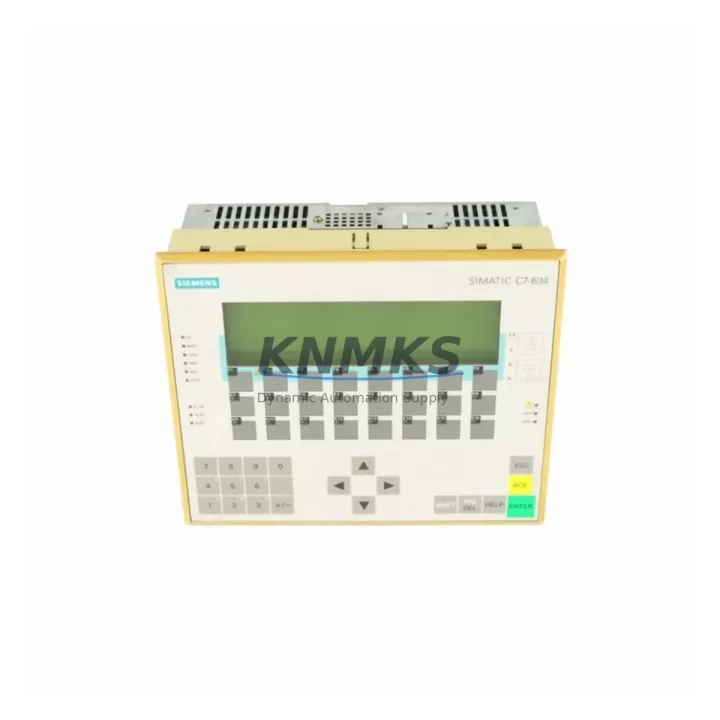
Overview
Siemens 6ES7634-1DF02-0AE3 Maintenance-Proven Spare for Factory Uptime
The Siemens 6ES7634-1DF02-0AE3 is a 10-inch color TFT touch panel from the SIMATIC TP270 series, engineered for demanding industrial HMI applications in process automation, discrete manufacturing, and utility control environments. As a maintenance-proven spare part, this unit supports continuous factory uptime by providing a direct, drop-in replacement for aging or failed TP270 panels integrated into S7-300 and S7-400 PLC architectures. Every unit dispatched from our inventory undergoes pre-shipment functional testing and is backed by a support terms confirmed by quotation, ensuring procurement engineers and maintenance teams can source with confidence — even under emergency shutdown conditions.
The 6ES7634-1DF02-0AE3 communicates via MPI and PROFIBUS-DP interfaces, making it fully compatible with existing S7-300/400 network topologies without requiring protocol adapters or gateway hardware. Its 640×480 VGA resolution display, integrated touch interface, and WinCC flexible runtime environment allow operators to resume visualization and control functions immediately upon installation. For facilities managing legacy SIMATIC systems beyond their standard product lifecycle, this spare part represents a critical asset in long-term system extension strategies.
Spare Maintenance Table
| Part Number | 6ES7634-1DF02-0AE3 |
| Series | SIMATIC TP270 |
| Display | 10″ Color TFT, 640×480 VGA |
| Interface | MPI, PROFIBUS-DP |
| Compatible PLC | SIMATIC S7-300, S7-400 |
| Runtime Software | WinCC flexible |
| Supply Voltage | 24 V DC |
| Operating Temperature | 0 °C to +50 °C |
| Protection Rating | IP65 (front panel) |
| Weight | Approx. 1.9 kg |
| Origin | Germany |
| Support terms | 12 Months |
| Pre-Shipment Testing | Yes — functional and communication verified |
| Compatibility Confirmation | S7-300/400 MPI/PROFIBUS-DP topology |
| Dispatch | Global, rapid fulfillment from verified stock |
Maintenance Planning for Continuous Operation
When replacing the 6ES7634-1DF02-0AE3 in a SIMATIC control cabinet, a thorough site inspection of the surrounding electrical and communication infrastructure is essential to prevent repeat failures and ensure stable HMI operation. Maintenance engineers should begin by verifying the 24 V DC panel power supply — a degraded or undersized SITOP PSU100S or equivalent power supply unit can cause intermittent HMI resets and touchscreen unresponsiveness that are often misdiagnosed as panel faults.
The MPI/PROFIBUS-DP network cable and bus termination resistors should be inspected for continuity and correct impedance. Damaged PROFIBUS connectors (such as the Siemens 6ES7972-0BA52-0XA0 bus connector) or improperly terminated cable runs are a leading cause of communication loss between the TP270 panel and the S7-300/400 CPU. Replacing the panel without addressing bus integrity issues will result in recurring communication alarms.
The S7-300 or S7-400 CPU module itself — for example a 6ES7315-2EH14-0AB0 or 6ES7416-3XR05-0AB0 — should be checked for active fault codes and memory card integrity. If the CPU has logged HMI communication errors, a firmware or project reload via STEP 7 or TIA Portal may be required after the panel swap. Additionally, the CP 343-1 or CP 443-1 Ethernet communication processor, if present in the rack, should be verified for correct IP configuration and network connectivity to avoid visualization gaps post-replacement.
For cabinets with dense I/O configurations, inspect the SM 321 digital input modules and SM 322 digital output modules for blown fuses or tripped protection circuits that may have contributed to the original HMI fault condition. Signal isolators and relay output modules in the same electrical loop should also be tested for correct switching behavior. Finally, review the cabinet’s internal wiring harness and terminal blocks for signs of thermal stress or loose connections — particularly on 24 V DC distribution rails feeding both the HMI panel and associated I/O modules.
Site Replacement Workflow
The 6ES7634-1DF02-0AE3 is a direct hardware replacement for earlier TP270 10″ variants. Before beginning the swap, document the existing MPI node address and PROFIBUS-DP station address configured on the outgoing panel — these settings must be replicated on the replacement unit to avoid address conflicts on the network. The WinCC flexible project file should be backed up from the original panel’s flash memory or from the engineering station prior to removal.
Power down the control cabinet following site lockout/tagout (LOTO) procedures. Disconnect the PROFIBUS-DP cable, 24 V DC power connector, and any USB or serial peripherals. Remove the panel from the cutout by releasing the mounting clamps from the rear. Install the replacement 6ES7634-1DF02-0AE3, reconnect all cables, and restore power. Use STEP 7 or WinCC flexible to download the project to the new panel via MPI or PROFIBUS-DP. Verify all screen pages, alarm displays, and operator inputs function correctly before returning the line to production.
This workflow minimizes downtime to under two hours for experienced maintenance teams and eliminates the need for panel reconfiguration from scratch, preserving existing visualization logic and operator familiarity. For facilities running multiple TP270 units across production lines, maintaining at least one 6ES7634-1DF02-0AE3 in the on-site spare parts inventory is strongly recommended to support emergency replacement without lead time dependency.
Spare Parts Support FAQ
Q1: Is the 6ES7634-1DF02-0AE3 still available as a new original spare?
Yes. We maintain verified stock of original Siemens 6ES7634-1DF02-0AE3 units sourced through authorized industrial supply channels. Each unit is individually tested before dispatch. Given that the SIMATIC TP270 series has reached end-of-life status with Siemens, securing spare inventory now is strongly advised to avoid extended lead times during future maintenance events.
Q2: What is covered under the support terms confirmed by quotation?
All units are covered by a support terms confirmed by quotation from the date of dispatch. This covers hardware defects, communication interface failures, and display malfunctions under normal industrial operating conditions. Pre-shipment testing documentation is available upon request and confirms functional verification of the MPI/PROFIBUS-DP interface and touchscreen operation prior to shipment.
Q3: Can this panel replace other TP270 variants such as the 6ES7634-1DF01-0AE3?
The 6ES7634-1DF02-0AE3 is the -0AE3 revision of the TP270 10″ color panel. Compatibility with earlier revisions such as the -0AE3 suffix variants is generally maintained at the hardware and software level, but engineers should verify the WinCC flexible project version and MPI address settings before installation. Contact our technical team for compatibility confirmation specific to your system configuration.
Q4: How quickly can the unit be dispatched for emergency maintenance situations?
In-stock units are available for same-day or next-business-day dispatch to global destinations. We support emergency procurement requests with priority handling. For facilities with critical uptime requirements, we recommend establishing a standing spare parts agreement to ensure guaranteed availability without relying on spot-market sourcing during unplanned shutdowns.
© 2026 KNMKS. All rights reserved.
Original Source: https://knmks.com
Contact: admin@knmks.com | +86 18359268345
Product Identification
- Brand / Ecosystem
-
Siemens
Siemens - Model / Series
-
6ES7634-1DF02-0AE3
SIMATIC Series - Product Family
- HMI & Displays
- Availability Status
- Available on request after model and quantity confirmation
- Inquiry Type
- B2B RFQ, replacement inquiry and project spare-part request
- Pre-Quote Check
- Exact SKU, brand, series, quantity, nameplate photos and destination country are checked before quotation
System Path
Where this product fits in the KNMKS automation structure.
Specification & Inquiry Focus
- Display range
- Operator panels and touch screens
- Common needs
- Screen size, interface and version matching
- Project support
- Retrofit, spare unit and panel replacement
Buyer Confirmation
Information KNMKS checks before replying.
- Exact model
- 6ES7634-1DF02-0AE3
- Brand / ecosystem
- Siemens
- Product family
- HMI & Displays
- Application note
- Replacement, maintenance, project build or spare-part list
- Useful photos
- Nameplate, installed unit, cabinet layout or connector side
- Delivery details
- Quantity, destination country and target schedule
Document Support
Files and notes can be confirmed during quotation.
- Product photos or nameplate confirmation when available
- Packing and delivery notes before quotation confirmation
- Support scope and delivery terms confirmed per inquiry
- Export document coordination for qualified B2B requests
Inquiry Support
- Panel size and interface confirmation
- Replacement unit inquiry for discontinued HMIs
- Protective packaging for display shipment
What to Send Us
- Brand and exact model number: Siemens 6ES7634-1DF02-0AE3
- Quantity and required delivery time
- Application, replacement requirement or nameplate photo
- Destination country and shipping preference
RFQ Preparation
This is a product inquiry page built for RFQ communication.
Fast Model Check
Send this model to KNMKS for confirmation.
Include quantity, destination country and photos if this is a maintenance replacement. The inquiry will be saved with a reference number after submission.
Brand & Compatibility Note
KNMKS displays automation product information for well-known industrial brand ecosystems and compatible replacement references. Brand names are used for product identification and compatibility reference only; final availability and commercial terms are confirmed per quotation.
 Manufacturing
 Machine Tools
 Packaging
 Energy & Power



 PLCs & Controllers
 Servo Systems
 Variable Frequency Drives
 Sensors