
Overview
Siemens 6ES7590-0AA00-0AA0 Migration-Ready U-Connector: Legacy System Retrofit & Compatibility Upgrade
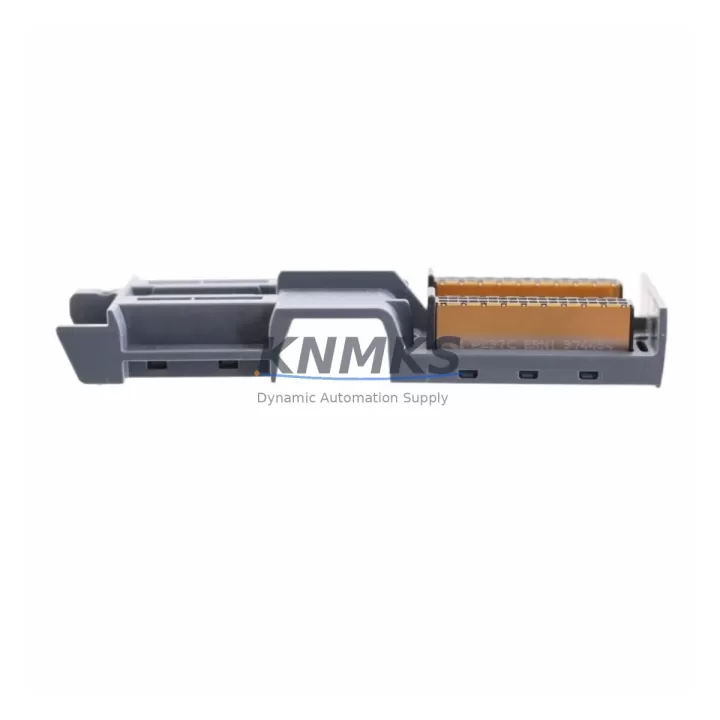
The Siemens 6ES7590-0AA00-0AA0 is the standard U-connector (bus connector) designed for the SIMATIC S7-1500 controller series. In retrofit and system migration projects, this component plays a critical role: it mechanically and electrically links adjacent modules on the S7-1500 mounting rail, forming the internal backplane bus that carries power and data between the CPU, signal modules, and communication processors. When upgrading from legacy S7-300 or S7-400 platforms, engineers must account for the fundamental architectural shift — the S7-1500 uses a U-connector-based backplane rather than the bus connector rail system of its predecessors, requiring careful planning of module sequencing, rack layout, and connector inventory before migration begins.
For facilities running aging SIMATIC S7-300 systems with discontinued CPU models such as the CPU 315-2 DP or CPU 317-2 PN/DP, migrating to the S7-1500 platform requires a complete reassessment of the control cabinet layout. The 6ES7590-0AA00-0AA0 U-connector must be installed between every pair of adjacent S7-1500 modules — including digital input/output modules like the SM 521 DI 16x24VDC and SM 522 DQ 16x24VDC/0.5A, analog modules, and technology modules — before the mounting rail assembly is finalized. Failure to pre-install connectors results in mandatory disassembly of the entire rack, significantly increasing downtime during commissioning.
In communication protocol migration scenarios — particularly transitions from PROFIBUS DP to PROFINET IO — the S7-1500 CPU’s integrated PROFINET interface eliminates the need for a separate CP 343-1 communication processor that was common in S7-300 installations. However, the physical rack build still depends on correctly sequenced 6ES7590-0AA00-0AA0 connectors to maintain bus integrity across all installed modules. Engineers migrating I/O from legacy ET 200M distributed racks should also verify that the new ET 200SP or ET 200MP remote I/O stations are correctly addressed and that the PROFINET device names are configured in TIA Portal before the first power-on.
Power supply compatibility is another key checkpoint. The S7-1500 system load group power supply — such as the PM 70W 120/230VAC or PS 60W 24/48/60VDC — must be sized to cover the total current draw of all installed modules. Unlike the S7-300, the S7-1500 does not use a backplane bus for power distribution; each module draws directly from the system power supply via the U-connector interface. This means the power budget calculation must be completed before the rack is assembled, and the 6ES7590-0AA00-0AA0 connectors must be in place before modules are snapped onto the rail.
For HMI integration, existing WinCC flexible projects targeting S7-300 CPUs must be migrated to TIA Portal WinCC and retargeted to the S7-1500 CPU. Tag addresses, data block structures, and alarm configurations typically require manual review and adjustment. The physical HMI panel — whether a KTP700 Basic or TP1200 Comfort — connects via PROFINET and is unaffected by the U-connector installation, but the communication link must be validated after the rack is fully assembled and powered.
Firmware version compatibility is a frequently overlooked migration risk. The S7-1500 CPU firmware must be at a version that supports all installed signal modules and technology modules. KNMKS supplies the 6ES7590-0AA00-0AA0 with full traceability documentation, and our pre-shipment testing protocol verifies physical integrity of the connector locking mechanism and bus contact surfaces. Each unit is inspected for pin alignment and housing integrity before dispatch.
Migration Compatibility Table
| Parameter | Details |
|---|---|
| Part Number | 6ES7590-0AA00-0AA0 |
| Compatible Platform | SIMATIC S7-1500 (all CPU variants) |
| Replaces / Supersedes | Bus connector rail system of S7-300/S7-400 (architectural change — not a direct swap) |
| Installation Requirement | Must be installed between every adjacent module before mounting on rail |
| Backplane Interface | U-connector backplane bus (proprietary S7-1500 interface) |
| Communication Compatibility | PROFINET IO, PROFIBUS DP (via CP modules) |
| Power Interface | Passes system power bus; compatible with PM 70W and PS 60W supply variants |
| Mounting Rail | Standard S7-1500 mounting rail (35mm DIN or dedicated S7-1500 rail) |
| Retrofit Recommendation | Order quantity = (number of S7-1500 modules − 1) per rack |
| Pre-Shipment Testing | Pin alignment, locking mechanism, bus contact surface inspection |
| Firmware Dependency | None (passive connector); CPU firmware must support installed signal modules |
| Support terms | 12 months from date of shipment |
| Origin | Germany |
| Stock Status | availability confirmed by RFQ — ready to ship |
Retrofit Planning for Existing Automation Systems
A successful S7-1500 retrofit begins with a complete module inventory of the existing S7-300 or S7-400 rack. Each slot position must be documented, including the CPU, power supply, signal modules, and any special function modules such as FM 350 counter modules or CP 343-1 PROFIBUS processors. The new S7-1500 rack layout must then be designed to accommodate the equivalent functionality, with one 6ES7590-0AA00-0AA0 U-connector required between every adjacent module pair.
Signal module migration typically involves replacing S7-300 SM 321/SM 322 digital I/O modules with S7-1500 SM 521/SM 522 equivalents, and SM 331/SM 332 analog modules with SM 531/SM 532 variants. Each new module requires its own U-connector on the left side before installation. Analog input modules used for process value acquisition — such as those handling 4–20 mA transmitter signals from pressure, temperature, or flow instruments — must be recalibrated and their scaling parameters re-entered in TIA Portal after migration.
For distributed I/O architectures, existing ET 200M stations connected via PROFIBUS DP can be retained during a phased migration, with the S7-1500 CPU managing both PROFINET and PROFIBUS networks simultaneously via a CM 1542-5 PROFIBUS communication module. This allows the central rack to be upgraded first while field devices remain on the legacy bus, reducing the scope of a single outage window. The CM 1542-5 itself requires a U-connector on its left side and must be positioned within the S7-1500 rack according to the system configuration in TIA Portal.
Safety-rated installations using S7-300F CPUs must be migrated to S7-1500F CPUs with appropriate F-DI and F-DO signal modules. The safety program must be re-validated after migration, and the F-address assignment must be reconfigured in the TIA Portal Safety Administration Editor. A 6ES7590-0AA00-0AA0 connector is required between the F-CPU and each F-module, identical to standard module installation. Signal isolators and barriers protecting field instruments from hazardous area installations remain unchanged and do not require replacement during the CPU migration.
Downtime Control During System Migration
Minimizing production downtime during an S7-1500 migration requires a structured parallel commissioning approach. The new S7-1500 rack — fully assembled with all required 6ES7590-0AA00-0AA0 U-connectors, signal modules, and power supply — should be built, configured in TIA Portal, and tested offline before the scheduled maintenance window. The existing S7-300 program should be exported and analyzed for structural compatibility; while direct program conversion is not supported, TIA Portal’s migration tools can assist with data block and tag mapping.
During the cutover window, the sequence should follow: (1) power down the existing S7-300 rack and label all field wiring terminations; (2) transfer field wiring to the new S7-1500 terminal blocks, verifying each signal against the I/O list; (3) power on the S7-1500 system and verify module diagnostics in TIA Portal online view; (4) perform a controlled test of all I/O points before releasing the system to automatic mode. The U-connector bus integrity can be verified via the CPU’s module diagnostics — any connector seating fault will appear as a module communication error in the diagnostic buffer.
For critical continuous-process applications where even brief interruptions are unacceptable, a hot-standby S7-1500H redundancy configuration should be evaluated. In this architecture, two S7-1500H CPUs operate in synchronization via fiber-optic sync modules, and a switchover occurs in under 100 ms in the event of a CPU fault. Each rack in an H-system requires its own set of 6ES7590-0AA00-0AA0 connectors, and the sync module positions must be planned during the initial rack layout design.
KNMKS maintains ready stock of the 6ES7590-0AA00-0AA0 to support time-critical retrofit projects. Orders placed before the scheduled maintenance window can be dispatched same-day or next-day, with full traceability documentation included. All units carry a support terms confirmed by quotation from the date of shipment, covering manufacturing defects and connector integrity.
Retrofit Support FAQ
Q1: Can the 6ES7590-0AA00-0AA0 be used as a direct replacement for the S7-300 bus connector?
No. The S7-300 uses a different bus connector system (6ES7390-1AB60-0AA0 and variants) that plugs into the back of each module. The S7-1500 U-connector (6ES7590-0AA00-0AA0) is a different mechanical and electrical interface specific to the S7-1500 mounting rail. Migration from S7-300 to S7-1500 is a platform upgrade, not a drop-in replacement, and requires new racks, power supplies, and signal modules in addition to the U-connectors.
Q2: How many 6ES7590-0AA00-0AA0 connectors do I need for my S7-1500 rack?
You need one U-connector for each module except the first (leftmost) module in the rack. For example, a rack with a CPU, a power module, and 8 signal modules requires 9 U-connectors. Always order a small quantity of spares for future module additions or replacements.
Q3: What pre-shipment testing does KNMKS perform on the 6ES7590-0AA00-0AA0?
Each unit undergoes visual inspection for housing integrity, pin alignment verification, and locking mechanism function testing before dispatch. Units are packaged in anti-static protective packaging with a traceability label. A support terms confirmed by quotation is included from the date of shipment, covering manufacturing defects.
Q4: Is the 6ES7590-0AA00-0AA0 compatible with all S7-1500 CPU variants, including safety and redundancy models?
Yes. The 6ES7590-0AA00-0AA0 is the standard U-connector for the entire S7-1500 family, including standard CPUs (CPU 1511 through CPU 1518), fail-safe CPUs (S7-1500F), and redundant CPUs (S7-1500H). It is also compatible with S7-1500T technology CPUs and ET 200SP open controller variants that use the S7-1500 mounting rail system.
© 2026 KNMKS. All rights reserved.
Original Source: https://knmks.com
Contact: admin@knmks.com | +86 18359268345
Product Identification
- Brand / Ecosystem
-
Siemens
Siemens - Model / Series
-
6ES7590-0AA00-0AA0
SIMATIC Series - Product Family
- Cables & Connectors
- Availability Status
- Available on request after model and quantity confirmation
- Inquiry Type
- B2B RFQ, replacement inquiry and project spare-part request
- Pre-Quote Check
- Exact SKU, brand, series, quantity, nameplate photos and destination country are checked before quotation
System Path
Where this product fits in the KNMKS automation structure.
Specification & Inquiry Focus
- Cable range
- Sensor, servo, network and circular connectors
- Common needs
- Length, pin count, shielding and plug type
- Project support
- Machine wiring and installation kits
Buyer Confirmation
Information KNMKS checks before replying.
- Exact model
- 6ES7590-0AA00-0AA0
- Brand / ecosystem
- Siemens
- Product family
- Cables & Connectors
- Application note
- Replacement, maintenance, project build or spare-part list
- Useful photos
- Nameplate, installed unit, cabinet layout or connector side
- Delivery details
- Quantity, destination country and target schedule
Document Support
Files and notes can be confirmed during quotation.
- Product photos or nameplate confirmation when available
- Packing and delivery notes before quotation confirmation
- Support scope and delivery terms confirmed per inquiry
- Export document coordination for qualified B2B requests
Inquiry Support
- Cable length and connector type confirmation
- Servo, sensor and network cable inquiry
- Accessory kits for installation teams
What to Send Us
- Brand and exact model number: Siemens 6ES7590-0AA00-0AA0
- Quantity and required delivery time
- Application, replacement requirement or nameplate photo
- Destination country and shipping preference
RFQ Preparation
This is a product inquiry page built for RFQ communication.
Fast Model Check
Send this model to KNMKS for confirmation.
Include quantity, destination country and photos if this is a maintenance replacement. The inquiry will be saved with a reference number after submission.
Brand & Compatibility Note
KNMKS displays automation product information for well-known industrial brand ecosystems and compatible replacement references. Brand names are used for product identification and compatibility reference only; final availability and commercial terms are confirmed per quotation.
 Manufacturing
 Machine Tools
 Packaging
 Energy & Power
 PLCs & Controllers
 HMI & Displays
 Servo Systems
 Variable Frequency Drives