
Overview
Siemens 6ES7193-6BP20-0BB0 Migration-Ready BaseUnit ET 200SP: Legacy System Retrofit & Compatibility Upgrade
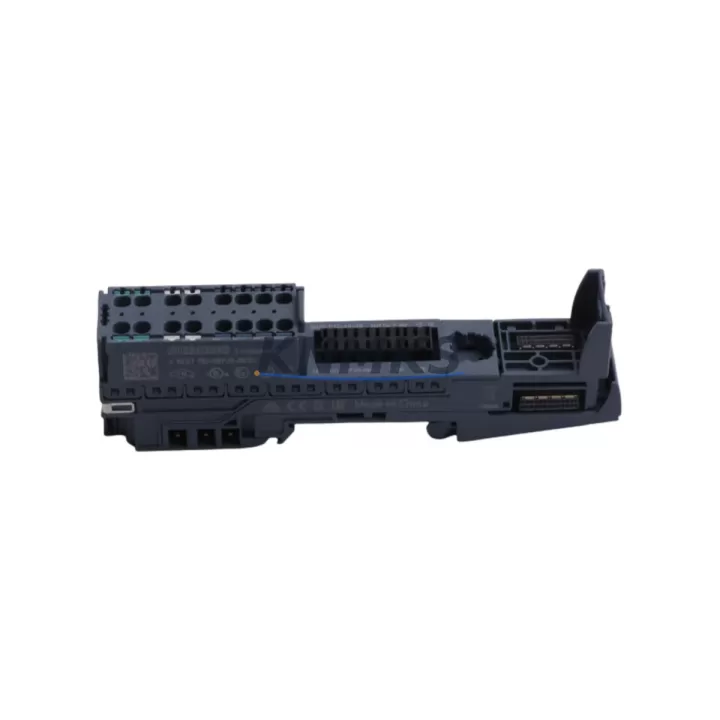
The Siemens 6ES7193-6BP20-0BB0 is a BU-Type A0 BaseUnit designed for the ET 200SP distributed I/O system, widely deployed across PROFINET-based automation architectures. As legacy ET 200S and S7-300 distributed I/O installations reach end-of-service milestones, this BaseUnit serves as a critical migration component — enabling engineers to modernize control cabinet wiring, expand I/O capacity, and restore system continuity without full-line replacement. Whether you are upgrading a discontinued ET 200S rack or extending an existing ET 200SP station, the 6ES7193-6BP20-0BB0 provides a verified, drop-in-compatible mounting and terminal interface that preserves existing field wiring and reduces retrofit labor time.
In distributed I/O retrofit projects, the BaseUnit is the foundation of every I/O module installation. The 6ES7193-6BP20-0BB0 supports push-in terminal connection, accommodating conductors up to 1.5 mm², and is compatible with the full range of ET 200SP I/O modules including digital input modules such as the 6ES7131-6BF01-0BA0, digital output modules such as the 6ES7132-6BF01-0BA0, and analog signal modules. When replacing legacy ET 200S BaseUnits, engineers must verify terminal pitch compatibility, module address assignment within the PROFINET device configuration, and backplane bus connector alignment before powering the new station.
Power budget validation is a mandatory step during any ET 200SP retrofit. The 6ES7193-6BP20-0BB0 operates within the ET 200SP power rail architecture, where the 24 VDC supply is distributed through the backplane from a dedicated power module such as the 6ES7193-6BP00-0BA0 load group separator or the PM-E power module. Engineers must calculate the cumulative current draw of all I/O modules in the station and confirm that the supply capacity is not exceeded before commissioning. Failure to account for inrush current during startup can cause nuisance tripping in legacy control cabinets with undersized 24 VDC PSUs.
For installations migrating from S7-300 with IM 153-x interface modules to ET 200SP with IM 155-6 PN interface modules, the 6ES7193-6BP20-0BB0 BaseUnit slots directly into the new station layout. The PROFINET interface module 6ES7155-6AU01-0BN0 manages device addressing and cyclic data exchange with the S7-1500 or S7-1200 CPU. During migration, the GSD file for the new ET 200SP station must be imported into TIA Portal, and the hardware configuration must be rebuilt to reflect the new module slot assignments. Existing FB/FC program logic referencing legacy I/O addresses must be remapped to the new process image addresses — a step that is often underestimated in project planning and should be allocated dedicated commissioning time.
HMI screen updates are frequently required when migrating from legacy WinCC flexible or TP/OP panel projects to current TIA Portal WinCC configurations. Tag addresses linked to ET 200S I/O points must be reassigned to the new ET 200SP module addresses. Where possible, retaining the same symbolic tag names in the PLC program reduces HMI rework and minimizes the risk of display errors during the first live run. Communication links between the HMI and the CPU should be verified using the online diagnostics function in TIA Portal before handing over the system to production.
Installation space confirmation is essential in retrofit projects where the control cabinet was originally designed for ET 200S or S7-300 rail-mounted components. The ET 200SP system uses a 35 mm DIN rail with a more compact module footprint than ET 200S, which can free up cabinet space for additional I/O expansion or cable management improvements. However, the terminal block height and wiring duct clearance must be re-evaluated to ensure that the new BaseUnit modules do not conflict with existing cable trays or adjacent equipment. Where signal isolation is required between legacy analog field devices and the new I/O modules, a signal isolator or barrier module should be inserted in the signal path before connecting to the ET 200SP analog input module.
Firmware compatibility should be confirmed before deploying the 6ES7193-6BP20-0BB0 in an existing ET 200SP station. The BaseUnit itself does not carry firmware, but the IM 155-6 PN interface module firmware version must be compatible with the TIA Portal project version and the CPU firmware. Siemens publishes firmware compatibility matrices in the product support portal; always cross-reference the IM firmware version against the TIA Portal version used for the project to avoid configuration download errors.
Pre-shipment testing of the 6ES7193-6BP20-0BB0 is performed prior to dispatch. Each unit is inspected for terminal block integrity, backplane bus connector condition, and module locking mechanism function. Units are shipped in anti-static packaging with original labeling intact. Stock is available for immediate dispatch with standard lead times of 1–3 business days for in-stock orders. A support terms confirmed by quotation cover manufacturing defects and functional failures under normal operating conditions.
Migration Compatibility Table
| Parameter | Detail |
|---|---|
| SKU / Part Number | 6ES7193-6BP20-0BB0 |
| Series | Siemens ET 200SP |
| Module Type | BU-Type A0 BaseUnit (Terminal Module) |
| Compatible I/O Modules | ET 200SP Digital / Analog I/O modules (6ES7131-x / 6ES7132-x / 6ES7134-x / 6ES7135-x series) |
| Interface Compatibility | ET 200SP backplane bus; compatible with IM 155-6 PN interface modules |
| Communication Protocol | PROFINET (via IM 155-6 PN); PROFIBUS (via IM 155-5 PN) |
| Terminal Connection | Push-in terminal, max. 1.5 mm² conductor cross-section |
| Supply Voltage | 24 VDC via ET 200SP power rail |
| DIN Rail | 35 mm standard DIN rail |
| Legacy Replacement Path | ET 200S BaseUnits (6ES7193-4x series); S7-300 distributed I/O via IM 153-x |
| TIA Portal Compatibility | TIA Portal V14 and above (GSD-based configuration) |
| Firmware Requirement | No firmware on BaseUnit; IM firmware must match TIA Portal version |
| Installation Space | Compact ET 200SP footprint; verify cabinet clearance vs. legacy ET 200S layout |
| Commissioning Notes | Remap I/O addresses in PLC program; update HMI tags; verify PROFINET device name |
| Support terms | 12 Months — covers manufacturing defects and functional failures |
| Origin | Germany (DE) |
| Stock Status | availability confirmed by RFQ — 1–3 business day dispatch |
Retrofit Planning for Existing Automation Systems
A successful ET 200SP retrofit begins with a complete audit of the existing distributed I/O station. For systems originally built on ET 200S with 6ES7193-4x BaseUnits, the migration to 6ES7193-6BP20-0BB0 BaseUnits requires a slot-by-slot module mapping exercise. Each legacy I/O module must be matched to its ET 200SP equivalent, and the new module order must be documented before any hardware changes are made on the production line.
The IM 155-6 PN interface module (e.g., 6ES7155-6AU01-0BN0) replaces the legacy IM 153-x and manages all PROFINET communication for the new ET 200SP station. The PROFINET device name assigned to the IM must match the name configured in the TIA Portal hardware configuration exactly — a mismatch will prevent the CPU from establishing a connection to the station after power-up. Where the existing network uses managed switches, VLAN and port settings should be reviewed to ensure that the new ET 200SP station is reachable from the CPU.
Power distribution within the new station is managed through load group separators such as the 6ES7193-6BP00-0BA0, which isolate power segments and allow individual groups of I/O modules to be de-energized without shutting down the entire station. This is particularly valuable in retrofit projects where partial station upgrades are performed in stages to minimize production downtime. Analog signal modules in the station may require shielded cable connections and proper grounding at the BaseUnit terminal to maintain signal integrity, especially when replacing legacy signal isolators or barriers that were used with older ET 200S analog modules.
Programming cables such as the USB-MPI adapter or PROFINET-based online access via TIA Portal are used to download the updated hardware configuration and program to the CPU after the retrofit is complete. A full online/offline comparison in TIA Portal should be performed before the first production run to confirm that all module configurations match the physical installation. Where a SIMATIC S7-1500 CPU replaces a legacy S7-300, the program migration tool in TIA Portal can assist with converting STL or LAD blocks, though manual review of I/O address references remains mandatory.
Downtime Control During System Migration
Minimizing unplanned downtime is the primary operational constraint in any legacy control system retrofit. For ET 200SP migrations, the recommended approach is to pre-configure the new station hardware — including the 6ES7193-6BP20-0BB0 BaseUnits, I/O modules, and IM 155-6 PN interface module — on a bench setup before the scheduled maintenance window. The TIA Portal project should be fully compiled and tested in simulation mode (PLCSIM) prior to the cutover to reduce on-site commissioning time.
During the cutover window, the sequence should follow: power down the legacy station, remove legacy modules and BaseUnits, install new DIN rail sections if required, mount the new ET 200SP station, reconnect field wiring to the new push-in terminals using the pre-prepared wiring schedule, power up the 24 VDC supply, download the updated TIA Portal project to the CPU, and verify PROFINET communication status in the online diagnostics view. The entire process for a single ET 200SP station of 8–12 I/O modules can typically be completed within a 4–6 hour maintenance window when pre-commissioning has been performed correctly.
Original PLC program logic should be preserved in a version-controlled archive before any changes are made. Where the retrofit involves address remapping, the original program should be retained as a reference for troubleshooting during the first weeks of operation. HMI screens should be tested in offline simulation against the new tag addresses before the system is handed back to production operators. Communication links between the CPU, ET 200SP station, and any SCADA or historian systems should be verified under live conditions before the maintenance window is closed.
Retrofit Support FAQ
Q1: Is the 6ES7193-6BP20-0BB0 a direct replacement for ET 200S BaseUnits?
The 6ES7193-6BP20-0BB0 is the ET 200SP generation equivalent of ET 200S BaseUnits (6ES7193-4x series). It is not a pin-for-pin drop-in replacement — the ET 200SP system uses a different backplane bus and terminal block design. A hardware reconfiguration in TIA Portal and field wiring reconnection to the new push-in terminals are required. However, the ET 200SP system is the Siemens-recommended migration path for all ET 200S installations.
Q2: What commissioning steps are required after installing the 6ES7193-6BP20-0BB0?
After physical installation, the PROFINET device name must be assigned to the IM 155-6 PN interface module using TIA Portal or a PRONETA scan. The updated hardware configuration must be downloaded to the CPU. I/O module addresses must be verified in the process image, and all field signals should be tested using the force table or watch table in TIA Portal before returning the system to automatic mode.
Q3: Can the existing field wiring be reused when migrating to the ET 200SP BaseUnit?
In most cases, existing field wiring can be reused if conductor cross-sections are within the 0.2–1.5 mm² range accepted by the ET 200SP push-in terminals. Ferrule-terminated conductors are recommended for reliable push-in connection. Shielded cables for analog signals should be re-terminated at the new BaseUnit shield clamp. A wiring schedule should be prepared in advance to map each legacy terminal point to the corresponding ET 200SP terminal position.
Q4: What support terms and stock availability applies to the 6ES7193-6BP20-0BB0?
All units supplied by KNMKS carry a support terms confirmed by quotation covering manufacturing defects and functional failures under normal operating conditions. Stock is maintained for immediate dispatch with a standard lead time of 1–3 business days. Pre-shipment functional testing is performed on each unit. For bulk retrofit project requirements, contact the sales team to confirm stock levels and arrange priority allocation.
© 2026 KNMKS. All rights reserved.
Original Source: https://knmks.com
Contact: admin@knmks.com | +86 18359268345
Product Identification
- Brand / Ecosystem
-
Siemens
Siemens - Model / Series
-
6ES7193-6BP20-0BB0
SIMATIC Series - Product Family
- HMI & Displays
- Availability Status
- Available on request after model and quantity confirmation
- Inquiry Type
- B2B RFQ, replacement inquiry and project spare-part request
- Pre-Quote Check
- Exact SKU, brand, series, quantity, nameplate photos and destination country are checked before quotation
System Path
Where this product fits in the KNMKS automation structure.
Specification & Inquiry Focus
- Display range
- Operator panels and touch screens
- Common needs
- Screen size, interface and version matching
- Project support
- Retrofit, spare unit and panel replacement
Buyer Confirmation
Information KNMKS checks before replying.
- Exact model
- 6ES7193-6BP20-0BB0
- Brand / ecosystem
- Siemens
- Product family
- HMI & Displays
- Application note
- Replacement, maintenance, project build or spare-part list
- Useful photos
- Nameplate, installed unit, cabinet layout or connector side
- Delivery details
- Quantity, destination country and target schedule
Document Support
Files and notes can be confirmed during quotation.
- Product photos or nameplate confirmation when available
- Packing and delivery notes before quotation confirmation
- Support scope and delivery terms confirmed per inquiry
- Export document coordination for qualified B2B requests
Inquiry Support
- Panel size and interface confirmation
- Replacement unit inquiry for discontinued HMIs
- Protective packaging for display shipment
What to Send Us
- Brand and exact model number: Siemens 6ES7193-6BP20-0BB0
- Quantity and required delivery time
- Application, replacement requirement or nameplate photo
- Destination country and shipping preference
RFQ Preparation
This is a product inquiry page built for RFQ communication.
Fast Model Check
Send this model to KNMKS for confirmation.
Include quantity, destination country and photos if this is a maintenance replacement. The inquiry will be saved with a reference number after submission.
Brand & Compatibility Note
KNMKS displays automation product information for well-known industrial brand ecosystems and compatible replacement references. Brand names are used for product identification and compatibility reference only; final availability and commercial terms are confirmed per quotation.
 Manufacturing
 Machine Tools
 Packaging
 Energy & Power



 PLCs & Controllers
 Servo Systems
 Variable Frequency Drives
 Sensors