
Overview
Siemens 6AV7894-0BH00-0BA0 Spare Part for Factory Uptime
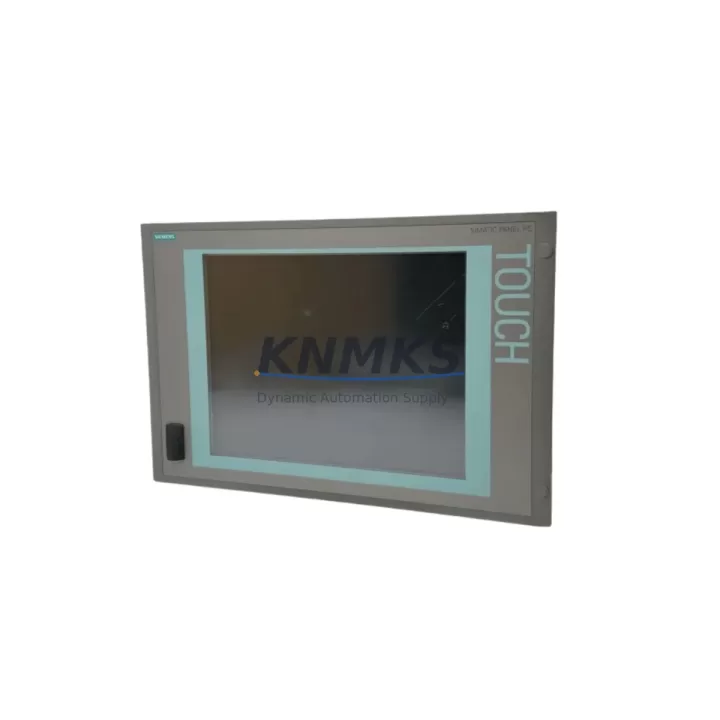
The Siemens 6AV7894-0BH00-0BA0 is an original SIMATIC IPC677E industrial panel PC designed for demanding HMI and visualization applications in process automation, discrete manufacturing, and machine control environments. As a maintenance-proven spare part, this unit supports rapid replacement of failed or end-of-life IPC677E systems, enabling maintenance engineers to restore production continuity with minimal downtime. With verified compatibility across the SIMATIC IPC677E series and full pre-shipment functional testing, this spare is a reliable choice for both emergency breakdown response and planned annual maintenance cycles.
Procurement engineers managing spare parts inventories for Siemens-based control systems will find the 6AV7894-0BH00-0BA0 an essential buffer stock item. Its role in sustaining legacy SIMATIC IPC677E installations — particularly in facilities where panel PC replacement requires extended OEM lead times — makes forward stocking a sound risk mitigation strategy. This unit ships with a support terms confirmed by quotation and is sourced from verified supply channels to ensure authenticity and long-term reliability.
Spare Maintenance Table
| SKU / Part Number | 6AV7894-0BH00-0BA0 |
| Brand | Siemens |
| Series | SIMATIC IPC677E |
| Product Type | Industrial Panel PC (HMI / Visualization) |
| Display | 19″ widescreen TFT, multi-touch capable (series-dependent) |
| Processor Platform | Intel Core i-series (6th/7th Gen, series-dependent) |
| Operating System | Windows 10 IoT Enterprise / Windows Embedded Standard (variant-dependent) |
| Protection Rating | IP65 front panel |
| Power Supply Input | 24 V DC (nominal), 19.2–28.8 V DC operating range |
| Mounting | Panel cutout / VESA mount (series-dependent) |
| Interfaces | USB 3.0, RJ45 Ethernet (PROFINET-capable), DisplayPort, COM ports |
| Origin | Germany |
| Compatibility | SIMATIC IPC677E series; compatible with SIMATIC WinCC, TIA Portal visualization projects |
| Application Environment | Process automation, discrete manufacturing, SCADA/HMI stations, control room visualization |
| Maintenance Recommendation | Inspect cooling fans, clean air filters every 6 months; verify 24 V DC supply stability; back up OS image before replacement |
| Support terms | 12 Months — covers manufacturing defects; pre-shipment functional test included |
Maintenance Planning for Continuous Operation
When replacing the 6AV7894-0BH00-0BA0 in a live production environment, a structured inspection of the surrounding electrical and control infrastructure is essential to prevent repeat failures and ensure stable long-term operation. Maintenance engineers should begin by verifying the 24 V DC panel power supply — units such as the Siemens SITOP PSU100S or equivalent regulated DIN-rail power supplies — to confirm output voltage is within the 19.2–28.8 V DC tolerance range. Voltage fluctuations or ripple exceeding specification are a common root cause of IPC instability and premature failure.
The control cabinet wiring harness and cable management should be inspected at the same time. Industrial Ethernet patch cables connecting the IPC677E to PROFINET switches or SCALANCE network components should be checked for insulation integrity, connector seating, and bend radius compliance. Damaged or improperly routed cables can introduce communication errors that manifest as HMI freezes or SCADA data loss, symptoms often misattributed to the panel PC itself.
I/O signal integrity is another critical checkpoint. If the IPC677E interfaces with distributed I/O via PROFINET — for example, ET 200SP or ET 200M remote I/O stations — engineers should verify that all I/O modules are correctly addressed and that no modules are reporting faults in the TIA Portal diagnostics view. Signal isolators or barriers protecting analog inputs from field-side noise should also be tested for correct output range.
For cabinets housing relay output modules or contactor control circuits alongside the IPC677E, it is advisable to inspect relay coil suppression components (RC snubbers or freewheeling diodes) to prevent inductive voltage spikes from coupling into the IPC’s power rail. Terminal blocks and DIN-rail mounted fuse holders protecting the 24 V DC branch circuit should be checked for loose connections and correct fuse ratings — typically 4 A to 6 A for IPC panel PC circuits.
Where the IPC677E is integrated into a broader SIMATIC S7-300 or S7-400 PLC system via MPI or PROFIBUS, the communication cable termination resistors and bus connectors should be verified. Faulty bus termination is a frequent cause of intermittent communication loss that can appear as HMI data dropouts. In S7-1500 or ET 200SP CPU-based systems connected via PROFINET, switch port configurations and PROFINET device names should be re-confirmed after IPC replacement to avoid address conflicts.
Site Replacement Workflow
Replacing the 6AV7894-0BH00-0BA0 on-site follows a structured sequence designed to minimize downtime and preserve system configuration integrity. Before powering down the existing unit, maintenance engineers should create a full OS image backup using Siemens Recovery USB media or a third-party disk imaging tool, and export the current WinCC or TIA Portal project archive. This ensures that the replacement IPC can be restored to the exact operational state of the failed unit without requiring a full software recommissioning cycle.
After powering down and isolating the cabinet, the panel PC is removed from its cutout or VESA mount. All cable connections — 24 V DC power, Ethernet, USB peripherals, and any serial COM port connections to legacy field devices — should be labeled before disconnection to prevent wiring errors during reinstallation. The replacement 6AV7894-0BH00-0BA0 is then mounted, all connections restored, and the OS image or WinCC project transferred via USB or network share.
On first power-up, engineers should verify PROFINET device name assignment, confirm that all I/O modules are recognized in the TIA Portal online view, and validate HMI tag communication before returning the system to production. A 30-minute supervised run at reduced load is recommended before full production restart to confirm thermal stability and communication reliability. This workflow is compatible with both direct like-for-like replacement of older IPC677E units and migration from earlier SIMATIC IPC677C or IPC677D generations, provided the OS image and project files are updated accordingly.
Spare Parts Support FAQ
Q1: Is the 6AV7894-0BH00-0BA0 compatible with existing SIMATIC IPC677E installations?
Yes. The 6AV7894-0BH00-0BA0 is a direct replacement within the SIMATIC IPC677E product family. It is compatible with existing panel cutout dimensions, 24 V DC power wiring, and PROFINET/Ethernet network configurations. Software restoration via OS image backup ensures minimal recommissioning time. Always verify the exact hardware revision and OS variant against your site documentation before ordering.
Q2: What pre-shipment testing is performed on this spare part?
Each unit undergoes functional power-on testing prior to dispatch, including verification of display output, USB port operation, Ethernet link establishment, and OS boot integrity. Units are inspected for physical condition and packed in anti-static, shock-protected packaging. A support terms confirmed by quotation covering manufacturing defects is included with every shipment.
Q3: How should procurement engineers plan buffer stock for IPC677E spares?
For facilities operating multiple SIMATIC IPC677E stations, a minimum of one spare unit per five installed panels is a widely adopted industry benchmark. Given that OEM lead times for industrial panel PCs can extend to 12–26 weeks, forward stocking eliminates the risk of extended production downtime caused by supply chain delays. Annual review of spare parts consumption and system criticality ratings should inform stock level adjustments.
Q4: Can this unit support long-term supply for legacy SIMATIC IPC677E systems?
Yes. We maintain ongoing stock of the 6AV7894-0BH00-0BA0 and related SIMATIC IPC677E series components to support customers with long-lifecycle automation systems. For facilities requiring guaranteed supply continuity, we offer long-term supply agreements with reserved stock allocation. Contact our sales team to discuss volume pricing, lead-time commitments, and multi-year procurement planning.
© 2026 KNMKS. All rights reserved.
Original Source: https://knmks.com
Contact: admin@knmks.com | +86 18359268345
Product Identification
- Brand / Ecosystem
-
Siemens
Siemens - Model / Series
-
6AV7894-0BH00-0BA0
SIMATIC Series - Product Family
- HMI & Displays
- Availability Status
- Available on request after model and quantity confirmation
- Inquiry Type
- B2B RFQ, replacement inquiry and project spare-part request
- Pre-Quote Check
- Exact SKU, brand, series, quantity, nameplate photos and destination country are checked before quotation
System Path
Where this product fits in the KNMKS automation structure.
Specification & Inquiry Focus
- Display range
- Operator panels and touch screens
- Common needs
- Screen size, interface and version matching
- Project support
- Retrofit, spare unit and panel replacement
Buyer Confirmation
Information KNMKS checks before replying.
- Exact model
- 6AV7894-0BH00-0BA0
- Brand / ecosystem
- Siemens
- Product family
- HMI & Displays
- Application note
- Replacement, maintenance, project build or spare-part list
- Useful photos
- Nameplate, installed unit, cabinet layout or connector side
- Delivery details
- Quantity, destination country and target schedule
Document Support
Files and notes can be confirmed during quotation.
- Product photos or nameplate confirmation when available
- Packing and delivery notes before quotation confirmation
- Support scope and delivery terms confirmed per inquiry
- Export document coordination for qualified B2B requests
Inquiry Support
- Panel size and interface confirmation
- Replacement unit inquiry for discontinued HMIs
- Protective packaging for display shipment
What to Send Us
- Brand and exact model number: Siemens 6AV7894-0BH00-0BA0
- Quantity and required delivery time
- Application, replacement requirement or nameplate photo
- Destination country and shipping preference
RFQ Preparation
This is a product inquiry page built for RFQ communication.
Fast Model Check
Send this model to KNMKS for confirmation.
Include quantity, destination country and photos if this is a maintenance replacement. The inquiry will be saved with a reference number after submission.
Brand & Compatibility Note
KNMKS displays automation product information for well-known industrial brand ecosystems and compatible replacement references. Brand names are used for product identification and compatibility reference only; final availability and commercial terms are confirmed per quotation.
 Manufacturing
 Machine Tools
 Packaging
 Energy & Power



 PLCs & Controllers
 Servo Systems
 Variable Frequency Drives
 Sensors