
Overview
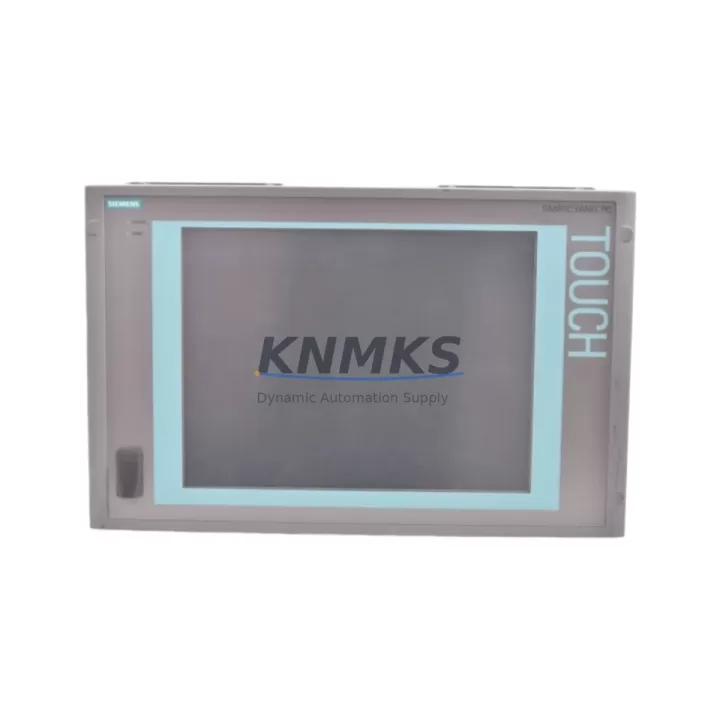
Siemens 6AV7892-0AB32-0AC0 Maintenance-Proven Spare Part for Factory Uptime
The Siemens 6AV7892-0AB32-0AC0 is an original SIMATIC IPC477E Industrial Panel PC spare part engineered for continuous operation in demanding industrial environments. Designed for integration into Siemens automation architectures, this unit supports factory uptime by providing a verified, drop-in replacement for aging or failed IPC477E systems. Whether you are managing a scheduled annual overhaul, responding to an unplanned line stoppage, or building a strategic spare parts inventory, the 6AV7892-0AB32-0AC0 delivers the reliability and compatibility that maintenance and procurement engineers depend on.
Sourced directly from authorized supply channels, each unit undergoes functional testing prior to shipment. A support terms confirmed by quotation is included, covering manufacturing defects and operational failures under normal industrial use conditions. Long-term supply commitments are available for customers requiring multi-year procurement planning across energy, petrochemical, manufacturing, and infrastructure sectors.
Spare Maintenance Table
| SKU / Part Number | 6AV7892-0AB32-0AC0 |
| Brand | Siemens |
| Series | SIMATIC IPC477E |
| Product Type | Industrial Panel PC |
| Display | 15″ TFT widescreen, multi-touch capable |
| Processor | Intel Core i5 / i7 (generation per order config) |
| Operating System | Windows 10 IoT Enterprise / Windows Embedded Standard 7 |
| Protection Rating | IP65 front panel |
| Supply Voltage | 24 V DC (18–30 V DC operating range) |
| Communication Interfaces | PROFINET, Ethernet, USB 3.0, RS-232/422/485 (optional) |
| Mounting | Panel cutout, portrait or landscape |
| Operating Temperature | 0 °C to +50 °C |
| Origin | Germany |
| Compatibility | SIMATIC IPC477E platform; compatible with TIA Portal, WinCC, STEP 7 |
| Support terms | 12 Months |
| Condition | Original, tested before shipment |
Maintenance Planning for Continuous Operation
When replacing the 6AV7892-0AB32-0AC0 in a live production environment, a structured inspection of the surrounding electrical and control infrastructure is essential to prevent repeat failures and ensure system stability. Maintenance engineers should begin by verifying the 24 V DC power supply feeding the IPC477E — units such as the Siemens SITOP PSU100S or equivalent regulated DIN-rail power supplies should be load-tested and checked for ripple voltage before the new panel PC is energized.
The PROFINET or Industrial Ethernet switch connecting the IPC477E to the broader control network — often a Siemens SCALANCE X series managed switch — should be inspected for port errors, firmware currency, and cable integrity. Faulty network infrastructure is a common root cause of IPC instability that is frequently misdiagnosed as a hardware failure in the panel PC itself.
I/O connectivity between the IPC477E and field devices should be reviewed, particularly if the unit interfaces with Siemens ET 200SP or ET 200M distributed I/O stations. Loose terminal connections, corroded signal wiring, or degraded shielding on analog input cables can introduce noise that affects HMI display stability and data logging accuracy. Terminal blocks and cable ferrules in the control cabinet should be re-torqued to specification during any IPC replacement event.
If the IPC477E is running WinCC or a SCADA visualization layer, the associated Siemens S7-300, S7-400, or S7-1500 PLC should be checked for firmware compatibility with the replacement unit’s OS image. Communication drivers and OPC server configurations may require re-validation after the swap. Signal isolators on analog loops connected to the HMI should also be inspected — degraded isolation can cause ground loops that corrupt trend data and alarm logs.
Fuse protection for the 24 V DC supply rail feeding the IPC477E should be verified. A correctly rated fuse (typically 4–6 A slow-blow) protects both the panel PC and the power supply from downstream fault propagation. Replacing the fuse holder and fuse as a precautionary measure during a planned IPC replacement is a low-cost step that reduces the risk of nuisance trips after recommissioning.
For facilities running legacy SIMATIC Panel systems alongside the IPC477E, maintaining a parallel spare of the Siemens 6AV2 series operator panels ensures HMI continuity during extended IPC maintenance windows. Documenting the IPC477E’s hardware configuration — including installed RAM, storage type, and expansion cards — in the site’s CMMS before replacement simplifies future procurement and reduces lead-time risk.
Site Replacement Workflow
Step 1 — Pre-Replacement Verification: Confirm the replacement unit’s SKU (6AV7892-0AB32-0AC0) matches the installed unit’s nameplate. Verify OS version, BIOS settings, and any factory-loaded software licenses. Back up the existing IPC477E configuration, WinCC project files, and network settings to a USB drive or network share before powering down.
Step 2 — Safe Isolation: Follow site LOTO (Lockout/Tagout) procedures. Isolate the 24 V DC supply at the cabinet fuse or circuit breaker. Disconnect PROFINET, USB peripherals, and any serial communication cables, labeling each connector for accurate reconnection.
Step 3 — Physical Swap: Remove the panel cutout mounting clamps and carefully extract the failed IPC477E. Install the 6AV7892-0AB32-0AC0 replacement into the same cutout. Torque mounting clamps evenly to prevent panel distortion and maintain IP65 sealing integrity.
Step 4 — Reconnection and Power-On: Reconnect all cables in reverse order. Restore 24 V DC supply and verify boot sequence. Confirm PROFINET link status on the SCALANCE switch and validate PLC communication via TIA Portal or STEP 7 online diagnostics.
Step 5 — Functional Validation: Restore the WinCC project from backup. Verify all HMI screens, alarm configurations, and trend archives load correctly. Conduct a full I/O check against the site’s loop test sheet before returning the line to production.
This workflow minimizes downtime to under four hours for a prepared maintenance team and ensures system compatibility is maintained without requiring PLC program modifications.
Spare Parts Support FAQ
Q1: Is the 6AV7892-0AB32-0AC0 a direct replacement for all IPC477E variants?
The 6AV7892-0AB32-0AC0 is a specific configuration within the SIMATIC IPC477E family. Before ordering, confirm the display size, processor generation, and I/O configuration match your installed unit’s nameplate. Our technical team can assist with compatibility verification based on your existing order number or site documentation.
Q2: What testing is performed before shipment?
Each unit undergoes power-on functional testing, BIOS verification, and communication interface checks prior to dispatch. Units are packed in anti-static ESD-safe packaging with foam cushioning to prevent transit damage. A test report is available upon request.
Q3: Can long-term supply agreements be arranged for this SKU?
Yes. We support multi-year blanket order agreements for customers requiring guaranteed stock availability for critical spare parts. Minimum order quantities and lead-time commitments can be negotiated based on annual consumption forecasts. Contact admin@knmks.com to discuss terms.
Q4: What does the support terms confirmed by quotation cover?
The support terms confirmed by quotation cover manufacturing defects and component failures under normal operating conditions within the specified environmental and electrical parameters. It does not cover damage resulting from incorrect installation, overvoltage events, or unauthorized modification. Support requests are processed within 5 business days of receipt of the returned unit.
© 2026 KNMKS. All rights reserved.
Original Source: https://knmks.com
Contact: admin@knmks.com | +86 18359268345
Product Identification
- Brand / Ecosystem
-
Siemens
Siemens - Model / Series
-
6AV7892-0AB32-0AC0
SIMATIC Series - Product Family
- HMI & Displays
- Availability Status
- Available on request after model and quantity confirmation
- Inquiry Type
- B2B RFQ, replacement inquiry and project spare-part request
- Pre-Quote Check
- Exact SKU, brand, series, quantity, nameplate photos and destination country are checked before quotation
System Path
Where this product fits in the KNMKS automation structure.
Specification & Inquiry Focus
- Display range
- Operator panels and touch screens
- Common needs
- Screen size, interface and version matching
- Project support
- Retrofit, spare unit and panel replacement
Buyer Confirmation
Information KNMKS checks before replying.
- Exact model
- 6AV7892-0AB32-0AC0
- Brand / ecosystem
- Siemens
- Product family
- HMI & Displays
- Application note
- Replacement, maintenance, project build or spare-part list
- Useful photos
- Nameplate, installed unit, cabinet layout or connector side
- Delivery details
- Quantity, destination country and target schedule
Document Support
Files and notes can be confirmed during quotation.
- Product photos or nameplate confirmation when available
- Packing and delivery notes before quotation confirmation
- Support scope and delivery terms confirmed per inquiry
- Export document coordination for qualified B2B requests
Inquiry Support
- Panel size and interface confirmation
- Replacement unit inquiry for discontinued HMIs
- Protective packaging for display shipment
What to Send Us
- Brand and exact model number: Siemens 6AV7892-0AB32-0AC0
- Quantity and required delivery time
- Application, replacement requirement or nameplate photo
- Destination country and shipping preference
RFQ Preparation
This is a product inquiry page built for RFQ communication.
Fast Model Check
Send this model to KNMKS for confirmation.
Include quantity, destination country and photos if this is a maintenance replacement. The inquiry will be saved with a reference number after submission.
Brand & Compatibility Note
KNMKS displays automation product information for well-known industrial brand ecosystems and compatible replacement references. Brand names are used for product identification and compatibility reference only; final availability and commercial terms are confirmed per quotation.
 Manufacturing
 Machine Tools
 Packaging
 Energy & Power



 PLCs & Controllers
 Servo Systems
 Variable Frequency Drives
 Sensors