
Overview
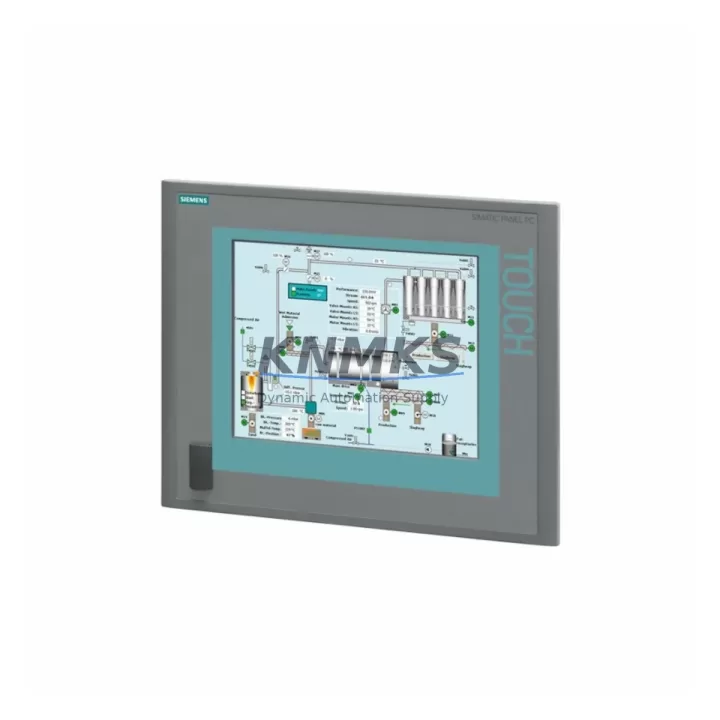
Siemens 6AV7884-2AA10-2BA0 Migration-Ready Panel PC for Legacy Control Systems
The Siemens 6AV7884-2AA10-2BA0 is a high-performance industrial Panel PC engineered for direct integration into SIMATIC IPC 477C control environments and legacy automation architectures. As production lines built around discontinued Siemens IPC platforms approach end-of-support milestones, the 6AV7884-2AA10-2BA0 provides a verified, migration-ready replacement path that preserves existing HMI logic, PROFINET communication links, and operator interface layouts without requiring a full control cabinet redesign.
This unit is sourced from multi-region stock, pre-shipment tested under industrial operating conditions, and backed by a support terms confirmed by quotation — making it a reliable choice for emergency replacements, planned retrofit projects, and long-cycle spare parts programs across process, discrete, and hybrid manufacturing environments.
Migration Compatibility Table
| Parameter | Details |
|---|---|
| SKU / Part Number | 6AV7884-2AA10-2BA0 |
| Brand / Manufacturer | Siemens |
| Series | SIMATIC IPC 477C / IPC 477D Compatible |
| Form Factor | Panel PC — rack-mount / cabinet-mount |
| Display Interface | Integrated touch panel; compatible with existing SIMATIC HMI screen layouts |
| Communication Interfaces | PROFINET, Ethernet (RJ45), USB, serial (RS-232/RS-485 via adapter) |
| Backplane / Rack Compatibility | Standard SIMATIC IPC mounting rail; verify cutout dimensions before installation |
| Power Supply Requirement | 24 VDC nominal; confirm existing PSU capacity (minimum 10 A recommended) |
| OS / Firmware | Windows Embedded / Windows 10 IoT; verify WinCC or STEP 7 runtime version compatibility |
| Replacement Target | Siemens IPC 477C (6AV7884 series predecessors); direct dimensional and interface match |
| Installation Space | Confirm panel cutout depth — rear connector clearance critical for cable management |
| Commissioning Notes | Restore HMI project via SIMATIC WinCC; re-map I/O tags if OS version differs |
| Pre-Shipment Testing | Yes — powered-on functional verification before dispatch |
| Support terms | 12 Months |
| Origin | Germany |
| Dispatch | Global rapid dispatch; multi-region stock available |
Retrofit Planning for Existing Automation Systems
A successful retrofit around the 6AV7884-2AA10-2BA0 requires a structured review of the surrounding control architecture before the replacement unit is installed. In most SIMATIC IPC 477C environments, the Panel PC operates as the primary HMI and supervisory node, communicating downstream with S7-300 or S7-400 PLCs via PROFINET or MPI. When migrating to the 6AV7884-2AA10-2BA0, engineers should first audit the existing SIMATIC S7-300 CPU module and its associated SM 321 digital input modules and SM 322 digital output modules to confirm that I/O addressing remains consistent with the restored WinCC project.
Power distribution within the control cabinet is a frequent bottleneck during IPC replacements. The SITOP PSU100S 24 VDC power supply module should be verified for adequate current headroom — particularly if additional USB peripherals or an extended display are connected to the new Panel PC. Insufficient PSU capacity is one of the most common causes of intermittent faults during the first 72 hours of post-retrofit operation.
Communication continuity is equally critical. If the legacy system relied on an MPI/PROFIBUS link between the IPC and field devices, a CP 5622 communications processor or equivalent PROFIBUS adapter may be required to bridge the protocol gap on the new platform. For sites already running PROFINET, the transition is typically seamless provided the IP addressing scheme and device names are preserved in the STEP 7 or TIA Portal project.
Where the control cabinet includes a SIMATIC TP1200 Comfort Panel as a secondary operator station, HMI screen synchronization should be validated after the IPC replacement to ensure alarm lists, trend views, and recipe management screens reflect the correct tag bindings. Finally, if the system uses a SIMATIC NET CP 343-1 Ethernet module for plant-level SCADA integration, confirm that the new IPC’s network adapter settings match the existing subnet configuration before going live.
Downtime Control During System Migration
Minimizing unplanned downtime during an IPC replacement is achievable with disciplined pre-migration preparation. Before removing the legacy 6AV7884 series unit, create a full backup of the WinCC Runtime project, including all HMI screens, tag databases, alarm configurations, and script logic. Store this backup on an external USB drive and a network share simultaneously to eliminate single points of failure.
The physical swap of the Panel PC should be planned during a scheduled maintenance window. Photograph all rear connector positions and cable labels before disconnection — PROFINET, USB, and serial cables are frequently unmarked in older installations. Use the photographs as a reference during reconnection to the 6AV7884-2AA10-2BA0 to avoid miswiring that could damage I/O modules or corrupt communication links.
After physical installation, restore the WinCC project to the new unit and perform a controlled startup with the PLC in STOP mode. Verify all I/O tag readings against known reference values before switching the PLC to RUN. This staged approach protects the original program logic and allows the commissioning engineer to identify any tag remapping issues before the process is restarted. For sites with strict SIL or safety interlock requirements, a parallel run period of 24–48 hours with both the legacy and replacement units active (where physically possible) provides an additional layer of validation before full cutover.
With pre-shipment testing completed on every 6AV7884-2AA10-2BA0 unit prior to dispatch, hardware-related commissioning failures are significantly reduced, allowing the on-site team to focus on software restoration and network reconfiguration rather than hardware fault diagnosis.
Retrofit Support FAQ
Q1: Is the 6AV7884-2AA10-2BA0 a direct drop-in replacement for the SIMATIC IPC 477C?
Yes. The 6AV7884-2AA10-2BA0 is dimensionally and interface-compatible with the IPC 477C mounting cutout. Verify rear connector clearance depth and confirm the panel gasket seal before final installation. No mechanical modification to the cabinet door is typically required.
Q2: Will my existing WinCC project run on the replacement unit without modification?
In most cases, yes — provided the WinCC Runtime version on the 6AV7884-2AA10-2BA0 matches or is forward-compatible with the version used in the original project. If the OS version differs (e.g., migrating from Windows 7 Embedded to Windows 10 IoT), a project migration step in WinCC is required before deployment. Contact our technical team for version-specific guidance.
Q3: What is the lead time and support terms coverage for the 6AV7884-2AA10-2BA0?
Units are dispatched from multi-region stock with rapid global shipping. Each unit undergoes powered-on pre-shipment testing before dispatch. A support terms confirmed by quotation is included, covering hardware defects under normal industrial operating conditions. Emergency replacement orders are prioritized.
Q4: Can this unit support PROFIBUS as well as PROFINET communication?
The 6AV7884-2AA10-2BA0 natively supports PROFINET and Ethernet. For legacy PROFIBUS MPI networks, a CP 5622 or USB-MPI adapter is required. Confirm the communication protocol map of your existing field devices before ordering to ensure the correct adapter is available on-site at the time of installation.
© 2026 KNMKS. All rights reserved.
Original Source: https://knmks.com
Contact: admin@knmks.com | +86 18359268345
Product Identification
- Brand / Ecosystem
-
Siemens
Siemens - Model / Series
-
6AV7884-2AA10-2BA0
SIMATIC Series - Product Family
- HMI & Displays
- Availability Status
- Available on request after model and quantity confirmation
- Inquiry Type
- B2B RFQ, replacement inquiry and project spare-part request
- Pre-Quote Check
- Exact SKU, brand, series, quantity, nameplate photos and destination country are checked before quotation
System Path
Where this product fits in the KNMKS automation structure.
Specification & Inquiry Focus
- Display range
- Operator panels and touch screens
- Common needs
- Screen size, interface and version matching
- Project support
- Retrofit, spare unit and panel replacement
Buyer Confirmation
Information KNMKS checks before replying.
- Exact model
- 6AV7884-2AA10-2BA0
- Brand / ecosystem
- Siemens
- Product family
- HMI & Displays
- Application note
- Replacement, maintenance, project build or spare-part list
- Useful photos
- Nameplate, installed unit, cabinet layout or connector side
- Delivery details
- Quantity, destination country and target schedule
Document Support
Files and notes can be confirmed during quotation.
- Product photos or nameplate confirmation when available
- Packing and delivery notes before quotation confirmation
- Support scope and delivery terms confirmed per inquiry
- Export document coordination for qualified B2B requests
Inquiry Support
- Panel size and interface confirmation
- Replacement unit inquiry for discontinued HMIs
- Protective packaging for display shipment
What to Send Us
- Brand and exact model number: Siemens 6AV7884-2AA10-2BA0
- Quantity and required delivery time
- Application, replacement requirement or nameplate photo
- Destination country and shipping preference
RFQ Preparation
This is a product inquiry page built for RFQ communication.
Fast Model Check
Send this model to KNMKS for confirmation.
Include quantity, destination country and photos if this is a maintenance replacement. The inquiry will be saved with a reference number after submission.
Brand & Compatibility Note
KNMKS displays automation product information for well-known industrial brand ecosystems and compatible replacement references. Brand names are used for product identification and compatibility reference only; final availability and commercial terms are confirmed per quotation.
 Manufacturing
 Machine Tools
 Packaging
 Energy & Power



 PLCs & Controllers
 Servo Systems
 Variable Frequency Drives
 Sensors