
Overview
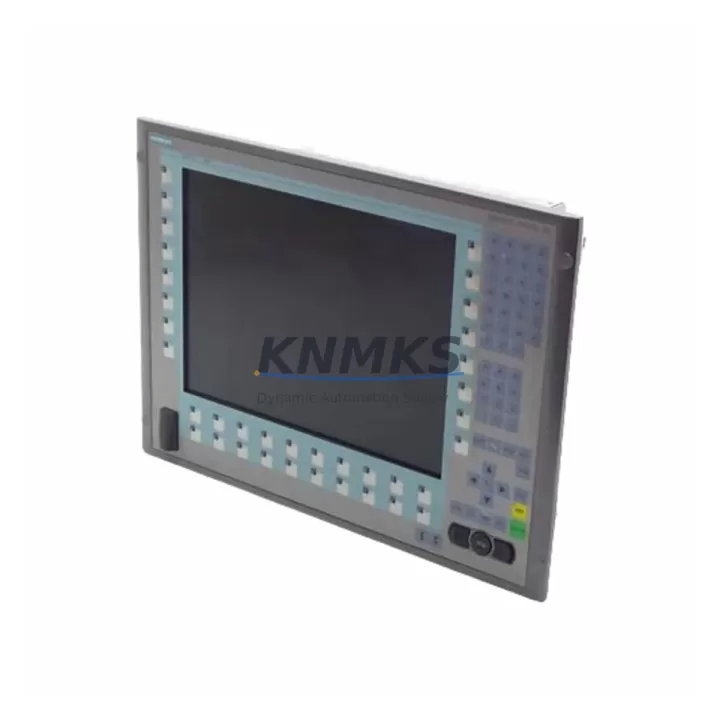
Siemens 6AV7875-0BC20-1AC0 PC677B Maintenance-Proven Spare Part for Factory Uptime
The Siemens 6AV7875-0BC20-1AC0 is a SIMATIC PC677B 15-inch industrial panel PC engineered for continuous operation in demanding automation environments. As a maintenance-proven spare part, it supports uninterrupted HMI and SCADA visualization across Siemens S7-300, S7-400, and S7-1500 PLC architectures. Maintenance engineers and procurement teams managing legacy or active Siemens control cabinets rely on this unit to eliminate extended downtime during panel failures, screen degradation, or controller board faults.
Sourced as an original Siemens component, the 6AV7875-0BC20-1AC0 undergoes pre-shipment functional testing covering display integrity, I/O port verification, communication interface validation, and power-on diagnostics. Each unit ships with a support terms confirmed by quotation and is available for rapid global dispatch to support emergency replacement scenarios and planned annual maintenance cycles alike.
For procurement engineers building resilient spare parts inventories, stocking the PC677B alongside compatible communication modules, power supply units, and I/O expansion components ensures that a single panel failure does not cascade into a multi-day production halt. This unit is particularly critical in facilities where the SIMATIC PC677B serves as the primary operator interface for process visualization, alarm management, and recipe control.
Spare Maintenance Table
| Parameter | Specification |
|---|---|
| Part Number | 6AV7875-0BC20-1AC0 |
| Series | SIMATIC PC677B |
| Brand | Siemens |
| Display | 15″ TFT LCD, 1024×768 |
| Supply Voltage | 24 VDC (18–30 VDC range) |
| Protection Rating | IP65 (front panel) |
| Operating Temperature | 0°C to +50°C |
| Communication Interfaces | PROFINET, USB, RS-232, Ethernet |
| PLC Compatibility | S7-300, S7-400, S7-1500, WinCC |
| Origin | Germany |
| Installation | Panel cutout mount, front-flush |
| Pre-Shipment Testing | Power-on, display, I/O, communication |
| Support terms | 12 Months |
| Dispatch | Global express available |
Maintenance Planning for Continuous Operation
When replacing the 6AV7875-0BC20-1AC0 in a Siemens control cabinet, a thorough site inspection of adjacent components is essential to prevent repeat failures and ensure system stability. Begin by verifying the 24 VDC panel power supply — units such as the Siemens SITOP PSU100S or equivalent 24V DIN-rail power supplies should be load-tested before reconnecting the new panel PC. Voltage fluctuations or ripple outside specification are a leading cause of premature HMI board failure.
Inspect all PROFINET and Ethernet patch cables routed to the PC677B. Industrial-grade shielded cables rated for continuous flex or fixed installation should be confirmed intact, as damaged cable shielding introduces communication errors that can be misdiagnosed as panel faults. If the cabinet includes a SIMATIC S7-1500 CPU or ET 200SP distributed I/O modules, verify that PROFINET device names and IP assignments are correctly configured in the TIA Portal project before commissioning the replacement unit.
Check the cabinet’s terminal blocks and 24V fuse protection circuits — blown fuses or loose terminal connections on the power feed to the HMI are common findings during panel replacement. For cabinets integrating signal isolators or relay output modules adjacent to the PC677B, confirm that these components have not been subjected to voltage spikes that may have caused latent damage. SIMATIC S7 digital output modules and CP communication processors in the same rack should also be inspected for fault LEDs or diagnostic buffer entries before returning the system to production.
Site Replacement Workflow
Before removing the failed 6AV7875-0BC20-1AC0, document the existing PROFINET configuration, IP address, device name, and WinCC project version from the TIA Portal or Step 7 project archive. This ensures the replacement unit can be commissioned without requiring engineering support on-site. Power down the cabinet following the site’s lockout/tagout procedure, then disconnect all communication cables, USB peripherals, and the 24 VDC power connector from the panel PC.
Remove the panel from the cutout by releasing the mounting clamps from the rear. Install the replacement 6AV7875-0BC20-1AC0 into the same cutout, reconnect all cables in reverse order, and restore power. Use the SIMATIC PC tool suite or TIA Portal to restore the WinCC runtime project and verify PROFINET communication with the connected S7 controller. Confirm all process values, alarm displays, and operator controls are functioning correctly before releasing the line to production. Total replacement time for a prepared maintenance team is typically 2–4 hours, significantly reducing unplanned downtime compared to waiting for OEM repair cycles.
Spare Parts Support FAQ
Q: Is the 6AV7875-0BC20-1AC0 compatible with both S7-300 and S7-1500 systems?
A: Yes. The SIMATIC PC677B communicates via PROFINET and standard Ethernet, making it compatible with S7-300, S7-400, and S7-1500 controllers running WinCC or WinCC flexible runtime. Configuration is managed through TIA Portal or Step 7, with no hardware modification required.
Q: What pre-shipment testing is performed on each unit?
A: Every 6AV7875-0BC20-1AC0 undergoes power-on verification, display uniformity and touch calibration checks, USB and serial port functional tests, and PROFINET/Ethernet interface validation before dispatch. A test report is available upon request.
Q: How many units should be stocked for a facility running multiple PC677B panels?
A: Industry best practice for critical HMI spares is a minimum of one unit per five installed panels, with at least one unit always on-site for facilities operating 24/7. For plants with legacy Siemens SIMATIC PC systems approaching end-of-support, increasing buffer stock to two or three units is recommended to mitigate supply chain risk.
Q: What is the support terms coverage and what does it include?
A: Each unit carries a support terms confirmed by quotation covering manufacturing defects and functional failures under normal operating conditions. Support terms support includes replacement dispatch and technical guidance for installation. Units damaged by incorrect voltage supply, physical impact, or improper installation are assessed on a case-by-case basis.
© 2026 KNMKS. All rights reserved.
Original Source: https://knmks.com
Contact: admin@knmks.com | +86 18359268345
Product Identification
- Brand / Ecosystem
-
Siemens
Siemens - Model / Series
-
6AV7875-0BC20-1AC0
SIMATIC Series - Product Family
- HMI & Displays
- Availability Status
- Available on request after model and quantity confirmation
- Inquiry Type
- B2B RFQ, replacement inquiry and project spare-part request
- Pre-Quote Check
- Exact SKU, brand, series, quantity, nameplate photos and destination country are checked before quotation
System Path
Where this product fits in the KNMKS automation structure.
Specification & Inquiry Focus
- Display range
- Operator panels and touch screens
- Common needs
- Screen size, interface and version matching
- Project support
- Retrofit, spare unit and panel replacement
Buyer Confirmation
Information KNMKS checks before replying.
- Exact model
- 6AV7875-0BC20-1AC0
- Brand / ecosystem
- Siemens
- Product family
- HMI & Displays
- Application note
- Replacement, maintenance, project build or spare-part list
- Useful photos
- Nameplate, installed unit, cabinet layout or connector side
- Delivery details
- Quantity, destination country and target schedule
Document Support
Files and notes can be confirmed during quotation.
- Product photos or nameplate confirmation when available
- Packing and delivery notes before quotation confirmation
- Support scope and delivery terms confirmed per inquiry
- Export document coordination for qualified B2B requests
Inquiry Support
- Panel size and interface confirmation
- Replacement unit inquiry for discontinued HMIs
- Protective packaging for display shipment
What to Send Us
- Brand and exact model number: Siemens 6AV7875-0BC20-1AC0
- Quantity and required delivery time
- Application, replacement requirement or nameplate photo
- Destination country and shipping preference
RFQ Preparation
This is a product inquiry page built for RFQ communication.
Fast Model Check
Send this model to KNMKS for confirmation.
Include quantity, destination country and photos if this is a maintenance replacement. The inquiry will be saved with a reference number after submission.
Brand & Compatibility Note
KNMKS displays automation product information for well-known industrial brand ecosystems and compatible replacement references. Brand names are used for product identification and compatibility reference only; final availability and commercial terms are confirmed per quotation.
 Manufacturing
 Machine Tools
 Packaging
 Energy & Power



 PLCs & Controllers
 Servo Systems
 Variable Frequency Drives
 Sensors