
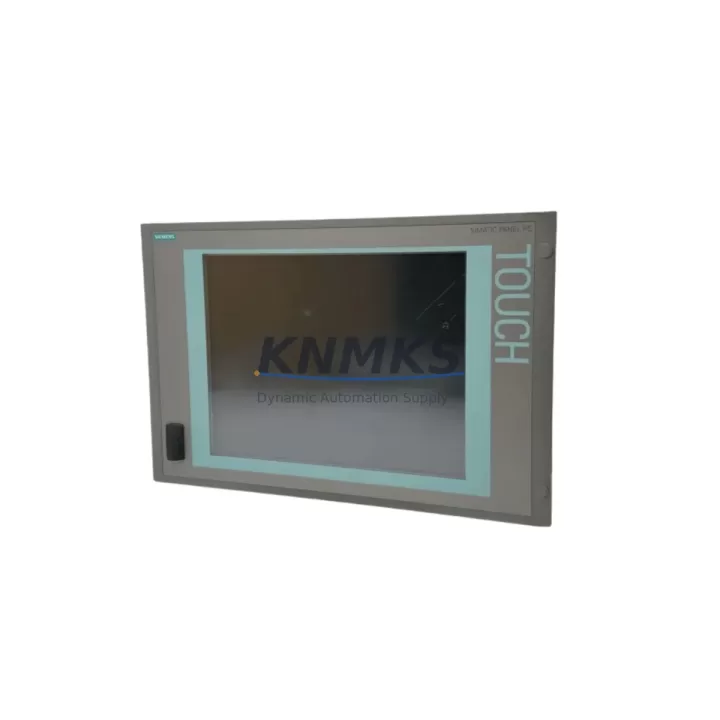
Overview
Siemens 6AV7870-0HE21-1AA0 Migration-Ready HMI for Legacy Control Systems
The Siemens 6AV7870-0HE21-1AA0 is a SIMATIC Panel PC 870 series industrial HMI panel designed for demanding factory-floor environments. As legacy SIMATIC PC 870 units reach end-of-life and OEM support is discontinued, this unit serves as the authoritative drop-in replacement for aging operator stations across automotive, process, and discrete manufacturing lines. Engineers undertaking control cabinet upgrades, production line retrofits, or system-wide PLC migrations rely on the 6AV7870-0HE21-1AA0 to restore HMI functionality without rewriting core SCADA logic or rebuilding panel wiring from scratch.
Each unit supplied by KNMKS is pre-shipment tested, sourced from verified industrial channels, and backed by a support terms confirmed by quotation covering hardware defects under normal operating conditions. Global stock is maintained to support urgent replacement orders with rapid dispatch to North America, Europe, and Asia-Pacific.
Migration Compatibility Table
| Parameter | 6AV7870-0HE21-1AA0 Specification | Retrofit / Migration Note |
|---|---|---|
| Series | SIMATIC Panel PC 870 | Direct replacement for Panel PC 870 legacy units |
| Display | 15″ TFT Color LCD | Verify panel cutout dimensions before installation |
| Operating System | Windows XP Embedded / CE compatible | Confirm WinCC or ProTool runtime version compatibility |
| Communication Interfaces | MPI, PROFIBUS DP, Ethernet (RJ45) | MPI/PROFIBUS cable pinout must match existing S7-300/400 rack |
| Power Supply | 24 V DC | Verify cabinet PSU capacity; recommend 6EP1 series SITOP PSU |
| Mounting | Panel front-mount, VESA compatible | Check cutout size and depth clearance in existing control cabinet |
| Backplane / Expansion | ISA/PCI slot (model-dependent) | Confirm slot count if CP cards (e.g., CP 5611) are installed |
| Firmware / BIOS | Siemens OEM BIOS | Match firmware version to existing WinCC project requirements |
| Program Compatibility | WinCC, ProTool, STEP 7 compatible | Backup and restore HMI project before swapping hardware |
| Support terms | 12 Months | Covers hardware defects under standard industrial operating conditions |
Retrofit Planning for Existing Automation Systems
Successful integration of the 6AV7870-0HE21-1AA0 into a legacy control environment requires a structured pre-installation audit. Begin by documenting the existing power distribution within the control cabinet. The Panel PC 870 operates on 24 V DC; confirm that the installed SITOP PSU 6EP1 series power supply module delivers sufficient current headroom after accounting for all connected I/O modules, communication cards, and peripheral devices. Undersized power supplies are a leading cause of intermittent HMI faults during retrofit commissioning.
Next, audit the backplane and communication wiring. If the existing system uses a CP 5611 or CP 5613 PROFIBUS communication card installed in the Panel PC’s PCI slot, verify that the replacement unit carries the same slot configuration. PROFIBUS DP segment addresses, baud rates, and termination resistor settings must be preserved exactly to avoid communication faults with connected S7-300 or S7-400 PLCs. Where MPI is used as the primary programming and HMI link, confirm that the MPI address assigned to the Panel PC does not conflict with other nodes on the segment — including the PG/PC programming cable connection used during commissioning.
For systems where the HMI communicates with a Siemens S7-400 rack via a dedicated IM 461 interface module or through a CP 443-1 Ethernet module, validate that the IP addressing scheme and S7 connection table in the WinCC project matches the replacement hardware’s network adapter MAC and IP configuration. Ethernet-based HMI links are increasingly common in modernized Panel PC 870 installations and require careful network parameter handover.
I/O signal integrity is equally critical. Where analog or digital I/O expansion cards are installed in the Panel PC’s ISA or PCI slots — such as legacy data acquisition cards interfacing with field transmitters — document card slot positions, IRQ assignments, and driver versions before removal. Reinstall and reconfigure these cards in the replacement unit prior to powering the system. Signal isolators installed between field devices and the Panel PC I/O cards should be inspected and re-verified for loop continuity after the swap.
HMI screen layout and tag mapping must be validated against the restored WinCC or ProTool project. Export and archive the existing HMI project from the outgoing unit before decommissioning. After installing the 6AV7870-0HE21-1AA0, restore the project, verify all tag connections, alarm configurations, and trend archives. Where the system includes a Siemens TP 270 or OP 270 operator panel as a secondary HMI node on the same MPI segment, confirm that the Panel PC’s MPI address and communication parameters do not disrupt the secondary panel’s operation.
Downtime Control During System Migration
Minimizing unplanned downtime during an HMI panel swap is the primary operational concern for maintenance engineers. The 6AV7870-0HE21-1AA0 supports a structured hot-swap preparation methodology: complete all software backups, firmware version checks, and communication parameter documentation while the existing unit is still operational. This pre-staging approach compresses the physical swap window to the minimum time required for mechanical removal, hardware installation, project restore, and communication verification.
Where production schedules permit only narrow maintenance windows — common in continuous process industries — prepare the replacement Panel PC 870 unit off-line in advance. Pre-install all required CP cards, configure network parameters, restore the HMI project, and perform a bench-level communication test using a STEP 7 programming cable before bringing the unit to the plant floor. This offline pre-commissioning strategy has been shown to reduce on-site swap time to under two hours for experienced automation technicians.
Protect existing PLC program logic throughout the migration. The S7-300 or S7-400 CPU continues to execute its control program independently of the HMI panel; a Panel PC swap does not interrupt PLC scan cycles or field I/O control. However, operators lose visibility and manual control capability during the swap window. Coordinate with production supervision to implement manual override procedures or temporary local control stations where safety-critical processes require continuous operator intervention.
After installation, perform a structured commissioning checklist: power-on sequence, BIOS boot verification, OS startup, WinCC runtime launch, communication link establishment with the PLC, alarm system verification, and operator acceptance sign-off. Document the completed commissioning record for the plant maintenance log and support terms registration.
Retrofit Support FAQ
Q1: Is the 6AV7870-0HE21-1AA0 a direct drop-in replacement for other Panel PC 870 variants?
The 6AV7870-0HE21-1AA0 is a specific Panel PC 870 configuration. While it shares the same mechanical form factor and 24 V DC power interface with other Panel PC 870 variants, the installed communication cards, expansion slots, and OS image may differ between order numbers. Always cross-reference the full SKU of the outgoing unit against the replacement specification sheet before ordering. KNMKS technical support can assist with compatibility verification prior to purchase.
Q2: What commissioning steps are required after installing the replacement unit?
After mechanical installation and power connection, restore the archived WinCC or ProTool HMI project to the replacement unit. Verify MPI or PROFIBUS communication with the connected S7 PLC using STEP 7 or TIA Portal. Confirm all HMI tags are live, alarms are active, and trend archives are logging correctly. Perform a full operator walkthrough of critical screens before returning the system to production. Document all commissioning steps for the plant maintenance record.
Q3: Does KNMKS provide pre-shipment testing and what does the support terms confirmed by quotation cover?
Yes. Every 6AV7870-0HE21-1AA0 unit dispatched by KNMKS undergoes pre-shipment functional testing covering power-on, display, communication interface continuity, and OS boot verification. The support terms confirmed by quotation cover hardware defects arising under normal industrial operating conditions. It does not cover damage resulting from incorrect installation, overvoltage, environmental contamination beyond the unit’s rated IP class, or unauthorized modification. Support requests are processed through KNMKS with replacement or repair turnaround coordinated to minimize customer downtime.
Q4: What is the typical lead time and are units available from stock?
KNMKS maintains forward stock of the 6AV7870-0HE21-1AA0 to support urgent replacement requirements. Standard orders are dispatched within 1–3 business days. For large-quantity orders or projects requiring multiple units, contact KNMKS sales to confirm current inventory levels and arrange priority allocation. Global logistics partners support delivery to North America, Europe, and Asia-Pacific with full export documentation.
© 2026 KNMKS. All rights reserved.
Original Source: https://knmks.com
Contact: admin@knmks.com | +86 18359268345
Product Identification
- Brand / Ecosystem
-
Siemens
Siemens - Model / Series
-
6AV7870-0HE21-1AA0
SIMATIC Series - Product Family
- HMI & Displays
- Availability Status
- Available on request after model and quantity confirmation
- Inquiry Type
- B2B RFQ, replacement inquiry and project spare-part request
- Pre-Quote Check
- Exact SKU, brand, series, quantity, nameplate photos and destination country are checked before quotation
System Path
Where this product fits in the KNMKS automation structure.
Specification & Inquiry Focus
- Display range
- Operator panels and touch screens
- Common needs
- Screen size, interface and version matching
- Project support
- Retrofit, spare unit and panel replacement
Buyer Confirmation
Information KNMKS checks before replying.
- Exact model
- 6AV7870-0HE21-1AA0
- Brand / ecosystem
- Siemens
- Product family
- HMI & Displays
- Application note
- Replacement, maintenance, project build or spare-part list
- Useful photos
- Nameplate, installed unit, cabinet layout or connector side
- Delivery details
- Quantity, destination country and target schedule
Document Support
Files and notes can be confirmed during quotation.
- Product photos or nameplate confirmation when available
- Packing and delivery notes before quotation confirmation
- Support scope and delivery terms confirmed per inquiry
- Export document coordination for qualified B2B requests
Inquiry Support
- Panel size and interface confirmation
- Replacement unit inquiry for discontinued HMIs
- Protective packaging for display shipment
What to Send Us
- Brand and exact model number: Siemens 6AV7870-0HE21-1AA0
- Quantity and required delivery time
- Application, replacement requirement or nameplate photo
- Destination country and shipping preference
RFQ Preparation
This is a product inquiry page built for RFQ communication.
Fast Model Check
Send this model to KNMKS for confirmation.
Include quantity, destination country and photos if this is a maintenance replacement. The inquiry will be saved with a reference number after submission.
Brand & Compatibility Note
KNMKS displays automation product information for well-known industrial brand ecosystems and compatible replacement references. Brand names are used for product identification and compatibility reference only; final availability and commercial terms are confirmed per quotation.
 Manufacturing
 Machine Tools
 Packaging
 Energy & Power



 PLCs & Controllers
 Servo Systems
 Variable Frequency Drives
 Sensors