
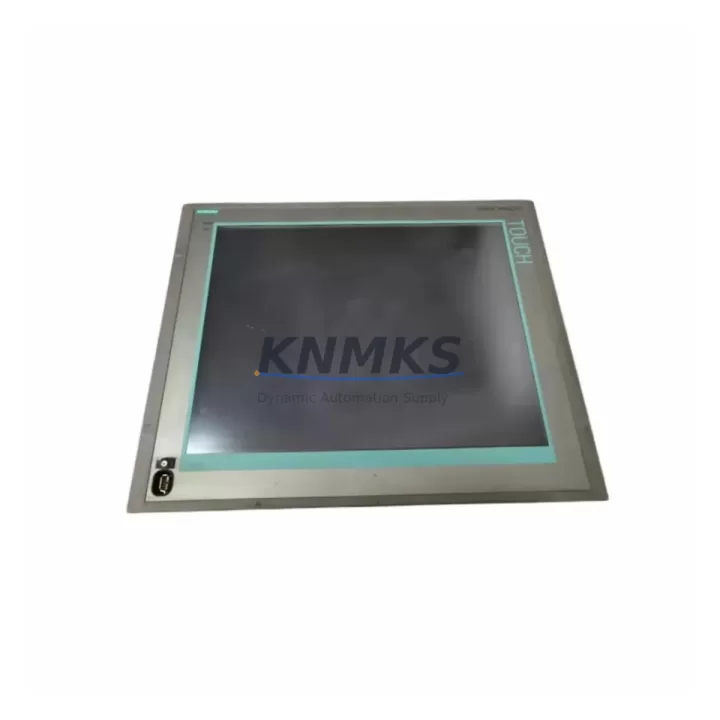
Overview
Siemens 6AV7870-0HA20-0AA0 Migration-Ready HMI for Legacy Control Systems
The Siemens 6AV7870-0HA20-0AA0 is a high-performance Human Machine Interface panel designed for the SIMATIC Panel PC 870 platform. As legacy SIMATIC Panel PC 670 and Panel PC 870 installations approach end-of-service milestones, plant engineers and system integrators increasingly rely on verified drop-in replacements to extend operational life without full control cabinet redesigns. The 6AV7870-0HA20-0AA0 addresses this need directly — offering a migration-ready HMI solution that preserves existing wiring harnesses, backplane connections, and STEP 7 or TIA Portal project structures while delivering a modernized display and processing layer.
This unit is engineered for environments where downtime is measured in production losses. Whether you are replacing a failed display assembly on a bottling line, upgrading visualization on a legacy press control system, or consolidating HMI hardware across a multi-cell manufacturing floor, the 6AV7870-0HA20-0AA0 provides the mechanical and electrical compatibility required to minimize retrofit scope.
Migration Compatibility Table
| Parameter | Details |
|---|---|
| SKU / Part Number | 6AV7870-0HA20-0AA0 |
| Series | SIMATIC Panel PC 870 |
| Form Factor | Panel PC, rack-mountable, front-panel mount |
| Display Interface | Integrated TFT, compatible with existing Panel PC 870 chassis cutouts |
| Backplane / Rack Interface | Compatible with SIMATIC Panel PC 870 backplane; verify slot addressing before installation |
| Communication Protocols | PROFIBUS DP, MPI, Industrial Ethernet (PROFINET-ready via CP cards) |
| Power Supply Requirement | 24 V DC nominal; verify existing PSU capacity before swap (minimum 10 A recommended for full load) |
| Terminal / Connector Compatibility | Existing terminal blocks and D-sub connectors retained; no re-termination required in standard retrofit |
| Firmware Compatibility | Supports WinCC flexible and TIA Portal WinCC Runtime; verify OS image version prior to project download |
| Replacement Scope | Direct replacement for failed or end-of-life Panel PC 870 HMI assemblies |
| Installation Space | Standard 19″ rack or panel cutout; confirm depth clearance for rear connectors |
| Commissioning Note | Re-download HMI project after hardware swap; verify tag addresses and screen navigation |
| Support terms | 12 Months — covers hardware defects, DOA replacement, and pre-shipment functional testing |
Retrofit Planning for Existing Automation Systems
A successful retrofit of the 6AV7870-0HA20-0AA0 into an existing SIMATIC Panel PC 870 installation requires a structured pre-migration checklist. Begin by auditing the existing power distribution within the control cabinet: the 24 V DC rail feeding the Panel PC must sustain the full inrush and steady-state current draw of the replacement unit. If the existing SITOP PSU 6EP1334-2BA20 or equivalent is already operating near capacity due to added I/O modules or communication cards, a power budget review is mandatory before proceeding.
Terminal block wiring should be documented and photographed prior to any disassembly. In most Panel PC 870 installations, the signal wiring to the ET 200S distributed I/O or directly connected SM 321 / SM 322 digital I/O modules remains unchanged during an HMI swap. However, if the retrofit also involves migrating from a legacy S7-300 CPU 315-2 DP to a newer S7-1500 controller, the I/O addressing scheme must be reconciled in the TIA Portal hardware configuration before the new HMI project is compiled and downloaded.
Communication link integrity is a critical checkpoint. If the existing system uses an MPI network connecting the Panel PC to a CPU 314C-2 DP or similar S7-300 controller, verify that the MPI address assigned to the HMI node does not conflict with other network participants after the hardware swap. For sites migrating toward PROFINET, a CP 343-1 Advanced communication processor may already be installed in the S7-300 rack — confirm that the new HMI project references the correct IP address and device name in the PROFINET configuration.
Where the retrofit scope extends to the operator station enclosure, confirm that the physical installation depth of the 6AV7870-0HA20-0AA0 is compatible with the existing panel cutout and rear cable management. In tight control cabinets, the routing of the PROFIBUS connector (typically a 9-pin D-sub with integrated termination resistor) and the USB programming cable used for project download must be planned before the unit is seated and secured.
HMI screen migration deserves particular attention. If the legacy project was developed in WinCC flexible 2008 SP3 or earlier, a project migration step in TIA Portal is required before the runtime can be loaded onto the replacement unit. Tag names, alarm classes, and recipe structures should be validated against the migrated project to prevent runtime errors during the first power-on sequence after installation.
Downtime Control During System Migration
Minimizing unplanned downtime during an HMI retrofit begins with preparation, not execution. Before the maintenance window opens, the existing HMI project should be backed up from the running unit using a USB drive or network share, and the backup should be verified by opening it in the engineering workstation. A shadow copy of the PLC program from the connected S7-300 or S7-1500 CPU should also be archived — this protects against accidental program loss if the CPU enters STOP state during the panel swap.
During the physical swap, the PLC CPU can typically remain in RUN mode if the HMI is the only component being replaced and no I/O rewiring is required. This approach maintains field control continuity: the process continues to execute based on the last valid HMI setpoints held in the CPU’s data blocks. Operators should be informed that visualization will be unavailable during the swap window, and any critical interlocks that rely on HMI operator acknowledgment should be temporarily managed from the local control panel or field devices.
After the 6AV7870-0HA20-0AA0 is seated and powered, the project download sequence should follow the standard TIA Portal or WinCC flexible transfer procedure: establish the communication link via Ethernet or MPI, initiate the transfer, and monitor the download progress log for any tag or screen errors. A full navigation test of all HMI screens, alarm acknowledgment functions, and recipe setpoint entries should be completed before the maintenance window is closed and normal production is resumed.
Pre-shipment functional testing of the 6AV7870-0HA20-0AA0 is performed prior to dispatch, reducing the risk of DOA units reaching the site. Combined with a support terms confirmed by quotation covering hardware defects and verified stock availability for immediate dispatch, this unit supports the tightest retrofit schedules in high-availability production environments.
Retrofit Support FAQ
Q1: Is the 6AV7870-0HA20-0AA0 a direct replacement for the original SIMATIC Panel PC 870 HMI assembly?
Yes. The 6AV7870-0HA20-0AA0 is designed as a compatible replacement for the Panel PC 870 platform. Mechanical dimensions, backplane interface, and standard wiring connections are retained. A project re-download is required after installation to restore full HMI functionality.
Q2: What commissioning steps are required after installation?
After seating the unit and restoring power, re-download the HMI project from the engineering workstation via Ethernet or MPI. Verify all tag connections, alarm configurations, and screen navigation. If migrating from WinCC flexible to TIA Portal WinCC Runtime, complete the project migration step on the engineering PC before transfer.
Q3: Can this unit be used in a system that is migrating from PROFIBUS to PROFINET?
Yes, with appropriate communication card configuration. The Panel PC 870 platform supports CP cards for PROFINET connectivity. Confirm the CP card firmware version and PROFINET device name assignment in TIA Portal before commissioning. Existing PROFIBUS wiring to field devices can be retained via a DP/PN Link coupler during a phased migration.
Q4: What does the support terms confirmed by quotation cover, and is stock available for immediate dispatch?
The support terms confirmed by quotation cover hardware defects identified during operation and includes DOA replacement support. All units undergo pre-shipment functional testing before dispatch. Stock is maintained for immediate global shipment, supporting urgent retrofit and breakdown replacement requirements.
© 2026 KNMKS. All rights reserved.
Original Source: https://knmks.com
Contact: admin@knmks.com | +86 18359268345
Product Identification
- Brand / Ecosystem
-
Siemens
Siemens - Model / Series
-
6AV7870-0HA20-0AA0
SIMATIC Series - Product Family
- HMI & Displays
- Availability Status
- Available on request after model and quantity confirmation
- Inquiry Type
- B2B RFQ, replacement inquiry and project spare-part request
- Pre-Quote Check
- Exact SKU, brand, series, quantity, nameplate photos and destination country are checked before quotation
System Path
Where this product fits in the KNMKS automation structure.
Specification & Inquiry Focus
- Display range
- Operator panels and touch screens
- Common needs
- Screen size, interface and version matching
- Project support
- Retrofit, spare unit and panel replacement
Buyer Confirmation
Information KNMKS checks before replying.
- Exact model
- 6AV7870-0HA20-0AA0
- Brand / ecosystem
- Siemens
- Product family
- HMI & Displays
- Application note
- Replacement, maintenance, project build or spare-part list
- Useful photos
- Nameplate, installed unit, cabinet layout or connector side
- Delivery details
- Quantity, destination country and target schedule
Document Support
Files and notes can be confirmed during quotation.
- Product photos or nameplate confirmation when available
- Packing and delivery notes before quotation confirmation
- Support scope and delivery terms confirmed per inquiry
- Export document coordination for qualified B2B requests
Inquiry Support
- Panel size and interface confirmation
- Replacement unit inquiry for discontinued HMIs
- Protective packaging for display shipment
What to Send Us
- Brand and exact model number: Siemens 6AV7870-0HA20-0AA0
- Quantity and required delivery time
- Application, replacement requirement or nameplate photo
- Destination country and shipping preference
RFQ Preparation
This is a product inquiry page built for RFQ communication.
Fast Model Check
Send this model to KNMKS for confirmation.
Include quantity, destination country and photos if this is a maintenance replacement. The inquiry will be saved with a reference number after submission.
Brand & Compatibility Note
KNMKS displays automation product information for well-known industrial brand ecosystems and compatible replacement references. Brand names are used for product identification and compatibility reference only; final availability and commercial terms are confirmed per quotation.
 Manufacturing
 Machine Tools
 Packaging
 Energy & Power



 PLCs & Controllers
 Servo Systems
 Variable Frequency Drives
 Sensors