
Overview
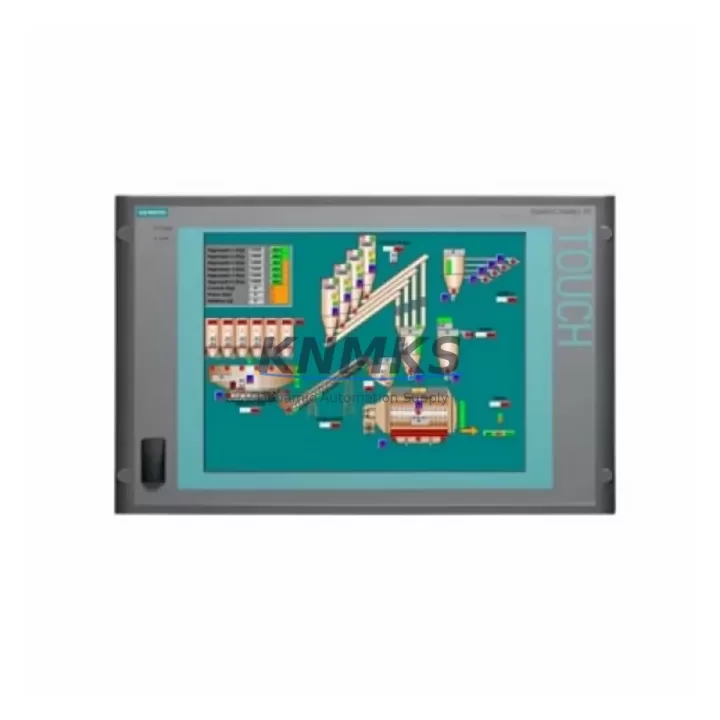
Siemens 6AV7800-0BA00-1AB0 Migration-Ready HMI Panel PC for Legacy Control Systems
The Siemens 6AV7800-0BA00-1AB0 is a migration-ready HMI Panel PC designed for the SIMATIC Panel PC 477B platform, widely deployed across process automation, discrete manufacturing, and utility control environments. As legacy SIMATIC HMI hardware reaches end-of-life and spare parts become increasingly scarce, the 6AV7800-0BA00-1AB0 provides a verified drop-in replacement path that preserves existing panel cutouts, PROFIBUS and MPI communication links, and WinCC Runtime project structures without requiring full cabinet redesign.
Engineers planning a control room modernization or emergency HMI replacement will find this unit pre-tested against SIMATIC Panel PC 477B mechanical and electrical specifications. Power supply compatibility, backplane connector pinout, and display resolution are validated prior to shipment, reducing on-site commissioning risk and protecting the original PLC program logic running on upstream S7-300 or S7-400 controllers. Stock is maintained across multiple warehouse locations to support both planned retrofit schedules and unplanned breakdown scenarios, with rapid global dispatch available.
When integrating the 6AV7800-0BA00-1AB0 into an existing automation cabinet, engineers should verify the 24 VDC supply capacity at the panel bus, confirm that the existing PROFIBUS DP cable termination resistors are correctly positioned, and review the MPI network address assignment to avoid node conflicts with other devices on the segment. The unit supports WinCC flexible and WinCC V7 Runtime environments, allowing existing HMI screen projects to be transferred directly without screen redevelopment, provided the Runtime version installed on the replacement unit matches the project compilation version.
For sites running mixed Siemens hardware generations, the 6AV7800-0BA00-1AB0 is frequently deployed alongside the SIMATIC S7-315-2DP CPU module, the CP 343-1 Ethernet communication processor, and the ET 200M distributed I/O station to maintain a consistent PROFIBUS backbone across the modernized control architecture. Where the original cabinet includes a SIMATIC OP 277 operator panel or TP 277 touch panel at secondary workstations, these units can remain in service on the same MPI segment, preserving operator interface continuity during the phased migration.
Firmware version alignment is a critical pre-commissioning step. The BIOS and embedded OS image on the 6AV7800-0BA00-1AB0 must be confirmed against the WinCC Runtime build version and any installed communication drivers, particularly for PROFIBUS DP master configurations where the GSD file library must match the field device firmware. Where the original Panel PC 477B was running a customized OS image with third-party drivers for barcode readers, RFID interfaces, or serial printers, these drivers should be staged and tested on the replacement unit before the cutover window begins.
Installation space confirmation is recommended before ordering. The 6AV7800-0BA00-1AB0 shares the Panel PC 477B form factor, but cabinet depth clearance behind the panel cutout should be measured to accommodate the rear connector block and any existing cable management brackets. Where the original unit was mounted with a VESA adapter or custom bracket, the mounting hole pattern should be verified against the replacement unit’s rear panel specification.
All units supplied by KNMKS are covered by a support terms confirmed by quotation and undergo pre-shipment functional testing including power-on verification, display output check, communication port continuity, and storage media integrity. In-stock availability is confirmed at the time of order, and lead time is communicated transparently before shipment. Emergency replacement orders are prioritized for sites with active production downtime.
Migration Compatibility Table
| Parameter | Detail |
|---|---|
| SKU / Part Number | 6AV7800-0BA00-1AB0 |
| Brand / Series | Siemens SIMATIC Panel PC 477B |
| Product Type | HMI Panel PC |
| Replaces / Compatible With | SIMATIC Panel PC 477B legacy units; compatible with S7-300, S7-400 PLC platforms |
| Communication Interfaces | PROFIBUS DP, MPI, Ethernet (RJ45) |
| Power Supply Requirement | 24 VDC (verify panel bus capacity before installation) |
| Mounting / Form Factor | Panel PC 477B cutout-compatible; confirm cabinet depth clearance |
| HMI Software Compatibility | WinCC flexible, WinCC V7 Runtime (version match required) |
| Firmware / OS Alignment | Confirm BIOS version and embedded OS image against Runtime build |
| Commissioning Focus | MPI node address, PROFIBUS termination, GSD file library, driver staging |
| Retrofit Recommendation | Direct drop-in replacement; no cabinet redesign required for standard 477B installations |
| Support terms | support terms confirmed by quotation — all units pre-shipment tested |
Retrofit Planning for Existing Automation Systems
A successful retrofit using the 6AV7800-0BA00-1AB0 begins with a structured audit of the existing control cabinet. Engineers should document the current 24 VDC power distribution rail loading, accounting for all connected devices including the SIMATIC S7-315-2DP CPU, CP 343-1 communication processor, and any ET 200M remote I/O stations drawing supply from the same rail. Adding the replacement HMI Panel PC to an already-loaded power budget without recalculating total current draw is a common source of post-installation instability.
Terminal wiring at the Panel PC rear connector should be photographed and labeled before disconnection. Where the original 477B installation used a custom cable harness for serial peripherals or USB-to-serial adapters for legacy printer interfaces, these harnesses must be retained and tested for compatibility with the replacement unit’s port configuration. Signal isolators installed between the HMI and field devices for noise suppression should remain in place and their output signal levels verified after the replacement unit is powered on.
For sites where the SIMATIC OP 277 or TP 277 panels share the MPI segment with the Panel PC, the MPI network topology should be reviewed to confirm that the replacement unit’s MPI address does not conflict with existing nodes. The PROFIBUS DP master configuration in the S7 hardware configuration (HW Config) should be exported and archived before the cutover, providing a recovery baseline if the new unit requires reconfiguration. Where the control system includes a SIMATIC NET CP 5611 or CP 5613 communication card in a separate engineering workstation, the PROFIBUS network scan should be re-run after installation to confirm all nodes are visible.
Where the retrofit scope extends beyond the HMI to include I/O expansion or controller upgrade, the 6AV7800-0BA00-1AB0 is compatible with ET 200M distributed I/O expansions and supports the standard PROFIBUS DP master-slave topology used in S7-300 and S7-400 based systems, allowing the HMI replacement to proceed independently of any planned controller migration without disrupting the field device communication structure.
Downtime Control During System Migration
Minimizing production downtime during an HMI Panel PC replacement requires a structured cutover plan executed within a defined maintenance window. The recommended approach is to complete all pre-staging activities — firmware verification, WinCC Runtime installation, project file transfer, and driver configuration — on the replacement 6AV7800-0BA00-1AB0 unit before it is brought to the installation site. A bench test using a laptop running STEP 7 or TIA Portal in offline mode allows the HMI project to be validated against the PLC program structure without requiring a live connection to the production system.
During the cutover window, the sequence should follow: controlled shutdown of the existing Panel PC 477B, disconnection of PROFIBUS and MPI cables with node address labels attached, physical removal of the legacy unit, installation of the 6AV7800-0BA00-1AB0 into the existing cutout, reconnection of all communication cables in documented order, power-on verification, and Runtime startup confirmation. The entire sequence for a standard single-HMI replacement can typically be completed within two to four hours when pre-staging is thorough.
Where the original PLC program includes HMI-triggered sequences or interlock logic that references specific HMI tag names, the WinCC project tag database should be reviewed to confirm that all tag connections resolve correctly after the Runtime is started on the replacement unit. Any unresolved tags will generate communication errors visible in the WinCC diagnostics log, allowing targeted troubleshooting without requiring a full program reload. The original S7-300 or S7-400 PLC program running on the upstream controller is not affected by the HMI replacement and continues to execute normally throughout the cutover, maintaining field device control continuity.
Retrofit Support FAQ
Q: Is the 6AV7800-0BA00-1AB0 a direct replacement for the SIMATIC Panel PC 477B?
A: Yes. The 6AV7800-0BA00-1AB0 is mechanically and electrically compatible with the Panel PC 477B platform. It fits the existing panel cutout, uses the same 24 VDC power input, and supports the same PROFIBUS DP and MPI communication interfaces. Pre-shipment testing confirms unit functionality before dispatch.
Q: Can I transfer my existing WinCC project to the replacement unit without redevelopment?
A: In most cases, yes. The WinCC Runtime version installed on the replacement unit must match the version used to compile the existing project. KNMKS can advise on Runtime version alignment based on your project file version before shipment.
Q: What pre-commissioning checks are required before powering on the replacement unit?
A: Verify 24 VDC supply capacity at the panel bus, confirm PROFIBUS termination resistor placement, assign the correct MPI node address, and confirm that all communication cable connections match the documented wiring layout from the original installation. Firmware and OS version alignment should be completed during bench staging before site installation.
Q: What support terms and testing coverage is included?
A: All 6AV7800-0BA00-1AB0 units supplied by KNMKS are covered by a support terms confirmed by quotation and undergo pre-shipment functional testing including power-on verification, display output, communication port continuity, and storage media integrity checks. In-stock availability is confirmed at order placement, and emergency replacement orders are prioritized for active downtime situations.
© 2026 KNMKS. All rights reserved.
Original Source: https://knmks.com
Contact: admin@knmks.com | +86 18359268345
Product Identification
- Brand / Ecosystem
-
Siemens
Siemens - Model / Series
-
6AV7800-0BA00-1AB0
SIMATIC Series - Product Family
- HMI & Displays
- Availability Status
- Available on request after model and quantity confirmation
- Inquiry Type
- B2B RFQ, replacement inquiry and project spare-part request
- Pre-Quote Check
- Exact SKU, brand, series, quantity, nameplate photos and destination country are checked before quotation
System Path
Where this product fits in the KNMKS automation structure.
Specification & Inquiry Focus
- Display range
- Operator panels and touch screens
- Common needs
- Screen size, interface and version matching
- Project support
- Retrofit, spare unit and panel replacement
Buyer Confirmation
Information KNMKS checks before replying.
- Exact model
- 6AV7800-0BA00-1AB0
- Brand / ecosystem
- Siemens
- Product family
- HMI & Displays
- Application note
- Replacement, maintenance, project build or spare-part list
- Useful photos
- Nameplate, installed unit, cabinet layout or connector side
- Delivery details
- Quantity, destination country and target schedule
Document Support
Files and notes can be confirmed during quotation.
- Product photos or nameplate confirmation when available
- Packing and delivery notes before quotation confirmation
- Support scope and delivery terms confirmed per inquiry
- Export document coordination for qualified B2B requests
Inquiry Support
- Panel size and interface confirmation
- Replacement unit inquiry for discontinued HMIs
- Protective packaging for display shipment
What to Send Us
- Brand and exact model number: Siemens 6AV7800-0BA00-1AB0
- Quantity and required delivery time
- Application, replacement requirement or nameplate photo
- Destination country and shipping preference
RFQ Preparation
This is a product inquiry page built for RFQ communication.
Fast Model Check
Send this model to KNMKS for confirmation.
Include quantity, destination country and photos if this is a maintenance replacement. The inquiry will be saved with a reference number after submission.
Brand & Compatibility Note
KNMKS displays automation product information for well-known industrial brand ecosystems and compatible replacement references. Brand names are used for product identification and compatibility reference only; final availability and commercial terms are confirmed per quotation.
 Manufacturing
 Machine Tools
 Packaging
 Energy & Power



 PLCs & Controllers
 Servo Systems
 Variable Frequency Drives
 Sensors