
Overview
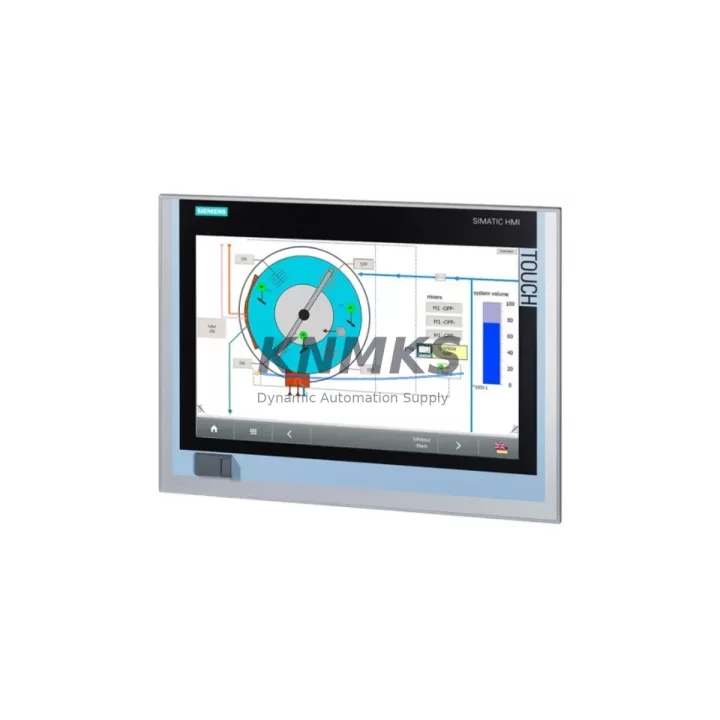
Siemens 6AV7240-0HC07-0PA0 IPC477D Spare Part for Factory Uptime
The Siemens 6AV7240-0HC07-0PA0 is a high-performance industrial panel PC from the SIMATIC IPC477D series, engineered for demanding automation environments where continuous operation and rapid fault recovery are non-negotiable. As a maintenance-proven spare part, this unit supports production lines, control cabinets, and SCADA workstations that depend on uninterrupted HMI and supervisory control functions. Whether you are managing a scheduled annual overhaul, responding to an unplanned shutdown, or building a strategic spare parts buffer, the 6AV7240-0HC07-0PA0 delivers the compatibility, reliability, and long-term supply assurance that maintenance engineers and procurement teams require.
Sourced directly from verified industrial channels and fully tested prior to dispatch, each unit undergoes functional verification to confirm display integrity, I/O responsiveness, communication port operation, and system boot performance. With a support terms confirmed by quotation and documented traceability, this spare is suitable for both emergency replacement and planned preventive maintenance programs across automotive, chemical, food processing, energy, and discrete manufacturing sectors.
Spare Maintenance Table
| Parameter | Specification |
|---|---|
| Part Number | 6AV7240-0HC07-0PA0 |
| Series | SIMATIC IPC477D |
| Brand | Siemens |
| Product Type | Industrial Panel PC |
| Display Size | 15″ Widescreen TFT |
| Processor | Intel Core i5 (embedded) |
| Operating System | Windows Embedded / Windows 10 IoT (configurable) |
| Communication Interfaces | PROFINET, Ethernet, USB, RS-232/422/485 |
| I/O Compatibility | Compatible with SIMATIC S7-300/400/1500 via PROFINET/MPI |
| Protection Rating | IP65 (front panel) |
| Operating Temperature | 0°C to +50°C |
| Power Supply | 24 V DC nominal |
| Weight | Approx. 2.6 kg |
| Origin | Germany |
| Condition | Original, Tested Before Shipment |
| Support terms | 12 Months |
| Compatibility | SIMATIC IPC477D family; drop-in replacement for 6AV7240-0HC07-0PA0 |
| Maintenance Recommendation | Inspect every 12 months; replace thermal paste and check fan module annually |
Maintenance Planning for Continuous Operation
When replacing the 6AV7240-0HC07-0PA0 in a live production environment, a structured maintenance approach significantly reduces the risk of secondary failures and repeat downtime. Maintenance engineers should treat this panel PC replacement as an opportunity to audit the entire control cabinet and associated electrical circuit.
Begin with the 24 V DC power supply feeding the IPC477D. Units such as the Siemens SITOP PSU100S or equivalent 24 V regulated power supplies should be checked for output voltage stability, ripple, and thermal condition. A degraded power supply is a common root cause of IPC instability and premature failure. Simultaneously, inspect the PROFINET switch or managed Ethernet switch (e.g., SCALANCE X series) that connects the panel PC to the PLC network — port LEDs, cable integrity, and switch firmware should all be verified.
The SIMATIC S7-1500 or S7-300 CPU module communicating with this HMI should be checked for active fault codes, memory utilization, and firmware version compatibility with the replacement IPC image. If the system uses CP communication processors (such as CP 343-1 or CP 443-1) for Ethernet or PROFIBUS connectivity, confirm that these modules are functioning correctly and that their configuration matches the restored IPC project.
On the I/O side, inspect SM signal modules (digital input/output cards) and any ET 200SP or ET 200M distributed I/O nodes connected via PROFINET. Loose terminal connections, blown channel fuses, or degraded I/O modules can cause process alarms that are incorrectly attributed to the HMI. Also review signal isolators and barriers in analog loops — these components are often overlooked during HMI-focused maintenance but can introduce measurement drift that appears as a software fault.
Finally, check the UPS module (if installed) that protects the IPC477D from power interruptions. Siemens SITOP UPS1600 or similar units should have their battery capacity tested and their communication link to the IPC verified. A failed UPS that does not signal a graceful shutdown can corrupt the IPC operating system, leading to repeat failures even after a hardware replacement.
Site Replacement Workflow
Replacing the 6AV7240-0HC07-0PA0 on-site follows a structured sequence designed to minimize downtime and ensure full system compatibility upon restart:
1. Pre-Replacement Preparation: Back up the existing IPC project, WinCC runtime configuration, and any locally stored historian data. Confirm the replacement unit’s firmware and OS version match the outgoing unit or that a compatible image is available. Verify the 24 V DC supply is within tolerance before powering the new unit.
2. Physical Swap: Isolate the control cabinet, disconnect all cables in sequence (power, PROFINET, USB peripherals, serial lines), and remove the panel PC from its mounting cutout. Install the replacement 6AV7240-0HC07-0PA0, reconnect all cables, and torque terminal connections to specification. Confirm IP65 gasket seating on the front panel.
3. Software Restoration: Restore the backed-up project to the replacement unit. Confirm PROFINET device name assignment matches the original configuration. Restart the PLC and verify all I/O nodes come online without fault. Launch WinCC runtime and confirm all process screens, alarms, and trends display correctly.
4. Functional Verification: Perform a full I/O check, confirm communication with all connected S7 CPUs and ET 200 nodes, and validate historian data logging. Document the replacement in the maintenance log with part number, serial number, and date.
This workflow supports legacy system life extension, reduces mean time to repair (MTTR), and ensures the replacement does not introduce new compatibility issues into the existing SIMATIC architecture.
Spare Parts Support FAQ
Q1: Is the 6AV7240-0HC07-0PA0 a direct drop-in replacement for older IPC477D variants?
Yes. The 6AV7240-0HC07-0PA0 is designed as a form-fit-function replacement within the SIMATIC IPC477D family. Physical mounting dimensions, connector positions, and PROFINET interface behavior are consistent across the IPC477D generation, allowing direct substitution without cabinet modification. Software image restoration is required to match the outgoing unit’s configuration.
Q2: What testing is performed before shipment?
Each unit undergoes power-on functional testing, display verification, communication port checks (Ethernet, USB, serial), and boot sequence validation. Units that do not pass all test criteria are not dispatched. A test report is available upon request for quality-critical procurement processes.
Q3: How should this spare part be stored if not immediately deployed?
Store in original anti-static packaging in a dry, temperature-controlled environment (10°C to 35°C, relative humidity below 75% non-condensing). Avoid exposure to direct sunlight, vibration, or magnetic fields. For long-term storage exceeding 12 months, power the unit on annually for a minimum of 4 hours to condition capacitors and verify operational status.
Q4: What is the long-term supply commitment for this part number?
We maintain dedicated stock of the 6AV7240-0HC07-0PA0 and key SIMATIC IPC477D series components to support customers with multi-year maintenance contracts and legacy system life extension programs. All units are covered by a support terms confirmed by quotation from the date of shipment. For volume procurement or scheduled delivery agreements, contact our sales team to discuss allocation and lead time planning.
© 2026 KNMKS. All rights reserved.
Original Source: https://knmks.com
Contact: admin@knmks.com | +86 18359268345
Product Identification
- Brand / Ecosystem
-
Siemens
Siemens - Model / Series
-
IPC477D 6AV7240-0HC07-0PA0
SIMATIC Series - Product Family
- HMI & Displays
- Availability Status
- Available on request after model and quantity confirmation
- Inquiry Type
- B2B RFQ, replacement inquiry and project spare-part request
- Pre-Quote Check
- Exact SKU, brand, series, quantity, nameplate photos and destination country are checked before quotation
System Path
Where this product fits in the KNMKS automation structure.
Specification & Inquiry Focus
- Display range
- Operator panels and touch screens
- Common needs
- Screen size, interface and version matching
- Project support
- Retrofit, spare unit and panel replacement
Buyer Confirmation
Information KNMKS checks before replying.
- Exact model
- IPC477D 6AV7240-0HC07-0PA0
- Brand / ecosystem
- Siemens
- Product family
- HMI & Displays
- Application note
- Replacement, maintenance, project build or spare-part list
- Useful photos
- Nameplate, installed unit, cabinet layout or connector side
- Delivery details
- Quantity, destination country and target schedule
Document Support
Files and notes can be confirmed during quotation.
- Product photos or nameplate confirmation when available
- Packing and delivery notes before quotation confirmation
- Support scope and delivery terms confirmed per inquiry
- Export document coordination for qualified B2B requests
Inquiry Support
- Panel size and interface confirmation
- Replacement unit inquiry for discontinued HMIs
- Protective packaging for display shipment
What to Send Us
- Brand and exact model number: Siemens IPC477D 6AV7240-0HC07-0PA0
- Quantity and required delivery time
- Application, replacement requirement or nameplate photo
- Destination country and shipping preference
RFQ Preparation
This is a product inquiry page built for RFQ communication.
Fast Model Check
Send this model to KNMKS for confirmation.
Include quantity, destination country and photos if this is a maintenance replacement. The inquiry will be saved with a reference number after submission.
Brand & Compatibility Note
KNMKS displays automation product information for well-known industrial brand ecosystems and compatible replacement references. Brand names are used for product identification and compatibility reference only; final availability and commercial terms are confirmed per quotation.
 Manufacturing
 Machine Tools
 Packaging
 Energy & Power



 PLCs & Controllers
 Servo Systems
 Variable Frequency Drives
 Sensors