
Overview
Siemens 6AV6671-5AE00-0AX0 Maintenance-Proven Spare Part for Factory Uptime
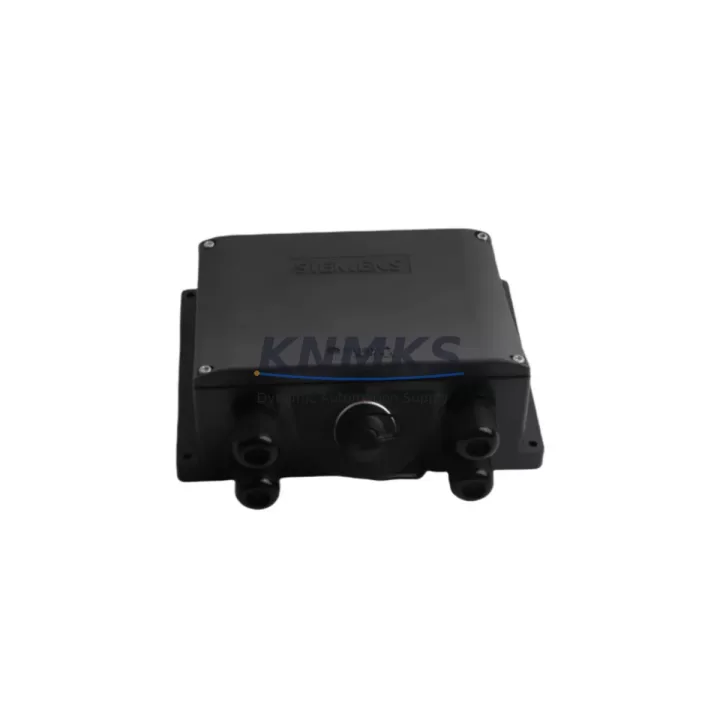
The Siemens 6AV6671-5AE00-0AX0 is an original rear-panel connection box designed for the SIMATIC HMI TP177, MP177, TP270, and MP270 operator panel series. In industrial environments where HMI availability directly determines line uptime, this component plays a critical role in maintaining secure, reliable connections between the operator panel and the control cabinet backplane. Whether you are managing a scheduled annual overhaul, responding to an unplanned HMI failure, or building a preventive spare parts inventory for a multi-line facility, the 6AV6671-5AE00-0AX0 is a foundational item in any SIMATIC HMI maintenance strategy.
Maintenance engineers working on legacy SIMATIC systems frequently encounter connector wear, terminal oxidation, and mechanical fatigue on rear-panel interfaces — particularly in high-vibration or high-humidity environments such as food processing, chemical plants, and heavy manufacturing. Replacing the 6AV6671-5AE00-0AX0 with a verified original Siemens component ensures full mechanical and electrical compatibility with the existing panel housing, eliminating the risk of signal degradation or intermittent communication faults that can arise from non-original substitutes.
Each unit supplied by KNMKS is sourced from authorized channels, subjected to pre-shipment functional inspection, and backed by a support terms confirmed by quotation. Long-term supply agreements are available for procurement engineers managing multi-site MRO contracts or planning 12–36 month spare parts coverage for aging SIMATIC HMI fleets.
Spare Maintenance Table
| Parameter | Specification |
|---|---|
| Part Number (SKU) | 6AV6671-5AE00-0AX0 |
| Brand | Siemens |
| Series | SIMATIC HMI TP177 / MP177 / TP270 / MP270 |
| Component Type | Rear-Panel Connection Box |
| Compatible Panels | TP177A, TP177B, MP177, TP270-6, TP270-10, MP270B-6, MP270B-10 |
| Mounting Interface | Rear panel snap-fit, standard SIMATIC HMI housing |
| Signal Interface | MPI / PROFIBUS DP, RS-422/485, power input terminals |
| Operating Voltage | 24 V DC (supplied via panel power input) |
| Operating Temperature | 0 °C to +50 °C |
| Protection Class | IP65 (front panel); rear connection box IP20 |
| Origin | Germany |
| Weight | Approx. 1,500 g (packaged) |
| Maintenance Recommendation | Inspect connector pins and terminal tightness every 12 months; replace on visible oxidation or intermittent communication faults |
| Support terms | 12 Months — KNMKS Pre-Shipment Tested |
Maintenance Planning for Continuous Operation
When replacing the 6AV6671-5AE00-0AX0 rear-panel connection box during a scheduled or emergency maintenance event, a thorough inspection of the surrounding electrical environment is essential to prevent repeat failures and ensure full system restoration. Maintenance engineers should treat this replacement as an opportunity to audit the entire HMI power and communication circuit.
Begin with the 24 V DC panel power supply feeding the TP177 or MP270 operator panel. Voltage ripple, under-voltage events, or an aging SITOP PSU8200 or equivalent power supply unit can cause premature wear on the connection box terminals. Verify output voltage stability under load before reconnecting the new component. Next, inspect the MPI/PROFIBUS DP communication cable and its termination resistors — a degraded bus cable or missing termination is a common root cause of HMI communication faults that are often misdiagnosed as panel hardware failures.
Check the PROFIBUS connector (e.g., Siemens 6ES7972-0BA52-0XA0) at both the HMI end and the PLC or CP module end. Connector body cracks, bent pins, or loose cable strain relief are frequent failure points in high-cycle maintenance environments. If the system uses a Siemens S7-300 or S7-400 CPU with a CP 343-1 or CP 443-1 communications processor, confirm that the DP address settings on the replacement panel match the original configuration to avoid address conflicts on the bus.
For panels installed in control cabinets with relay output modules or digital I/O expansion units, verify that the I/O wiring harness connectors at the rear of the panel are fully seated after reinstallation. Loose I/O connectors are a common source of intermittent faults following HMI maintenance. Additionally, inspect the cabinet fuse or circuit breaker protecting the 24 V DC HMI supply circuit — a marginally rated or aging fuse may have been stressed by the original fault condition and should be replaced as a precaution.
If the installation includes a Siemens OP 177B or TP 177B panel with an integrated CF card slot, confirm that the CF card and its data are intact after the replacement procedure, as vibration during disassembly can dislodge the card. For systems using signal isolators or galvanic separation modules on the RS-422/485 interface, verify isolator output levels post-replacement to ensure signal integrity on long cable runs.
Site Replacement Workflow
Step 1 — Fault Isolation: Before ordering or installing the 6AV6671-5AE00-0AX0, confirm the fault is isolated to the rear-panel connection box and not to the panel display unit, the power supply, or the communication cable. Use the SIMATIC HMI diagnostic screen (if accessible) or a PROFIBUS analyzer to identify the fault layer.
Step 2 — Safe Isolation: De-energize the control cabinet and lock out the 24 V DC supply to the HMI panel. Document the existing wiring layout and terminal assignments using photographs before disconnecting any cables.
Step 3 — Component Removal: Release the rear-panel connection box from the panel housing using the manufacturer-specified release tabs. Avoid applying lateral force to the connector body to prevent damage to the panel PCB interface.
Step 4 — Installation of 6AV6671-5AE00-0AX0: Align the replacement connection box with the panel housing guide rails and press firmly until the retention clips engage. Reconnect all terminal wiring per the documented layout, ensuring correct torque on screw terminals (typically 0.5–0.6 Nm for M3 terminals).
Step 5 — Commissioning Check: Re-energize the panel and verify HMI startup, communication link status (MPI/PROFIBUS), and I/O signal integrity. Confirm that the panel project loads correctly from the CF card or internal flash memory.
Step 6 — Documentation: Record the replacement in the equipment maintenance log, including the new component serial number, installation date, and technician ID. Update the spare parts inventory to trigger reorder of a replacement unit for the next maintenance cycle.
Spare Parts Support FAQ
Q1: Is the 6AV6671-5AE00-0AX0 compatible with all TP177 and MP270 panel variants?
The 6AV6671-5AE00-0AX0 rear-panel connection box is designed for the SIMATIC HMI TP177A, TP177B, MP177, TP270-6, TP270-10, MP270B-6, and MP270B-10 series. Always verify the panel order number and hardware revision against the Siemens compatibility matrix before installation. KNMKS technical support can assist with compatibility confirmation prior to order.
Q2: How does KNMKS verify the condition of spare parts before shipment?
Every 6AV6671-5AE00-0AX0 unit undergoes a pre-shipment functional inspection covering connector integrity, terminal condition, and mechanical fit. Units that do not pass inspection are not shipped. Each dispatched unit is covered by a support terms confirmed by quotation from the date of delivery, providing assurance for both emergency replacements and planned maintenance stock.
Q3: Can KNMKS support long-term supply agreements for this part?
Yes. KNMKS offers long-term supply agreements for MRO procurement teams managing multi-site SIMATIC HMI fleets. Agreements covering 12–36 months of forward inventory are available, with options for consignment stock, scheduled batch delivery, and priority allocation for critical production facilities. Contact admin@knmks.com to discuss terms.
Q4: What should I do if the replacement panel shows a communication fault after installing the 6AV6671-5AE00-0AX0?
First, verify that the PROFIBUS DP address on the replacement panel matches the original configuration. Check the bus termination at both ends of the PROFIBUS segment and inspect the PROFIBUS connector for pin damage. If the fault persists, use a PROFIBUS diagnostic tool to check bus load and signal quality. KNMKS technical support is available to assist with post-installation troubleshooting.
© 2026 KNMKS. All rights reserved.
Original Source: https://knmks.com
Contact: admin@knmks.com | +86 18359268345
Product Identification
- Brand / Ecosystem
-
Siemens
Siemens - Model / Series
-
6AV6671-5AE00-0AX0
SIMATIC Series - Product Family
- HMI & Displays
- Availability Status
- Available on request after model and quantity confirmation
- Inquiry Type
- B2B RFQ, replacement inquiry and project spare-part request
- Pre-Quote Check
- Exact SKU, brand, series, quantity, nameplate photos and destination country are checked before quotation
System Path
Where this product fits in the KNMKS automation structure.
Specification & Inquiry Focus
- Display range
- Operator panels and touch screens
- Common needs
- Screen size, interface and version matching
- Project support
- Retrofit, spare unit and panel replacement
Buyer Confirmation
Information KNMKS checks before replying.
- Exact model
- 6AV6671-5AE00-0AX0
- Brand / ecosystem
- Siemens
- Product family
- HMI & Displays
- Application note
- Replacement, maintenance, project build or spare-part list
- Useful photos
- Nameplate, installed unit, cabinet layout or connector side
- Delivery details
- Quantity, destination country and target schedule
Document Support
Files and notes can be confirmed during quotation.
- Product photos or nameplate confirmation when available
- Packing and delivery notes before quotation confirmation
- Support scope and delivery terms confirmed per inquiry
- Export document coordination for qualified B2B requests
Inquiry Support
- Panel size and interface confirmation
- Replacement unit inquiry for discontinued HMIs
- Protective packaging for display shipment
What to Send Us
- Brand and exact model number: Siemens 6AV6671-5AE00-0AX0
- Quantity and required delivery time
- Application, replacement requirement or nameplate photo
- Destination country and shipping preference
RFQ Preparation
This is a product inquiry page built for RFQ communication.
Fast Model Check
Send this model to KNMKS for confirmation.
Include quantity, destination country and photos if this is a maintenance replacement. The inquiry will be saved with a reference number after submission.
Brand & Compatibility Note
KNMKS displays automation product information for well-known industrial brand ecosystems and compatible replacement references. Brand names are used for product identification and compatibility reference only; final availability and commercial terms are confirmed per quotation.
 Manufacturing
 Machine Tools
 Packaging
 Energy & Power



 PLCs & Controllers
 Servo Systems
 Variable Frequency Drives
 Sensors