
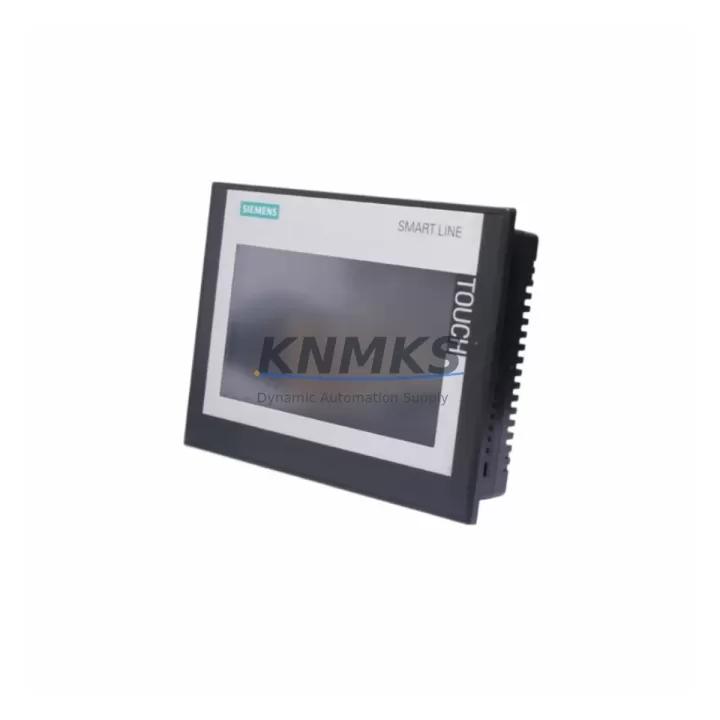
Overview
Siemens 6AV6648-0CE11-3AX0 Migration-Ready HMI Panel: Legacy System Retrofit & Compatibility Upgrade
The Siemens 6AV6648-0CE11-3AX0 is a SIMATIC SMART 700 IE V3 7-inch HMI panel engineered as a direct migration-ready replacement for discontinued or end-of-life operator panels in legacy Siemens control architectures. Whether you are modernizing an aging S7-200 SMART production line, upgrading a control cabinet that previously ran an older TP177 or OP177 panel, or extending the service life of a distributed I/O station, this unit provides a validated upgrade path with minimal re-engineering effort. Its dual Ethernet ports, integrated USB host interface, and native S7-200 SMART protocol support make it one of the most field-proven retrofit choices for small-to-mid-scale automation systems across manufacturing, water treatment, packaging, and building automation sectors.
Migration Compatibility Table
| Parameter | Details |
|---|---|
| Replacement Target | Siemens TP177B, OP177B, SMART 700 IE V2, and compatible 3rd-party 7″ panels |
| Display | 7″ TFT widescreen, 800×480 px, 64K colors |
| Communication Ports | 2× RJ45 Ethernet (PROFINET/IE), 1× RS-422/485 (MPI/PROFIBUS DP), 1× USB Host |
| Controller Compatibility | S7-200 SMART, S7-300, S7-1200 (via Ethernet), LOGO! 8 (via Ethernet) |
| Panel Cutout | 192 × 138 mm (compatible with most TP177B cutouts — verify before installation) |
| Power Supply | 24 V DC (20.4–28.8 V), max. 4.5 W — confirm existing PSU capacity |
| Degree of Protection | IP65 (front), IP20 (rear) |
| Programming Software | WinCC flexible 2008 SP3 or STEP 7 Micro/WIN SMART V2.4+ |
| Firmware Compatibility | Verify firmware version against WinCC flexible project version before migration |
| Mounting | Panel flush-mount; portrait or landscape orientation supported |
| Retrofit Recommendation | Backup original HMI project; re-compile under WinCC flexible before download |
| Commissioning Focus | Tag mapping, alarm configuration, communication driver re-assignment |
| Support terms | 12 Months — covers hardware defects under normal operating conditions |
Retrofit Planning for Existing Automation Systems
A successful retrofit with the 6AV6648-0CE11-3AX0 begins well before the panel arrives on site. Engineers should audit the existing control cabinet for available 24 V DC power capacity — the panel draws up to 4.5 W, and if the existing Siemens SITOP PSU8200 or equivalent power supply is already near its rated output due to additional I/O modules or communication cards, a capacity upgrade may be required before installation. Terminal wiring from the legacy panel should be documented and photographed; the 6AV6648-0CE11-3AX0 uses a standard 2-pin DC power connector and a 9-pin Sub-D for RS-422/485, which may differ from older OP177B wiring harnesses.
Backplane and rack considerations are equally important. If the legacy system used a Siemens S7-300 rack with a CP 343-1 Ethernet communication processor, the new HMI can connect directly via Ethernet, eliminating the need for MPI adapters. For systems still running S7-200 CPUs with a PC/PPI cable or USB-PPI adapter, the transition to the 6AV6648-0CE11-3AX0’s RS-485 port is straightforward, but the communication driver in WinCC flexible must be reconfigured from PPI to S7-200 SMART Ethernet if the CPU has been upgraded to an S7-200 SMART CPU SR40 or similar. In mixed environments where a Siemens ET 200S distributed I/O island feeds signals back to the HMI via the PLC, verify that all I/O addresses referenced in the original HMI project remain consistent after any CPU address reassignment.
HMI screen migration deserves careful attention. Existing projects built in ProTool or early WinCC flexible versions may require manual screen re-layout to match the 800×480 widescreen resolution of the 6AV6648-0CE11-3AX0. Alarm lists, recipe management screens, and trend displays should be validated in simulation mode before the panel is powered on in the field. If the original system used a Siemens MP 277 or MP 377 multi-panel with advanced scripting, those scripts must be reviewed for compatibility with the SMART 700 IE V3 runtime environment. Communication links to third-party SCADA systems via OPC or Modbus TCP should also be re-tested after the panel swap, as IP address assignments and port configurations may need updating.
Downtime Control During System Migration
Minimizing production downtime during an HMI panel replacement requires a structured pre-migration checklist. Before the scheduled maintenance window, download and archive the complete WinCC flexible project from the existing panel using a USB drive or Ethernet backup. Verify that the archived project opens correctly on the engineering workstation and that all tag connections resolve without errors. Prepare the 6AV6648-0CE11-3AX0 by pre-loading the updated project in the workshop, confirming that all screens display correctly in offline simulation, and labeling all terminal connections on the replacement panel to match the existing cabinet layout.
During the cutover, isolate the control circuit — do not de-energize the entire machine if field devices can remain powered safely. Remove the legacy panel, transfer the terminal block wiring to the new unit, and restore power. The 6AV6648-0CE11-3AX0 typically completes its boot sequence in under 30 seconds. Establish the PLC communication link first, confirm that all I/O tags are reading live values, and then walk through each HMI screen with the machine operator before releasing the line. Keeping the original panel on-site for 48 hours post-cutover provides a rapid fallback option if unexpected compatibility issues arise. This approach consistently reduces unplanned downtime to under two hours for standard single-panel replacements.
For multi-panel installations or systems with redundant communication paths, coordinate the migration sequence with the site automation engineer to ensure that no single panel replacement disrupts the broader control network. Document all firmware versions, IP addresses, and tag mapping changes in the site’s control system change log to support future maintenance and audit requirements. All units supplied by KNMKS are pre-tested prior to shipment and covered by a support terms confirmed by quotation, reducing the risk of field failures during the critical post-migration period.
Retrofit Support FAQ
Q1: Is the 6AV6648-0CE11-3AX0 a direct drop-in replacement for the SMART 700 IE V2?
A: Mechanically, the panel cutout dimensions are identical, making it a physical drop-in for most V2 installations. Electrically, the power connector and RS-485 pinout are compatible. However, the WinCC flexible project must be re-compiled under a version that supports the V3 runtime — projects created for V2 panels may require minor screen adjustments due to the updated display driver. Always validate the project in simulation before field deployment.
Q2: What commissioning steps are required after installation?
A: After mounting and wiring, power on the panel and confirm the boot screen appears. Navigate to the communication settings and verify the PLC IP address or RS-485 station address matches the controller configuration. Download the pre-tested WinCC flexible project via Ethernet or USB. Confirm all tags are live, test alarm triggers, and verify recipe and trend functions. Document the firmware version displayed in the panel’s system information screen for the site change log.
Q3: Can this panel communicate with both S7-200 SMART and S7-1200 controllers simultaneously?
A: The 6AV6648-0CE11-3AX0 supports multiple simultaneous communication connections via its dual Ethernet ports. It can maintain an active connection to an S7-200 SMART CPU via RS-485 while also connecting to an S7-1200 via Ethernet, making it suitable for hybrid migration environments where both legacy and new controllers coexist during a phased upgrade.
Q4: What does the support terms confirmed by quotation cover, and how is stock availability managed?
A: The support terms confirmed by quotation cover hardware defects arising under normal operating conditions, including display, communication port, and power circuit failures. It does not cover damage from incorrect wiring, overvoltage, or physical impact. KNMKS maintains in-stock inventory of the 6AV6648-0CE11-3AX0 to support urgent retrofit and breakdown replacement requirements. Units are pre-tested before shipment. Contact admin@knmks.com or +86 18359268345 to confirm current stock levels and lead times before placing a critical-path order.
© 2026 KNMKS. All rights reserved.
Original Source: https://knmks.com
Contact: admin@knmks.com | +86 18359268345
Product Identification
- Brand / Ecosystem
-
Siemens
Siemens - Model / Series
-
6AV6648-0CE11-3AX0
SIMATIC Series - Product Family
- HMI & Displays
- Availability Status
- Available on request after model and quantity confirmation
- Inquiry Type
- B2B RFQ, replacement inquiry and project spare-part request
- Pre-Quote Check
- Exact SKU, brand, series, quantity, nameplate photos and destination country are checked before quotation
System Path
Where this product fits in the KNMKS automation structure.
Specification & Inquiry Focus
- Display range
- Operator panels and touch screens
- Common needs
- Screen size, interface and version matching
- Project support
- Retrofit, spare unit and panel replacement
Buyer Confirmation
Information KNMKS checks before replying.
- Exact model
- 6AV6648-0CE11-3AX0
- Brand / ecosystem
- Siemens
- Product family
- HMI & Displays
- Application note
- Replacement, maintenance, project build or spare-part list
- Useful photos
- Nameplate, installed unit, cabinet layout or connector side
- Delivery details
- Quantity, destination country and target schedule
Document Support
Files and notes can be confirmed during quotation.
- Product photos or nameplate confirmation when available
- Packing and delivery notes before quotation confirmation
- Support scope and delivery terms confirmed per inquiry
- Export document coordination for qualified B2B requests
Inquiry Support
- Panel size and interface confirmation
- Replacement unit inquiry for discontinued HMIs
- Protective packaging for display shipment
What to Send Us
- Brand and exact model number: Siemens 6AV6648-0CE11-3AX0
- Quantity and required delivery time
- Application, replacement requirement or nameplate photo
- Destination country and shipping preference
RFQ Preparation
This is a product inquiry page built for RFQ communication.
Fast Model Check
Send this model to KNMKS for confirmation.
Include quantity, destination country and photos if this is a maintenance replacement. The inquiry will be saved with a reference number after submission.
Brand & Compatibility Note
KNMKS displays automation product information for well-known industrial brand ecosystems and compatible replacement references. Brand names are used for product identification and compatibility reference only; final availability and commercial terms are confirmed per quotation.
 Manufacturing
 Machine Tools
 Packaging
 Energy & Power



 PLCs & Controllers
 Servo Systems
 Variable Frequency Drives
 Sensors