
Overview
Siemens 6AV6648-0CC11-3AX0 Migration-Ready HMI Panel for Legacy Control Systems
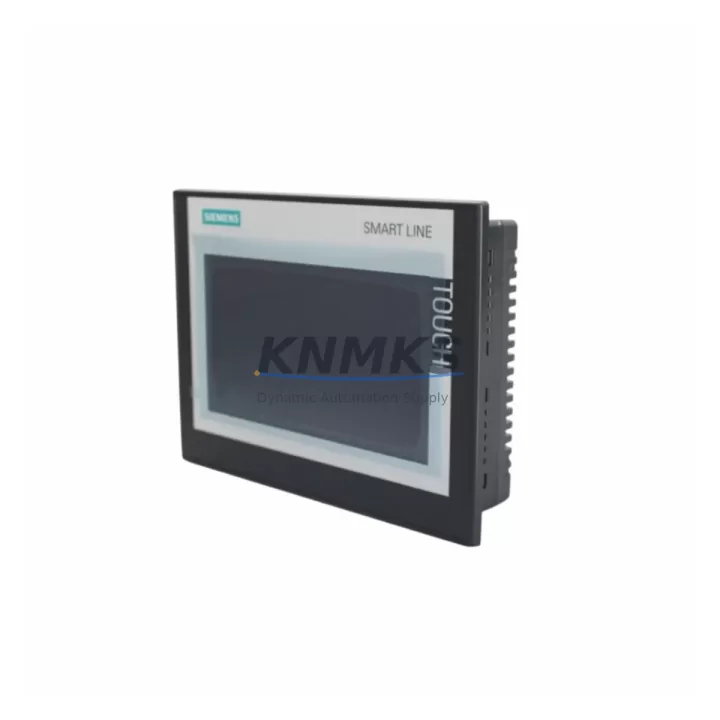
The Siemens 6AV6648-0CC11-3AX0 is a 7-inch SIMATIC SMART 700 IE V3 HMI touch panel engineered for direct integration into existing SIMATIC S7-200 SMART control architectures and legacy panel upgrade projects. As production lines built around earlier SMART 700 IE generations approach end-of-service, the 6AV6648-0CC11-3AX0 provides a validated migration path that preserves existing screen logic, communication links, and operator workflows while delivering a modern, reliable operator interface. This unit is stocked, pre-shipment tested, and covered by a support terms confirmed by quotation, making it a dependable choice for maintenance teams managing unplanned panel failures or scheduled control cabinet modernization programs.
For facilities operating legacy SIMATIC SMART 700 IE or SMART 700 IE V2 panels, the transition to the V3 variant requires careful attention to several compatibility checkpoints. The physical footprint of the 6AV6648-0CC11-3AX0 matches the standard 192 × 138 mm cutout used across the SMART 700 IE family, which eliminates the need for panel door rework in most retrofit scenarios. However, engineers should verify the depth clearance behind the mounting surface, as the V3 unit’s connector arrangement may differ slightly from earlier revisions. Mounting hardware and sealing gaskets should be inspected and replaced as part of the retrofit to maintain IP65 front-face protection.
Communication configuration is a critical step in any HMI migration. The 6AV6648-0CC11-3AX0 connects to the S7-200 SMART CPU — such as the CPU SR20, CPU ST30, or CPU SR40 — via Ethernet using the integrated RJ45 port. Engineers migrating from RS-485-based legacy panels must confirm that the target PLC supports Ethernet communication and that the IP addressing scheme is correctly configured in both the HMI project and the PLC network settings. Where the existing control cabinet includes a SIMATIC S7-300 or S7-400 platform with a CP 343-1 or CP 443-1 communication processor, protocol bridging or a dedicated Ethernet switch may be required to maintain network segmentation.
Screen project migration from WinCC flexible or earlier SMART LINE editor versions to the current SIMATIC WinCC SMART V3 software requires a project conversion step. Maintenance teams should back up the original .hmi project file before initiating conversion, as tag mappings, alarm configurations, and recipe data structures may require manual adjustment after the automated migration wizard completes. HMI screen layouts, button assignments, and trend displays typically transfer intact, but any scripts or VB logic embedded in the original project should be reviewed for compatibility with the V3 runtime environment.
Power supply requirements for the 6AV6648-0CC11-3AX0 are 24 V DC with a typical consumption of approximately 6 W. Control cabinets housing legacy panels should have their 24 V rail capacity verified before installation, particularly in cabinets where additional I/O modules, signal isolators, or communication modules have been added since the original commissioning. A SITOP PSU100S or equivalent regulated 24 V supply is recommended to ensure stable HMI operation in environments with variable load conditions.
For projects involving broader control system upgrades, the 6AV6648-0CC11-3AX0 is commonly deployed alongside the SIMATIC S7-200 SMART expansion modules — including EM AE04 analog input modules and EM DE08 digital input modules — to extend I/O capacity without replacing the core CPU. In cabinet layouts where space is constrained, the compact form factor of the SMART 700 IE V3 allows co-installation with a SIMATIC S7-200 SMART CPU and a standard DIN rail-mounted power supply within a 400 mm × 600 mm enclosure. Programming cable access via the USB port on the CPU should be confirmed to remain unobstructed after HMI mounting.
All units are subject to pre-shipment functional testing covering display calibration, communication port verification, and power-on self-test routines. Each 6AV6648-0CC11-3AX0 is shipped with protective packaging suitable for international freight and is covered by a support terms confirmed by quotation against manufacturing defects. Inventory is maintained to support both emergency replacement orders and planned retrofit procurement schedules.
Migration Compatibility Table
| Parameter | 6AV6648-0CC11-3AX0 (SMART 700 IE V3) | Legacy SMART 700 IE / V2 |
|---|---|---|
| Display Size | 7-inch TFT widescreen | 7-inch TFT |
| Resolution | 800 × 480 px | 800 × 480 px |
| Communication | Ethernet (RJ45), PROFINET-compatible | Ethernet / RS-485 (model-dependent) |
| PLC Compatibility | S7-200 SMART, S7-200, S7-300 (via Ethernet) | S7-200 SMART, S7-200 |
| Panel Cutout | 192 × 138 mm | 192 × 138 mm (verify per revision) |
| Power Supply | 24 V DC, ~6 W | 24 V DC, ~5–7 W |
| IP Rating (Front) | IP65 | IP65 |
| Engineering Software | WinCC SMART V3 | WinCC flexible / SMART V1–V2 |
| Project Migration | Conversion wizard required from V1/V2 | — |
| Commissioning Focus | IP config, tag remapping, screen validation | — |
| Support terms | 12 Months | — |
Retrofit Planning for Existing Automation Systems
A successful retrofit using the 6AV6648-0CC11-3AX0 begins with a systematic audit of the existing control cabinet. Engineers should document the current HMI model, firmware version, project file version, and all active communication connections before initiating any hardware swap. Where the existing panel is connected to a SIMATIC S7-200 SMART CPU SR20 or SR40, the Ethernet cable routing and switch port assignments should be recorded to avoid IP conflicts during commissioning.
In multi-panel installations — for example, where a SMART 700 IE is used alongside a SMART 1000 IE for supervisory display — the replacement of a single panel should not disrupt the communication network of adjacent HMI units. Network topology diagrams should be updated to reflect the new unit’s MAC address and IP assignment. Where the cabinet also houses a SIMATIC ET 200S distributed I/O rack or a CP 243-1 Ethernet module for legacy S7-200 connectivity, the network switch configuration should be reviewed to ensure VLAN or subnet assignments remain consistent.
For cabinets undergoing broader modernization, the 6AV6648-0CC11-3AX0 is frequently installed as part of a phased upgrade that also includes replacement of aging 24 V SITOP power supply modules, addition of EM QR80 high-speed counter modules for encoder feedback, and installation of SIMATIC S7-200 SMART signal boards for expanded analog I/O. This phased approach allows maintenance teams to validate each component independently before returning the line to production, reducing the risk of compounding faults during commissioning.
Downtime Control During System Migration
Minimizing production downtime during an HMI panel replacement requires preparation that begins well before the physical swap. The original HMI project file should be exported and stored on a secure engineering workstation before the legacy panel is removed. If the original panel is non-functional, a backup project file from the site’s document management system or from the PLC supplier should be obtained and verified against the current PLC program version to confirm tag consistency.
The physical replacement of the 6AV6648-0CC11-3AX0 into an existing cutout typically requires less than 30 minutes for a prepared technician, assuming the panel cutout dimensions are compatible and the 24 V DC supply and Ethernet cable are pre-routed. The converted WinCC SMART V3 project should be loaded and verified on a bench setup prior to site installation wherever possible, allowing screen navigation, alarm acknowledgment, and PLC communication to be confirmed before the panel is mounted in the cabinet.
During the commissioning phase on-site, the PLC program should remain in RUN mode where safe to do so, allowing the new HMI to establish communication and display live process values without interrupting the control logic. Any discrepancies in tag addresses or data types identified during the project conversion should be corrected in the engineering software and re-downloaded to the HMI before the panel is handed over to the operations team. A post-commissioning checklist covering all active screens, alarm groups, recipe sets, and trend archives should be completed and signed off before the retrofit is considered complete.
Retrofit Support FAQ
Q: Is the 6AV6648-0CC11-3AX0 a direct drop-in replacement for the SMART 700 IE V2?
A: The panel cutout dimensions are compatible, and the Ethernet communication interface is retained. However, the engineering project must be converted from WinCC SMART V2 to V3 format using the migration wizard in WinCC SMART V3 software. Tag mappings and screen layouts are generally preserved, but scripts and custom logic should be reviewed after conversion.
Q: What commissioning steps are required after installation?
A: After mounting and connecting the 24 V DC supply and Ethernet cable, configure the HMI IP address to match the project settings, establish communication with the S7-200 SMART CPU, and verify all screen pages, alarm displays, and data logging functions. A full functional test against the process should be completed before returning the system to production.
Q: Can this HMI connect to a Siemens S7-300 PLC?
A: Yes, via Ethernet using the S7 protocol, provided the S7-300 CPU or its communication processor (such as a CP 343-1) supports Ethernet connectivity. The HMI project must be configured with the correct PLC connection type and IP address in WinCC SMART V3.
Q: What does the support terms confirmed by quotation cover?
A: The support terms covers manufacturing defects and functional failures under normal operating conditions for 12 months from the date of shipment. Each unit undergoes pre-shipment functional testing including display, communication port, and power-on verification. Support requests are supported by our technical team at admin@knmks.com.
© 2026 KNMKS. All rights reserved.
Original Source: https://knmks.com
Contact: admin@knmks.com | +86 18359268345
Product Identification
- Brand / Ecosystem
-
Siemens
Siemens - Model / Series
-
6AV6648-0CC11-3AX0
SIMATIC Series - Product Family
- HMI & Displays
- Availability Status
- Available on request after model and quantity confirmation
- Inquiry Type
- B2B RFQ, replacement inquiry and project spare-part request
- Pre-Quote Check
- Exact SKU, brand, series, quantity, nameplate photos and destination country are checked before quotation
System Path
Where this product fits in the KNMKS automation structure.
Specification & Inquiry Focus
- Display range
- Operator panels and touch screens
- Common needs
- Screen size, interface and version matching
- Project support
- Retrofit, spare unit and panel replacement
Buyer Confirmation
Information KNMKS checks before replying.
- Exact model
- 6AV6648-0CC11-3AX0
- Brand / ecosystem
- Siemens
- Product family
- HMI & Displays
- Application note
- Replacement, maintenance, project build or spare-part list
- Useful photos
- Nameplate, installed unit, cabinet layout or connector side
- Delivery details
- Quantity, destination country and target schedule
Document Support
Files and notes can be confirmed during quotation.
- Product photos or nameplate confirmation when available
- Packing and delivery notes before quotation confirmation
- Support scope and delivery terms confirmed per inquiry
- Export document coordination for qualified B2B requests
Inquiry Support
- Panel size and interface confirmation
- Replacement unit inquiry for discontinued HMIs
- Protective packaging for display shipment
What to Send Us
- Brand and exact model number: Siemens 6AV6648-0CC11-3AX0
- Quantity and required delivery time
- Application, replacement requirement or nameplate photo
- Destination country and shipping preference
RFQ Preparation
This is a product inquiry page built for RFQ communication.
Fast Model Check
Send this model to KNMKS for confirmation.
Include quantity, destination country and photos if this is a maintenance replacement. The inquiry will be saved with a reference number after submission.
Brand & Compatibility Note
KNMKS displays automation product information for well-known industrial brand ecosystems and compatible replacement references. Brand names are used for product identification and compatibility reference only; final availability and commercial terms are confirmed per quotation.
 Manufacturing
 Machine Tools
 Packaging
 Energy & Power



 PLCs & Controllers
 Servo Systems
 Variable Frequency Drives
 Sensors