
Overview
Siemens 6AV6648-0BE11-3AX0 Maintenance-Proven Spare Part for Factory Uptime
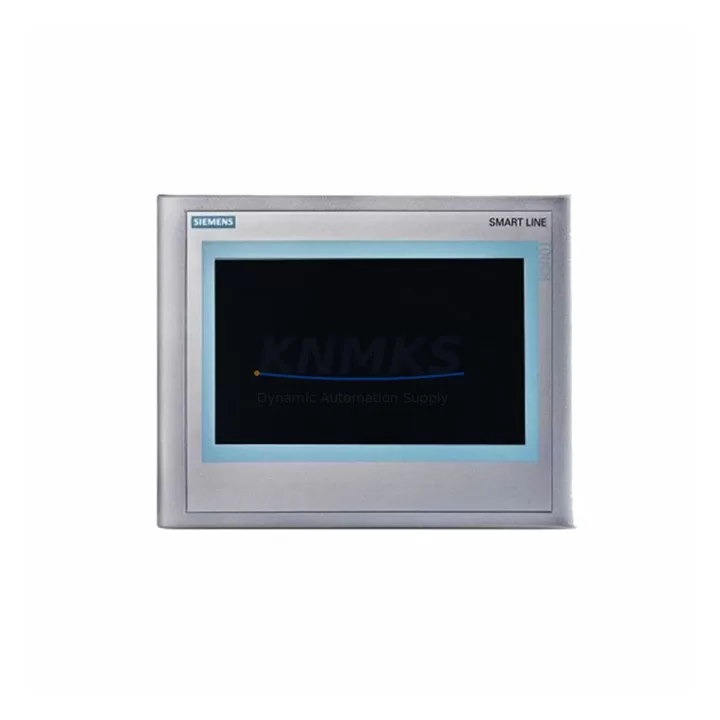
The Siemens 6AV6648-0BE11-3AX0 is a 10-inch SIMATIC KTP1000 Basic PN HMI panel designed for demanding industrial environments where operator interface reliability directly determines production continuity. As a maintenance-proven spare part, this unit supports PROFINET-based communication and integrates seamlessly with SIMATIC S7-300, S7-400, S7-1200, and S7-1500 PLC platforms — making it a critical component in both legacy system sustainment and modern automation upgrades. Sourced as an original Siemens component, each unit undergoes pre-shipment functional testing and is backed by a support terms confirmed by quotation, ensuring that maintenance engineers and procurement teams can deploy with confidence during planned shutdowns or emergency replacements.
For facilities operating continuous process lines, paper mills, water treatment plants, or discrete manufacturing cells, the KTP1000 Basic PN serves as the primary operator interface for alarm acknowledgment, setpoint entry, trend visualization, and process status monitoring. When this panel fails or degrades — whether from display backlight aging, touchscreen delamination, or PROFINET communication faults — the impact on production uptime is immediate. Stocking a verified spare eliminates the risk of extended lead times from OEM channels and ensures that your maintenance team can execute a swap within a single shift window.
Spare Maintenance Table
| Parameter | Specification |
|---|---|
| Part Number | 6AV6648-0BE11-3AX0 |
| Series | SIMATIC KTP1000 Basic PN |
| Display Size | 10.1″ Widescreen TFT |
| Resolution | 800 × 480 px |
| Communication Interface | PROFINET (1× RJ45) |
| Compatible PLC Platforms | S7-300, S7-400, S7-1200, S7-1500, WinCC |
| Supply Voltage | 24 V DC (20.4–28.8 V) |
| Power Consumption | Approx. 18 W |
| Operating Temperature | 0 °C to +50 °C |
| Protection Rating | IP65 (front panel) |
| Mounting | Panel cutout, portrait/landscape |
| Configuration Software | TIA Portal WinCC Basic / Comfort |
| Country of Origin | Germany |
| Support terms | 12 Months — Pre-shipment tested |
Maintenance Planning for Continuous Operation
When replacing the 6AV6648-0BE11-3AX0 in the field, a thorough inspection of the surrounding electrical and communication infrastructure is essential to prevent repeat failures and ensure stable recommissioning. Begin by verifying the 24 V DC supply rail feeding the HMI — a degraded SITOP PSU100S or equivalent Siemens power supply module can introduce voltage ripple that accelerates touchscreen controller wear. Check the PROFINET cable routing and confirm that the RJ45 connector and patch panel terminations are free from corrosion or mechanical stress, particularly in high-vibration environments.
Inspect the SIMATIC S7-1200 or S7-1500 CPU’s PROFINET port configuration and ensure the device name and IP address assignment in TIA Portal matches the replacement panel’s factory defaults before going live. If the control cabinet also houses a SIMATIC ET 200SP distributed I/O station, verify that the I/O update cycle and HMI polling interval are correctly balanced to avoid communication timeouts after the swap. For older installations running S7-300 with a CP 343-1 PROFINET communication processor, confirm firmware compatibility between the CP module and the new HMI firmware version.
During annual cabinet inspections, it is good practice to simultaneously check the condition of the 24 V DC terminal blocks (such as Siemens SIRIUS 3RT contactors or Phoenix Contact terminal strips), inspect any signal isolators on analog input channels feeding the HMI trend displays, and test the cabinet door sealing to maintain the IP65 rating of the panel cutout. If the installation includes a SIMATIC S7-300 IM 153-2 interface module for remote I/O, verify that the PROFIBUS DP segment serving that rack is not introducing latency that could affect HMI responsiveness. Fuse protection on the 24 V DC bus — typically 2 A slow-blow — should also be inspected and replaced as part of the same maintenance window to avoid nuisance trips after the HMI is restored to service.
Site Replacement Workflow
Replacing the 6AV6648-0BE11-3AX0 follows a structured workflow that minimizes downtime and eliminates configuration errors. Before removing the failed unit, export the current HMI project from TIA Portal and confirm the backup includes all screen layouts, alarm configurations, tag connections, and recipe data. Power down the 24 V DC supply to the panel, disconnect the PROFINET cable, and release the panel mounting clamps from the rear of the cutout.
Install the replacement unit into the same cutout — no mechanical modification is required as the KTP1000 Basic PN maintains a consistent form factor across production revisions. Reconnect the PROFINET cable and 24 V DC supply, then download the backed-up project to the new panel via TIA Portal. Assign the correct PROFINET device name using the “Assign device name” function in the network view, and perform a full online test of all HMI screens, alarm triggers, and operator inputs before returning the line to production. Total replacement time for a prepared maintenance team is typically under 90 minutes, making this one of the most efficient HMI swap procedures in the SIMATIC product family.
For facilities managing a fleet of KTP1000 panels across multiple production lines, maintaining at least one verified spare per five installed units is a widely adopted inventory strategy that balances carrying cost against the risk of extended downtime. This spare should be stored in its original packaging in a climate-controlled environment and rotated into service on a 3–5 year cycle to prevent storage-related degradation of the display backlight and capacitive touchscreen.
Spare Parts Support FAQ
Q1: Is the 6AV6648-0BE11-3AX0 compatible with both TIA Portal V13 and V16 projects?
Yes. The KTP1000 Basic PN supports TIA Portal WinCC Basic from V13 SP1 onward. Projects created in earlier versions can be migrated using TIA Portal’s built-in migration wizard. Always verify the HMI firmware version matches the TIA Portal version used for the project download to avoid compatibility warnings during commissioning.
Q2: What is included with each unit and how is pre-shipment testing conducted?
Each 6AV6648-0BE11-3AX0 is supplied with the panel unit, mounting clamps, and a support terms confirmed by quotation certificate. Prior to dispatch, the unit undergoes power-on functional testing including display verification, touchscreen calibration check, and PROFINET port continuity confirmation. A test report is available upon request for quality-controlled procurement processes.
Q3: Can this spare replace older KTP1000 PN variants such as the 6AV6648-0BE11-3AX0 revision A?
The 6AV6648-0BE11-3AX0 is form-fit-function compatible with earlier production revisions of the KTP1000 Basic PN. Minor firmware differences between hardware revisions are handled transparently by TIA Portal during project download. No panel cutout modification or wiring change is required for a direct swap.
Q4: What is the long-term supply availability for this part?
We maintain multi-region stock of the 6AV6648-0BE11-3AX0 to support both emergency replacement and planned annual procurement cycles. Orders are dispatched within 1–3 business days with global shipping options. For facilities requiring guaranteed supply over a 12–24 month horizon, blanket order arrangements are available — contact our sales team to discuss volume and lead time commitments.
© 2026 KNMKS. All rights reserved.
Original Source: https://knmks.com
Contact: admin@knmks.com | +86 18359268345
Product Identification
- Brand / Ecosystem
-
Siemens
Siemens - Model / Series
-
6AV6 648-0BE11-3AX0
SIMATIC Series - Product Family
- HMI & Displays
- Availability Status
- Available on request after model and quantity confirmation
- Inquiry Type
- B2B RFQ, replacement inquiry and project spare-part request
- Pre-Quote Check
- Exact SKU, brand, series, quantity, nameplate photos and destination country are checked before quotation
System Path
Where this product fits in the KNMKS automation structure.
Specification & Inquiry Focus
- Display range
- Operator panels and touch screens
- Common needs
- Screen size, interface and version matching
- Project support
- Retrofit, spare unit and panel replacement
Buyer Confirmation
Information KNMKS checks before replying.
- Exact model
- 6AV6 648-0BE11-3AX0
- Brand / ecosystem
- Siemens
- Product family
- HMI & Displays
- Application note
- Replacement, maintenance, project build or spare-part list
- Useful photos
- Nameplate, installed unit, cabinet layout or connector side
- Delivery details
- Quantity, destination country and target schedule
Document Support
Files and notes can be confirmed during quotation.
- Product photos or nameplate confirmation when available
- Packing and delivery notes before quotation confirmation
- Support scope and delivery terms confirmed per inquiry
- Export document coordination for qualified B2B requests
Inquiry Support
- Panel size and interface confirmation
- Replacement unit inquiry for discontinued HMIs
- Protective packaging for display shipment
What to Send Us
- Brand and exact model number: Siemens 6AV6 648-0BE11-3AX0
- Quantity and required delivery time
- Application, replacement requirement or nameplate photo
- Destination country and shipping preference
RFQ Preparation
This is a product inquiry page built for RFQ communication.
Fast Model Check
Send this model to KNMKS for confirmation.
Include quantity, destination country and photos if this is a maintenance replacement. The inquiry will be saved with a reference number after submission.
Brand & Compatibility Note
KNMKS displays automation product information for well-known industrial brand ecosystems and compatible replacement references. Brand names are used for product identification and compatibility reference only; final availability and commercial terms are confirmed per quotation.
 Manufacturing
 Machine Tools
 Packaging
 Energy & Power



 PLCs & Controllers
 Servo Systems
 Variable Frequency Drives
 Sensors