
Overview
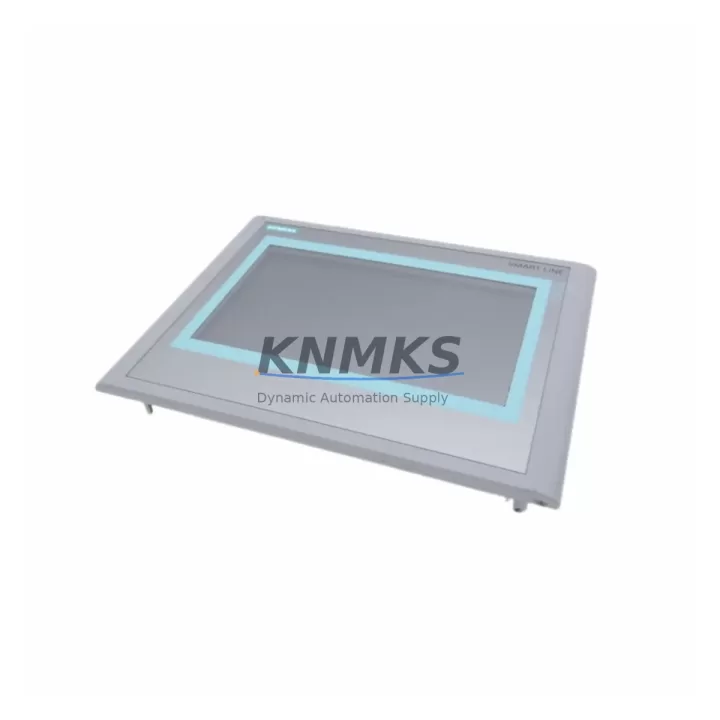
Siemens 6AV6648-0BC11-3AX0 Maintenance-Proven Spare Part for Factory Uptime
The Siemens 6AV6648-0BC11-3AX0 is a 7-inch widescreen touch panel from the SIMATIC Smart 700 IE series, engineered for operator interface applications in industrial automation environments. As a direct original spare part, this unit is sourced, inspected, and dispatched to support maintenance engineers and procurement teams managing aging SIMATIC control systems. Whether you are responding to an unplanned HMI failure on a production line or building a structured spare parts inventory for annual overhaul cycles, the 6AV6648-0BC11-3AX0 delivers the compatibility, reliability, and documentation traceability required for mission-critical factory uptime.
Facilities running Siemens S7-200, S7-300, or S7-1200 PLC platforms frequently rely on the Smart 700 IE panel as the primary operator interface for process visualization, alarm management, and parameter adjustment. When this panel fails or degrades — whether due to touchscreen wear, backlight aging, or communication faults — the impact on production continuity is immediate. Stocking a verified original replacement eliminates the diagnostic uncertainty that comes with non-original substitutes and ensures that your maintenance team can restore operations within a single shift.
Spare Maintenance Table
| Part Number | 6AV6648-0BC11-3AX0 |
| Brand | Siemens |
| Series | SIMATIC Smart 700 IE |
| Display Size | 7″ Widescreen TFT |
| Resolution | 800 × 480 px |
| Touch Type | Resistive Touch |
| Communication Interface | Ethernet (RJ45), RS-422/485 |
| Supply Voltage | 24 V DC (20.4–28.8 V) |
| Power Consumption | Approx. 8 W |
| Operating Temperature | 0 °C to +50 °C |
| Protection Rating | IP65 (front panel) |
| Compatible PLCs | Siemens S7-200, S7-300, S7-1200, LOGO! |
| Configuration Software | WinCC flexible Compact / STEP 7 Micro/WIN Smart |
| Country of Origin | Germany |
| Condition | Original, New or Tested Surplus |
| Pre-shipment Testing | Power-on functional verification |
| Support terms | 12 Months from shipment date |
| Shipping | Global express; ESD-safe packaging |
Maintenance Planning for Continuous Operation
Replacing the 6AV6648-0BC11-3AX0 in a live control cabinet is rarely an isolated task. Maintenance engineers conducting a thorough site inspection should simultaneously verify the condition of the 24 V DC panel power supply — a degraded or undersized supply rail is a common root cause of intermittent HMI resets and communication dropouts. Check the supply voltage at the HMI terminal block under load; values outside the 20.4–28.8 V operating range will cause erratic behavior even with a new panel installed.
The Ethernet communication path between the HMI and the S7-200 or S7-300 CPU should be validated using a cable tester or managed switch port diagnostics. Faulty RJ45 connectors, degraded Cat5e runs, or misconfigured IP addressing are frequent causes of HMI-PLC communication loss that can be misdiagnosed as panel failure. If the installation uses RS-422/485 serial communication, inspect the terminal connections and verify the bus termination resistors are correctly installed at both ends of the segment.
For cabinets housing Siemens S7-300 racks, it is good practice to inspect the CPU module, SM321/SM322 digital I/O modules, and the CP343-1 or CP343-1 Lean communication processor during the same maintenance window. A failing I/O module or communication processor can generate alarms that appear on the HMI screen and are sometimes incorrectly attributed to the panel itself. Similarly, if the system includes a Siemens IM153 interface module for distributed I/O via PROFIBUS, verify the bus cable integrity and station address settings.
Procurement engineers building a structured spare parts list for facilities running Smart 700 IE panels should also consider stocking the 6ES7 307-1EA01-0AA0 24 V DC power supply module, appropriate fuse holders and 2 A panel fuses for the HMI supply circuit, and a set of spare Ethernet patch cables rated for industrial environments. These low-cost components are disproportionately responsible for HMI downtime and are frequently overlooked in annual spare parts budget reviews. A single unplanned shutdown caused by a failed fuse or corroded connector will cost far more than a pre-stocked replacement kit.
For facilities managing long-term system life extension programs on legacy SIMATIC installations, maintaining at least one verified 6AV6648-0BC11-3AX0 unit in local inventory is a recognized best practice. Siemens has transitioned the Smart 700 IE series through multiple hardware revisions; sourcing original units from a reliable industrial spare parts supplier with documented stock and pre-shipment testing eliminates the procurement risk associated with counterfeit or non-functional substitutes entering the maintenance supply chain.
Site Replacement Workflow
1. Pre-replacement verification: Confirm the replacement unit part number matches 6AV6648-0BC11-3AX0 exactly, including the hardware revision suffix where applicable. Photograph the existing panel wiring, terminal assignments, and IP address configuration before disconnection.
2. Power isolation: Isolate the 24 V DC supply to the HMI at the dedicated fuse or circuit breaker. Verify zero voltage at the panel terminal block with a calibrated multimeter before proceeding.
3. Panel removal: Release the panel mounting clamps from the rear of the cutout. Disconnect the power terminals, Ethernet cable, and any serial communication connectors. Label all connectors if not already marked.
4. Replacement installation: Insert the new 6AV6648-0BC11-3AX0 into the cutout and secure the mounting clamps evenly to maintain IP65 front panel sealing. Reconnect all terminals in reverse order of removal.
5. Configuration transfer: Load the existing WinCC flexible Compact or STEP 7 Micro/WIN Smart project file onto the replacement panel via Ethernet or USB. Verify all screen pages, alarm configurations, and PLC communication parameters are correctly restored.
6. Functional test: Restore power and confirm HMI-PLC communication is established. Navigate through all operator screens, verify alarm display, and confirm any analog or digital setpoint adjustments function correctly before returning the system to production.
This structured workflow minimizes total downtime to under two hours for a prepared maintenance team and eliminates the risk of configuration errors that can extend an unplanned outage.
Spare Parts Support FAQ
Q: Is the 6AV6648-0BC11-3AX0 compatible with both S7-200 and S7-300 PLC systems?
A: Yes. The SIMATIC Smart 700 IE panel supports Ethernet and serial communication with Siemens S7-200, S7-300, S7-1200, and LOGO! controllers. Compatibility is configured through the WinCC flexible Compact or STEP 7 Micro/WIN Smart engineering software. Always verify the firmware version on the replacement panel matches or exceeds the version required by your existing project file.
Q: What pre-shipment testing is performed on each unit?
A: Every 6AV6648-0BC11-3AX0 dispatched by KNMKS undergoes a power-on functional verification to confirm display operation, touch response, and communication port integrity. Units are packed in ESD-safe anti-static bags with foam cushioning to prevent transit damage. A support terms confirmed by quotation from the shipment date covers any manufacturing or functional defects identified during normal installation and operation.
Q: How should I manage long-term spare parts inventory for aging Smart 700 IE installations?
A: For facilities with three or more Smart 700 IE panels in service, maintaining one replacement unit in local inventory is recommended. Given the product lifecycle status of the Smart 700 IE series, sourcing original units while supply remains available reduces future procurement risk. KNMKS maintains ongoing stock of the 6AV6648-0BC11-3AX0 and can support scheduled procurement for annual maintenance budgets or multi-site spare parts programs.
Q: Can KNMKS support urgent replacement orders for production-critical downtime situations?
A: Yes. KNMKS offers priority dispatch for production-critical orders. Contact admin@knmks.com or call +86 18359268345 to confirm stock availability, lead time, and express shipping options to your facility. All units are dispatched with full documentation including part number verification, test records, and support terms certificate.
© 2026 KNMKS. All rights reserved.
Original Source: https://knmks.com
Contact: admin@knmks.com | +86 18359268345
Product Identification
- Brand / Ecosystem
-
Siemens
Siemens - Model / Series
-
6AV6648-0BC11-3AX0
SIMATIC Series - Product Family
- HMI & Displays
- Availability Status
- Available on request after model and quantity confirmation
- Inquiry Type
- B2B RFQ, replacement inquiry and project spare-part request
- Pre-Quote Check
- Exact SKU, brand, series, quantity, nameplate photos and destination country are checked before quotation
System Path
Where this product fits in the KNMKS automation structure.
Specification & Inquiry Focus
- Display range
- Operator panels and touch screens
- Common needs
- Screen size, interface and version matching
- Project support
- Retrofit, spare unit and panel replacement
Buyer Confirmation
Information KNMKS checks before replying.
- Exact model
- 6AV6648-0BC11-3AX0
- Brand / ecosystem
- Siemens
- Product family
- HMI & Displays
- Application note
- Replacement, maintenance, project build or spare-part list
- Useful photos
- Nameplate, installed unit, cabinet layout or connector side
- Delivery details
- Quantity, destination country and target schedule
Document Support
Files and notes can be confirmed during quotation.
- Product photos or nameplate confirmation when available
- Packing and delivery notes before quotation confirmation
- Support scope and delivery terms confirmed per inquiry
- Export document coordination for qualified B2B requests
Inquiry Support
- Panel size and interface confirmation
- Replacement unit inquiry for discontinued HMIs
- Protective packaging for display shipment
What to Send Us
- Brand and exact model number: Siemens 6AV6648-0BC11-3AX0
- Quantity and required delivery time
- Application, replacement requirement or nameplate photo
- Destination country and shipping preference
RFQ Preparation
This is a product inquiry page built for RFQ communication.
Fast Model Check
Send this model to KNMKS for confirmation.
Include quantity, destination country and photos if this is a maintenance replacement. The inquiry will be saved with a reference number after submission.
Brand & Compatibility Note
KNMKS displays automation product information for well-known industrial brand ecosystems and compatible replacement references. Brand names are used for product identification and compatibility reference only; final availability and commercial terms are confirmed per quotation.
 Manufacturing
 Machine Tools
 Packaging
 Energy & Power



 PLCs & Controllers
 Servo Systems
 Variable Frequency Drives
 Sensors