
Overview
Siemens 6AV6647-0AH11-3AX1 Migration-Ready HMI for Legacy Control Systems
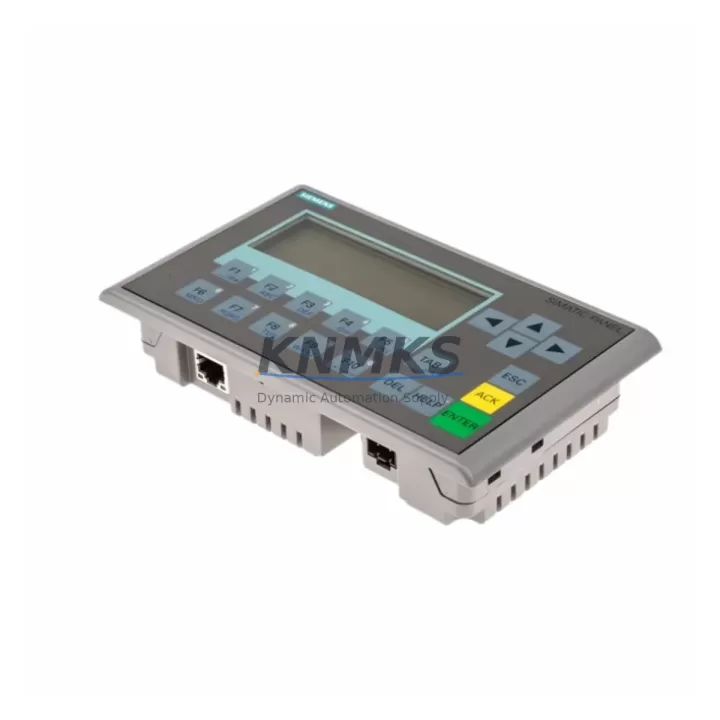
The Siemens 6AV6647-0AH11-3AX1 KTP400 Basic Mono PN is a compact 4-inch PROFINET-enabled Human Machine Interface panel engineered for direct integration into existing SIMATIC S7-300 and S7-400 control architectures. As legacy HMI platforms such as the OP77B and TP177B approach end-of-life and spare parts become increasingly scarce, the KTP400 Basic Mono PN provides a validated, drop-in migration path that preserves existing screen logic, tag structures, and communication links with minimal engineering rework.
Designed for demanding industrial environments — including petrochemical processing, power generation, water treatment, metallurgy, and port automation — this panel delivers reliable operator interface capability in a DIN-rail-compatible, panel-cutout-friendly form factor. Its PROFINET IO interface ensures seamless integration with the broader SIMATIC ecosystem, including S7-300 CPUs such as the CPU 315-2 PN/DP and S7-400 controllers, without requiring protocol conversion hardware or additional communication modules.
Migration Compatibility Table
| Parameter | Legacy Unit (OP77B / TP177B) | 6AV6647-0AH11-3AX1 (KTP400 Basic Mono PN) |
|---|---|---|
| Display Size | 3.8″ / 5.7″ STN | 4.0″ TFT Monochrome |
| Communication Interface | MPI / PROFIBUS DP | PROFINET IO (RJ45) |
| Panel Cutout (W × H) | 196 × 141 mm (OP77B) | 122 × 92 mm — adapter frame may be required |
| Power Supply | 24 V DC | 24 V DC (0.25 A typical) |
| Engineering Software | ProTool / WinCC flexible | TIA Portal V13 SP1 or higher |
| Controller Compatibility | S7-200 / S7-300 / S7-400 (MPI/DP) | S7-300 / S7-400 / S7-1200 / S7-1500 (PROFINET) |
| Screen Migration Tool | N/A | TIA Portal Migration Wizard (partial screen conversion) |
| Replacement Recommendation | Direct functional replacement with protocol migration from MPI/DP to PROFINET. Panel cutout adapter recommended. | |
| Commissioning Focus | IP address assignment, device name configuration, tag re-mapping, alarm re-validation, and HMI screen functional test | |
| Support terms | — | support terms confirmed by quotation | Pre-shipment functional test included |
Retrofit Planning for Existing Automation Systems
A successful retrofit of the 6AV6647-0AH11-3AX1 into a legacy control cabinet requires a structured pre-engineering review. The first step is confirming that the existing 24 V DC power supply — typically a SITOP PSU100S or equivalent — can sustain the additional 0.25 A draw of the KTP400 alongside other panel loads. Where power budgets are tight, a dedicated SITOP power module should be added to the cabinet rail before installation.
Terminal wiring for the 24 V DC supply and the PROFINET RJ45 connection is straightforward, but engineers must verify that the existing Ethernet switch or managed switch in the control cabinet supports PROFINET IO real-time classes. Unmanaged switches are generally not recommended for PROFINET topologies; a SCALANCE X005 or similar industrial Ethernet switch ensures deterministic communication between the KTP400 and the S7 CPU.
For sites migrating from MPI or PROFIBUS DP-based OP77B panels, the communication link must be re-established over PROFINET. This typically involves adding a PROFINET interface to the S7-300 rack — for example, replacing a standard CPU with a CPU 315-2 PN/DP — or using a PN/DP coupler to bridge the existing PROFIBUS segment. Where the S7-400 rack is involved, the CP 443-1 communication processor provides the PROFINET IO controller function without requiring a CPU swap.
Screen migration from WinCC flexible or ProTool projects to TIA Portal is supported via the built-in migration wizard, but engineers should budget time for manual re-validation of alarm screens, recipe views, and trend displays. Tag names and data block addresses must be cross-checked against the current S7 program to avoid runtime communication errors after commissioning. Where the existing program resides on a SIMATIC S7-300 CPU 314C-2 DP, the data block structure should be exported and reviewed before the TIA Portal project is finalized.
Physical installation requires confirming the panel cutout dimensions. The KTP400 Basic Mono PN uses a 122 × 92 mm cutout, which is smaller than the OP77B footprint. A stainless steel adapter frame is recommended to maintain IP65 sealing at the cabinet door. Mounting depth behind the panel door should also be verified, particularly in compact cabinets where backplane clearance is limited.
Downtime Control During System Migration
Minimizing unplanned downtime during an HMI migration is a primary concern for any production facility. The recommended approach for replacing an OP77B or TP177B with the 6AV6647-0AH11-3AX1 is to complete all TIA Portal engineering, screen migration, and offline simulation before the scheduled maintenance window. The new KTP400 panel should be pre-configured with its PROFINET device name and IP address, and the TIA Portal project should be downloaded and verified on a test bench using a spare S7-300 CPU or a PLCSIM simulation environment.
During the cutover window, the sequence should follow: power down the cabinet, remove the legacy OP77B, install the KTP400 with the adapter frame, connect the 24 V DC supply and PROFINET cable, power up, and confirm communication with the CPU within the first five minutes. If the S7 CPU retains its existing program and data blocks unchanged, the KTP400 should establish communication and display the home screen without requiring a full CPU restart. This approach protects the original PLC program logic and maintains field control continuity throughout the HMI swap.
For sites where the migration also involves a CPU upgrade — for example, moving from a CPU 315-2 DP to a CPU 315-2 PN/DP — the CPU swap and HMI replacement should be staged separately where possible, with each step validated independently before the next is executed. This staged approach reduces the risk of compounding faults and allows the maintenance team to isolate any communication or screen issues to a specific change.
All units supplied by KNMKS undergo pre-shipment functional testing, including power-on verification, display check, and PROFINET communication validation. The support terms confirmed by quotation cover hardware defects identified after installation, providing additional assurance for long-cycle spare parts strategies and multi-site rollout programs.
Retrofit Support FAQ
Q1: Can the 6AV6647-0AH11-3AX1 directly replace an OP77B without modifying the S7-300 program?
In most cases, yes — the S7-300 program and data block structure do not need to be modified. However, the communication interface changes from MPI to PROFINET, so the CPU must have a PROFINET port (e.g., CPU 315-2 PN/DP) or a CP 343-1 communication processor must be added to the rack. The HMI project must be re-engineered in TIA Portal, but the underlying PLC logic remains intact.
Q2: What pre-shipment testing is performed on each unit?
Every 6AV6647-0AH11-3AX1 supplied by KNMKS is powered on, display-verified, and subjected to a PROFINET communication handshake test before dispatch. Units are shipped with original or equivalent packaging and include a support terms confirmed by quotation covering hardware defects under normal operating conditions.
Q3: Is stock available for immediate dispatch, and what are the lead times?
KNMKS maintains buffer stock of the KTP400 Basic Mono PN to support urgent replacement and planned retrofit programs. Standard orders are dispatched within 1–3 business days. For multi-unit project requirements or scheduled maintenance windows, contact admin@knmks.com to confirm availability and reserve stock in advance.
Q4: What wiring changes are required when replacing a TP177B with the KTP400?
The 24 V DC power supply wiring is identical. The primary change is the communication cable: the TP177B uses a PROFIBUS DP or MPI connector (9-pin Sub-D), while the KTP400 uses a standard RJ45 PROFINET cable. The panel cutout dimensions also differ, so an adapter frame is required to maintain cabinet door sealing. No changes to the S7 CPU terminal wiring or I/O module connections are needed.
© 2026 KNMKS. All rights reserved.
Original Source: https://knmks.com
Contact: admin@knmks.com | +86 18359268345
Product Identification
- Brand / Ecosystem
-
Siemens
Siemens - Model / Series
-
6AV6647-0AH11-3AX1
SIMATIC Series - Product Family
- HMI & Displays
- Availability Status
- Available on request after model and quantity confirmation
- Inquiry Type
- B2B RFQ, replacement inquiry and project spare-part request
- Pre-Quote Check
- Exact SKU, brand, series, quantity, nameplate photos and destination country are checked before quotation
System Path
Where this product fits in the KNMKS automation structure.
Specification & Inquiry Focus
- Display range
- Operator panels and touch screens
- Common needs
- Screen size, interface and version matching
- Project support
- Retrofit, spare unit and panel replacement
Buyer Confirmation
Information KNMKS checks before replying.
- Exact model
- 6AV6647-0AH11-3AX1
- Brand / ecosystem
- Siemens
- Product family
- HMI & Displays
- Application note
- Replacement, maintenance, project build or spare-part list
- Useful photos
- Nameplate, installed unit, cabinet layout or connector side
- Delivery details
- Quantity, destination country and target schedule
Document Support
Files and notes can be confirmed during quotation.
- Product photos or nameplate confirmation when available
- Packing and delivery notes before quotation confirmation
- Support scope and delivery terms confirmed per inquiry
- Export document coordination for qualified B2B requests
Inquiry Support
- Panel size and interface confirmation
- Replacement unit inquiry for discontinued HMIs
- Protective packaging for display shipment
What to Send Us
- Brand and exact model number: Siemens 6AV6647-0AH11-3AX1
- Quantity and required delivery time
- Application, replacement requirement or nameplate photo
- Destination country and shipping preference
RFQ Preparation
This is a product inquiry page built for RFQ communication.
Fast Model Check
Send this model to KNMKS for confirmation.
Include quantity, destination country and photos if this is a maintenance replacement. The inquiry will be saved with a reference number after submission.
Brand & Compatibility Note
KNMKS displays automation product information for well-known industrial brand ecosystems and compatible replacement references. Brand names are used for product identification and compatibility reference only; final availability and commercial terms are confirmed per quotation.
 Manufacturing
 Machine Tools
 Packaging
 Energy & Power



 PLCs & Controllers
 Servo Systems
 Variable Frequency Drives
 Sensors