
Overview
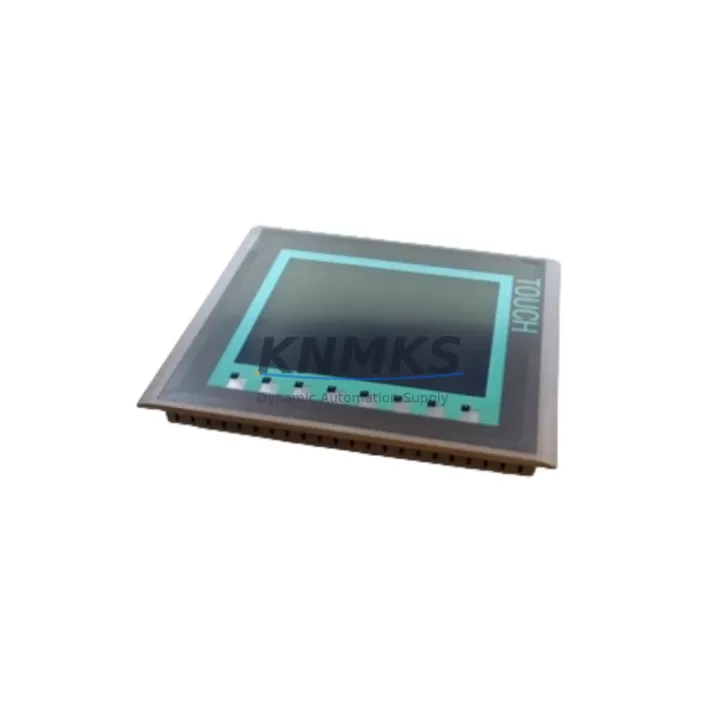
Siemens 6AV6647-0AE11-3AX0 Maintenance-Proven Spare KTP400: Reliable HMI Replacement for Continuous Factory Uptime
The Siemens 6AV6647-0AE11-3AX0 is a SIMATIC KTP400 Basic DP 4-inch key/touch HMI panel designed for PROFIBUS DP communication in industrial control environments. As a maintenance-proven spare part, this unit is essential for facilities running Siemens S7-300, S7-400, or compatible PLC platforms where unplanned HMI failure can halt production lines, disrupt process visibility, and trigger costly downtime events. Stocking a validated replacement of the 6AV6647-0AE11-3AX0 is a fundamental element of any proactive spare parts strategy in petrochemical, water treatment, power generation, and discrete manufacturing environments.
Every unit supplied by KNMKS undergoes pre-shipment functional verification, including display integrity, keypad response, PROFIBUS DP communication initialization, and power-on self-test. This ensures that when your maintenance team installs the replacement panel on-site, the unit is ready for immediate commissioning without additional bench testing. A support terms confirmed by quotation is included with every shipment, providing procurement engineers with the assurance needed for long-cycle spare parts planning.
Spare Maintenance Table
| Parameter | Specification |
|---|---|
| Part Number / SKU | 6AV6647-0AE11-3AX0 |
| Series | SIMATIC KTP400 Basic DP |
| Display Size | 4.3-inch TFT widescreen |
| Interface | PROFIBUS DP (RS-485) |
| Keys | 4 function keys (configurable) |
| Supply Voltage | 24 V DC (20.4–28.8 V) |
| Power Consumption | Approx. 4.5 W typical |
| Operating Temperature | 0 °C to +50 °C |
| Protection Rating | IP65 (front panel) |
| Compatible PLCs | Siemens S7-300, S7-400, S7-1200 (via DP adapter) |
| Configuration Software | WinCC flexible 2008 SP3 or TIA Portal V13+ |
| Country of Origin | Germany |
| Weight | Approx. 2,300 g (with packaging) |
| Support terms | 12 Months — KNMKS Verified |
| Pre-Shipment Test | Power-on, display, keypad, PROFIBUS DP initialization |
| Delivery | Global express shipping available |
Maintenance Planning for Continuous Operation
When replacing the 6AV6647-0AE11-3AX0 in the field, maintenance engineers should treat the HMI swap as part of a broader control cabinet inspection. The PROFIBUS DP network segment connected to this panel should be verified for correct termination resistance (typically 220 Ω at each end of the bus segment) and bus address conflicts before the new panel is brought online. A faulty PROFIBUS connector or degraded cable shielding can cause the replacement HMI to exhibit intermittent communication faults that are easily misdiagnosed as a panel defect.
The 24 V DC power supply feeding the KTP400 should be checked for output stability and ripple. Units such as the Siemens SITOP PSU100S or equivalent 24 V regulated DIN-rail power supplies are commonly paired with this HMI in S7-based control cabinets. If the supply voltage has been marginal or subject to transient spikes, it is advisable to inspect or replace the power supply module concurrently with the HMI to prevent repeat failures. Inline fuse protection — typically a 2 A slow-blow fuse on the 24 V feed — should also be inspected and replaced if discolored or showing signs of thermal stress.
For cabinets running S7-300 or S7-400 CPUs, the CPU module itself (such as the 6ES7315-2EH14-0AB0 or 6ES7416-3XR05-0AB0) and the associated IM interface modules should be checked for firmware compatibility with the HMI project version. If the WinCC flexible project was compiled under an older runtime version, re-downloading the project to the new 6AV6647-0AE11-3AX0 panel via the PROFIBUS DP connection or USB service port is recommended before returning the system to production. Signal modules (SM321 digital input, SM322 digital output) connected to the same rack should be visually inspected for indicator LED status to confirm the PLC program is executing normally after the HMI replacement.
In facilities where the KTP400 is used for operator interaction with motor control or drive systems, the associated SINAMICS or MICROMASTER drive parameters should be verified post-replacement to ensure no setpoint or reference values were lost during the panel outage. Terminal blocks and I/O wiring within the cabinet should be checked for loose connections, particularly on the PROFIBUS DP sub-D connector (9-pin) attached to the HMI. Relay output modules and safety relay units in the same cabinet should be functionally tested as part of the return-to-service checklist.
Site Replacement Workflow
Step 1 — Isolation and Documentation: Before removing the existing 6AV6647-0AE11-3AX0, photograph the PROFIBUS DP connector wiring, note the bus address set on the panel (accessible via the Start Center menu), and record the project name and runtime version displayed on the panel. This information is critical for rapid recommissioning of the replacement unit.
Step 2 — Panel Removal: Isolate the 24 V DC supply to the HMI. Disconnect the PROFIBUS DP connector and the power terminals. Release the panel mounting clips from the rear of the cutout (standard 122 mm × 92 mm cutout for KTP400) and remove the unit. Inspect the cutout gasket for damage and replace if necessary to maintain IP65 sealing on the new panel.
Step 3 — New Panel Preparation: Set the PROFIBUS DP bus address on the replacement 6AV6647-0AE11-3AX0 to match the documented address of the removed unit. Connect the 24 V DC power supply and PROFIBUS DP connector. Power on the panel and confirm the Start Center screen appears without error codes.
Step 4 — Project Download: Using a PC with WinCC flexible 2008 SP3 or TIA Portal V13+ and the original project file, download the HMI project to the new panel via the PROFIBUS DP connection or USB service interface. Verify all screens, alarms, and tag connections are functional before releasing the system to operators.
Step 5 — Return to Service: Restore the 24 V DC supply, confirm PROFIBUS DP communication status (green LED on panel), and perform a brief operational check with the control room operator. Log the replacement in the maintenance management system with the new panel serial number and installation date.
This structured workflow minimizes downtime to under two hours for experienced maintenance teams and eliminates the risk of bus conflicts or project version mismatches that can extend outages unnecessarily.
Spare Parts Support FAQ
Q1: Is the 6AV6647-0AE11-3AX0 compatible with my existing WinCC flexible project without modification?
Yes, provided the replacement panel is the same hardware revision and the project was compiled for the KTP400 Basic DP runtime. If the original panel was running a different firmware version, a project re-download is recommended to ensure full compatibility. KNMKS can advise on firmware version matching based on your project file details.
Q2: What is included in the support terms confirmed by quotation and pre-shipment testing?
Every 6AV6647-0AE11-3AX0 unit shipped by KNMKS undergoes a pre-shipment functional test covering power-on self-test, display uniformity, keypad response, and PROFIBUS DP communication initialization. The support terms confirmed by quotation cover manufacturing defects and functional failures under normal operating conditions. Units showing damage from incorrect supply voltage, reversed polarity, or physical impact are excluded from support terms coverage.
Q3: Can KNMKS supply multiple units for a long-term spare parts inventory program?
Yes. KNMKS maintains stock of the 6AV6647-0AE11-3AX0 and can fulfill both single-unit emergency orders and multi-unit blanket orders for annual maintenance programs. For facilities managing multiple S7-based control cabinets, we recommend holding a minimum of one KTP400 spare per five installed panels to support a 12–36 month maintenance horizon without supply risk.
Q4: How do I verify the panel is genuine and not a counterfeit unit?
All units supplied by KNMKS are sourced through verified industrial channels. Each panel carries the original Siemens product label with the full part number, serial number, and CE/UL markings. The MLFB code (6AV6647-0AE11-3AX0) is laser-etched on the rear housing. Upon request, KNMKS can provide a pre-shipment inspection report and photographic documentation of the unit before dispatch.
© 2026 KNMKS. All rights reserved.
Original Source: https://knmks.com
Contact: admin@knmks.com | +86 18359268345
Product Identification
- Brand / Ecosystem
-
Siemens
Siemens - Model / Series
-
6AV6647-0AE11-3AX0
SIMATIC Series - Product Family
- HMI & Displays
- Availability Status
- Available on request after model and quantity confirmation
- Inquiry Type
- B2B RFQ, replacement inquiry and project spare-part request
- Pre-Quote Check
- Exact SKU, brand, series, quantity, nameplate photos and destination country are checked before quotation
System Path
Where this product fits in the KNMKS automation structure.
Specification & Inquiry Focus
- Display range
- Operator panels and touch screens
- Common needs
- Screen size, interface and version matching
- Project support
- Retrofit, spare unit and panel replacement
Buyer Confirmation
Information KNMKS checks before replying.
- Exact model
- 6AV6647-0AE11-3AX0
- Brand / ecosystem
- Siemens
- Product family
- HMI & Displays
- Application note
- Replacement, maintenance, project build or spare-part list
- Useful photos
- Nameplate, installed unit, cabinet layout or connector side
- Delivery details
- Quantity, destination country and target schedule
Document Support
Files and notes can be confirmed during quotation.
- Product photos or nameplate confirmation when available
- Packing and delivery notes before quotation confirmation
- Support scope and delivery terms confirmed per inquiry
- Export document coordination for qualified B2B requests
Inquiry Support
- Panel size and interface confirmation
- Replacement unit inquiry for discontinued HMIs
- Protective packaging for display shipment
What to Send Us
- Brand and exact model number: Siemens 6AV6647-0AE11-3AX0
- Quantity and required delivery time
- Application, replacement requirement or nameplate photo
- Destination country and shipping preference
RFQ Preparation
This is a product inquiry page built for RFQ communication.
Fast Model Check
Send this model to KNMKS for confirmation.
Include quantity, destination country and photos if this is a maintenance replacement. The inquiry will be saved with a reference number after submission.
Brand & Compatibility Note
KNMKS displays automation product information for well-known industrial brand ecosystems and compatible replacement references. Brand names are used for product identification and compatibility reference only; final availability and commercial terms are confirmed per quotation.
 Manufacturing
 Machine Tools
 Packaging
 Energy & Power



 PLCs & Controllers
 Servo Systems
 Variable Frequency Drives
 Sensors