
Overview
Siemens 6AV6647-0AD11-3AX0 Maintenance-Proven Spare Part for Factory Uptime
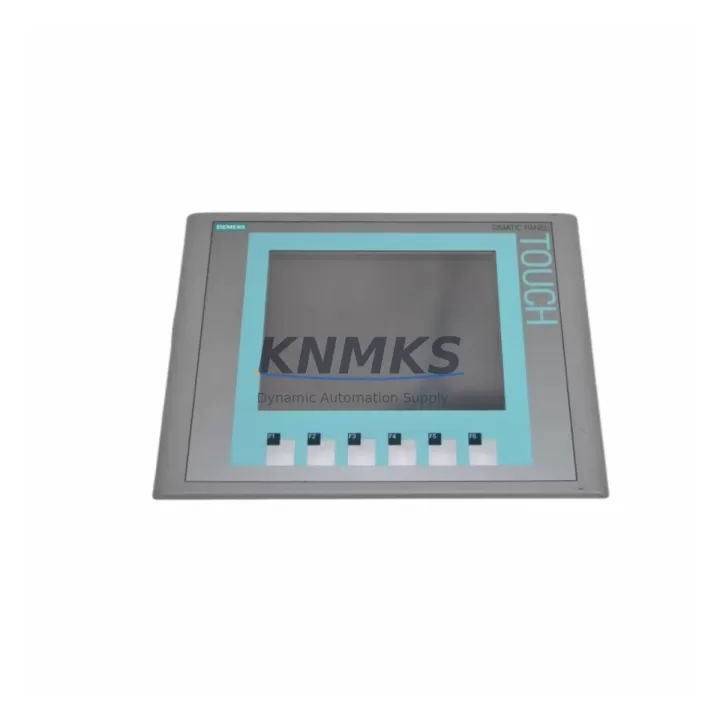
The Siemens 6AV6647-0AD11-3AX0 is the KTP600 Basic Color PN HMI panel — a 6-inch PROFINET-connected operator interface widely deployed across S7-300, S7-400, and S7-1500 PLC architectures in discrete manufacturing, process automation, and utilities. When this panel fails or degrades, the operator loses real-time process visibility, alarm acknowledgment capability, and manual override access — all of which directly extend unplanned downtime. Holding a verified original spare of the 6AV6647-0AD11-3AX0 in your maintenance inventory is one of the most cost-effective decisions a maintenance or procurement engineer can make for any facility running Siemens SIMATIC HMI infrastructure.
This unit ships pre-tested, sealed in anti-static packaging, and is backed by a support terms confirmed by quotation covering manufacturing defects and functional integrity. Every unit undergoes power-on verification and communication handshake testing prior to dispatch, ensuring the replacement panel is ready for immediate commissioning on arrival at site.
Spare Maintenance Table
| SKU / Part Number | 6AV6647-0AD11-3AX0 |
| Product Series | SIMATIC HMI KTP600 Basic Color PN |
| Brand | Siemens |
| Display | 6″ TFT Color, 256 colors, 320 × 234 px |
| Interface | PROFINET (RJ45), USB Type-A (host) |
| PLC Compatibility | S7-300, S7-400, S7-1200, S7-1500, WinCC |
| Supply Voltage | 24 V DC (20.4–28.8 V DC) |
| Power Consumption | Approx. 6 W typical |
| Protection Rating | IP65 (front panel), IP20 (rear) |
| Operating Temperature | 0 °C to +50 °C |
| Storage Temperature | −20 °C to +60 °C |
| Mounting | Panel cutout 192 × 138 mm, snap-fit clips |
| Origin | Germany |
| Support terms | 12 Months — covers manufacturing defects and functional integrity |
| Condition | Original New / Tested Stock |
| Dispatch | Pre-shipment power-on and PROFINET handshake tested |
Maintenance Planning for Continuous Operation
Replacing the 6AV6647-0AD11-3AX0 is rarely an isolated task. A thorough site replacement should include inspection of the entire HMI power and communication circuit to prevent repeat failures and ensure stable long-term operation. Maintenance engineers should verify the 24 V DC panel power supply — typically a SITOP PSU100S or equivalent — for output ripple and voltage stability before connecting the new panel, as an unstable supply is a leading cause of premature HMI failure.
The PROFINET patch cable and RJ45 connector at the panel port should be replaced or at minimum re-terminated if the cable shows any signs of jacket damage, bend stress near the connector, or intermittent link-loss history. For installations where the KTP600 shares a PROFINET segment with S7-1500 CPUs or ET 200SP distributed I/O, the network switch port should be checked for autonegotiation errors and port statistics reset after panel swap.
The 24 V DC fuse or circuit breaker protecting the HMI supply branch should be inspected and replaced if it shows any signs of thermal stress or nuisance tripping history. In control cabinets where the KTP600 is co-located with SIMATIC S7-300 or S7-400 CPU modules, the backplane bus connectors and CPU memory card should be verified for seating integrity — a loose CPU or corrupted project can prevent the replacement HMI from establishing a valid PROFINET connection.
For facilities running WinCC flexible or TIA Portal HMI projects, ensure the project version compiled for the 6AV6647-0AD11-3AX0 is archived and accessible before beginning the swap. If the panel is part of a redundant visualization architecture alongside a SIMATIC IPC or PC-based SCADA station, confirm that the SCADA system does not hold an exclusive PROFINET device name lock that would conflict with the replacement panel’s commissioning. Additionally, inspect any signal isolators or surge protection devices on the 24 V supply line — these are often overlooked during HMI replacement but are critical for long-term panel protection in environments with variable grid quality.
Site Replacement Workflow
The 6AV6647-0AD11-3AX0 is a direct form-fit-function replacement for earlier KTP600 Basic Color PN revisions. The panel cutout dimensions (192 × 138 mm) and PROFINET interface are unchanged across production revisions, allowing drop-in installation without mechanical modification to the control cabinet door.
Step 1 — Isolation: De-energize the HMI supply branch at the 24 V DC distribution terminal. Confirm zero voltage at the panel connector before disconnecting.
Step 2 — Removal: Release the snap-fit mounting clips from the rear using the standard HMI mounting tool. Disconnect the PROFINET RJ45 cable and 24 V DC power connector. Label connectors if multiple cables are present.
Step 3 — Inspection: Inspect the panel cutout gasket for compression set or damage. Replace the gasket if IP65 integrity is required. Clean the cutout edges of any corrosion or debris.
Step 4 — Installation: Insert the replacement 6AV6647-0AD11-3AX0 into the cutout and engage all mounting clips evenly. Reconnect the 24 V DC supply and PROFINET cable.
Step 5 — Commissioning: Apply power and confirm the panel boots to the project start screen. Verify PROFINET device name assignment via TIA Portal or STEP 7 online diagnostics. Confirm all process values, alarms, and operator controls are functional before returning the line to production.
Step 6 — Documentation: Record the replacement in the maintenance log with the new panel serial number, date, and technician ID. Update the spare parts inventory to trigger reorder of a replacement buffer unit.
Spare Parts Support FAQ
Q1: Is the 6AV6647-0AD11-3AX0 compatible with all KTP600 Basic Color PN installations?
Yes. The 6AV6647-0AD11-3AX0 is the standard catalog part number for the KTP600 Basic Color PN and is compatible with all S7-300, S7-400, S7-1200, and S7-1500 PLC systems configured for PROFINET HMI communication. Projects compiled in TIA Portal or WinCC flexible for the KTP600 Basic Color PN device type will operate on this unit without modification.
Q2: What testing is performed before dispatch?
Every unit undergoes power-on verification at 24 V DC, PROFINET link establishment test, and display pixel integrity check. Units that do not pass all three stages are quarantined and not shipped. A test report reference is available on request for quality-controlled procurement environments.
Q3: What is the recommended inventory strategy for this part?
For facilities operating more than three KTP600 panels, we recommend maintaining a minimum of one buffer unit on-site at all times. Given typical OEM lead times of 8–16 weeks for new production, a single on-site spare eliminates the risk of extended downtime during the procurement cycle. Annual inspection of the buffer unit’s storage condition (temperature, humidity, anti-static packaging integrity) is advised.
Q4: Does the support terms confirmed by quotation cover field installation damage?
The support terms confirmed by quotation cover manufacturing defects, component failures, and functional integrity under normal operating conditions as specified in the Siemens KTP600 datasheet. Physical damage resulting from incorrect installation voltage, reverse polarity, or mechanical impact is not covered. Support requests are processed with photographic documentation of the failed unit and the installation environment.
© 2026 KNMKS. All rights reserved.
Original Source: https://knmks.com
Contact: admin@knmks.com | +86 18359268345
Product Identification
- Brand / Ecosystem
-
Siemens
Siemens - Model / Series
-
6AV6647-0AD11-3AX0
SIMATIC Series - Product Family
- HMI & Displays
- Availability Status
- Available on request after model and quantity confirmation
- Inquiry Type
- B2B RFQ, replacement inquiry and project spare-part request
- Pre-Quote Check
- Exact SKU, brand, series, quantity, nameplate photos and destination country are checked before quotation
System Path
Where this product fits in the KNMKS automation structure.
Specification & Inquiry Focus
- Display range
- Operator panels and touch screens
- Common needs
- Screen size, interface and version matching
- Project support
- Retrofit, spare unit and panel replacement
Buyer Confirmation
Information KNMKS checks before replying.
- Exact model
- 6AV6647-0AD11-3AX0
- Brand / ecosystem
- Siemens
- Product family
- HMI & Displays
- Application note
- Replacement, maintenance, project build or spare-part list
- Useful photos
- Nameplate, installed unit, cabinet layout or connector side
- Delivery details
- Quantity, destination country and target schedule
Document Support
Files and notes can be confirmed during quotation.
- Product photos or nameplate confirmation when available
- Packing and delivery notes before quotation confirmation
- Support scope and delivery terms confirmed per inquiry
- Export document coordination for qualified B2B requests
Inquiry Support
- Panel size and interface confirmation
- Replacement unit inquiry for discontinued HMIs
- Protective packaging for display shipment
What to Send Us
- Brand and exact model number: Siemens 6AV6647-0AD11-3AX0
- Quantity and required delivery time
- Application, replacement requirement or nameplate photo
- Destination country and shipping preference
RFQ Preparation
This is a product inquiry page built for RFQ communication.
Fast Model Check
Send this model to KNMKS for confirmation.
Include quantity, destination country and photos if this is a maintenance replacement. The inquiry will be saved with a reference number after submission.
Brand & Compatibility Note
KNMKS displays automation product information for well-known industrial brand ecosystems and compatible replacement references. Brand names are used for product identification and compatibility reference only; final availability and commercial terms are confirmed per quotation.
 Manufacturing
 Machine Tools
 Packaging
 Energy & Power



 PLCs & Controllers
 Servo Systems
 Variable Frequency Drives
 Sensors