
Overview
Siemens 6AV6647-0AC11-3AX0 Migration-Ready HMI Panel: Legacy System Retrofit & Compatibility Upgrade
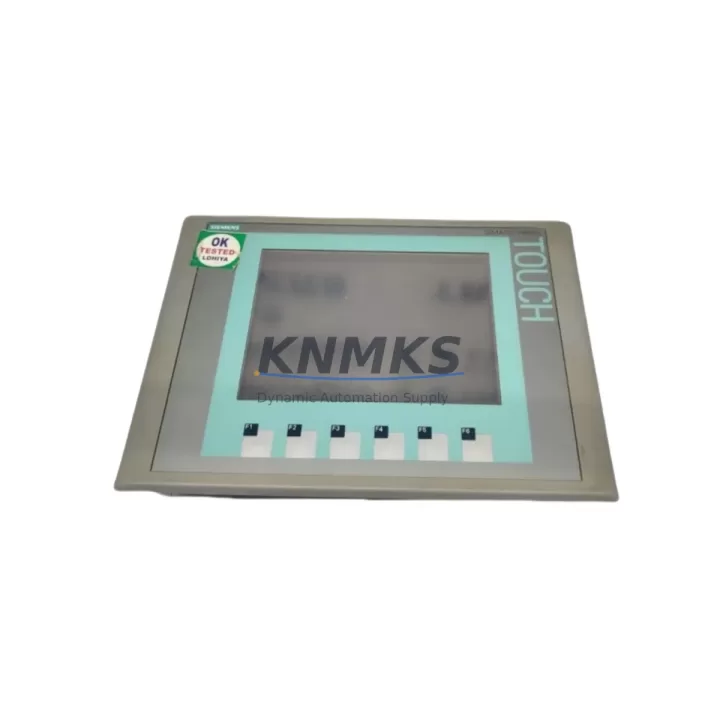
The Siemens 6AV6647-0AC11-3AX0 is a KTP600 Basic Color DP HMI panel engineered for direct integration into existing SIMATIC automation environments. As legacy Siemens OP/TP series panels reach end-of-life and spare parts become increasingly scarce, the 6AV6647-0AC11-3AX0 provides a validated, migration-ready replacement path that preserves existing control logic, PROFIBUS network topology, and operator interface workflows without requiring a full system redesign.
This unit features a 5.7-inch TFT color display with 256-color depth, 6 function keys, and native PROFIBUS DP connectivity — making it a direct functional successor to discontinued panels such as the OP7, OP17, TP170B, and TP177B DP. Engineers managing aging SIMATIC S7-300 or S7-400 control systems will find the 6AV6647-0AC11-3AX0 particularly well-suited for brownfield retrofit projects where minimizing downtime and preserving validated HMI screen logic are critical priorities.
For facilities running multi-panel control cabinets, the 6AV6647-0AC11-3AX0 integrates cleanly alongside SIMATIC S7-300 CPUs such as the CPU 315-2 DP or CPU 317-2 DP, sharing the same PROFIBUS DP segment without requiring additional network configuration. When combined with a CP 342-5 communications processor or an ET 200S distributed I/O station, the panel supports distributed visualization across multiple control zones — a common requirement in process plant and packaging line modernization projects.
Migration projects involving the 6AV6647-0AC11-3AX0 typically require engineers to verify the following before cutover: 24 VDC power supply capacity at the control cabinet (minimum 1.2 A draw), terminal block wiring compatibility with the existing PROFIBUS DP sub-D connector pinout, panel cutout dimensions (192 mm × 138 mm), PROFIBUS node address assignment to avoid conflicts with existing S7 network devices, and WinCC flexible project file compatibility for screen migration from legacy TP/OP projects. In most cases, existing HMI screen projects developed in ProTool or early WinCC flexible versions can be converted and reloaded via the PC/PPI cable or MPI/PROFIBUS programming interface without rebuilding from scratch.
For control systems that also incorporate SIMATIC S7-200 PLCs or legacy Micromaster 440 drive networks, the PROFIBUS DP port on the 6AV6647-0AC11-3AX0 supports multi-master configurations, allowing the HMI to coexist with existing S7 CPU masters on the same bus segment. This eliminates the need to restructure the PROFIBUS network during the panel swap, significantly reducing retrofit risk and on-site engineering hours.
In cabinet upgrade scenarios where space is constrained, the KTP600 form factor (panel depth: 46 mm) is compatible with standard 35 mm DIN rail mounting arrangements and fits within the same cutout envelope as most 5.7-inch legacy Siemens panels. This dimensional compatibility is a key advantage when retrofitting older Rittal or Hoffman enclosures where machining new cutouts is not feasible during a planned maintenance window.
Firmware compatibility should be confirmed prior to deployment: the 6AV6647-0AC11-3AX0 ships with a factory-loaded firmware version compatible with WinCC flexible 2008 SP3 and later. For projects using TIA Portal V13 or higher, the panel is supported under the SIMATIC WinCC Basic engineering environment, enabling seamless project transfer via Ethernet or USB without requiring a dedicated programming cable adapter.
All units supplied by KNMKS are tested prior to shipment, including power-on verification, display function check, PROFIBUS port continuity test, and firmware version confirmation. Each unit is covered by a support terms confirmed by quotation against manufacturing defects and is available from regional stock to support urgent maintenance and unplanned breakdown scenarios.
Migration Compatibility Table
| Parameter | Details |
|---|---|
| SKU / Part Number | 6AV6647-0AC11-3AX0 |
| Series | SIMATIC KTP600 Basic Color DP |
| Display | 5.7-inch TFT Color, 256 colors, 320 × 240 px |
| Communication Interface | PROFIBUS DP (RS-485, 9-pin sub-D) |
| Power Supply | 24 VDC (20.4–28.8 V), approx. 1.2 A |
| Panel Cutout Dimensions | 192 mm × 138 mm |
| Panel Depth | 46 mm |
| Function Keys | 6 configurable function keys |
| Legacy Replacements | OP7, OP17, TP170B, TP177B DP |
| Compatible PLCs | SIMATIC S7-200, S7-300, S7-400 |
| Engineering Software | WinCC flexible 2008 SP3+, TIA Portal V13+ (WinCC Basic) |
| Installation Requirement | Standard panel cutout; no additional adapter required |
| Commissioning Interface | USB / MPI / PROFIBUS programming port |
| Firmware Pre-loaded | Yes – factory verified before shipment |
| Support terms | 12 Months – covers manufacturing defects |
| Origin | Germany |
| Stock Availability | Regional warehouse stock – fast dispatch |
Retrofit Planning for Existing Automation Systems
Successful integration of the 6AV6647-0AC11-3AX0 into a brownfield automation environment requires a structured pre-retrofit assessment. Engineers should begin by auditing the existing PROFIBUS DP segment to document all active node addresses, baud rate settings (typically 1.5 Mbps or 12 Mbps for S7-300 networks), and cable termination status at both ends of the bus. The 6AV6647-0AC11-3AX0 must be assigned a unique PROFIBUS address (default: 1) that does not conflict with existing S7 CPU masters, ET 200S remote I/O stations, or Micromaster 440 drive nodes already present on the network.
Power supply verification is a critical pre-installation step. The 6AV6647-0AC11-3AX0 draws approximately 1.2 A at 24 VDC. In cabinets where a SITOP PSU100S 24V/5A or equivalent power supply is already installed, engineers should confirm that the remaining available current budget — after accounting for S7-300 CPU modules, SM 321/SM 322 digital I/O modules, and any CP 342-5 communications processors — is sufficient to support the new HMI without triggering overcurrent protection on the 24 VDC rail.
For projects that also involve I/O expansion or signal isolation, the retrofit scope may extend to include additional SM 331 analog input modules or signal isolators to condition legacy 4–20 mA transmitter signals before they reach the S7-300 backplane. In these cases, the HMI project should be updated to reflect any new tag addresses or data block structures introduced by the expanded I/O configuration, ensuring that operator screens display accurate process values immediately after cutover.
HMI screen migration from legacy TP170B or OP17 projects is typically performed using the WinCC flexible Migration Wizard, which converts ProTool project files into WinCC flexible format. Engineers should review all converted screens for tag mapping accuracy, alarm configuration, and recipe data structures before downloading the project to the 6AV6647-0AC11-3AX0. A SIMATIC PC adapter USB or MPI/PROFIBUS programming cable is required for the initial project download if Ethernet connectivity is not available at the panel location.
Downtime Control During System Migration
Minimizing unplanned downtime during HMI panel replacement is a primary concern for maintenance teams operating continuous process lines or batch manufacturing systems. The 6AV6647-0AC11-3AX0 supports a structured hot-swap preparation methodology that allows the replacement panel to be pre-configured, project-loaded, and tested offline before the actual cutover window begins.
The recommended approach is to load the converted WinCC flexible project onto the replacement 6AV6647-0AC11-3AX0 using a laptop with WinCC flexible 2008 SP3 or TIA Portal WinCC Basic installed, connected via USB before the panel is installed in the cabinet. This offline pre-loading step eliminates the need for on-site programming during the maintenance window, reducing the active cutover time to panel removal, physical installation, PROFIBUS cable reconnection, and power-on verification — typically achievable within 30–45 minutes for a prepared team.
To protect existing PLC program logic during the HMI swap, engineers should confirm that the S7-300 CPU remains in RUN mode throughout the panel replacement. The PROFIBUS DP master (S7 CPU) will continue executing the control program and maintaining I/O states even when the HMI node is temporarily disconnected from the bus. This ensures that field devices — including valve actuators, motor starters, and analog control loops — remain under PLC control without interruption during the panel changeover.
Post-installation commissioning should include a full alarm acknowledgment test, recipe download verification (if applicable), and a communications diagnostics check using the PROFIBUS diagnostic function in the S7 CPU to confirm that the new HMI node is recognized at the correct bus address with no communication errors. Any residual bus errors should be investigated before returning the system to normal production operation.
Retrofit Support FAQ
Q1: Is the 6AV6647-0AC11-3AX0 a direct drop-in replacement for the TP177B DP?
A: The 6AV6647-0AC11-3AX0 is functionally compatible with the TP177B DP in terms of PROFIBUS DP connectivity and panel cutout dimensions. The HMI project must be migrated using the WinCC flexible Migration Wizard. Screen layouts and tag mappings should be reviewed and validated after migration before going live.
Q2: What commissioning steps are required after installation?
A: After physical installation and PROFIBUS cable connection, assign the correct PROFIBUS node address via the panel’s Start Center menu, download the pre-loaded WinCC flexible project, and perform a communications diagnostics check from the S7 CPU to confirm the HMI is recognized on the bus. Verify all operator screens display correct process values before releasing to production.
Q3: Can the existing PROFIBUS wiring be reused?
A: Yes, in most cases. The 6AV6647-0AC11-3AX0 uses a standard 9-pin sub-D PROFIBUS DP connector compatible with existing Siemens PROFIBUS cables. Inspect the cable for physical damage and verify termination resistor status at both ends of the bus segment before reconnecting.
Q4: What support terms and stock availability does KNMKS provide?
A: All units are covered by a support terms confirmed by quotation against manufacturing defects. KNMKS maintains regional warehouse stock to support urgent maintenance requirements, with fast dispatch available for confirmed orders. Pre-shipment testing includes power-on verification, display function check, and PROFIBUS port continuity confirmation.
© 2026 KNMKS. All rights reserved.
Original Source: https://knmks.com
Contact: admin@knmks.com | +86 18359268345
Product Identification
- Brand / Ecosystem
-
Siemens
Siemens - Model / Series
-
6AV6647-0AC11-3AX0
SIMATIC Series - Product Family
- HMI & Displays
- Availability Status
- Available on request after model and quantity confirmation
- Inquiry Type
- B2B RFQ, replacement inquiry and project spare-part request
- Pre-Quote Check
- Exact SKU, brand, series, quantity, nameplate photos and destination country are checked before quotation
System Path
Where this product fits in the KNMKS automation structure.
Specification & Inquiry Focus
- Display range
- Operator panels and touch screens
- Common needs
- Screen size, interface and version matching
- Project support
- Retrofit, spare unit and panel replacement
Buyer Confirmation
Information KNMKS checks before replying.
- Exact model
- 6AV6647-0AC11-3AX0
- Brand / ecosystem
- Siemens
- Product family
- HMI & Displays
- Application note
- Replacement, maintenance, project build or spare-part list
- Useful photos
- Nameplate, installed unit, cabinet layout or connector side
- Delivery details
- Quantity, destination country and target schedule
Document Support
Files and notes can be confirmed during quotation.
- Product photos or nameplate confirmation when available
- Packing and delivery notes before quotation confirmation
- Support scope and delivery terms confirmed per inquiry
- Export document coordination for qualified B2B requests
Inquiry Support
- Panel size and interface confirmation
- Replacement unit inquiry for discontinued HMIs
- Protective packaging for display shipment
What to Send Us
- Brand and exact model number: Siemens 6AV6647-0AC11-3AX0
- Quantity and required delivery time
- Application, replacement requirement or nameplate photo
- Destination country and shipping preference
RFQ Preparation
This is a product inquiry page built for RFQ communication.
Fast Model Check
Send this model to KNMKS for confirmation.
Include quantity, destination country and photos if this is a maintenance replacement. The inquiry will be saved with a reference number after submission.
Brand & Compatibility Note
KNMKS displays automation product information for well-known industrial brand ecosystems and compatible replacement references. Brand names are used for product identification and compatibility reference only; final availability and commercial terms are confirmed per quotation.
 Manufacturing
 Machine Tools
 Packaging
 Energy & Power



 PLCs & Controllers
 Servo Systems
 Variable Frequency Drives
 Sensors