
Overview
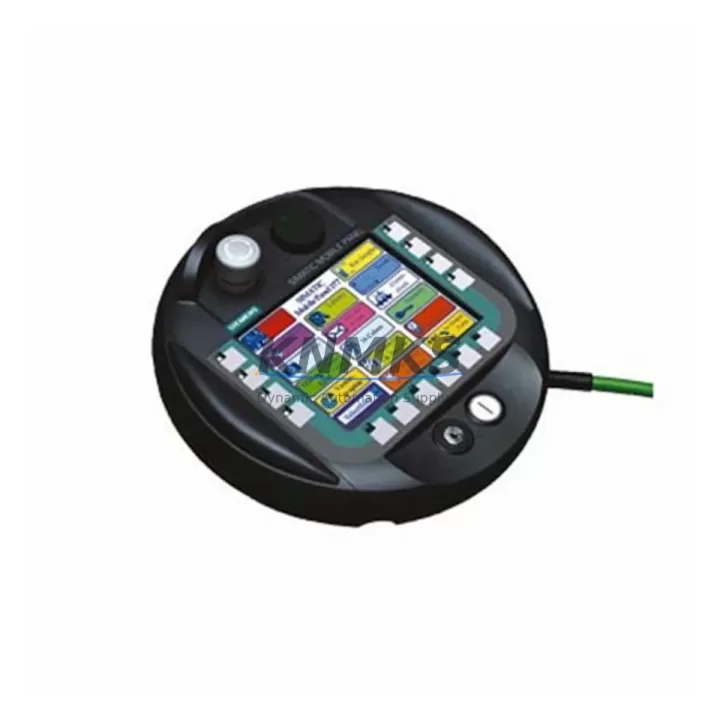
Siemens 6AV6645-7AB10-1AS0 Spare Part for Factory Uptime
The Siemens 6AV6645-7AB10-1AS0 is a SIMATIC Mobile Panel 277 WLAN unit — a ruggedized, wireless HMI designed for mobile operator control in demanding industrial environments. As a maintenance-proven spare part, it supports continuous factory operation by enabling rapid field replacement of failed or degraded mobile panels in SIMATIC S7-300, S7-400, and WinCC-based automation systems. With pre-shipment functional testing, verified WLAN compatibility, and a support terms confirmed by quotation, this unit is stocked for emergency dispatch and planned annual maintenance cycles alike.
Maintenance engineers and procurement teams managing SIMATIC-based production lines, assembly cells, or process control cabinets rely on the MP277 WLAN panel for mobile visualization, parameter adjustment, and fault acknowledgment directly at the machine. When this panel fails — due to display damage, WLAN module degradation, battery failure, or firmware corruption — production visibility is lost and operator response time increases. Holding a verified spare of the 6AV6645-7AB10-1AS0 eliminates unplanned downtime caused by HMI unavailability.
Spare Maintenance Table
| Parameter | Specification |
|---|---|
| Part Number | 6AV6645-7AB10-1AS0 |
| Series | SIMATIC Mobile Panel 277 WLAN |
| Brand | Siemens |
| Display | 7″ TFT Color, 800 × 480 px |
| Communication | WLAN IEEE 802.11b/g, PROFINET, MPI/PROFIBUS via adapter |
| Operating Voltage | 24 V DC (via charging station or cable) |
| Protection Rating | IP65 (front panel) |
| Operating Temperature | 0 °C to +50 °C |
| Compatible Systems | SIMATIC S7-300, S7-400, WinCC Flexible, TIA Portal |
| Origin | Germany |
| Support terms | 12 Months |
| Pre-Shipment Testing | Yes — functional and WLAN connectivity verified |
| Dispatch | Global express shipping available |
Maintenance Planning for Continuous Operation
When replacing the 6AV6645-7AB10-1AS0 in a SIMATIC control environment, a thorough site inspection should accompany the HMI swap to prevent repeat failures and ensure system integrity. Begin by verifying the WLAN access point infrastructure — degraded AP signal strength or misconfigured SSID/security settings are a common root cause of MP277 WLAN disconnection faults. Check the 24 V DC power supply feeding the charging station (e.g., Siemens SITOP PSU100S or equivalent) for voltage stability and ripple within specification.
Inspect the PROFINET switch ports and Ethernet patch cables connecting the WLAN AP to the control cabinet backbone — damaged RJ45 connectors or degraded Cat5e/Cat6 cabling can cause intermittent communication loss that is misdiagnosed as HMI failure. If the MP277 is used with a PROFIBUS MPI adapter (e.g., 6AV6671-5AE11-0AX0), verify adapter firmware version and cable shielding continuity.
For sites running WinCC Flexible or TIA Portal HMI projects, confirm that the replacement panel’s firmware version matches the project’s target version before deployment — a firmware mismatch will prevent project download and extend recovery time. Maintain a backup of the HMI project on a dedicated engineering station or USB drive stored in the control cabinet.
Additionally, inspect the SIMATIC S7-300 or S7-400 CPU (e.g., 6ES7315-2EH14-0AB0 or 6ES7414-3XM07-0AB0) for active diagnostic faults that may have contributed to the HMI failure event. Check I/O module status LEDs on SM321/SM322 digital I/O modules and SM331/SM332 analog modules for channel faults. Review the CP communication processor (e.g., CP 343-1 or CP 443-1) for PROFINET connection errors logged in the diagnostic buffer. Where signal isolation is required between field devices and the CPU, verify signal isolators or barriers (e.g., Siemens SITRANS or equivalent) are within calibration and free of ground faults.
Site Replacement Workflow
Step 1 — Isolate and document: Place the SIMATIC system in a safe maintenance state. Record the current HMI project version, WLAN configuration (SSID, IP address, subnet), and any active alarms from the WinCC or TIA Portal alarm log before powering down the failed panel.
Step 2 — Physical swap: Remove the failed 6AV6645-7AB10-1AS0 from its charging station or cable connection. Install the replacement unit. Verify the charging station contacts are clean and undamaged. Power on the replacement panel and confirm boot sequence completes without hardware fault indicators.
Step 3 — WLAN commissioning: Connect to the site WLAN network using the stored SSID and security credentials. Confirm IP address assignment (static or DHCP as per site configuration). Verify PROFINET or MPI communication is established with the target PLC — check the connection status icon on the MP277 status bar.
Step 4 — Project download and validation: Download the HMI project from the engineering station using WinCC Flexible or TIA Portal. Perform a full screen navigation test, alarm acknowledgment test, and I/O write test on non-critical outputs to confirm end-to-end system functionality before returning the line to production.
Step 5 — Documentation and spare replenishment: Log the replacement event in the site maintenance register. Initiate a replenishment order for a new 6AV6645-7AB10-1AS0 spare to restore buffer stock. Update the spare parts list with the replacement unit’s serial number and support terms start date.
Spare Parts Support FAQ
Q: Is the 6AV6645-7AB10-1AS0 compatible with TIA Portal V15 and later HMI projects?
A: The SIMATIC MP277 WLAN panel is compatible with WinCC Flexible 2008 SP3 and later. For TIA Portal projects, compatibility depends on the panel firmware version and the TIA Portal version used. We recommend confirming the firmware version of the supplied unit against your project’s target device version before deployment. Our technical team can advise on firmware matching prior to shipment.
Q: What does the support terms confirmed by quotation cover for this spare part?
A: The support terms confirmed by quotation cover manufacturing defects, functional failures under normal operating conditions, and WLAN module performance. It does not cover physical damage caused by incorrect installation, overvoltage events, or environmental exposure beyond IP65 rated conditions. All units undergo pre-shipment functional and WLAN connectivity testing before dispatch.
Q: Can this unit replace older SIMATIC Mobile Panel 277 variants with different order numbers?
A: The 6AV6645-7AB10-1AS0 is a specific WLAN-equipped variant of the MP277 series. Cross-compatibility with other MP277 order numbers (e.g., wired Ethernet variants) depends on the HMI project configuration and communication interface used at the site. We recommend providing your existing panel order number and site communication topology for a compatibility assessment before ordering.
Q: What is your lead time and long-term supply availability for this part?
A: We maintain multi-region stock of the 6AV6645-7AB10-1AS0 to support emergency replacement and planned procurement. Standard dispatch is within 1–3 business days for in-stock units, with global express shipping options available. For sites requiring long-term supply agreements or annual maintenance stock planning, contact our sales team to discuss volume pricing and reservation arrangements.
© 2026 KNMKS. All rights reserved.
Original Source: https://knmks.com
Contact: admin@knmks.com | +86 18359268345
Product Identification
- Brand / Ecosystem
-
Siemens
Siemens - Model / Series
-
6AV6645-7AB10-1AS0
SIMATIC Series - Product Family
- HMI & Displays
- Availability Status
- Available on request after model and quantity confirmation
- Inquiry Type
- B2B RFQ, replacement inquiry and project spare-part request
- Pre-Quote Check
- Exact SKU, brand, series, quantity, nameplate photos and destination country are checked before quotation
System Path
Where this product fits in the KNMKS automation structure.
Specification & Inquiry Focus
- Display range
- Operator panels and touch screens
- Common needs
- Screen size, interface and version matching
- Project support
- Retrofit, spare unit and panel replacement
Buyer Confirmation
Information KNMKS checks before replying.
- Exact model
- 6AV6645-7AB10-1AS0
- Brand / ecosystem
- Siemens
- Product family
- HMI & Displays
- Application note
- Replacement, maintenance, project build or spare-part list
- Useful photos
- Nameplate, installed unit, cabinet layout or connector side
- Delivery details
- Quantity, destination country and target schedule
Document Support
Files and notes can be confirmed during quotation.
- Product photos or nameplate confirmation when available
- Packing and delivery notes before quotation confirmation
- Support scope and delivery terms confirmed per inquiry
- Export document coordination for qualified B2B requests
Inquiry Support
- Panel size and interface confirmation
- Replacement unit inquiry for discontinued HMIs
- Protective packaging for display shipment
What to Send Us
- Brand and exact model number: Siemens 6AV6645-7AB10-1AS0
- Quantity and required delivery time
- Application, replacement requirement or nameplate photo
- Destination country and shipping preference
RFQ Preparation
This is a product inquiry page built for RFQ communication.
Fast Model Check
Send this model to KNMKS for confirmation.
Include quantity, destination country and photos if this is a maintenance replacement. The inquiry will be saved with a reference number after submission.
Brand & Compatibility Note
KNMKS displays automation product information for well-known industrial brand ecosystems and compatible replacement references. Brand names are used for product identification and compatibility reference only; final availability and commercial terms are confirmed per quotation.
 Manufacturing
 Machine Tools
 Packaging
 Energy & Power



 PLCs & Controllers
 Servo Systems
 Variable Frequency Drives
 Sensors