
Overview
Siemens 6AV6645-7AB10-0AS0 Migration-Ready Mobile HMI Panel for Legacy Control Systems
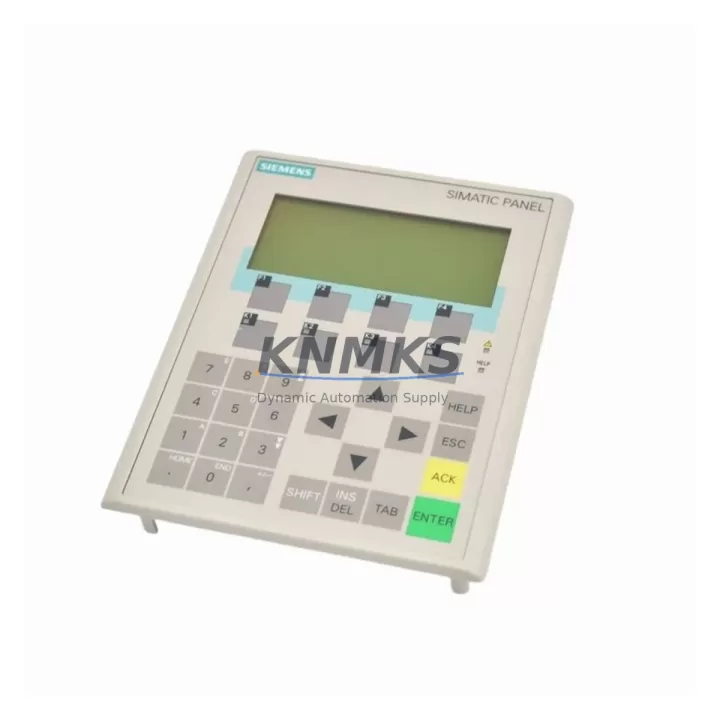
The Siemens 6AV6645-7AB10-0AS0 is a SIMATIC Mobile Panel 277 designed for direct operator interaction with automation systems in the field. As legacy SIMATIC HMI infrastructure reaches end-of-life, this unit serves as a critical replacement and migration-ready component for facilities running aging MP 277 platforms, S7-300/S7-400 controllers, and PROFIBUS/MPI-based control architectures. Whether you are managing a planned retrofit or responding to an unplanned panel failure, the 6AV6645-7AB10-0AS0 provides a verified drop-in path that preserves existing wiring, program logic, and HMI screen configurations with minimal downtime exposure.
This mobile HMI panel supports both PROFINET and MPI communication interfaces, making it directly compatible with a wide range of legacy Siemens control platforms without requiring protocol conversion hardware. The unit connects to the control cabinet via a standard enabling device cable and integrates with WinCC flexible runtime projects already deployed on the plant floor. For facilities that have not yet migrated to TIA Portal-based HMI infrastructure, the 6AV6645-7AB10-0AS0 extends the operational life of existing SIMATIC HMI projects while a full migration plan is developed and budgeted.
Each unit supplied by KNMKS undergoes pre-shipment functional testing covering display integrity, communication link establishment, enabling device response, and emergency stop circuit continuity. Units are shipped with a support terms confirmed by quotation covering hardware defects under normal industrial operating conditions.
Migration Compatibility Table
| Parameter | Detail |
|---|---|
| SKU / Part Number | 6AV6645-7AB10-0AS0 |
| Series | SIMATIC Mobile Panel 277 |
| Communication Interfaces | PROFINET (RJ45), MPI/PROFIBUS (RS-485) |
| Display | 10.4″ TFT Color Touch, 640×480 |
| Operating Voltage | 24 V DC (via enabling device cable) |
| Replaces / Compatible With | SIMATIC MP 277 10″ Touch (legacy variants) |
| Controller Compatibility | S7-300, S7-400, S7-1200 (via PROFINET), S7-1500 (via PROFINET) |
| HMI Software | WinCC flexible 2008 SP3 or later; TIA Portal WinCC (RT Advanced) |
| Installation Type | Handheld / Mobile (enabling device cable required) |
| Enabling Device Cable | 6AV6671-5AE11-0AX0 or equivalent 10 m / 20 m variants |
| IP Rating | IP65 (front panel) |
| Country of Origin | Germany |
| Retrofit Recommendation | Direct replacement for failed or end-of-life MP 277 mobile panels; no backplane modification required |
| Commissioning Notes | Verify WinCC flexible project compatibility; confirm MPI node address or PROFINET device name assignment before first power-on |
| Support terms | 12 Months — hardware defects under normal industrial operating conditions |
Retrofit Planning for Existing Automation Systems
Replacing a mobile HMI panel in an active production environment requires careful coordination across several system layers. Before installing the 6AV6645-7AB10-0AS0, maintenance engineers should confirm the enabling device cable type and length in use — the 6AV6671-5AE11-0AX0 (10 m) is the most common variant, but 20 m and 30 m cable assemblies exist for larger control cabinet distances. The cable carries both the 24 V DC supply and the safety-rated enabling device signal, so continuity and connector condition must be verified before connecting the replacement panel.
On the controller side, facilities running S7-300 CPUs such as the CPU 315-2 PN/DP or CPU 317-2 PN/DP should confirm that the PROFINET device name assigned to the original panel is correctly re-assigned to the replacement unit using STEP 7 or TIA Portal. For MPI-connected installations, the MPI node address configured in the WinCC flexible project must match the address set on the replacement panel prior to commissioning. Failure to align these parameters is the most common cause of communication faults during mobile HMI replacement.
Facilities that also manage ET 200S distributed I/O stations or IM 151-3 PN interface modules in the same control cabinet should note that PROFINET bandwidth allocation may need to be reviewed if the replacement panel is added to an existing PROFINET ring or line topology. Similarly, if the control system includes a CP 343-1 Advanced communications processor for remote access or SCADA integration, the network configuration should be validated after the panel swap to confirm no IP address conflicts exist.
For control cabinets that house a SITOP PSU300S or similar 24 V DC power supply module, verify that the available current budget accommodates the mobile panel’s supply draw through the enabling device cable. The 6AV6645-7AB10-0AS0 draws approximately 1.0 A at 24 V DC under normal operating conditions. If the existing power supply is already loaded near capacity due to additional I/O modules or signal isolators added during previous upgrades, a supplementary SITOP PSU100S module may be required before the replacement panel is commissioned.
HMI screen migration is typically straightforward when the replacement panel runs the same WinCC flexible runtime version as the original. However, if the plant has upgraded the engineering station to TIA Portal V16 or later, the existing WinCC flexible project may require a one-time migration step before it can be downloaded to the replacement panel. This migration should be performed and validated in a test environment before the scheduled maintenance window to avoid extending planned downtime.
Downtime Control During System Migration
Minimizing downtime during a mobile HMI panel replacement depends on preparation completed before the maintenance window begins. The most effective approach is to export the current WinCC flexible project from the engineering station and verify it compiles without errors against the 6AV6645-7AB10-0AS0 hardware configuration. This confirms that all screen objects, tag connections, alarm definitions, and recipe structures are compatible with the replacement panel before the original unit is disconnected.
During the physical swap, the enabling device cable should remain connected to the control cabinet junction box while the panel is exchanged. This preserves the safety circuit continuity and avoids triggering a safety-rated stop condition on the connected S7-300 or S7-400 CPU. Once the replacement panel is physically connected, the PROFINET device name or MPI address should be assigned via the panel’s bootstrap interface before the WinCC flexible project is downloaded.
For facilities where the mobile panel is used to control axis movements or conveyor sequences directly, it is advisable to place the affected PLC program sections in manual hold mode before disconnecting the original panel. This prevents unintended output activations during the communication gap between panel removal and replacement panel initialization. Once the replacement panel is online and the HMI project is confirmed operational, normal automatic mode can be restored and the system returned to production.
KNMKS supplies the 6AV6645-7AB10-0AS0 from verified inventory with pre-shipment testing completed. Lead time and stock availability are confirmed at the time of order. For urgent replacement requirements, expedited shipping options are available to minimize the gap between panel failure and restoration of full operator control capability.
Retrofit Support FAQ
Q: Is the 6AV6645-7AB10-0AS0 a direct replacement for the original SIMATIC MP 277 10″ Touch mobile panel?
A: Yes. The 6AV6645-7AB10-0AS0 is the standard SIMATIC Mobile Panel 277 10″ Touch variant and is a direct hardware replacement for failed or end-of-life MP 277 units. The enabling device cable connector, PROFINET/MPI interface, and WinCC flexible runtime compatibility are identical, allowing the replacement to be commissioned without modifying the existing control cabinet wiring or HMI project structure.
Q: What pre-shipment testing is performed on each unit?
A: Each 6AV6645-7AB10-0AS0 supplied by KNMKS is tested for display function, touch response, PROFINET and MPI communication link establishment, enabling device circuit continuity, and emergency stop button operation before shipment. A test report is available on request. All units are covered by a support terms confirmed by quotation against hardware defects under normal industrial operating conditions.
Q: Can this panel be used with a TIA Portal-based S7-1500 controller?
A: Yes, via PROFINET. The 6AV6645-7AB10-0AS0 supports PROFINET communication and can be integrated with S7-1500 CPUs using WinCC RT Advanced configured in TIA Portal. Note that if the existing HMI project was created in WinCC flexible, a project migration step is required in TIA Portal before downloading to the panel. This migration should be validated before the scheduled maintenance window.
Q: What is the stock availability and lead time?
A: KNMKS maintains inventory of the 6AV6645-7AB10-0AS0 for immediate dispatch. Stock levels and lead times are confirmed at the time of order inquiry. For urgent replacement requirements, please contact admin@knmks.com or call +86 18359268345 to confirm availability and arrange expedited shipping.
© 2026 KNMKS. All rights reserved.
Original Source: https://knmks.com
Contact: admin@knmks.com | +86 18359268345
Product Identification
- Brand / Ecosystem
-
Siemens
Siemens - Model / Series
-
6AV6645-7AB10-0AS0
SIMATIC Series - Product Family
- HMI & Displays
- Availability Status
- Available on request after model and quantity confirmation
- Inquiry Type
- B2B RFQ, replacement inquiry and project spare-part request
- Pre-Quote Check
- Exact SKU, brand, series, quantity, nameplate photos and destination country are checked before quotation
System Path
Where this product fits in the KNMKS automation structure.
Specification & Inquiry Focus
- Display range
- Operator panels and touch screens
- Common needs
- Screen size, interface and version matching
- Project support
- Retrofit, spare unit and panel replacement
Buyer Confirmation
Information KNMKS checks before replying.
- Exact model
- 6AV6645-7AB10-0AS0
- Brand / ecosystem
- Siemens
- Product family
- HMI & Displays
- Application note
- Replacement, maintenance, project build or spare-part list
- Useful photos
- Nameplate, installed unit, cabinet layout or connector side
- Delivery details
- Quantity, destination country and target schedule
Document Support
Files and notes can be confirmed during quotation.
- Product photos or nameplate confirmation when available
- Packing and delivery notes before quotation confirmation
- Support scope and delivery terms confirmed per inquiry
- Export document coordination for qualified B2B requests
Inquiry Support
- Panel size and interface confirmation
- Replacement unit inquiry for discontinued HMIs
- Protective packaging for display shipment
What to Send Us
- Brand and exact model number: Siemens 6AV6645-7AB10-0AS0
- Quantity and required delivery time
- Application, replacement requirement or nameplate photo
- Destination country and shipping preference
RFQ Preparation
This is a product inquiry page built for RFQ communication.
Fast Model Check
Send this model to KNMKS for confirmation.
Include quantity, destination country and photos if this is a maintenance replacement. The inquiry will be saved with a reference number after submission.
Brand & Compatibility Note
KNMKS displays automation product information for well-known industrial brand ecosystems and compatible replacement references. Brand names are used for product identification and compatibility reference only; final availability and commercial terms are confirmed per quotation.
 Manufacturing
 Machine Tools
 Packaging
 Energy & Power



 PLCs & Controllers
 Servo Systems
 Variable Frequency Drives
 Sensors