
Overview
Siemens 6AV6644-0AB01-2AX0 MP 377 15″ Touch HMI Retrofit: Migration-Ready Upgrade for Legacy Control Systems
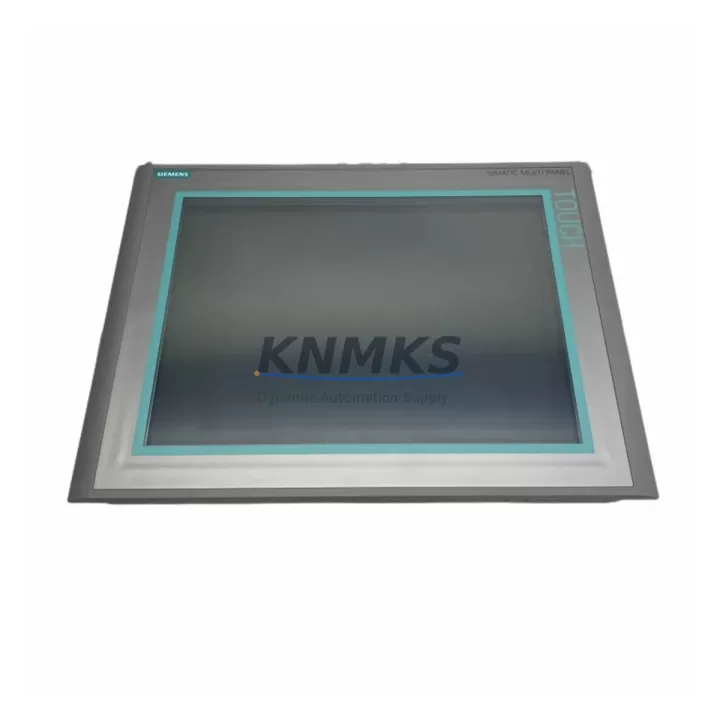
The Siemens 6AV6644-0AB01-2AX0 is a 15-inch widescreen touch HMI panel from the SIMATIC MP 377 series, engineered for demanding industrial environments and purpose-built for drop-in replacement of aging operator panels across legacy SIMATIC S7-300, S7-400, and WinCC-based control architectures. As production lines age and original HMI hardware reaches end-of-life, the 6AV6644-0AB01-2AX0 provides a validated migration path that preserves existing PLC logic, communication topology, and operator workflows while delivering a modern, high-resolution touch interface.
For automation engineers managing retrofit projects, the 6AV6644-0AB01-2AX0 supports both PROFIBUS DP and Industrial Ethernet (PROFINET), enabling direct integration into existing network segments without requiring protocol conversion gateways or additional communication modules. The panel runs WinCC flexible 2008 SP3 or later, allowing project files from older OP 277, TP 277, and MP 277 panels to be migrated with minimal rework using the WinCC flexible Migration Wizard. This dramatically reduces engineering hours and the risk of introducing logic errors during the transition.
When planning a retrofit involving the 6AV6644-0AB01-2AX0, engineers must verify several critical parameters before cutover. Power supply capacity at the control cabinet must support the panel’s 24 VDC input at up to 4.5 A peak draw — existing SITOP PSU100S or PSU200M power supply modules should be load-checked against the new panel’s consumption profile. Terminal wiring for the 24 VDC supply and PE ground must conform to the panel’s M4 screw terminal specifications. If the legacy panel used a 9-pin Sub-D PROFIBUS connector, the existing cable and termination resistor configuration can typically be reused directly with the 6AV6644-0AB01-2AX0’s integrated PROFIBUS interface.
Backplane and mounting cutout compatibility is a key consideration: the 6AV6644-0AB01-2AX0 requires a panel cutout of 396 mm × 305 mm. Installations migrating from older OP 17 or TP 170 panels will require a new cutout or adapter plate. For S7-300 rack-based systems, the HMI communicates via MPI or PROFIBUS to the CPU — no additional CP communication processor is required when the CPU already supports integrated MPI/DP. For S7-400 systems using a CP 443-1 or CP 341 for serial communication, the existing communication module and its configured connection table remain valid after migration.
Program compatibility must be confirmed at the WinCC flexible project level. Tag names, screen navigation structures, alarm classes, and recipe data sources should be audited before migration. The 6AV6644-0AB01-2AX0 supports up to 2,048 tags and 500 alarm messages, which covers the majority of legacy MP 277 and OP 277 project scopes. HMI screen layouts designed for 10.4″ or 12.1″ panels will require resolution adaptation to the 6AV6644-0AB01-2AX0’s 1280 × 800 native display. Firmware version alignment between the panel and the WinCC flexible runtime project must be confirmed prior to download to avoid runtime startup errors.
Communication link integrity should be validated using STEP 7 or TIA Portal’s online diagnostics before the panel goes live. For PROFIBUS segments, bus termination at both ends of the segment must be confirmed, and the 6AV6644-0AB01-2AX0’s station address must be set to a unique value not already occupied by other nodes such as ET 200S distributed I/O stations, IM 153-2 interface modules, or FM 350 function modules on the same segment. For Ethernet-connected installations, IP address assignment, subnet mask, and default gateway must be configured to match the plant network’s addressing scheme.
Installation space confirmation is essential for cabinet retrofits. The 6AV6644-0AB01-2AX0 has a depth of 68 mm behind the panel surface, which must be verified against available cabinet depth, particularly in older Rittal or Hoffman enclosures where cable management trays may reduce usable depth. The panel’s IP65 front protection rating makes it suitable for wash-down environments and dusty production floors without additional protective covers.
Each 6AV6644-0AB01-2AX0 unit supplied by KNMKS undergoes pre-shipment functional testing covering display calibration, communication port verification, and firmware version confirmation. Units are shipped with original Siemens packaging and include a support terms confirmed by quotation covering hardware defects. In-stock availability supports urgent replacement scenarios where production downtime must be minimized.
Migration Compatibility Table
| Parameter | 6AV6644-0AB01-2AX0 (MP 377 15″) | Legacy Reference (MP 277 / OP 277) |
|---|---|---|
| Display Size | 15″ Widescreen TFT, 1280×800 | 10.4″ / 8.4″ TFT |
| Touch Interface | Resistive Touch | Resistive Touch / Keys |
| Communication | PROFIBUS DP, MPI, Industrial Ethernet | PROFIBUS DP, MPI, Ethernet (model-dependent) |
| Power Supply | 24 VDC, max 4.5 A | 24 VDC, max 2.5 A |
| Panel Cutout | 396 mm × 305 mm | Varies — adapter plate may be required |
| Engineering Software | WinCC flexible 2008 SP3+ | WinCC flexible 2008 / ProTool |
| PLC Compatibility | S7-300, S7-400, S7-1200*, S7-1500* | S7-300, S7-400 |
| IP Protection | IP65 (front) | IP65 (front) |
| Retrofit Recommendation | Direct replacement for MP 277 10″; cutout modification for OP 277 | — |
| Commissioning Focus | Tag migration, screen resolution adaptation, PROFIBUS address, firmware alignment | — |
| Support terms | 12 Months (KNMKS) | — |
*S7-1200/1500 compatibility requires TIA Portal project with HSP for MP 377 or use of WinCC RT Advanced.
Retrofit Planning for Existing Automation Systems
A successful retrofit involving the 6AV6644-0AB01-2AX0 typically occurs within a broader system modernization effort that touches multiple components in the control cabinet. Engineers replacing an aging MP 277 or OP 277 panel frequently find that adjacent hardware also requires attention. The 24 VDC rail feeding the HMI may be shared with a SITOP PSU100S power supply module that has accumulated operating hours beyond its recommended service interval — this is an appropriate time to replace or load-test that unit alongside the HMI swap.
For systems using S7-300 CPUs such as the CPU 315-2 DP or CPU 317-2 PN/DP, the existing PROFIBUS segment connecting the HMI to the PLC rack typically also carries ET 200S or ET 200M distributed I/O stations via IM 151-1 or IM 153-2 interface modules. These modules and their associated SM 321 digital input or SM 322 digital output signal modules remain fully compatible with the 6AV6644-0AB01-2AX0 and do not require replacement during the HMI migration. However, their station addresses and GSD files should be re-verified in STEP 7 HW Config after the new HMI is added to the network configuration.
Where the legacy system used a CP 5611 or CP 5613 PROFIBUS communication processor in a PC-based SCADA station alongside the HMI, the migration to the 6AV6644-0AB01-2AX0 may allow that PC-based station to be decommissioned, simplifying the network topology. For installations requiring serial communication to third-party drives or instruments, a CP 341 communication processor with the appropriate protocol module (ASCII, 3964R, or Modbus RTU) can be retained in the S7-300 rack without modification.
Panel wiring harnesses, including the PROFIBUS cable with its 9-pin Sub-D connector and the 24 VDC power cable, can typically be reused if they are in good condition and meet current cable routing standards. A programming cable — such as the PC Adapter USB A2 — will be needed to download the migrated WinCC flexible project to the 6AV6644-0AB01-2AX0 during commissioning if a direct Ethernet connection to the engineering station is not available.
Downtime Control During System Migration
Minimizing production downtime during an HMI retrofit requires a structured pre-cutover preparation process. Before the maintenance window begins, the existing WinCC flexible project should be backed up from the legacy panel using the panel’s USB export function or via the engineering PC. The migrated project for the 6AV6644-0AB01-2AX0 should be compiled, simulated, and validated on the engineering station before the cutover date. Any screen resolution adaptations, tag remapping, or alarm text corrections should be completed and reviewed offline.
During the cutover window, the sequence should follow: controlled shutdown of the legacy HMI, disconnection of PROFIBUS and power cables, physical removal of the old panel, installation of the 6AV6644-0AB01-2AX0 into the prepared cutout, reconnection of cables, power-on and firmware verification, project download, and communication link test with the PLC. This sequence can typically be completed within a two-hour maintenance window for a prepared team. The PLC program continues to execute throughout the HMI replacement — only the operator interface is offline during the swap, preserving field control continuity for automated sequences that do not require operator input.
Post-installation, the PROFIBUS segment should be checked for correct termination and the new HMI’s station address confirmed in STEP 7 online view. All alarm displays, trend views, and recipe screens should be functionally tested against live PLC data before the system is returned to production. KNMKS recommends documenting the as-commissioned firmware version and project checksum for future reference and support terms validation.
Retrofit Support FAQ
Q: Can the 6AV6644-0AB01-2AX0 directly replace an MP 277 10″ Touch panel?
A: Yes, with a panel cutout modification. The MP 377 15″ requires a larger cutout (396 mm × 305 mm) compared to the MP 277 10″. The WinCC flexible project can be migrated using the Migration Wizard, and the PROFIBUS or Ethernet connection is directly compatible. Screen layouts will require resolution adaptation from 640×480 to 1280×800.
Q: What commissioning steps are required after installation?
A: After physical installation and cable reconnection, set the PROFIBUS station address via the panel’s Start Center, download the migrated WinCC flexible project via USB or Ethernet, verify firmware version compatibility, and perform an online communication test with the S7-300 or S7-400 CPU. Confirm all tag values, alarm triggers, and recipe data are reading correctly before returning to production.
Q: Is the existing PROFIBUS wiring compatible with the 6AV6644-0AB01-2AX0?
A: Yes. The 6AV6644-0AB01-2AX0 uses a standard 9-pin Sub-D PROFIBUS connector, compatible with existing PROFIBUS cables and bus connectors (e.g., Siemens 6ES7972-0BA52-0XA0). Bus termination at the segment ends must be verified and the new panel’s address must not conflict with existing nodes.
Q: What does the support terms confirmed by quotation cover, and how is it validated?
A: The support terms confirmed by quotation provided by KNMKS covers hardware defects in the 6AV6644-0AB01-2AX0 unit from the date of shipment. Each unit undergoes pre-shipment functional testing. Support requests are supported by the original invoice and shipment documentation. Contact admin@knmks.com for support terms service requests. The support terms does not cover damage resulting from incorrect installation, overvoltage, or unauthorized modification.
© 2026 KNMKS. All rights reserved.
Original Source: https://knmks.com
Contact: admin@knmks.com | +86 18359268345
Product Identification
- Brand / Ecosystem
-
Siemens
Siemens - Model / Series
-
6AV6644-0AB01-2AX0
SIMATIC Series - Product Family
- HMI & Displays
- Availability Status
- Available on request after model and quantity confirmation
- Inquiry Type
- B2B RFQ, replacement inquiry and project spare-part request
- Pre-Quote Check
- Exact SKU, brand, series, quantity, nameplate photos and destination country are checked before quotation
System Path
Where this product fits in the KNMKS automation structure.
Specification & Inquiry Focus
- Display range
- Operator panels and touch screens
- Common needs
- Screen size, interface and version matching
- Project support
- Retrofit, spare unit and panel replacement
Buyer Confirmation
Information KNMKS checks before replying.
- Exact model
- 6AV6644-0AB01-2AX0
- Brand / ecosystem
- Siemens
- Product family
- HMI & Displays
- Application note
- Replacement, maintenance, project build or spare-part list
- Useful photos
- Nameplate, installed unit, cabinet layout or connector side
- Delivery details
- Quantity, destination country and target schedule
Document Support
Files and notes can be confirmed during quotation.
- Product photos or nameplate confirmation when available
- Packing and delivery notes before quotation confirmation
- Support scope and delivery terms confirmed per inquiry
- Export document coordination for qualified B2B requests
Inquiry Support
- Panel size and interface confirmation
- Replacement unit inquiry for discontinued HMIs
- Protective packaging for display shipment
What to Send Us
- Brand and exact model number: Siemens 6AV6644-0AB01-2AX0
- Quantity and required delivery time
- Application, replacement requirement or nameplate photo
- Destination country and shipping preference
RFQ Preparation
This is a product inquiry page built for RFQ communication.
Fast Model Check
Send this model to KNMKS for confirmation.
Include quantity, destination country and photos if this is a maintenance replacement. The inquiry will be saved with a reference number after submission.
Brand & Compatibility Note
KNMKS displays automation product information for well-known industrial brand ecosystems and compatible replacement references. Brand names are used for product identification and compatibility reference only; final availability and commercial terms are confirmed per quotation.
 Manufacturing
 Machine Tools
 Packaging
 Energy & Power



 PLCs & Controllers
 Servo Systems
 Variable Frequency Drives
 Sensors