
Overview
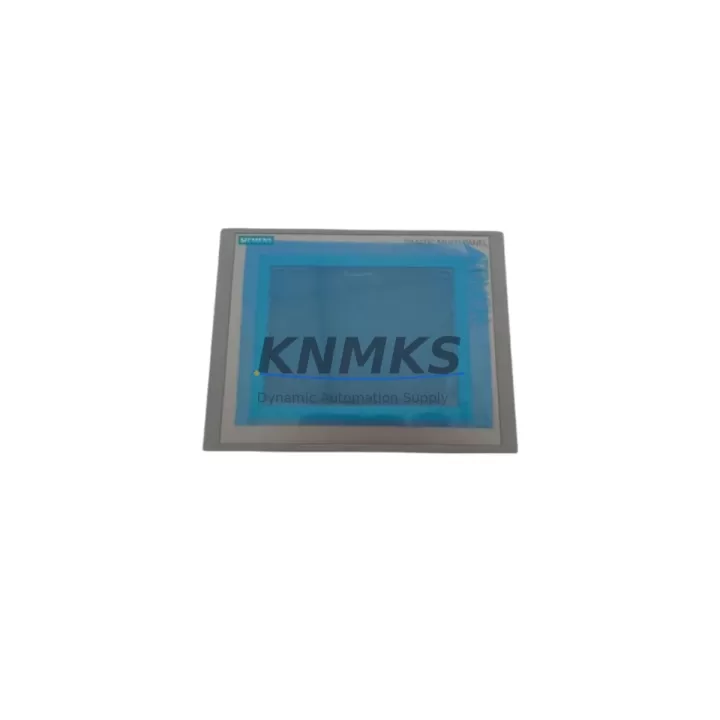
Siemens 6AV6643-0CB01-1AX1 MP277 Spare for Factory Uptime
The Siemens 6AV6643-0CB01-1AX1 is an original SIMATIC MP277 8-inch Touch HMI panel engineered for continuous industrial operation in demanding automation environments. As a maintenance-proven spare part, it is the direct replacement for aging or failed MP277 units integrated into Siemens S7-300 and S7-400 PLC systems across process control, discrete manufacturing, and utility infrastructure. Sourced from verified supply channels, each unit undergoes pre-shipment functional testing and ships with a support terms confirmed by quotation, giving maintenance engineers and procurement teams the confidence to stock and deploy without compromise.
For facilities running legacy SIMATIC architectures, the 6AV6643-0CB01-1AX1 represents a critical line of defense against unplanned downtime. Its 8-inch TFT touchscreen, 800×600 SVGA resolution, and dual Ethernet/MPI/PROFIBUS interfaces make it a versatile operator interface for both new panel builds and direct swap-in replacements. Whether you are managing a scheduled annual overhaul, responding to an emergency HMI failure, or building a strategic spare parts inventory for a multi-line facility, this unit delivers the compatibility and reliability that industrial operations demand.
Spare Maintenance Table
| Parameter | Specification |
|---|---|
| Part Number / SKU | 6AV6643-0CB01-1AX1 |
| Series | SIMATIC MP277 |
| Display | 8″ TFT Touch, 800×600 SVGA |
| Communication Interfaces | 2× Ethernet RJ45, MPI/PROFIBUS DP, USB |
| Compatible PLC Systems | Siemens S7-300, S7-400, WinCC flexible |
| Supply Voltage | 24 V DC (20.4–28.8 V) |
| Power Consumption | Approx. 18 W |
| Operating Temperature | 0 °C to +50 °C |
| Protection Rating | IP65 (front panel) |
| Weight | Approx. 1,400 g |
| Origin | Germany |
| Configuration Software | WinCC flexible 2008 SP3 or higher |
| Maintenance Recommendation | Replace on screen failure, touch drift, or communication loss; inspect every 24 months |
| Support terms | 12 Months — Tested before shipment |
Maintenance Planning for Continuous Operation
A failed or degraded 6AV6643-0CB01-1AX1 rarely fails in isolation. When replacing this HMI panel during a corrective or preventive maintenance event, experienced maintenance engineers systematically inspect the surrounding electrical and control infrastructure to prevent repeat failures and ensure full system restoration.
Power supply integrity is the first checkpoint. The MP277 operates on 24 V DC; verify that the panel power supply — commonly a Siemens SITOP PSU100S 24V/10A or equivalent — is within tolerance and free of ripple or voltage sag. A degraded power supply is a frequent root cause of HMI resets and touchscreen anomalies. Inspect the 24 V distribution fuse block and replace any blown or aged fuse holders in the same cabinet service cycle.
Communication cabling and connectors should be inspected next. The MP277 connects to S7-300/400 CPUs via MPI or PROFIBUS DP using Siemens 6ES7 972-series PROFIBUS connectors. Check for bent pins, loose termination resistors, and cable shielding continuity. On Ethernet-connected installations, verify RJ45 patch cables and managed switch port assignments. A faulty connector or improperly terminated PROFIBUS segment can cause intermittent communication faults that mimic HMI hardware failure.
I/O module health in the associated S7-300 or S7-400 rack warrants a parallel check. Digital input modules such as the 6ES7321-1BH02-0AA0 SM321 and analog output modules like the 6ES7332-5HB01-0AB0 SM332 should be inspected for diagnostic LEDs indicating channel faults. A malfunctioning I/O module can generate spurious alarms on the HMI screen, leading to misdiagnosis of the panel itself.
Relay and signal isolation components in the control cabinet should also be reviewed. Intermediate relays — such as those in the Siemens 3TX7 series — and signal isolators protecting analog inputs from field noise can degrade over time, introducing signal errors that appear as HMI display anomalies. Replace any relay showing contact wear or coil resistance drift during the same maintenance window.
Finally, if the installation includes a Siemens TP177B or OP177B as a secondary operator station on the same PROFIBUS segment, verify its firmware version and communication parameters are consistent with the replaced MP277 to avoid address conflicts or protocol mismatches after the swap.
Site Replacement Workflow
Replacing the 6AV6643-0CB01-1AX1 on-site follows a structured sequence to minimize downtime and ensure system continuity:
- Backup project data: Before powering down, use WinCC flexible to export the current HMI project from the panel via USB or Ethernet. Store the backup on a local engineering laptop and a network share.
- Power isolation: Isolate the 24 V DC supply to the HMI panel using the dedicated circuit breaker. Verify zero voltage with a calibrated multimeter before disconnecting cables.
- Cable labeling and disconnection: Label all Ethernet, MPI/PROFIBUS, USB, and power connectors before removal. Photograph the rear panel wiring for reference.
- Panel removal and replacement: Remove the panel from the cutout (standard 198×298 mm cutout for MP277 8″). Install the replacement 6AV6643-0CB01-1AX1 and secure with the original mounting clamps. Reconnect all labeled cables.
- Project restore and commissioning: Power on the panel, transfer the backed-up WinCC flexible project via USB, and perform a full communication test with the S7-300/400 CPU. Verify all screen pages, alarm displays, and tag values match pre-failure baseline.
- Functional sign-off: Document the replacement in the maintenance log, record the new unit serial number, and update the spare parts inventory system.
This workflow is compatible with direct replacement of older MP270B and TP270 units where panel cutout dimensions and communication interfaces align, further extending the service life of legacy control cabinets without full panel redesign.
Spare Parts Support FAQ
Q1: Is the 6AV6643-0CB01-1AX1 compatible with WinCC flexible 2008 projects?
Yes. The SIMATIC MP277 8″ Touch is fully supported by WinCC flexible 2008 SP3 and later. Existing projects developed for MP277 can be transferred directly without modification. If migrating from an MP270B project, use the WinCC flexible migration wizard to convert the project before transfer.
Q2: What is included in the support terms confirmed by quotation and pre-shipment testing?
Each unit is powered on and tested for display function, touchscreen calibration, Ethernet communication, and MPI/PROFIBUS interface continuity before shipment. The support terms confirmed by quotation cover hardware defects under normal operating conditions. Units showing physical damage from improper installation or overvoltage are excluded. Contact admin@knmks.com for support requests and RMA procedures.
Q3: How many units should a facility stock as strategic spare inventory?
For facilities with 3–10 MP277 panels in active service, a minimum of one spare unit is recommended. Facilities with more than 10 panels or operating in 24/7 continuous process environments should maintain two units on-hand. Given the end-of-life status of the MP277 series, early procurement is advised to avoid supply constraints during critical maintenance windows.
Q4: Can this unit be supplied on a long-term or blanket order basis?
Yes. KNMKS supports long-term supply agreements for the 6AV6643-0CB01-1AX1 and related SIMATIC HMI spare parts. Contact admin@knmks.com or call +86 18359268345 to discuss volume pricing, lead times, and scheduled delivery programs tailored to your annual maintenance plan.
© 2026 KNMKS. All rights reserved.
Original Source: https://knmks.com
Contact: admin@knmks.com | +86 18359268345
Product Identification
- Brand / Ecosystem
-
SIEMENS
Siemens - Model / Series
-
6AV6643-0CB01-1AX1
SIMATIC Series - Product Family
- HMI & Displays
- Availability Status
- Available on request after model and quantity confirmation
- Inquiry Type
- B2B RFQ, replacement inquiry and project spare-part request
- Pre-Quote Check
- Exact SKU, brand, series, quantity, nameplate photos and destination country are checked before quotation
System Path
Where this product fits in the KNMKS automation structure.
Specification & Inquiry Focus
- Display range
- Operator panels and touch screens
- Common needs
- Screen size, interface and version matching
- Project support
- Retrofit, spare unit and panel replacement
Buyer Confirmation
Information KNMKS checks before replying.
- Exact model
- 6AV6643-0CB01-1AX1
- Brand / ecosystem
- SIEMENS
- Product family
- HMI & Displays
- Application note
- Replacement, maintenance, project build or spare-part list
- Useful photos
- Nameplate, installed unit, cabinet layout or connector side
- Delivery details
- Quantity, destination country and target schedule
Document Support
Files and notes can be confirmed during quotation.
- Product photos or nameplate confirmation when available
- Packing and delivery notes before quotation confirmation
- Support scope and delivery terms confirmed per inquiry
- Export document coordination for qualified B2B requests
Inquiry Support
- Panel size and interface confirmation
- Replacement unit inquiry for discontinued HMIs
- Protective packaging for display shipment
What to Send Us
- Brand and exact model number: SIEMENS 6AV6643-0CB01-1AX1
- Quantity and required delivery time
- Application, replacement requirement or nameplate photo
- Destination country and shipping preference
RFQ Preparation
This is a product inquiry page built for RFQ communication.
Fast Model Check
Send this model to KNMKS for confirmation.
Include quantity, destination country and photos if this is a maintenance replacement. The inquiry will be saved with a reference number after submission.
Brand & Compatibility Note
KNMKS displays automation product information for well-known industrial brand ecosystems and compatible replacement references. Brand names are used for product identification and compatibility reference only; final availability and commercial terms are confirmed per quotation.
 Manufacturing
 Machine Tools
 Packaging
 Energy & Power



 PLCs & Controllers
 Servo Systems
 Variable Frequency Drives
 Sensors