
Overview
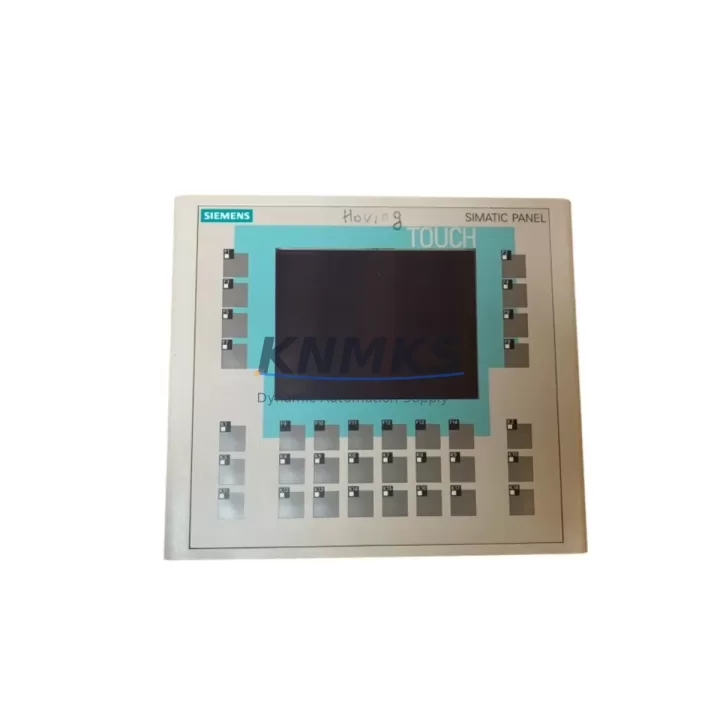
Siemens 6AV6642-0DA01-1AX1 Migration-Ready HMI Panel: Legacy System Retrofit & Upgrade
The Siemens 6AV6642-0DA01-1AX1 is a 5.7-inch color TFT operator panel from the SIMATIC OP177B series, purpose-built for integration into SIMATIC S7-300 and S7-400 control architectures. As legacy HMI platforms approach end-of-life and spare parts become increasingly scarce, the 6AV6642-0DA01-1AX1 has become a critical migration component for plant engineers managing aging control cabinets, distributed I/O panels, and multi-zone process lines. Whether you are replacing a failed OP170B, retiring an OP7 or OP17 panel, or upgrading a PROFIBUS-based visualization node to a more capable MPI/PROFIBUS dual-port interface, this unit delivers a verified drop-in upgrade path with minimal downtime exposure.
Before committing to a retrofit, engineers must systematically verify several key parameters. Power supply capacity is the first checkpoint: the 6AV6642-0DA01-1AX1 requires a 24 VDC supply rated at a minimum of 1.5 A, and existing cabinet power rails — often shared with a SITOP PSU100S or similar — must be confirmed to have sufficient headroom after accounting for all connected loads. Terminal wiring must be reviewed against the original panel’s connector pinout; the OP177B uses a 9-pin Sub-D connector for MPI/PROFIBUS communication, and any existing cable assemblies should be inspected for correct shielding and termination resistance settings, particularly on long PROFIBUS segments where 150 Ω termination resistors are required at both ends of the bus.
Backplane interface and mounting cutout dimensions are the next critical factors. The OP177B panel fits a standard 192 × 138 mm cutout, which is compatible with most OP170B and OP7 installations, but engineers should measure the existing cutout and confirm gasket seating before ordering. Module addressing on the PROFIBUS network must be reconfigured to match the station address previously assigned to the retired panel; this is performed via the panel’s commissioning menu or through STEP 7 hardware configuration. Program compatibility is a frequent concern during HMI migration: WinCC flexible 2008 SP4 or TIA Portal with the appropriate migration wizard must be used to convert existing OP7 or OP17 projects, and all tag mappings, alarm classes, and recipe structures should be validated in simulation before going live.
HMI screen layouts from older panels often require adaptation. Graphic objects, trend views, and alarm windows designed for lower-resolution displays must be rescaled for the OP177B’s 320 × 240 pixel resolution. Communication links to SIMATIC S7-300 CPUs — such as the CPU 315-2 DP or CPU 317-2 PN/DP — should be re-established and tested with a live PLC before the panel is mounted in the cabinet. Where the control system also includes a SIMATIC ET 200S distributed I/O rack or a CP 343-1 Ethernet communication processor, the network topology diagram should be updated to reflect the new HMI node address and any changes to the PROFIBUS segment structure.
Firmware version compatibility is another area requiring attention. The 6AV6642-0DA01-1AX1 ships with a specific firmware baseline; if the target PLC program was developed against an older HMI firmware, a firmware update via ProSave or TIA Portal may be required to ensure full feature compatibility. Installation space in the control cabinet should be confirmed: the OP177B has a panel depth of approximately 55 mm behind the mounting surface, and sufficient clearance must be available for the communication cable and power connector without creating strain on the wiring harness.
On-site commissioning typically follows a structured sequence: power-on self-test, communication link verification, tag download, alarm acknowledgment test, and a full functional walkthrough with the process operator. Where the existing system includes a SIMATIC S7-400 rack with a CP 443-5 Extended PROFIBUS module, the OP177B can be integrated into the same PROFIBUS segment without requiring additional hardware, provided the bus cycle time is adjusted to accommodate the new node. For systems that also use a SIMATIC Panel PC 677 or a TP177B touch panel in a parallel visualization role, the 6AV6642-0DA01-1AX1 can be configured as a redundant or zone-specific operator station, extending the useful life of the broader control platform.
Migration Compatibility Table
| Parameter | 6AV6642-0DA01-1AX1 (OP177B) | Retrofit Notes |
|---|---|---|
| Display | 5.7″ Color TFT, 320×240 px | Rescale graphics from OP7/OP17 projects |
| Communication Interfaces | MPI / PROFIBUS DP (9-pin Sub-D) | Verify termination resistors on PROFIBUS segment |
| Power Supply | 24 VDC, min. 1.5 A | Confirm cabinet PSU headroom before installation |
| Mounting Cutout | 192 × 138 mm | Compatible with OP170B and most OP7 cutouts |
| Panel Depth | ~55 mm behind surface | Confirm cable clearance in cabinet |
| Compatible PLCs | SIMATIC S7-300, S7-400 | Test communication link before final mounting |
| Engineering Software | WinCC flexible 2008 SP4 / TIA Portal | Use migration wizard for OP7/OP17 projects |
| Replaces | OP170B, OP7, OP17, TP177B (key-based) | Verify station address reassignment on PROFIBUS |
| Support terms | 12 Months | Covers hardware defects from date of shipment |
Retrofit Planning for Existing Automation Systems
A successful retrofit of the 6AV6642-0DA01-1AX1 into an existing automation environment requires a structured bill-of-materials review. In most S7-300 installations, the HMI panel shares a PROFIBUS segment with the CPU and one or more ET 200S distributed I/O stations. Before removing the legacy panel, document the current PROFIBUS station address, the baud rate setting, and the number of active nodes on the segment. If the cabinet also contains a SIMATIC S7-300 SM 321 digital input module or an SM 331 analog input module, confirm that the PLC program’s HMI tag assignments reference the correct DB addresses, as these will need to be re-validated after the panel swap.
Power distribution within the cabinet should be reviewed in conjunction with the SITOP PSU100S or equivalent 24 VDC power supply. If the existing supply is already loaded near capacity by the CPU, I/O modules, and relay outputs, a supplementary power rail or a higher-capacity SITOP unit may be required. For cabinets that include a CP 343-1 Lean Ethernet communication processor for remote monitoring, the OP177B can coexist on the same network segment without conflict, provided IP address assignments are updated in the STEP 7 hardware configuration.
Where the legacy system includes a SIMATIC S7-400 rack with multiple function modules, the migration plan should account for the possibility that the original HMI project references CPU-specific memory areas or organization blocks that differ between S7-300 and S7-400 architectures. In these cases, the WinCC flexible migration wizard will flag incompatible objects, and the project engineer must resolve each flag before downloading the converted project to the OP177B. A SIMATIC programming cable (PC Adapter USB or MPI/PROFIBUS adapter) is required for the initial firmware update and project download; this step should be completed on the bench before the panel is installed in the cabinet to minimize on-site commissioning time.
Downtime Control During System Migration
Minimizing production downtime during an HMI panel replacement requires a pre-staged approach. The replacement 6AV6642-0DA01-1AX1 should be fully configured, firmware-updated, and project-loaded before the maintenance window begins. All tag connections should be verified in offline simulation using WinCC flexible or TIA Portal, and a printed copy of the alarm list and critical setpoint values should be available for the commissioning engineer.
During the physical swap, the PLC program continues to execute independently of the HMI panel; the control system does not lose its operational state when the panel is disconnected, provided the PLC CPU remains powered and the program is not in STOP mode. This means that process control continuity is maintained throughout the panel replacement, and operators can monitor the process via any parallel visualization node — such as a SIMATIC Panel PC 677 or a WinCC SCADA station — during the brief period when the OP177B is being mounted and connected.
After physical installation, the commissioning sequence should begin with a communication link test: confirm that the OP177B appears on the PROFIBUS segment at the correct station address, that all configured tags are updating correctly, and that alarm acknowledgment functions as expected. The entire swap and commissioning process, when properly pre-staged, can typically be completed within a single 2–4 hour maintenance window, significantly reducing the risk of extended unplanned downtime.
Retrofit Support FAQ
Q: Can the 6AV6642-0DA01-1AX1 directly replace an OP170B or OP7 panel without hardware modification?
A: In most cases, yes. The mounting cutout dimensions are compatible, and the MPI/PROFIBUS interface is electrically identical. The primary requirement is a project migration using WinCC flexible or TIA Portal to convert the existing HMI project to the OP177B format. Station address reassignment on the PROFIBUS segment is also required.
Q: What commissioning steps are required after installation?
A: After mounting and wiring, perform a power-on self-test, verify the PROFIBUS communication link, download the migrated project, confirm all tag values are updating correctly, and conduct a full alarm acknowledgment test. Firmware should be updated to the latest compatible version before project download.
Q: Is the unit tested before shipment?
A: Yes. Each 6AV6642-0DA01-1AX1 unit undergoes a pre-shipment functional test covering power-on, display, communication interface, and key input verification. Units are shipped with a test report and are covered by a support terms confirmed by quotation from the date of shipment.
Q: What is the stock availability and lead time?
A: We maintain in-stock inventory of the 6AV6642-0DA01-1AX1 to support urgent replacement requirements. Standard orders ship within 1–3 business days. For large-quantity or project-based orders, please contact our sales team to confirm availability and arrange priority allocation.
© 2026 KNMKS. All rights reserved.
Original Source: https://knmks.com
Contact: admin@knmks.com | +86 18359268345
Product Identification
- Brand / Ecosystem
-
Siemens
Siemens - Model / Series
-
6AV6642-0DA01-1AX1
SIMATIC Series - Product Family
- HMI & Displays
- Availability Status
- Available on request after model and quantity confirmation
- Inquiry Type
- B2B RFQ, replacement inquiry and project spare-part request
- Pre-Quote Check
- Exact SKU, brand, series, quantity, nameplate photos and destination country are checked before quotation
System Path
Where this product fits in the KNMKS automation structure.
Specification & Inquiry Focus
- Display range
- Operator panels and touch screens
- Common needs
- Screen size, interface and version matching
- Project support
- Retrofit, spare unit and panel replacement
Buyer Confirmation
Information KNMKS checks before replying.
- Exact model
- 6AV6642-0DA01-1AX1
- Brand / ecosystem
- Siemens
- Product family
- HMI & Displays
- Application note
- Replacement, maintenance, project build or spare-part list
- Useful photos
- Nameplate, installed unit, cabinet layout or connector side
- Delivery details
- Quantity, destination country and target schedule
Document Support
Files and notes can be confirmed during quotation.
- Product photos or nameplate confirmation when available
- Packing and delivery notes before quotation confirmation
- Support scope and delivery terms confirmed per inquiry
- Export document coordination for qualified B2B requests
Inquiry Support
- Panel size and interface confirmation
- Replacement unit inquiry for discontinued HMIs
- Protective packaging for display shipment
What to Send Us
- Brand and exact model number: Siemens 6AV6642-0DA01-1AX1
- Quantity and required delivery time
- Application, replacement requirement or nameplate photo
- Destination country and shipping preference
RFQ Preparation
This is a product inquiry page built for RFQ communication.
Fast Model Check
Send this model to KNMKS for confirmation.
Include quantity, destination country and photos if this is a maintenance replacement. The inquiry will be saved with a reference number after submission.
Brand & Compatibility Note
KNMKS displays automation product information for well-known industrial brand ecosystems and compatible replacement references. Brand names are used for product identification and compatibility reference only; final availability and commercial terms are confirmed per quotation.
 Manufacturing
 Machine Tools
 Packaging
 Energy & Power



 PLCs & Controllers
 Servo Systems
 Variable Frequency Drives
 Sensors