
Overview
Siemens 6AV6642-0BC01-1AX1 Maintenance-Proven Spare Part for Factory Uptime
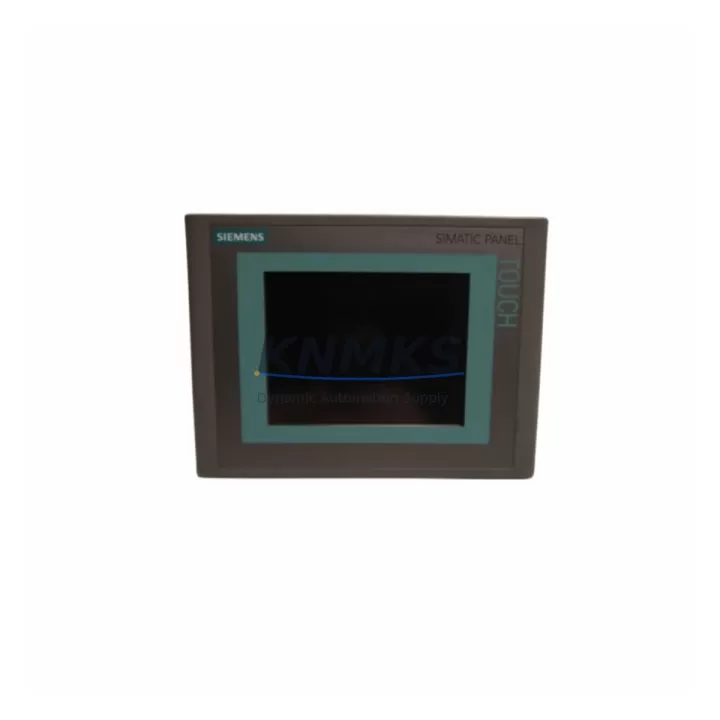
The Siemens 6AV6642-0BC01-1AX1 is a SIMATIC TP177B 6-inch touch panel HMI designed for demanding industrial environments. As a critical operator interface in S7-300 and S7-400 PLC-based control systems, this unit is widely deployed across manufacturing lines, process plants, packaging machinery, and utility control cabinets. When this HMI fails or reaches end-of-service, rapid replacement with a verified original spare is essential to restore operator visibility and resume production without extended downtime.
At KNMKS, every 6AV6642-0BC01-1AX1 unit is sourced from authorized supply channels, individually inspected, and pre-shipment tested before dispatch. Our inventory is maintained specifically to support maintenance engineers and procurement teams managing legacy SIMATIC TP177 installations — including systems where the original panel has been discontinued or is no longer available through standard distribution.
Whether you are responding to an unplanned HMI failure, executing a scheduled annual overhaul, or building a strategic spare parts buffer for a multi-line facility, the 6AV6642-0BC01-1AX1 is available for immediate dispatch with a support terms confirmed by quotation and long-term supply commitment.
Spare Maintenance Table
| SKU / Part Number | 6AV6642-0BC01-1AX1 |
| Product Series | SIMATIC TP177B (TP177 Series) |
| Brand | Siemens |
| Display | 6-inch TFT Color Touch Screen |
| Resolution | 320 × 240 px (QVGA) |
| Supply Voltage | 24 V DC (nominal), 19.2–28.8 V DC operating range |
| Power Consumption | Approx. 8 W typical |
| Communication Interfaces | MPI / PROFIBUS DP, RS-422/485, Ethernet (RJ45) |
| Compatible PLC Systems | SIMATIC S7-300, S7-400, S7-200 (via adapter), WinCC flexible |
| Operating Temperature | 0 °C to +50 °C |
| Storage Temperature | -20 °C to +60 °C |
| Protection Rating | IP65 (front panel) |
| Mounting | Panel cut-out, portrait/landscape |
| Weight | 760 g |
| Origin | Germany |
| Support terms | 12 Months from shipment date |
| Pre-Shipment Test | Power-on, display, touch calibration, communication port check |
| Condition | Original spare — new or refurbished-to-spec with full test record |
Maintenance Planning for Continuous Operation
The 6AV6642-0BC01-1AX1 does not operate in isolation. In a typical SIMATIC S7-300 or S7-400 control cabinet, this HMI is the primary operator interface connecting to the CPU via MPI or PROFIBUS DP. When planning a replacement or conducting a control cabinet inspection, maintenance engineers should simultaneously verify the condition of adjacent components to prevent secondary failures after the HMI is restored.
The 24 V DC power supply feeding the TP177B panel — commonly a SITOP PSU100S or equivalent DIN-rail power supply — should be load-tested and output voltage confirmed within tolerance before the new HMI is powered on. A marginal power supply that was masking symptoms under the old panel’s reduced load can cause immediate failure of the replacement unit.
The MPI/PROFIBUS DP communication cable (typically a 6XV1830-series shielded cable) connecting the HMI to the S7-300 CPU or CP module should be inspected for insulation damage, connector wear, and correct termination resistance. A degraded cable is a common root cause of intermittent HMI communication faults that are misdiagnosed as panel failures.
If the control cabinet includes a SIMATIC S7-300 CPU (such as a CPU 315-2 DP or CPU 317-2 PN/DP) or associated SM321/SM322 digital I/O modules, their firmware versions and configuration should be confirmed compatible with the WinCC flexible project loaded on the replacement TP177B. Version mismatches can prevent the HMI from establishing a connection after swap-out.
For cabinets using CP 343-1 or CP 343-5 communication processors for Ethernet or PROFIBUS network integration, verify that the network topology and node addresses remain consistent after the HMI replacement. Address conflicts on the MPI bus are a frequent commissioning issue when a replacement HMI is configured with a default node address.
Additionally, inspect the 24 V DC fuse or circuit breaker protecting the HMI supply branch, the terminal blocks (e.g., Weidmüller or Phoenix Contact series) on the power and signal wiring, and any signal isolators in the analog input circuit if the HMI is used for process value visualization. These passive components are often overlooked during emergency replacements and can cause recurring faults if left unserviced.
For facilities managing multiple TP177B installations, maintaining a minimum stock of one spare 6AV6642-0BC01-1AX1 per production zone — alongside a pre-configured WinCC flexible project backup on a USB drive — is the most effective strategy for reducing mean time to repair (MTTR) during unplanned HMI failures.
Site Replacement Workflow
Step 1 — Isolate and document: Before removing the failed TP177B, photograph the existing wiring, note the MPI node address displayed in the HMI startup screen (if accessible), and record the WinCC flexible project version from the panel’s system information menu.
Step 2 — Power down safely: De-energize the 24 V DC supply to the HMI branch via the dedicated fuse or circuit breaker. Do not disconnect the MPI/PROFIBUS cable while the bus is live, as this can cause communication errors on other nodes.
Step 3 — Physical swap: Remove the panel from the cabinet cut-out, disconnect the power and communication connectors, and install the replacement 6AV6642-0BC01-1AX1. Verify the panel gasket is seated correctly to maintain IP65 protection.
Step 4 — Configure and load project: Set the MPI node address on the replacement panel to match the original (default is node 1; adjust via the panel’s loader menu). Transfer the WinCC flexible project via USB or ProSave. Confirm the project version matches the PLC program revision.
Step 5 — Commission and verify: Power on the HMI, confirm display and touch calibration, verify communication with the S7-300/400 CPU, and test all operator screens for correct tag mapping and alarm display before returning the line to production.
This workflow is compatible with direct replacement of earlier TP177B variants and is applicable to facilities transitioning from TP170B or TP177A panels, where the 6AV6642-0BC01-1AX1 provides a form-fit-function upgrade path without cabinet modification.
Spare Parts Support FAQ
Q1: Is the 6AV6642-0BC01-1AX1 still available as a new original spare?
The SIMATIC TP177B series has reached end-of-sale through standard Siemens distribution channels. However, KNMKS maintains verified original stock — including new and refurbished-to-specification units — specifically to support facilities with long-term TP177B installations. Each unit is individually tested and shipped with a support terms confirmed by quotation from the dispatch date.
Q2: How do I confirm compatibility with my existing WinCC flexible project?
The 6AV6642-0BC01-1AX1 is compatible with WinCC flexible 2008 SP4 and earlier versions. Before ordering, confirm your project’s target panel type is set to TP177B 6″ in the WinCC flexible project properties. If your project was originally compiled for a TP177A or TP170B, a project migration step is required before transfer to the TP177B panel.
Q3: What is included in the pre-shipment test for this HMI?
Every 6AV6642-0BC01-1AX1 dispatched by KNMKS undergoes a power-on test at 24 V DC, full display pixel check, touch screen calibration verification, and communication port continuity check on both the MPI/PROFIBUS and Ethernet interfaces. A test record is available on request.
Q4: Can KNMKS support long-term supply for multi-site maintenance contracts?
Yes. KNMKS offers long-term supply agreements for maintenance teams managing multiple TP177B installations across production sites. Blanket orders, reserved stock allocation, and priority dispatch are available for procurement engineers requiring supply continuity beyond standard spot-buy arrangements. Contact admin@knmks.com to discuss volume and lead time requirements.
© 2026 KNMKS. All rights reserved.
Original Source: https://knmks.com
Contact: admin@knmks.com | +86 18359268345
Product Identification
- Brand / Ecosystem
-
Siemens
Siemens - Model / Series
-
6AV6642-0BC01-1AX1
SIMATIC Series - Product Family
- HMI & Displays
- Availability Status
- Available on request after model and quantity confirmation
- Inquiry Type
- B2B RFQ, replacement inquiry and project spare-part request
- Pre-Quote Check
- Exact SKU, brand, series, quantity, nameplate photos and destination country are checked before quotation
System Path
Where this product fits in the KNMKS automation structure.
Specification & Inquiry Focus
- Display range
- Operator panels and touch screens
- Common needs
- Screen size, interface and version matching
- Project support
- Retrofit, spare unit and panel replacement
Buyer Confirmation
Information KNMKS checks before replying.
- Exact model
- 6AV6642-0BC01-1AX1
- Brand / ecosystem
- Siemens
- Product family
- HMI & Displays
- Application note
- Replacement, maintenance, project build or spare-part list
- Useful photos
- Nameplate, installed unit, cabinet layout or connector side
- Delivery details
- Quantity, destination country and target schedule
Document Support
Files and notes can be confirmed during quotation.
- Product photos or nameplate confirmation when available
- Packing and delivery notes before quotation confirmation
- Support scope and delivery terms confirmed per inquiry
- Export document coordination for qualified B2B requests
Inquiry Support
- Panel size and interface confirmation
- Replacement unit inquiry for discontinued HMIs
- Protective packaging for display shipment
What to Send Us
- Brand and exact model number: Siemens 6AV6642-0BC01-1AX1
- Quantity and required delivery time
- Application, replacement requirement or nameplate photo
- Destination country and shipping preference
RFQ Preparation
This is a product inquiry page built for RFQ communication.
Fast Model Check
Send this model to KNMKS for confirmation.
Include quantity, destination country and photos if this is a maintenance replacement. The inquiry will be saved with a reference number after submission.
Brand & Compatibility Note
KNMKS displays automation product information for well-known industrial brand ecosystems and compatible replacement references. Brand names are used for product identification and compatibility reference only; final availability and commercial terms are confirmed per quotation.
 Manufacturing
 Machine Tools
 Packaging
 Energy & Power



 PLCs & Controllers
 Servo Systems
 Variable Frequency Drives
 Sensors