
Overview
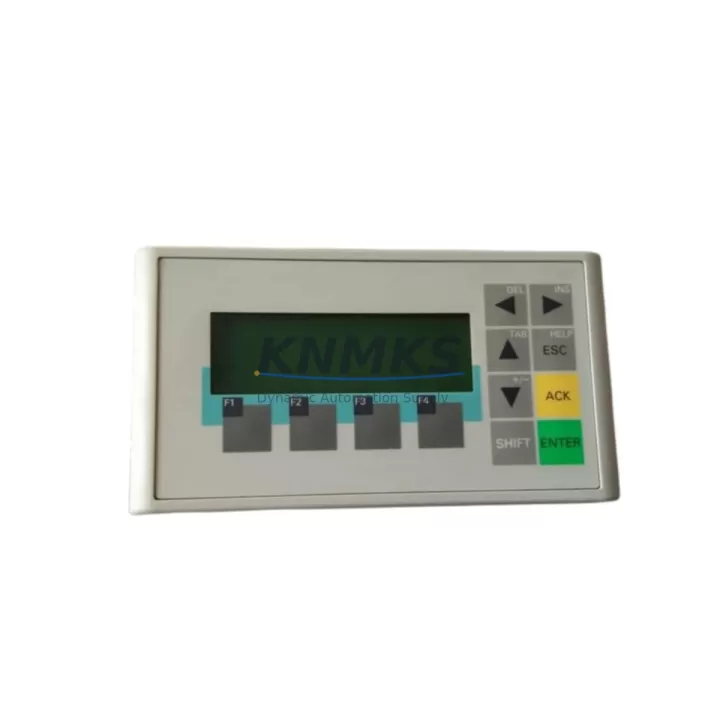
Siemens 6AV6641-0AA11-0AX0 Migration-Ready HMI for Legacy Control Systems
The Siemens 6AV6641-0AA11-0AX0, commercially designated as the SIMATIC OP73, is a compact operator panel engineered for demanding industrial environments where legacy HMI infrastructure must be preserved, extended, or systematically replaced. As production lines built around SIMATIC S7-200, S7-300, and S7-400 controllers approach end-of-service milestones, the OP73 remains one of the most viable drop-in solutions for facilities that cannot afford full-scale control system overhauls. This unit communicates natively over MPI and PROFIBUS DP, making it directly compatible with the communication backbones already installed in the majority of legacy control cabinets across discrete manufacturing, process automation, and utilities sectors.
For engineers managing retrofit projects, the 6AV6641-0AA11-0AX0 addresses a critical gap: the need for a verified, in-stock HMI replacement that does not require reprogramming the PLC, redesigning the control cabinet, or retraining operators. Its 3-inch STN monochrome display, function key layout, and panel-mount form factor are dimensionally and functionally consistent with earlier OP series units, allowing direct substitution in existing cutouts without mechanical modification. When sourced through a qualified distributor with pre-shipment testing and a support terms confirmed by quotation, this module significantly reduces both procurement risk and unplanned downtime during the replacement cycle.
Before initiating a replacement or retrofit involving the 6AV6641-0AA11-0AX0, engineers should systematically verify several critical parameters. Power supply compatibility must be confirmed — the OP73 operates on 24 V DC and requires a stable, low-ripple supply; if the existing SITOP PSU or third-party power module in the cabinet is aging or undersized, it should be assessed or replaced concurrently. Terminal wiring from the legacy panel must be mapped against the OP73’s connector pinout, particularly for the MPI/PROFIBUS port and the 24 V DC input terminals, to avoid polarity errors or signal conflicts during commissioning.
Backplane and rack interface considerations are not applicable to the OP73 as a standalone panel-mount device, but the communication link to the PLC rack — whether via a dedicated MPI cable or a PROFIBUS segment — must be verified for correct bus termination, cable length compliance, and node address assignment. The OP73’s station address must be configured to avoid conflicts with other devices on the same MPI or PROFIBUS network, including programming devices, other HMI panels such as the TP177B or MP277, and any CP communication processors installed in the S7-300 or S7-400 rack.
Program compatibility is a central concern in any HMI retrofit. Projects developed in SIMATIC WinCC flexible 2008 or earlier versions of ProTool are directly transferable to the OP73 platform, provided the project’s target device settings are correctly configured. Engineers should validate all screen objects, alarm messages, tag connections, and recipe structures before downloading to the replacement unit. If the original project files are unavailable — a common scenario with discontinued equipment — partial reconstruction using archived PLC symbol tables and process documentation is the recommended approach.
Migration Compatibility Table
| Parameter | Specification / Recommendation |
|---|---|
| Compatible Controllers | SIMATIC S7-200, S7-300, S7-400; also S7-1200/1500 via MPI adapter |
| Communication Interface | MPI / PROFIBUS DP (RS-485); 9-pin Sub-D connector |
| Power Supply | 24 V DC (20.4–28.8 V); verify existing PSU capacity before installation |
| Display | 3-inch STN monochrome LCD; 160 × 80 px resolution |
| Panel Cutout | Verify existing cutout dimensions; OP73 fits standard OP7/OP17 cutout profiles |
| Programming Software | WinCC flexible 2008 SP4 or later; ProTool legacy projects supported |
| Firmware Compatibility | Confirm firmware version matches project configuration; update via MPI if required |
| Bus Termination | Enable termination resistor if OP73 is at physical end of MPI/PROFIBUS segment |
| Replacement Path | Direct replacement for OP7, OP17, OP73 (earlier revisions); functional substitute for TD200 |
| Commissioning Tool | PC + MPI/USB adapter (e.g., PC Adapter USB A2) required for project download |
| Support terms | support terms confirmed by quotation; pre-shipment functional test included |
Retrofit Planning for Existing Automation Systems
A successful retrofit involving the 6AV6641-0AA11-0AX0 requires a structured assessment of the surrounding control architecture. In most legacy installations, the OP73 operates alongside a SIMATIC S7-300 CPU — such as the CPU 314C-2 DP or CPU 315-2 PN/DP — mounted in a standard S7-300 rack with a PS 307 power supply module providing 24 V DC to both the CPU and field devices. Engineers should confirm that the PS 307 or equivalent power module has sufficient residual capacity to support the OP73’s current draw without triggering overload protection.
In systems where the OP73 replaces a failed or discontinued OP7 or OP17 panel, the existing MPI cable and connector can typically be reused, provided the cable is undamaged and the bus termination configuration is correct. If the installation includes a CP 342-5 or CP 343-1 communication processor for Ethernet connectivity, the OP73’s MPI link operates independently and does not interfere with the CP module’s network functions. For systems that have been partially upgraded to include a SIMATIC ET 200S or ET 200M distributed I/O station, the OP73 can continue to serve as the local operator interface while the distributed I/O handles field signal acquisition.
Where the control cabinet also houses a SIMATIC S7-200 CPU — such as the CPU 224XP or CPU 226 — the OP73 connects via the PPI/MPI port on the CPU’s onboard communication interface. In these configurations, engineers must verify that the OP73’s communication parameters (baud rate, station address, PPI/MPI mode) match the CPU’s port settings exactly. A PC Adapter USB A2 or equivalent MPI/USB programming cable is required to download the WinCC flexible project to the OP73 and to perform online diagnostics during commissioning.
For facilities planning a phased migration toward S7-1500 or TIA Portal-based architectures, the OP73 can serve as an interim HMI solution during the transition period, maintaining operator visibility and control continuity while the PLC infrastructure is upgraded in stages. Signal isolators may be required at the I/O level if legacy 4–20 mA analog signals are being rerouted through new SM 331 or SM 332 analog I/O modules during the upgrade.
Downtime Control During System Migration
Minimizing unplanned downtime is the primary operational constraint in any legacy HMI replacement project. For the 6AV6641-0AA11-0AX0, the recommended approach is to prepare and validate the WinCC flexible project on a bench setup — using a spare CPU or a PLCSIM simulation — before the scheduled maintenance window. This allows engineers to verify all tag connections, alarm configurations, and screen navigation logic without exposing the live production system to risk.
During the physical replacement, the existing MPI or PROFIBUS cable should be disconnected from the failed panel before the panel is removed from the cabinet cutout. The 6AV6641-0AA11-0AX0 should be mechanically installed and secured before any electrical connections are made. Power should be applied only after all terminal connections have been verified against the wiring diagram. The project download via MPI typically completes within a few minutes, after which the OP73 can be placed in online mode and tested against the live PLC.
To protect the original PLC program logic during the migration, engineers should create a full backup of the S7 project using SIMATIC Manager or TIA Portal before any changes are made to the CPU configuration. If the OP73 replacement is part of a broader control cabinet upgrade that includes changes to the CPU, I/O modules, or communication processors, each change should be staged and tested independently to isolate potential fault sources. Maintaining a documented rollback procedure — including backup project files, wiring photographs, and configuration records — is essential for controlling risk and reducing mean time to recovery if issues arise during commissioning.
Retrofit Support FAQ
Q1: Can the 6AV6641-0AA11-0AX0 directly replace an OP7 or OP17 without modifying the PLC program?
In most cases, yes. The OP73 uses the same MPI communication protocol and is compatible with WinCC flexible and ProTool projects originally developed for the OP7 and OP17. The PLC program itself does not require modification; only the HMI project may need minor adjustments to match the OP73’s display resolution and function key layout. Panel cutout dimensions should be verified before installation.
Q2: What commissioning steps are required after installing the replacement unit?
After mechanical installation and wiring, connect a PC via MPI/USB adapter and download the validated WinCC flexible project to the OP73. Set the correct station address and communication parameters. Power on the unit and verify online communication with the PLC. Test all operator screens, alarm displays, and function key assignments before returning the system to production. Document all settings for future reference.
Q3: Is the unit pre-tested before shipment, and what support terms is provided?
Yes. Each 6AV6641-0AA11-0AX0 unit undergoes functional testing prior to shipment to verify communication interface integrity, display operation, and power supply performance. A support terms confirmed by quotation is provided from the date of shipment, covering manufacturing defects and functional failures under normal operating conditions. Contact admin@knmks.com for support requests or technical support.
Q4: What is the typical lead time, and is stock available for urgent replacement orders?
Stock is maintained for immediate dispatch to support urgent breakdown and replacement scenarios. Standard orders are processed within 1–2 business days. For time-critical projects or bulk procurement, contact admin@knmks.com or call +86 18359268345 to confirm current inventory levels and expedited shipping options.
© 2026 KNMKS. All rights reserved.
Original Source: https://knmks.com
Contact: admin@knmks.com | +86 18359268345
Product Identification
- Brand / Ecosystem
-
SIEMENS
Siemens - Model / Series
-
6AV6641-0AA11-0AX0
SIMATIC Series - Product Family
- HMI & Displays
- Availability Status
- Available on request after model and quantity confirmation
- Inquiry Type
- B2B RFQ, replacement inquiry and project spare-part request
- Pre-Quote Check
- Exact SKU, brand, series, quantity, nameplate photos and destination country are checked before quotation
System Path
Where this product fits in the KNMKS automation structure.
Specification & Inquiry Focus
- Display range
- Operator panels and touch screens
- Common needs
- Screen size, interface and version matching
- Project support
- Retrofit, spare unit and panel replacement
Buyer Confirmation
Information KNMKS checks before replying.
- Exact model
- 6AV6641-0AA11-0AX0
- Brand / ecosystem
- SIEMENS
- Product family
- HMI & Displays
- Application note
- Replacement, maintenance, project build or spare-part list
- Useful photos
- Nameplate, installed unit, cabinet layout or connector side
- Delivery details
- Quantity, destination country and target schedule
Document Support
Files and notes can be confirmed during quotation.
- Product photos or nameplate confirmation when available
- Packing and delivery notes before quotation confirmation
- Support scope and delivery terms confirmed per inquiry
- Export document coordination for qualified B2B requests
Inquiry Support
- Panel size and interface confirmation
- Replacement unit inquiry for discontinued HMIs
- Protective packaging for display shipment
What to Send Us
- Brand and exact model number: SIEMENS 6AV6641-0AA11-0AX0
- Quantity and required delivery time
- Application, replacement requirement or nameplate photo
- Destination country and shipping preference
RFQ Preparation
This is a product inquiry page built for RFQ communication.
Fast Model Check
Send this model to KNMKS for confirmation.
Include quantity, destination country and photos if this is a maintenance replacement. The inquiry will be saved with a reference number after submission.
Brand & Compatibility Note
KNMKS displays automation product information for well-known industrial brand ecosystems and compatible replacement references. Brand names are used for product identification and compatibility reference only; final availability and commercial terms are confirmed per quotation.
 Manufacturing
 Machine Tools
 Packaging
 Energy & Power



 PLCs & Controllers
 Servo Systems
 Variable Frequency Drives
 Sensors