
Overview
Siemens 6AV6640-0CA11-0AX0 Migration-Ready HMI Panel: Legacy System Retrofit and Compatibility Upgrade
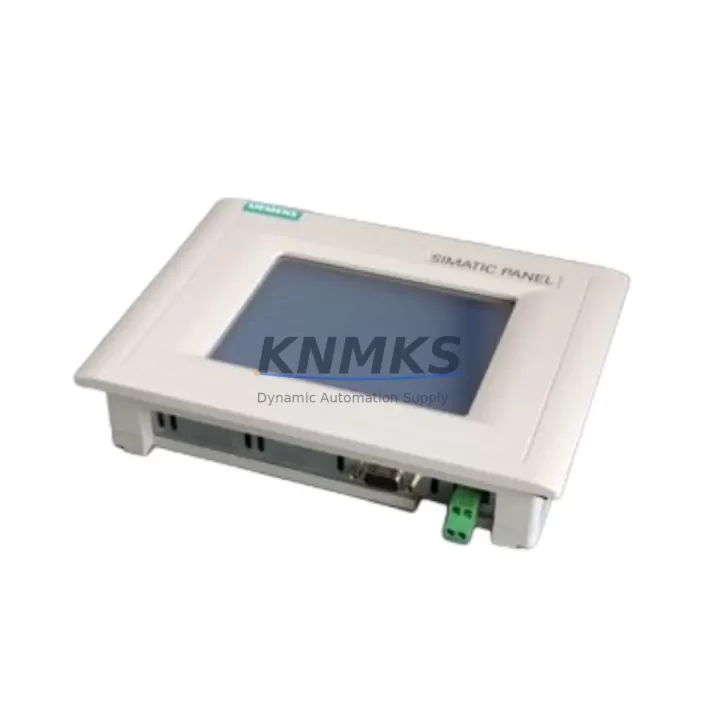
The Siemens 6AV6640-0CA11-0AX0 is a SIMATIC OP73 operator panel engineered for seamless integration into existing SIMATIC S7-300 and S7-400 control architectures. As legacy HMI panels reach end-of-life and original spare parts become increasingly scarce, the 6AV6640-0CA11-0AX0 serves as a verified drop-in replacement for discontinued OP73 units, enabling production lines to maintain operational continuity without requiring full control cabinet redesign or PLC reprogramming.
This unit supports both Profibus DP and MPI communication protocols, making it directly compatible with the majority of installed SIMATIC S7 base systems still operating in manufacturing, process control, and utilities environments worldwide. Engineers undertaking a panel replacement must verify the existing MPI/Profibus network address assignment, confirm the 24 VDC power supply capacity at the cabinet rail, and ensure the front-panel cutout dimensions match the OP73 form factor before installation. The 6AV6640-0CA11-0AX0 retains the same 3.2-inch STN display and membrane keypad layout as the original OP73, eliminating the need to redraw HMI screen configurations in SIMATIC WinCC flexible or ProTool when migrating from an identical predecessor unit.
For facilities managing a broader SIMATIC migration, this panel integrates directly with SIMATIC S7-300 CPUs such as the CPU 315-2 DP and CPU 314C-2 DP via the onboard MPI port, and can coexist on the same Profibus segment as SIMATIC ET 200S distributed I/O stations and SIMATIC S7-400 racks. When the replacement scope extends beyond the HMI itself, engineers should audit the CP 342-5 Profibus communication processor and the SM 321 digital input modules to confirm firmware compatibility with the updated panel configuration. In multi-panel installations, the OP73 address must be set uniquely within the MPI network to prevent bus conflicts during commissioning.
Migration Compatibility Table
| Parameter | Specification / Recommendation |
|---|---|
| Replaces / Compatible With | SIMATIC OP73 (6AV6640-0CA11-0AX0), OP73micro legacy variants |
| Communication Interface | MPI / Profibus DP (RS-485), 9-pin Sub-D connector |
| Power Supply | 24 VDC (20.4–28.8 V), verify cabinet PSU capacity before swap |
| Display | 3.2-inch STN monochrome, 160 × 48 px |
| Front Panel Cutout | Confirm OP73 standard cutout dimensions on existing enclosure |
| HMI Software Compatibility | SIMATIC WinCC flexible 2008 SP3 / ProTool V6.0 SP2 and above |
| Firmware Migration | Re-download project via PC/PPI cable or MPI adapter after replacement |
| Network Address | Set unique MPI/Profibus node address; default factory address: 1 |
| Installation Space | Panel-mount; verify depth clearance for connector and cable routing |
| Commissioning Note | Perform full I/O force test and alarm acknowledgment check post-installation |
| Support terms | support terms confirmed by quotation — covers manufacturing defects and functional failure |
Retrofit Planning for Existing Automation Systems
A successful OP73 panel replacement requires a structured pre-migration audit of the surrounding control architecture. Begin by documenting the existing MPI network topology, including all connected nodes such as the SIMATIC S7-300 CPU, any CP 343-1 Ethernet communication modules, and additional OP73 or TP177 touch panels sharing the same bus segment. Confirm that the 24 VDC rail supplying the panel has sufficient residual capacity after accounting for other loads in the cabinet, including SITOP PSU100S power supply modules and relay output cards.
Before physically removing the legacy panel, export the complete WinCC flexible or ProTool project from the engineering workstation and verify the project compiles without errors against the target panel type 6AV6640-0CA11-0AX0. If the original project was created for an earlier OP73 hardware revision, use the WinCC flexible Migration Wizard to convert the project and resolve any deprecated function block references. Retain a backup of the original project file and the S7 PLC program on a dedicated USB drive stored at the control cabinet.
During physical installation, route the Profibus or MPI cable with a minimum bend radius appropriate for the cable specification, and terminate the bus segment correctly if this panel occupies a physical end node position. After powering up the replacement unit, download the HMI project via the PC adapter USB or MPI/DP adapter, confirm the panel displays the correct start screen, and verify all configured tags are communicating with the S7 CPU. Cross-check analog input scaling on any connected SM 331 analog input modules to ensure process values display correctly on the new panel. For installations involving SIMATIC ET 200M remote I/O racks, confirm the IM 153-2 interface module firmware is compatible with the Profibus DP cycle time configured in the HMI project.
Downtime Control During System Migration
Minimizing production downtime during an OP73 panel swap requires preparation that begins well before the scheduled maintenance window. Pre-stage the replacement 6AV6640-0CA11-0AX0 unit with the HMI project already downloaded and verified on a bench setup using a SIMATIC S7-300 simulator or a spare CPU, so that the panel arrives at the machine ready for immediate installation. Prepare a printed copy of the current alarm list, setpoint table, and I/O assignment sheet so operators can maintain manual oversight of the process during the brief transition period.
During the cutover, follow a structured sequence: isolate the cabinet, label and photograph all existing wiring before disconnection, swap the panel, reconnect in reverse order, restore power, and confirm communication within a defined time target — typically under 30 minutes for a prepared team. Retain the original PLC program in the CPU memory throughout the process; do not perform a CPU memory reset unless a program update is also part of the scope. After restoring power, run a supervised production cycle at reduced speed to validate all HMI-controlled interlocks, motor start/stop commands, and alarm acknowledgment functions before returning the line to full production rate. Document the completed replacement in the site maintenance log, including the serial number of the removed unit and the replacement 6AV6640-0CA11-0AX0, to support future support requests and spare parts lifecycle planning.
Retrofit Support FAQ
Q1: Is the 6AV6640-0CA11-0AX0 a direct replacement for the original SIMATIC OP73?
Yes. The 6AV6640-0CA11-0AX0 is the current production variant of the SIMATIC OP73 operator panel. It is dimensionally and electrically compatible with the original OP73 form factor and supports the same MPI and Profibus DP communication interfaces. Existing HMI projects created in WinCC flexible or ProTool can be downloaded directly to the replacement unit without modification in most cases.
Q2: What commissioning steps are required after installing the replacement panel?
After installation, set the MPI or Profibus node address to match the original panel configuration, download the HMI project from the engineering workstation, and perform a full communication test with the connected S7 CPU. Verify all process tags, alarm messages, and operator input functions. Conduct a supervised test cycle before returning the system to automatic operation.
Q3: Does KNMKS provide pre-shipment testing for the 6AV6640-0CA11-0AX0?
Yes. Each unit undergoes functional verification prior to dispatch, including power-on test, display check, and communication port validation. Units are shipped with protective packaging to prevent transit damage. A support terms confirmed by quotation covering manufacturing defects and functional failure is included with every unit.
Q4: What is the stock availability and lead time?
KNMKS maintains inventory of the 6AV6640-0CA11-0AX0 to support urgent replacement requirements. Standard orders are processed and dispatched within 1–3 business days. For large-quantity or project-based procurement, contact our team directly to confirm availability and arrange priority allocation.
© 2026 KNMKS. All rights reserved.
Original Source: https://knmks.com
Contact: admin@knmks.com | +86 18359268345
Product Identification
- Brand / Ecosystem
-
Siemens
Siemens - Model / Series
-
6AV6640-0CA11-0AX0
SIMATIC Series - Product Family
- HMI & Displays
- Availability Status
- Available on request after model and quantity confirmation
- Inquiry Type
- B2B RFQ, replacement inquiry and project spare-part request
- Pre-Quote Check
- Exact SKU, brand, series, quantity, nameplate photos and destination country are checked before quotation
System Path
Where this product fits in the KNMKS automation structure.
Specification & Inquiry Focus
- Display range
- Operator panels and touch screens
- Common needs
- Screen size, interface and version matching
- Project support
- Retrofit, spare unit and panel replacement
Buyer Confirmation
Information KNMKS checks before replying.
- Exact model
- 6AV6640-0CA11-0AX0
- Brand / ecosystem
- Siemens
- Product family
- HMI & Displays
- Application note
- Replacement, maintenance, project build or spare-part list
- Useful photos
- Nameplate, installed unit, cabinet layout or connector side
- Delivery details
- Quantity, destination country and target schedule
Document Support
Files and notes can be confirmed during quotation.
- Product photos or nameplate confirmation when available
- Packing and delivery notes before quotation confirmation
- Support scope and delivery terms confirmed per inquiry
- Export document coordination for qualified B2B requests
Inquiry Support
- Panel size and interface confirmation
- Replacement unit inquiry for discontinued HMIs
- Protective packaging for display shipment
What to Send Us
- Brand and exact model number: Siemens 6AV6640-0CA11-0AX0
- Quantity and required delivery time
- Application, replacement requirement or nameplate photo
- Destination country and shipping preference
RFQ Preparation
This is a product inquiry page built for RFQ communication.
Fast Model Check
Send this model to KNMKS for confirmation.
Include quantity, destination country and photos if this is a maintenance replacement. The inquiry will be saved with a reference number after submission.
Brand & Compatibility Note
KNMKS displays automation product information for well-known industrial brand ecosystems and compatible replacement references. Brand names are used for product identification and compatibility reference only; final availability and commercial terms are confirmed per quotation.
 Manufacturing
 Machine Tools
 Packaging
 Energy & Power



 PLCs & Controllers
 Servo Systems
 Variable Frequency Drives
 Sensors