
Overview
Siemens 6AV6545-0CC10-0AX0 Migration-Ready HMI Panel: Legacy System Migration and Compatible Upgrade
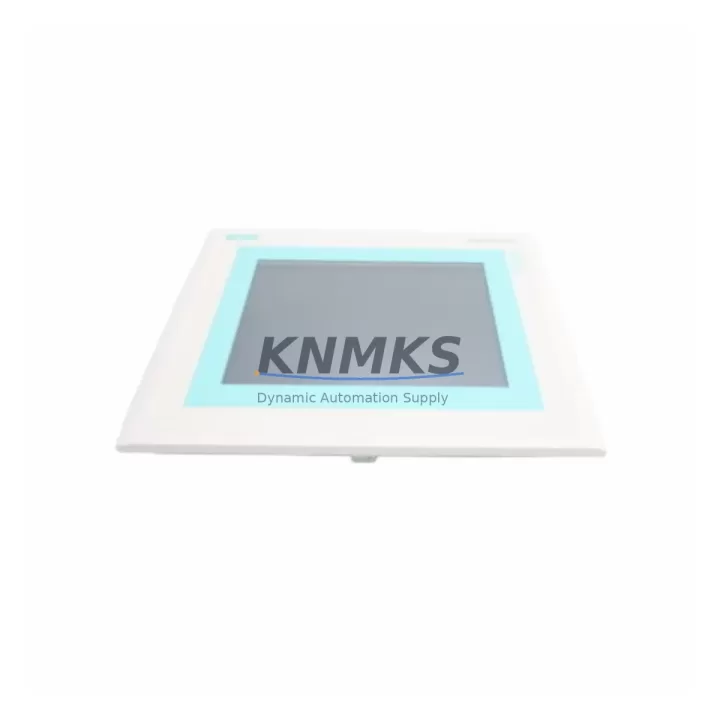
The Siemens 6AV6545-0CC10-0AX0 is a 10.4-inch color touch panel from the SIMATIC TP270 series, designed for direct integration into existing SIMATIC S7-300 and S7-400 control architectures. As legacy TP170 and TP270 panels reach end-of-life and spare parts become increasingly scarce, the 6AV6545-0CC10-0AX0 serves as a proven migration-ready replacement that preserves existing WinCC flexible project structures, MPI/PROFIBUS communication links, and panel cutout dimensions — dramatically reducing retrofit engineering time and unplanned downtime.
For automation engineers managing aging production lines, the primary challenge in any HMI replacement project is not the panel itself but the surrounding system dependencies: power supply wiring, communication protocol continuity, screen resolution mapping, tag address alignment, and operator retraining. The 6AV6545-0CC10-0AX0 addresses each of these concerns through its native compatibility with the SIMATIC ecosystem, supporting both MPI and PROFIBUS DP communication protocols without requiring gateway modules or protocol converters.
Migration Compatibility Table
| Parameter | 6AV6545-0CC10-0AX0 (This Unit) | Legacy TP170B / TP270-6 | Retrofit Notes |
|---|---|---|---|
| Display Size | 10.4″ TFT Color | 5.7″ / 10.4″ STN | Panel cutout compatible with TP270-10; verify cabinet depth |
| Communication | MPI / PROFIBUS DP | MPI / PROFIBUS DP | Direct cable reuse; no protocol converter required |
| Power Supply | 24 VDC (18–30 V) | 24 VDC | Verify PSU capacity ≥ 2.5 A; reuse existing terminal block |
| Engineering Software | WinCC flexible 2008 SP4+ | WinCC flexible 2004/2005 | Project migration via WinCC flexible Migration Wizard |
| Installation Cutout | 261 × 201 mm | 261 × 201 mm (TP270-10) | Drop-in fit for TP270-10 cutout; adapter frame for TP270-6 |
| Backplane / Rack | Stand-alone panel mount | Stand-alone panel mount | No backplane dependency; mounts directly to control cabinet door |
| Firmware Version | V3.x (upgradeable) | V2.x | Flash firmware via ProSave before commissioning |
| Tag / Address Compatibility | Full S7-300/400 tag support | Full S7-300/400 tag support | Verify DB block addresses post-migration; test all alarm tags |
| Support terms | support terms confirmed by quotation — covers hardware defects, display, and communication ports | ||
Retrofit Planning for Existing Automation Systems
A successful retrofit of the 6AV6545-0CC10-0AX0 into an existing control cabinet begins with a systematic audit of the surrounding components. Before removing the legacy panel, engineers should document the existing MPI or PROFIBUS DP network topology, including node addresses, baud rate settings, and cable termination resistors. The 6AV6545-0CC10-0AX0 supports baud rates from 9.6 kbps to 12 Mbps on PROFIBUS DP, matching the range of the SIMATIC ET 200S distributed I/O modules and CP 342-5 PROFIBUS communication processors commonly found in the same control cabinet.
Power supply verification is a critical pre-installation step. The 6AV6545-0CC10-0AX0 draws up to 2.5 A at 24 VDC under full backlight load. If the existing SITOP PSU 6EP1334-2BA20 or equivalent power supply is already powering a SIMATIC S7-300 CPU, a CP 343-1 Ethernet module, and signal modules such as SM 321 digital input or SM 331 analog input cards, the total current budget must be recalculated before adding the new HMI. In many legacy cabinets, a dedicated 24 VDC branch for the HMI panel is the safest approach.
Terminal block wiring for the 6AV6545-0CC10-0AX0 follows the standard 9-pin Sub-D connector pinout for MPI/PROFIBUS. In most TP270 installations, the existing PROFIBUS cable with its 9-pin connector can be transferred directly to the new panel without re-termination, provided the cable shielding and bus termination at the physical ends of the network remain intact. If the legacy panel was the last node on the PROFIBUS segment, confirm that the termination resistor is re-enabled on the 6AV6545-0CC10-0AX0’s port or on the adjacent node.
For the WinCC flexible project migration, the Migration Wizard in WinCC flexible 2008 SP4 handles the conversion of TP270 projects automatically, preserving screen layouts, tag connections, alarm configurations, and recipe structures. However, engineers should manually verify all dynamic elements — particularly trend displays, bar graphs, and user administration screens — as resolution differences between the original STN display and the new TFT panel can affect element positioning. After migration, a full offline simulation using the WinCC flexible Runtime Simulator is recommended before loading the project onto the 6AV6545-0CC10-0AX0 via the PC/PPI cable or USB-MPI adapter.
In multi-panel installations where the 6AV6545-0CC10-0AX0 operates alongside a SIMATIC S7-300 CPU 315-2 DP and additional OP 77B operator panels on the same MPI network, each device must be assigned a unique MPI node address. The default address for new TP270-series panels is 1; this must be changed to match the address previously assigned to the legacy panel to avoid disrupting the PLC’s communication configuration.
Downtime Control During System Migration
Minimizing production downtime during an HMI retrofit requires a structured pre-commissioning approach. The 6AV6545-0CC10-0AX0 should be fully configured, firmware-updated, and project-loaded on the bench before the scheduled maintenance window. Using ProSave, the firmware can be updated via the USB interface without requiring a live PLC connection, allowing the panel to be prepared in advance.
During the actual swap, the sequence should be: power down the control cabinet, disconnect the legacy TP270 panel, mount the 6AV6545-0CC10-0AX0 in the same cutout, reconnect the 24 VDC power terminals and the PROFIBUS/MPI connector, then restore power. In a well-prepared retrofit, the physical swap takes under 30 minutes. The PLC program in the S7-300 or S7-400 CPU does not require modification — the HMI communicates with the CPU using the same DB blocks and variable addresses as the original panel, provided the WinCC flexible project migration was completed correctly.
To protect the original program logic during the migration window, it is advisable to perform a full CPU backup using SIMATIC Manager or TIA Portal’s upload function before beginning any hardware changes. This ensures that if any communication issue arises during commissioning, the CPU can be restored to its last known good state without affecting the production program. Field testing should include cycling through all HMI screens, triggering test alarms, verifying analog value displays against the actual process values read from the SM 331 analog input modules, and confirming that all operator inputs correctly write to the PLC data blocks.
Retrofit Support FAQ
Q1: Is the 6AV6545-0CC10-0AX0 a direct drop-in replacement for the SIMATIC TP270-10?
Yes. The 6AV6545-0CC10-0AX0 shares the same 261 × 201 mm panel cutout dimensions as the TP270-10, uses the same 24 VDC power supply wiring, and communicates via MPI or PROFIBUS DP using the same 9-pin Sub-D connector. The WinCC flexible Migration Wizard converts existing TP270 projects automatically. No PLC program changes are required.
Q2: What commissioning steps are required after installation?
After physical installation, update the panel firmware via ProSave, load the migrated WinCC flexible project via USB or MPI, set the correct MPI node address, and verify PROFIBUS baud rate settings. Perform a full screen-by-screen functional test and confirm all alarm and analog display values against live PLC data before returning the system to production.
Q3: Can this unit be used with S7-400 controllers and ET 200 distributed I/O?
Yes. The 6AV6545-0CC10-0AX0 communicates directly with SIMATIC S7-400 CPUs via MPI or PROFIBUS DP. It is fully compatible with ET 200S and ET 200M distributed I/O stations on the same PROFIBUS network. No additional communication modules or gateways are required.
Q4: What does the support terms confirmed by quotation cover, and what is the stock availability?
The support terms confirmed by quotation cover all hardware defects including the TFT display, touch interface, communication ports, and power input circuitry. Units are pre-tested before shipment with a functional power-on and communication verification check. Stock is maintained for immediate dispatch. Contact admin@knmks.com or +86 18359268345 to confirm current availability and lead time.
© 2026 KNMKS. All rights reserved.
Original Source: https://knmks.com
Contact: admin@knmks.com | +86 18359268345
Product Identification
- Brand / Ecosystem
-
Siemens
Siemens - Model / Series
-
6AV6545-0CC10-0AX0
SIMATIC Series - Product Family
- HMI & Displays
- Availability Status
- Available on request after model and quantity confirmation
- Inquiry Type
- B2B RFQ, replacement inquiry and project spare-part request
- Pre-Quote Check
- Exact SKU, brand, series, quantity, nameplate photos and destination country are checked before quotation
System Path
Where this product fits in the KNMKS automation structure.
Specification & Inquiry Focus
- Display range
- Operator panels and touch screens
- Common needs
- Screen size, interface and version matching
- Project support
- Retrofit, spare unit and panel replacement
Buyer Confirmation
Information KNMKS checks before replying.
- Exact model
- 6AV6545-0CC10-0AX0
- Brand / ecosystem
- Siemens
- Product family
- HMI & Displays
- Application note
- Replacement, maintenance, project build or spare-part list
- Useful photos
- Nameplate, installed unit, cabinet layout or connector side
- Delivery details
- Quantity, destination country and target schedule
Document Support
Files and notes can be confirmed during quotation.
- Product photos or nameplate confirmation when available
- Packing and delivery notes before quotation confirmation
- Support scope and delivery terms confirmed per inquiry
- Export document coordination for qualified B2B requests
Inquiry Support
- Panel size and interface confirmation
- Replacement unit inquiry for discontinued HMIs
- Protective packaging for display shipment
What to Send Us
- Brand and exact model number: Siemens 6AV6545-0CC10-0AX0
- Quantity and required delivery time
- Application, replacement requirement or nameplate photo
- Destination country and shipping preference
RFQ Preparation
This is a product inquiry page built for RFQ communication.
Fast Model Check
Send this model to KNMKS for confirmation.
Include quantity, destination country and photos if this is a maintenance replacement. The inquiry will be saved with a reference number after submission.
Brand & Compatibility Note
KNMKS displays automation product information for well-known industrial brand ecosystems and compatible replacement references. Brand names are used for product identification and compatibility reference only; final availability and commercial terms are confirmed per quotation.
 Manufacturing
 Machine Tools
 Packaging
 Energy & Power



 PLCs & Controllers
 Servo Systems
 Variable Frequency Drives
 Sensors