
Overview
Siemens 6AV6545-0BB15-2AX0 Migration-Ready HMI Panel: Legacy SIMATIC System Upgrade & Retrofit
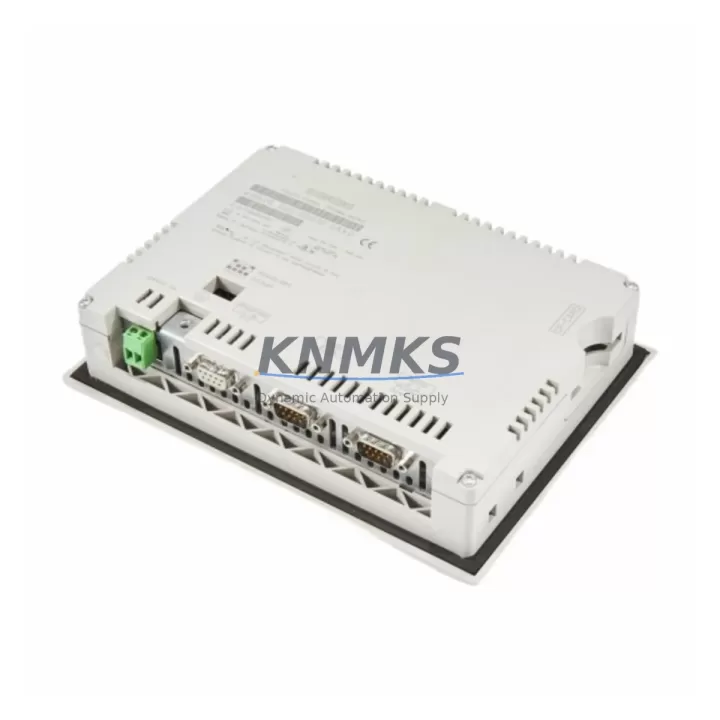
The Siemens 6AV6545-0BB15-2AX0 is a SIMATIC HMI OP 73 operator panel designed for direct integration into legacy S7-300 and S7-400 control architectures. As aging SIMATIC HMI panels reach end-of-life or become unavailable through standard supply channels, the 6AV6545-0BB15-2AX0 serves as a validated, migration-ready replacement that preserves existing PROFIBUS DP communication links, operator screen layouts, and PLC program logic without requiring a full control system overhaul.
This unit is stocked, pre-shipment tested, and backed by a support terms confirmed by quotation — making it a reliable spare parts solution for petrochemical plants, water treatment facilities, power generation stations, and manufacturing lines that depend on continuous SIMATIC-based process control. Whether you are replacing a failed panel on an active production line or building a long-term spare parts inventory for a multi-site automation network, the 6AV6545-0BB15-2AX0 provides a cost-effective, low-risk path to restoring and extending HMI functionality.
Migration Compatibility Table
| Parameter | Specification / Retrofit Guidance |
|---|---|
| Replaced / Legacy Model | SIMATIC HMI OP 73 series; earlier OP 7, OP 17 panels in compatible enclosures |
| Communication Interface | PROFIBUS DP (MPI compatible); verify baud rate and station address match existing network configuration |
| Compatible Controllers | Siemens S7-300, S7-400; confirm DB block and variable tag mapping in WinCC flexible or ProTool project |
| Installation Dimensions | Panel cutout: 196 × 141 mm; confirm available depth clearance ≥ 55 mm behind panel face |
| Power Supply | 24 V DC (20.4–28.8 V); verify existing 24 V rail capacity before connection |
| Terminal Wiring | Retain existing PROFIBUS cable shielding and termination resistor settings; re-use existing connector if undamaged |
| Firmware / Project Transfer | Transfer project via PC Adapter USB or MPI/PROFIBUS programming cable; confirm WinCC flexible version compatibility |
| Commissioning Focus | Verify station address, baud rate, tag connections, alarm messages, and screen navigation after project download |
| Support terms | support terms confirmed by quotation — covers hardware defects; pre-shipment functional test included |
Retrofit Planning for Existing Automation Systems
Successful integration of the 6AV6545-0BB15-2AX0 into a legacy control cabinet requires a structured approach that accounts for the full scope of the existing automation architecture. Before removing the failed or obsolete panel, engineers should document the current PROFIBUS DP station address, network baud rate, and cable routing to avoid reconfiguration errors during commissioning.
In most S7-300-based control cabinets, the HMI panel shares the MPI/PROFIBUS backplane segment with the CPU — such as a CPU 315-2 DP or CPU 317-2 DP — along with distributed I/O nodes connected via ET 200S or ET 200M remote I/O stations. These I/O nodes must remain online during the HMI swap to prevent process interruption. If the control cabinet also includes a CP 343-1 Ethernet communication processor for SCADA connectivity, verify that the HMI project’s Ethernet tag connections are preserved after the panel replacement.
For sites running WinCC flexible projects, the project file should be archived from the original panel or the engineering workstation before the swap. The project is then downloaded to the 6AV6545-0BB15-2AX0 using a PC Adapter USB or an MPI programming cable. If the original project was developed in ProTool, a migration to WinCC flexible may be required — this step should be completed and validated in a test environment before the scheduled maintenance window.
Where the control cabinet includes a SITOP power supply module, confirm that the 24 V DC rail has sufficient current capacity to support the replacement panel alongside existing loads. In cabinets with tight installation space, verify the panel cutout dimensions and rear depth clearance before ordering. Signal isolators or barriers installed between the HMI and field devices should be inspected and re-terminated according to the original wiring diagram to maintain signal integrity.
For multi-panel installations or distributed control rooms, it is advisable to maintain at least one spare 6AV6545-0BB15-2AX0 unit on-site to minimize response time in the event of a future panel failure. Long-term spare parts planning for SIMATIC HMI systems should also consider the availability of compatible PROFIBUS DP cables, MPI connectors, and panel mounting hardware to support rapid field replacement without extended procurement lead times.
Downtime Control During System Migration
Minimizing unplanned downtime during an HMI panel replacement requires careful pre-migration preparation. The most effective approach is to complete all project archiving, firmware verification, and test downloads before the scheduled maintenance window — so that the physical swap and recommissioning can be completed within a single planned outage period.
Before powering down the control cabinet, confirm that the S7-300 or S7-400 CPU is in RUN mode and that all active process interlocks are in a safe state. If the process cannot be fully stopped, coordinate with the operations team to identify a safe hold point where the HMI can be taken offline without triggering safety shutdowns or process alarms. In facilities with redundant control paths, the HMI replacement can often be performed while the PLC continues to execute the control program, maintaining field device operation throughout the swap.
After installing the 6AV6545-0BB15-2AX0, restore the PROFIBUS DP station address and baud rate settings before downloading the project. Verify all alarm messages, operator inputs, and screen navigation sequences against the original HMI specification before returning the panel to service. Document the commissioning results and update the site’s spare parts register to reflect the completed replacement. With proper preparation, most 6AV6545-0BB15-2AX0 retrofit installations can be completed within a two- to four-hour maintenance window, significantly reducing the risk of extended production loss.
Retrofit Support FAQ
Q1: Is the 6AV6545-0BB15-2AX0 a direct replacement for the original SIMATIC OP 73 panel?
Yes. The 6AV6545-0BB15-2AX0 is the standard SIMATIC HMI OP 73 operator panel and is a direct hardware replacement for units of the same model. Verify that the existing WinCC flexible or ProTool project is compatible with the firmware version of the replacement unit before commissioning.
Q2: What programming cable is required to download the HMI project to the replacement panel?
A PC Adapter USB (6ES7972-0CB20-0XA0) or an MPI/PROFIBUS programming cable is required to transfer the project from the engineering workstation to the 6AV6545-0BB15-2AX0. Ensure the cable driver is installed and the COM port settings match the panel’s MPI configuration.
Q3: Will the existing PROFIBUS DP wiring need to be modified during the panel swap?
In most cases, the existing PROFIBUS DP cable and connector can be reused without modification, provided the cable is undamaged and the termination resistor settings are correct. Confirm the station address and baud rate on the replacement panel match the original configuration before reconnecting to the network.
Q4: What does the support terms confirmed by quotation cover, and is pre-shipment testing included?
Every 6AV6545-0BB15-2AX0 unit is functionally tested prior to shipment to verify power-up, display operation, and communication interface integrity. The support terms confirmed by quotation cover hardware defects identified under normal operating conditions. Units are shipped with protective packaging to prevent transit damage. Contact admin@knmks.com for support requests or technical support.
© 2026 KNMKS. All rights reserved.
Original Source: https://knmks.com
Contact: admin@knmks.com | +86 18359268345
Product Identification
- Brand / Ecosystem
-
Siemens
Siemens - Model / Series
-
6AV6545-0BB15-2AX0
SIMATIC Series - Product Family
- HMI & Displays
- Availability Status
- Available on request after model and quantity confirmation
- Inquiry Type
- B2B RFQ, replacement inquiry and project spare-part request
- Pre-Quote Check
- Exact SKU, brand, series, quantity, nameplate photos and destination country are checked before quotation
System Path
Where this product fits in the KNMKS automation structure.
Specification & Inquiry Focus
- Display range
- Operator panels and touch screens
- Common needs
- Screen size, interface and version matching
- Project support
- Retrofit, spare unit and panel replacement
Buyer Confirmation
Information KNMKS checks before replying.
- Exact model
- 6AV6545-0BB15-2AX0
- Brand / ecosystem
- Siemens
- Product family
- HMI & Displays
- Application note
- Replacement, maintenance, project build or spare-part list
- Useful photos
- Nameplate, installed unit, cabinet layout or connector side
- Delivery details
- Quantity, destination country and target schedule
Document Support
Files and notes can be confirmed during quotation.
- Product photos or nameplate confirmation when available
- Packing and delivery notes before quotation confirmation
- Support scope and delivery terms confirmed per inquiry
- Export document coordination for qualified B2B requests
Inquiry Support
- Panel size and interface confirmation
- Replacement unit inquiry for discontinued HMIs
- Protective packaging for display shipment
What to Send Us
- Brand and exact model number: Siemens 6AV6545-0BB15-2AX0
- Quantity and required delivery time
- Application, replacement requirement or nameplate photo
- Destination country and shipping preference
RFQ Preparation
This is a product inquiry page built for RFQ communication.
Fast Model Check
Send this model to KNMKS for confirmation.
Include quantity, destination country and photos if this is a maintenance replacement. The inquiry will be saved with a reference number after submission.
Brand & Compatibility Note
KNMKS displays automation product information for well-known industrial brand ecosystems and compatible replacement references. Brand names are used for product identification and compatibility reference only; final availability and commercial terms are confirmed per quotation.
 Manufacturing
 Machine Tools
 Packaging
 Energy & Power



 PLCs & Controllers
 Servo Systems
 Variable Frequency Drives
 Sensors