
Overview
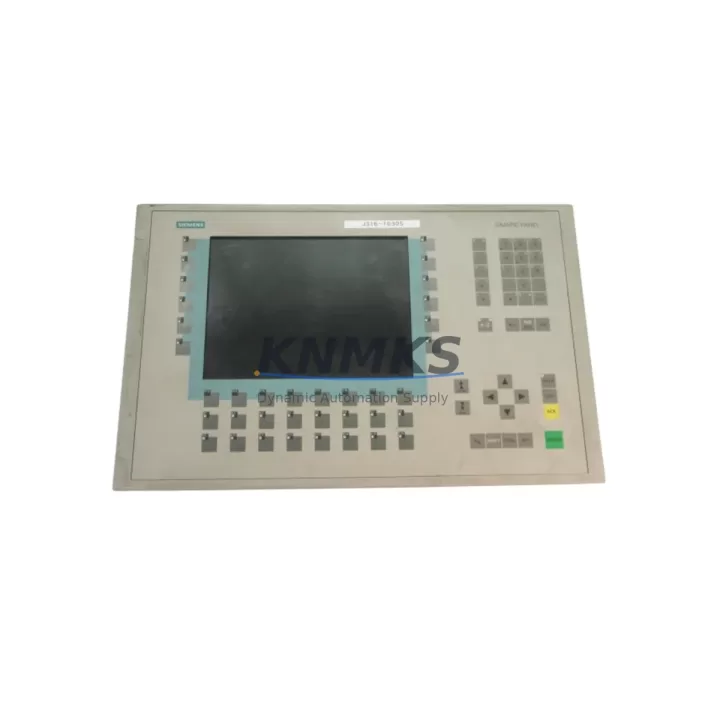
Siemens 6AV6542-0CC10-0AX0 Maintenance-Proven Spare Part for Factory Uptime
The Siemens 6AV6542-0CC10-0AX0 is an original SIMATIC OP270 10″ Key HMI operator panel engineered for continuous industrial operation. As a maintenance-proven spare part, it is purpose-built to restore HMI functionality in SIMATIC S7-300, S7-400, and WinCC-based control architectures with minimal downtime. Whether you are managing a scheduled annual overhaul, responding to an unplanned panel failure, or building a strategic spare parts buffer for a long-lifecycle production line, the 6AV6542-0CC10-0AX0 delivers the compatibility, reliability, and supply continuity that maintenance engineers and procurement teams depend on.
Sourced directly from verified Siemens distribution channels, each unit undergoes pre-shipment functional verification covering display integrity, keypad response, communication port continuity, and firmware version confirmation. This ensures that the replacement panel integrates seamlessly into your existing PROFIBUS DP or MPI network without requiring additional configuration overhead. With a support terms confirmed by quotation covering manufacturing defects and operational failures under normal industrial conditions, the 6AV6542-0CC10-0AX0 represents a low-risk, high-confidence procurement decision for facilities operating under strict uptime SLAs.
For aging SIMATIC installations where OEM lead times have extended beyond acceptable thresholds, maintaining a stocked unit of the 6AV6542-0CC10-0AX0 in your control room spare parts cabinet is a proven strategy for eliminating single-point-of-failure risk at the HMI layer. This panel supports the full OP270 feature set including recipe management, alarm logging, trend display, and multi-language operator guidance — capabilities that are critical for process-intensive environments in food and beverage, chemical processing, automotive assembly, and utilities.
Spare Maintenance Table
| Part Number | 6AV6542-0CC10-0AX0 |
| Brand | Siemens |
| Series | SIMATIC OP270 |
| Display | 10″ CSTN, 640×480, Keypad Operation |
| Communication | PROFIBUS DP / MPI |
| Compatible Controllers | SIMATIC S7-300, S7-400, S5 (via adapter) |
| Operating Voltage | 24 V DC |
| Operating Temperature | 0°C to +50°C |
| Protection Rating | IP65 (front panel) |
| Origin | Germany |
| Firmware | ProTool / WinCC flexible compatible |
| Installation | Panel cutout mount, standard OP270 footprint |
| Maintenance Recommendation | Inspect connector pins, clean display surface, verify PROFIBUS address on replacement |
| Support terms | 12 Months from shipment date |
Maintenance Planning for Continuous Operation
Replacing the 6AV6542-0CC10-0AX0 in a live control cabinet is rarely an isolated task. Maintenance engineers conducting a thorough panel swap should simultaneously inspect the 24 V DC power supply feeding the HMI — a degraded SITOP PSU100S or equivalent power module is a common root cause of premature HMI failure and should be tested or replaced as a precautionary measure. The PROFIBUS DP cable and connector at the HMI port should be checked for impedance continuity and termination resistance, particularly in installations where the OP270 sits at the end of a PROFIBUS segment.
If the control cabinet also houses a SIMATIC S7-300 CPU such as the 6ES7315-2AG10-0AB0 or a CP 343-1 communication processor, verify that the PLC firmware and HMI project version are aligned before commissioning the replacement panel. Mismatched ProTool or WinCC flexible project versions are a frequent source of post-replacement communication faults. For cabinets with distributed I/O via ET 200S or ET 200M remote stations, confirm that the PROFIBUS DP network remains stable after the panel replacement by monitoring the diagnostic buffer on the CPU.
Procurement engineers building a comprehensive spare parts kit for OP270-based lines should also consider stocking the SIMATIC MPI/PROFIBUS PC adapter (6GK1571-0BA00-0AA0) for offline project backup and firmware updates, as well as a set of replacement membrane keypads if the existing panel shows wear. For facilities running multiple OP270 units across production zones, a centralized spare parts register that tracks serial numbers, firmware versions, and last-tested dates significantly reduces mean time to repair (MTTR) during unplanned outages.
Site Replacement Workflow
Before removing the failed 6AV6542-0CC10-0AX0, isolate the 24 V DC supply to the HMI circuit and document the PROFIBUS DP station address displayed in the panel’s startup diagnostics or recorded in the project documentation. Back up the existing HMI project using a PC with WinCC flexible or ProTool installed via the MPI/PROFIBUS adapter — this step is critical if the project has been modified on-site since the original commissioning.
Remove the panel from the cutout by releasing the mounting clamps from the rear. Disconnect the PROFIBUS DP connector and the 24 V DC power terminals. Install the replacement 6AV6542-0CC10-0AX0 into the same cutout — the standard OP270 footprint ensures a direct mechanical fit without panel modification. Reconnect power and communications, then power up and verify that the PROFIBUS address matches the original configuration. If the replacement unit ships with a blank project, download the backed-up project via the MPI adapter before returning the line to operation.
Post-replacement, run a 30-minute supervised operational check covering alarm acknowledgment, recipe selection, and trend display to confirm full HMI functionality. Log the replacement in your maintenance management system with the new unit’s serial number and support terms start date. This workflow minimizes downtime to under two hours for experienced maintenance teams and eliminates the risk of compatibility issues that arise from undocumented on-site project changes.
Spare Parts Support FAQ
Q: Is the 6AV6542-0CC10-0AX0 compatible with my existing WinCC flexible project?
A: Yes. The OP270 10″ Key panel is fully compatible with WinCC flexible 2008 and ProTool v6.x projects. Ensure your project targets the OP270 10″ Key device type. If your project was created for an earlier OP270 variant, use the WinCC flexible migration wizard to convert and verify tag mappings before downloading to the replacement unit.
Q: What pre-shipment testing is performed on each unit?
A: Every 6AV6542-0CC10-0AX0 dispatched from our warehouse undergoes a functional verification protocol covering display backlight and pixel integrity, full keypad actuation test, PROFIBUS DP and MPI port continuity, 24 V DC power input range test, and firmware version confirmation. A test report is available upon request for quality-controlled procurement processes.
Q: Can you guarantee long-term supply for this part number?
A: We maintain dedicated stock buffers for the 6AV6542-0CC10-0AX0 to support facilities with multi-year maintenance contracts and annual overhaul schedules. For customers requiring guaranteed availability over a 12–36 month horizon, we offer blanket order agreements with reserved stock allocation. Contact our sales team to discuss volume and lead time commitments.
Q: What does the support terms confirmed by quotation cover?
A: The support terms confirmed by quotation cover manufacturing defects, component failures, and operational malfunctions arising under normal industrial operating conditions as specified in the Siemens OP270 technical datasheet. It does not cover damage resulting from incorrect installation, overvoltage events, physical impact, or unauthorized modification. Support requests are processed with a target replacement dispatch of 5 business days from fault confirmation.
© 2026 KNMKS. All rights reserved.
Original Source: https://knmks.com
Contact: admin@knmks.com | +86 18359268345
Product Identification
- Brand / Ecosystem
-
Siemens
Siemens - Model / Series
-
OP270-KEY10-CSTN-6AV6542-0CC10-0AX0
SIMATIC Series - Product Family
- HMI & Displays
- Availability Status
- Available on request after model and quantity confirmation
- Inquiry Type
- B2B RFQ, replacement inquiry and project spare-part request
- Pre-Quote Check
- Exact SKU, brand, series, quantity, nameplate photos and destination country are checked before quotation
System Path
Where this product fits in the KNMKS automation structure.
Specification & Inquiry Focus
- Display range
- Operator panels and touch screens
- Common needs
- Screen size, interface and version matching
- Project support
- Retrofit, spare unit and panel replacement
Buyer Confirmation
Information KNMKS checks before replying.
- Exact model
- OP270-KEY10-CSTN-6AV6542-0CC10-0AX0
- Brand / ecosystem
- Siemens
- Product family
- HMI & Displays
- Application note
- Replacement, maintenance, project build or spare-part list
- Useful photos
- Nameplate, installed unit, cabinet layout or connector side
- Delivery details
- Quantity, destination country and target schedule
Document Support
Files and notes can be confirmed during quotation.
- Product photos or nameplate confirmation when available
- Packing and delivery notes before quotation confirmation
- Support scope and delivery terms confirmed per inquiry
- Export document coordination for qualified B2B requests
Inquiry Support
- Panel size and interface confirmation
- Replacement unit inquiry for discontinued HMIs
- Protective packaging for display shipment
What to Send Us
- Brand and exact model number: Siemens OP270-KEY10-CSTN-6AV6542-0CC10-0AX0
- Quantity and required delivery time
- Application, replacement requirement or nameplate photo
- Destination country and shipping preference
RFQ Preparation
This is a product inquiry page built for RFQ communication.
Fast Model Check
Send this model to KNMKS for confirmation.
Include quantity, destination country and photos if this is a maintenance replacement. The inquiry will be saved with a reference number after submission.
Brand & Compatibility Note
KNMKS displays automation product information for well-known industrial brand ecosystems and compatible replacement references. Brand names are used for product identification and compatibility reference only; final availability and commercial terms are confirmed per quotation.
 Manufacturing
 Machine Tools
 Packaging
 Energy & Power



 PLCs & Controllers
 Servo Systems
 Variable Frequency Drives
 Sensors