
Overview
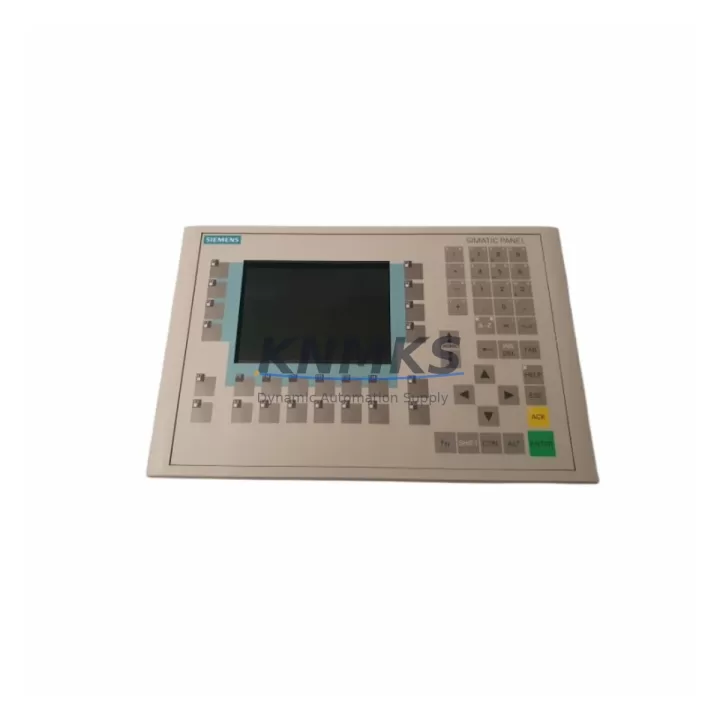
Siemens 6AV6542-0CA10-0AX1 Migration-Ready HMI Panel for Legacy Control Systems
The Siemens 6AV6542-0CA10-0AX1 is a 10-inch color TFT operator panel from the OP270 series, designed for human-machine interface applications in SIMATIC S7 and legacy process control environments. As original OP270 units reach end-of-service life, the 6AV6542-0CA10-0AX1 provides a validated migration path that preserves existing project files, screen layouts, and communication configurations — minimizing engineering rework and unplanned downtime during panel replacement.
For maintenance engineers managing aging SIMATIC S7-300, S7-400, or earlier distributed control architectures, sourcing a tested and warranted 6AV6542-0CA10-0AX1 from verified stock is a critical step in sustaining operator visibility and control continuity. This unit supports MPI and PROFIBUS DP communication protocols, enabling direct integration with existing PLC backplanes and field bus segments without protocol conversion hardware.
Migration Compatibility Table
| Parameter | Specification |
|---|---|
| SKU / Order No. | 6AV6542-0CA10-0AX1 |
| Series | OP270 (SIMATIC HMI) |
| Display | 10.4″ Color TFT, 640 × 480 px |
| Communication Interfaces | MPI, PROFIBUS DP (RS-485) |
| Supply Voltage | 24 V DC (20.4–28.8 V) |
| Power Consumption | Approx. 25 W |
| Operating Temperature | 0 °C to +50 °C |
| Protection Rating | IP65 (front panel) |
| Mounting | Panel cutout, snap-in clips |
| Configuration Software | ProTool / WinCC flexible |
| Replacement Compatibility | Direct replacement for OP270-10 (6AV6542-0CA10-0AX0) |
| Origin | Germany |
| Support terms | 12 Months |
| Condition | Original, pre-shipment tested |
Retrofit Planning for Existing Automation Systems
Replacing an OP270 panel in a live production environment requires a structured pre-migration checklist to avoid configuration loss and communication faults. Before removing the existing unit, engineers should back up the ProTool or WinCC flexible project file and verify the firmware version on the replacement 6AV6542-0CA10-0AX1 matches or is compatible with the project’s target runtime.
Communication wiring must be confirmed before power-up. The MPI or PROFIBUS DP cable — typically a 6XV1830-0EH10 or equivalent shielded twisted-pair segment cable — should be inspected for continuity and correct bus termination at both ends. If the panel is the last node on the PROFIBUS segment, the termination resistor on the DP connector must be enabled. Incorrect termination is a common cause of communication timeout alarms after panel replacement.
Power supply integrity is equally important. The 24 V DC rail feeding the 6AV6542-0CA10-0AX1 should be verified under load using a calibrated meter. Aging SITOP PSU100S or equivalent 24 V power supply modules in the same cabinet may exhibit voltage droop under combined load, which can cause intermittent HMI resets. Replacing or load-testing the power supply module during the same maintenance window reduces the risk of a repeat callout.
For cabinets where the OP270 communicates with a SIMATIC S7-300 CPU — such as a CPU 315-2 DP or CPU 317-2 PN/DP — engineers should confirm the MPI station address assigned to the panel matches the address stored in the project file. Address conflicts with other MPI nodes, including programming adapters or additional OP panels, will prevent the replacement unit from establishing a connection. The S7-300 rack’s SM321 digital input modules and SM322 digital output modules should also be inspected for loose terminal connections during the same cabinet access, as vibration-induced terminal loosening is a common concurrent fault in aging installations.
Where the control system includes a CP 343-1 or CP 343-5 communications processor for Ethernet or PROFIBUS network integration, verify that the network topology and IP/station address assignments remain consistent after the HMI swap. Any changes to the OP270’s configured PLC connections in WinCC flexible must be recompiled and downloaded before the panel is returned to service.
Downtime Control During System Migration
Minimizing operator downtime during an OP270 panel replacement depends on preparation quality. A pre-staged 6AV6542-0CA10-0AX1 with the correct project file pre-loaded and tested in a workshop environment reduces on-site replacement time to under 30 minutes in most installations. This approach — sometimes called a hot-swap kit — is strongly recommended for production lines where each hour of downtime carries significant cost.
Panel cutout dimensions for the 6AV6542-0CA10-0AX1 are identical to earlier OP270-10 variants, so no cabinet modification is required for a direct swap. The snap-in mounting clips should be inspected and replaced if deformed, as worn clips can allow panel movement that stresses the PROFIBUS connector and causes intermittent communication faults over time.
After installation, the startup sequence should be observed carefully. The panel should display the configured start screen within 60 seconds of power application. If the unit enters a fault or configuration mode, the most common causes are a mismatched project file version, an incorrect MPI address, or a missing bus termination. Each of these can be resolved on-site without returning the unit, provided the engineer has access to a PG/PC with WinCC flexible and a standard MPI/USB programming adapter such as the PC Adapter USB A2.
For sites managing multiple OP270 panels across a facility, maintaining at least one pre-configured spare 6AV6542-0CA10-0AX1 in the local spare parts inventory — alongside a current backup of each panel’s project file — is the most effective strategy for achieving sub-hour recovery times during unplanned panel failures.
Retrofit Support FAQ
Q: Is the 6AV6542-0CA10-0AX1 a direct replacement for the 6AV6542-0CA10-0AX0?
A: Yes. The 6AV6542-0CA10-0AX1 is the successor revision of the 6AV6542-0CA10-0AX0 OP270-10 panel. Physical dimensions, mounting cutout, and communication interfaces are identical. The existing project file compiled for the AX0 variant is compatible with the AX1 unit after a firmware-level transfer via WinCC flexible or ProTool.
Q: What communication cables are required for installation?
A: For MPI connections, a standard SIMATIC MPI cable with 9-pin Sub-D connectors is used. For PROFIBUS DP, a shielded bus cable with correct termination at segment endpoints is required. The bus connector type (e.g., 6ES7972-0BA52-0XA0 with integrated termination switch) should be confirmed before installation to avoid bus faults.
Q: How is the unit tested before shipment?
A: Each 6AV6542-0CA10-0AX1 undergoes pre-shipment functional testing including power-on verification, display check, communication port continuity, and touchscreen calibration where applicable. A test report is available on request. All units are covered by a support terms confirmed by quotation from the date of shipment.
Q: Can long-term supply be arranged for multi-site retrofit programs?
A: Yes. For customers managing phased OP270 replacement programs across multiple facilities, we support reserved stock arrangements and scheduled delivery. Contact our sales team to discuss volume requirements, lead times, and supply continuity agreements.
—
© 2026 KNMKS. All rights reserved.
Original Source: https://knmks.com
Contact: admin@knmks.com | +86 18359268345
Product Identification
- Brand / Ecosystem
-
Siemens
Siemens - Model / Series
-
6AV6542-0CA10-0AX1
SIMATIC Series - Product Family
- HMI & Displays
- Availability Status
- Available on request after model and quantity confirmation
- Inquiry Type
- B2B RFQ, replacement inquiry and project spare-part request
- Pre-Quote Check
- Exact SKU, brand, series, quantity, nameplate photos and destination country are checked before quotation
System Path
Where this product fits in the KNMKS automation structure.
Specification & Inquiry Focus
- Display range
- Operator panels and touch screens
- Common needs
- Screen size, interface and version matching
- Project support
- Retrofit, spare unit and panel replacement
Buyer Confirmation
Information KNMKS checks before replying.
- Exact model
- 6AV6542-0CA10-0AX1
- Brand / ecosystem
- Siemens
- Product family
- HMI & Displays
- Application note
- Replacement, maintenance, project build or spare-part list
- Useful photos
- Nameplate, installed unit, cabinet layout or connector side
- Delivery details
- Quantity, destination country and target schedule
Document Support
Files and notes can be confirmed during quotation.
- Product photos or nameplate confirmation when available
- Packing and delivery notes before quotation confirmation
- Support scope and delivery terms confirmed per inquiry
- Export document coordination for qualified B2B requests
Inquiry Support
- Panel size and interface confirmation
- Replacement unit inquiry for discontinued HMIs
- Protective packaging for display shipment
What to Send Us
- Brand and exact model number: Siemens 6AV6542-0CA10-0AX1
- Quantity and required delivery time
- Application, replacement requirement or nameplate photo
- Destination country and shipping preference
RFQ Preparation
This is a product inquiry page built for RFQ communication.
Fast Model Check
Send this model to KNMKS for confirmation.
Include quantity, destination country and photos if this is a maintenance replacement. The inquiry will be saved with a reference number after submission.
Brand & Compatibility Note
KNMKS displays automation product information for well-known industrial brand ecosystems and compatible replacement references. Brand names are used for product identification and compatibility reference only; final availability and commercial terms are confirmed per quotation.
 Manufacturing
 Machine Tools
 Packaging
 Energy & Power



 PLCs & Controllers
 Servo Systems
 Variable Frequency Drives
 Sensors