
Overview
Siemens 6AV6542-0BB15-2AX0 Maintenance-Proven Spare Part for Factory Uptime
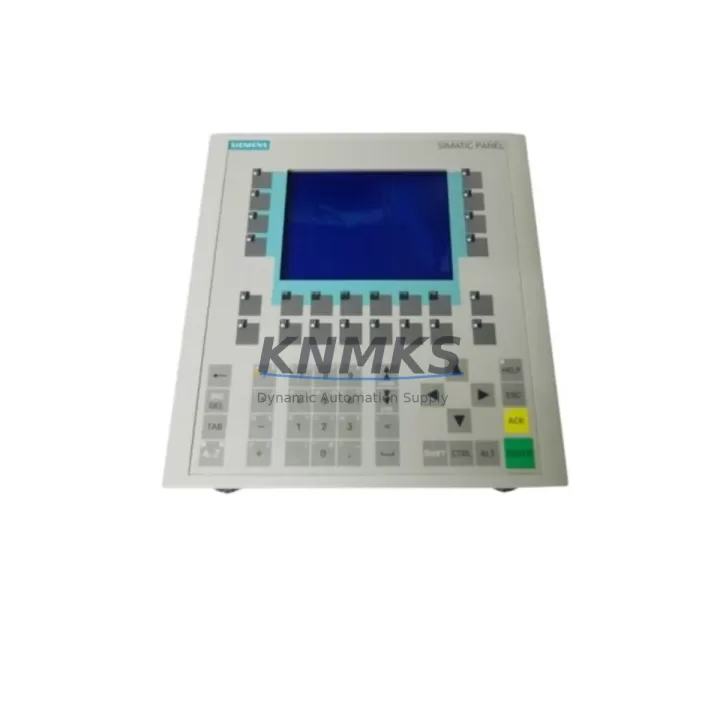
The Siemens 6AV6542-0BB15-2AX0 is a SIMATIC OP170B monochrome operator panel designed for direct integration with SIMATIC S7-300 and S7-400 PLC systems via MPI or PROFIBUS-DP. As a critical HMI component in process visualization and machine control, this unit is widely deployed across automotive assembly lines, chemical processing plants, packaging machinery, and discrete manufacturing cells. When this panel fails or degrades, the entire operator interface goes dark — halting production and forcing unplanned downtime. Maintaining a verified spare in your control cabinet inventory is the most reliable strategy for rapid recovery.
At KNMKS, every 6AV6542-0BB15-2AX0 unit is sourced from authorized supply chains, inspected against original Siemens specifications, and dispatch-tested before shipment. We support maintenance engineers and procurement teams with long-term supply continuity, backed by a support terms confirmed by quotation on all units.
Spare Maintenance Table
| Parameter | Specification |
|---|---|
| Part Number / SKU | 6AV6542-0BB15-2AX0 |
| Product Series | SIMATIC OP170B |
| Brand | Siemens |
| Display Type | Monochrome STN LCD, 320 × 240 px |
| Communication Interface | MPI / PROFIBUS-DP (RS-485) |
| Compatible PLC Systems | SIMATIC S7-300, S7-400, S5 (via adapter) |
| Supply Voltage | 24 V DC (20.4–28.8 V) |
| Power Consumption | Approx. 12 W |
| Operating Temperature | 0 °C to +50 °C |
| Protection Rating | IP65 (front panel) |
| Mounting | Panel cut-out, snap-in clips |
| Weight | Approx. 1,100 g |
| Country of Origin | Germany |
| Support terms | 12 Months (KNMKS) |
| Condition | New / Refurbished-Tested (specify on order) |
| Maintenance Recommendation | Replace backlight every 5–7 years; inspect connector pins annually |
Maintenance Planning for Continuous Operation
When a 6AV6542-0BB15-2AX0 is flagged during routine control cabinet inspection or fails during a production shift, the replacement scope should extend beyond the HMI panel itself. Maintenance engineers should simultaneously verify the integrity of the PROFIBUS-DP communication cable (typically 6XV1830-0EH10 or equivalent shielded twisted-pair) connecting the panel to the PLC rack, as cable degradation is a common root cause of intermittent HMI faults that are misdiagnosed as panel failure.
The 24 V DC power supply module feeding the operator panel — often a SITOP PSU100S or equivalent — should be load-tested and its output voltage verified at the panel terminal block. Voltage sag or ripple outside the 20.4–28.8 V tolerance range will cause display anomalies and premature panel failure even after replacement. Inspect the terminal block and wiring harness at the panel rear connector for corrosion, loose crimps, or insulation breakdown, particularly in high-vibration or high-humidity environments.
For systems where the OP170B interfaces with a SIMATIC S7-300 CPU module (such as the CPU 315-2 DP or CPU 317-2 PN/DP), confirm that the MPI/PROFIBUS address configuration in the replacement panel matches the original unit before powering up. Address conflicts will prevent the panel from establishing communication and may trigger CPU fault states. If the installation includes a PROFIBUS repeater or bus connector (e.g., 6ES7972-0BA52-0XA0), inspect termination resistor settings and bus segment integrity as part of the replacement workflow.
Procurement engineers building annual maintenance kits for S7-based control systems should consider stocking the 6AV6542-0BB15-2AX0 alongside compatible SIMATIC S7-300 I/O modules (digital input SM 321 or analog input SM 331) and CP communication processors to cover the full scope of a panel-down recovery scenario. Including a spare MPI programming cable (PC Adapter USB or equivalent) ensures that re-parameterization of the replacement panel can be performed on-site without dependency on external tools.
Site Replacement Workflow
Step 1 — Isolate and document: Power down the control cabinet following LOTO procedures. Photograph the existing panel wiring, PROFIBUS address switch settings, and connector orientation before disconnection.
Step 2 — Remove the failed unit: Release the snap-in mounting clips from the rear, disconnect the PROFIBUS-DP connector and 24 V DC power terminals. Label all cables.
Step 3 — Prepare the replacement 6AV6542-0BB15-2AX0: Set the MPI/PROFIBUS station address to match the original unit using the address switches on the rear housing. Load the project configuration via SIMATIC WinCC flexible or ProTool using the MPI programming cable.
Step 4 — Install and reconnect: Insert the replacement panel into the panel cut-out, engage mounting clips, reconnect power and PROFIBUS-DP connectors. Verify torque on terminal screws.
Step 5 — Power-up and verify: Restore 24 V DC supply. Confirm panel boot sequence, communication link status (green LED on PROFIBUS connector), and correct screen display. Run a functional test of all configured operator screens before returning the line to production.
This workflow minimizes downtime to under 60 minutes for a prepared maintenance team and eliminates the risk of configuration errors that extend recovery time.
Spare Parts Support FAQ
Q1: Is the 6AV6542-0BB15-2AX0 still available as a new unit, or only as refurbished stock?
KNMKS maintains both new old-stock (NOS) and fully tested refurbished units. Each refurbished panel undergoes functional testing including display, keypad, and communication interface verification. Unit condition is clearly stated on the order confirmation. Both variants carry a support terms confirmed by quotation.
Q2: How do I confirm compatibility with my existing SIMATIC S7 system before ordering?
The 6AV6542-0BB15-2AX0 is compatible with SIMATIC S7-300 and S7-400 systems communicating via MPI or PROFIBUS-DP. Provide your CPU model and existing WinCC flexible or ProTool project version when contacting KNMKS — our technical team will confirm compatibility and advise on any firmware considerations before shipment.
Q3: What is the recommended inventory strategy for this HMI panel in a multi-line facility?
For facilities operating 3 or more S7-based production lines using OP170B panels, we recommend maintaining a minimum of one spare unit per 5 installed panels, with a maximum replenishment lead time of 30 days. Given the age of the OP170B platform, sourcing windows are narrowing — early procurement and bonded stock agreements are advisable for high-criticality lines.
Q4: Does KNMKS provide pre-shipment testing and documentation?
Yes. All units are powered-on tested prior to dispatch. A test report confirming display function, keypad response, and communication interface integrity is available on request. Units are packed in anti-static ESD packaging with foam protection to prevent transit damage. Shipment tracking is provided for all orders.
© 2026 KNMKS. All rights reserved.
Original Source: https://knmks.com
Contact: admin@knmks.com | +86 18359268345
Product Identification
- Brand / Ecosystem
-
Siemens
Siemens - Model / Series
-
6AV6542-0BB15-2AX0
SIMATIC Series - Product Family
- HMI & Displays
- Availability Status
- Available on request after model and quantity confirmation
- Inquiry Type
- B2B RFQ, replacement inquiry and project spare-part request
- Pre-Quote Check
- Exact SKU, brand, series, quantity, nameplate photos and destination country are checked before quotation
System Path
Where this product fits in the KNMKS automation structure.
Specification & Inquiry Focus
- Display range
- Operator panels and touch screens
- Common needs
- Screen size, interface and version matching
- Project support
- Retrofit, spare unit and panel replacement
Buyer Confirmation
Information KNMKS checks before replying.
- Exact model
- 6AV6542-0BB15-2AX0
- Brand / ecosystem
- Siemens
- Product family
- HMI & Displays
- Application note
- Replacement, maintenance, project build or spare-part list
- Useful photos
- Nameplate, installed unit, cabinet layout or connector side
- Delivery details
- Quantity, destination country and target schedule
Document Support
Files and notes can be confirmed during quotation.
- Product photos or nameplate confirmation when available
- Packing and delivery notes before quotation confirmation
- Support scope and delivery terms confirmed per inquiry
- Export document coordination for qualified B2B requests
Inquiry Support
- Panel size and interface confirmation
- Replacement unit inquiry for discontinued HMIs
- Protective packaging for display shipment
What to Send Us
- Brand and exact model number: Siemens 6AV6542-0BB15-2AX0
- Quantity and required delivery time
- Application, replacement requirement or nameplate photo
- Destination country and shipping preference
RFQ Preparation
This is a product inquiry page built for RFQ communication.
Fast Model Check
Send this model to KNMKS for confirmation.
Include quantity, destination country and photos if this is a maintenance replacement. The inquiry will be saved with a reference number after submission.
Brand & Compatibility Note
KNMKS displays automation product information for well-known industrial brand ecosystems and compatible replacement references. Brand names are used for product identification and compatibility reference only; final availability and commercial terms are confirmed per quotation.
 Manufacturing
 Machine Tools
 Packaging
 Energy & Power



 PLCs & Controllers
 Servo Systems
 Variable Frequency Drives
 Sensors