
Overview
Siemens 6AV3617-5BB00-0AB0 Maintenance-Proven Spare Part for Factory Uptime
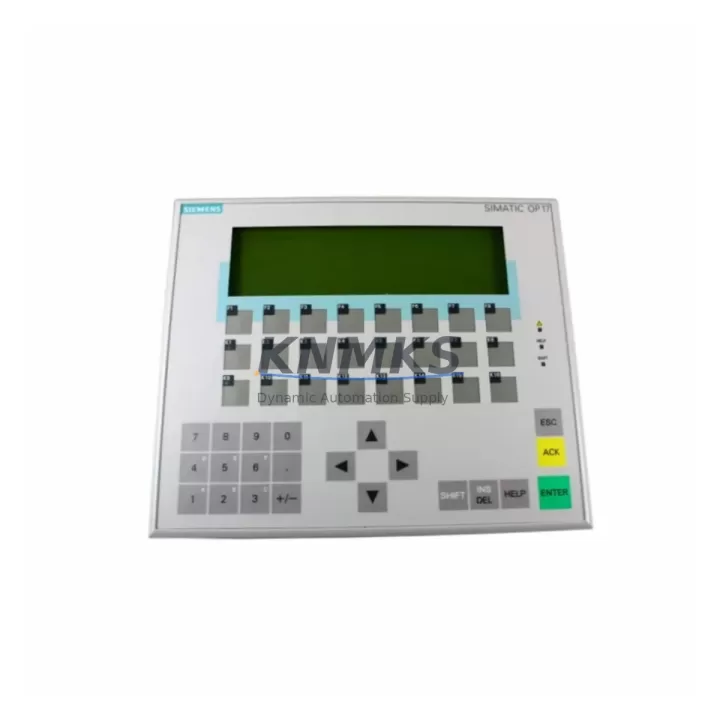
The Siemens 6AV3617-5BB00-0AB0 is an original SIMATIC OP17 operator panel spare part engineered for continuous industrial operation in demanding automation environments. As a front-end HMI interface within Siemens SIMATIC S5 and S7 control architectures, the OP17 panel serves as the primary operator interface for process visualization, alarm acknowledgment, and parameter input across a wide range of manufacturing, utilities, and process industries. Maintaining an in-stock supply of the 6AV3617-5BB00-0AB0 is a critical element of any proactive maintenance strategy for facilities running legacy SIMATIC control systems.
For maintenance engineers managing aging SIMATIC installations, the OP17 panel is frequently the first component to show wear — membrane keypad degradation, display contrast loss, and communication faults are the most common failure modes. When the 6AV3617-5BB00-0AB0 fails, the entire operator station becomes non-functional, halting process visibility and forcing unplanned downtime. Sourcing a verified original spare in advance eliminates this risk and ensures rapid panel swap without reconfiguration delays.
Each 6AV3617-5BB00-0AB0 unit dispatched from our warehouse undergoes pre-shipment functional testing covering display integrity, keypad response, RS-485 communication port continuity, and power input verification. Units are shipped with protective packaging suitable for international freight and are backed by a support terms confirmed by quotation covering manufacturing defects and functional failures under normal operating conditions.
Spare Maintenance Table
| Parameter | Specification |
|---|---|
| Part Number | 6AV3617-5BB00-0AB0 |
| Series | SIMATIC OP17 |
| Brand | Siemens |
| Product Type | HMI Operator Panel |
| Display | LCD, 4-line text display with backlight |
| Keypad | Membrane keypad with function keys and numeric input |
| Communication Interface | RS-485 (MPI/PROFIBUS DP compatible) |
| Supply Voltage | 24 V DC |
| Compatible Controllers | SIMATIC S5, S7-200, S7-300, S7-400 (via MPI/PROFIBUS) |
| Degree of Protection (Front) | IP65 |
| Operating Temperature | 0 °C to +50 °C |
| Country of Origin | Germany |
| Support terms | 12 Months |
| Pre-Shipment Testing | Yes — display, keypad, communication, power input |
| Dispatch | Global, rapid dispatch from verified stock |
Maintenance Planning for Continuous Operation
When replacing the 6AV3617-5BB00-0AB0 OP17 panel in the field, a thorough inspection of the surrounding electrical circuit is essential to prevent repeat failures and ensure system stability. Maintenance engineers should begin by verifying the 24 V DC power supply feeding the panel — a failing or under-spec SITOP power supply module can cause intermittent resets and display anomalies that mimic panel hardware failure. Confirm supply voltage is within tolerance before commissioning the replacement unit.
The RS-485 communication cable connecting the OP17 to the SIMATIC S7-300 CPU or CP communication processor should be inspected for insulation damage, connector corrosion, and correct termination resistor placement. A degraded PROFIBUS DP cable or a faulty MPI connector is a frequent root cause of OP17 communication faults that are misdiagnosed as panel failure. Replacing the panel without addressing cable integrity will result in recurring faults on the new unit.
Inspect the SIMATIC S7-300 backplane and CPU module for any fault LEDs or diagnostic buffer entries that may indicate upstream issues. If the control cabinet houses a CP 343-1 or CP 343-2 communication processor, verify its configuration and firmware version for compatibility with the OP17 project file. Additionally, check the 24 V DC distribution terminal blocks and fuse holders within the control cabinet — a blown fuse on the HMI supply branch is a common and easily overlooked cause of panel outage.
For facilities maintaining a comprehensive spare parts inventory, it is advisable to stock the 6AV3617-5BB00-0AB0 alongside related components including the SIMATIC S7-300 CPU module relevant to your installation, a spare PROFIBUS DP connector set, and a replacement SITOP 24 V DC power supply module. Signal isolators on analog I/O channels adjacent to the operator station should also be inspected during any OP17 replacement event, as ground loop issues can introduce noise that affects panel communication stability.
Site Replacement Workflow
The 6AV3617-5BB00-0AB0 is a direct replacement for earlier OP17 variants within the SIMATIC OP17 product family. Before beginning the swap, download and archive the existing panel project using SIMATIC ProTool or WinCC flexible on a connected engineering station. This ensures the operator screen configuration, alarm texts, and parameter assignments are preserved and can be transferred to the replacement unit without re-engineering.
Power down the control cabinet following your site lockout/tagout procedure. Disconnect the RS-485 communication cable and the 24 V DC power connector from the existing panel. Remove the panel from the cutout by releasing the mounting clamps from the rear. Install the 6AV3617-5BB00-0AB0 replacement unit into the same cutout — the panel dimensions and mounting pattern are consistent across the OP17 series, requiring no panel cutout modification. Reconnect power and communication cables, restore power, and transfer the archived project to the new panel via the MPI interface. Verify all operator screens, alarm pages, and function key assignments before returning the line to production.
This replacement workflow is compatible with SIMATIC S7-300 and S7-400 host systems and does not require changes to the PLC program or I/O configuration. Downtime for a prepared swap with a pre-configured replacement unit is typically under 60 minutes, making the 6AV3617-5BB00-0AB0 an efficient solution for minimizing production interruption during HMI maintenance events.
Spare Parts Support FAQ
Q: Is the 6AV3617-5BB00-0AB0 compatible with both SIMATIC S7-300 and S7-400 systems?
A: Yes. The OP17 panel communicates via MPI and PROFIBUS DP interfaces, which are supported by both SIMATIC S7-300 and S7-400 CPUs. Compatibility with S5 systems is also supported via the appropriate protocol adapter. Always verify the communication protocol configured in your existing OP17 project before replacement.
Q: What does the support terms confirmed by quotation cover for this spare part?
A: The support terms confirmed by quotation cover manufacturing defects and functional failures under normal operating conditions, including display, keypad, and communication port integrity. Support requests are supported with documented pre-shipment test records provided upon request.
Q: How do you verify stock availability and lead time for the 6AV3617-5BB00-0AB0?
A: We maintain multi-region stock of the 6AV3617-5BB00-0AB0 to support emergency replacement and planned maintenance schedules. Contact our sales team at admin@knmks.com for real-time stock confirmation and estimated dispatch timeline. For critical applications, we recommend maintaining at least one unit on-site as a cold standby spare.
Q: Can this unit be used as a long-term supply solution for aging SIMATIC OP17 installations?
A: Yes. We specialize in long-term supply of legacy SIMATIC spare parts for facilities extending the operational life of S5 and S7-era control systems. We can support scheduled annual procurement, blanket order arrangements, and emergency dispatch to minimize exposure to obsolescence risk.
© 2026 KNMKS. All rights reserved.
Original Source: https://knmks.com
Contact: admin@knmks.com | +86 18359268345
Product Identification
- Brand / Ecosystem
-
Siemens
Siemens - Model / Series
-
6AV3617-5BB00-0AB0
SIMATIC Series - Product Family
- HMI & Displays
- Availability Status
- Available on request after model and quantity confirmation
- Inquiry Type
- B2B RFQ, replacement inquiry and project spare-part request
- Pre-Quote Check
- Exact SKU, brand, series, quantity, nameplate photos and destination country are checked before quotation
System Path
Where this product fits in the KNMKS automation structure.
Specification & Inquiry Focus
- Display range
- Operator panels and touch screens
- Common needs
- Screen size, interface and version matching
- Project support
- Retrofit, spare unit and panel replacement
Buyer Confirmation
Information KNMKS checks before replying.
- Exact model
- 6AV3617-5BB00-0AB0
- Brand / ecosystem
- Siemens
- Product family
- HMI & Displays
- Application note
- Replacement, maintenance, project build or spare-part list
- Useful photos
- Nameplate, installed unit, cabinet layout or connector side
- Delivery details
- Quantity, destination country and target schedule
Document Support
Files and notes can be confirmed during quotation.
- Product photos or nameplate confirmation when available
- Packing and delivery notes before quotation confirmation
- Support scope and delivery terms confirmed per inquiry
- Export document coordination for qualified B2B requests
Inquiry Support
- Panel size and interface confirmation
- Replacement unit inquiry for discontinued HMIs
- Protective packaging for display shipment
What to Send Us
- Brand and exact model number: Siemens 6AV3617-5BB00-0AB0
- Quantity and required delivery time
- Application, replacement requirement or nameplate photo
- Destination country and shipping preference
RFQ Preparation
This is a product inquiry page built for RFQ communication.
Fast Model Check
Send this model to KNMKS for confirmation.
Include quantity, destination country and photos if this is a maintenance replacement. The inquiry will be saved with a reference number after submission.
Brand & Compatibility Note
KNMKS displays automation product information for well-known industrial brand ecosystems and compatible replacement references. Brand names are used for product identification and compatibility reference only; final availability and commercial terms are confirmed per quotation.
 Manufacturing
 Machine Tools
 Packaging
 Energy & Power



 PLCs & Controllers
 Servo Systems
 Variable Frequency Drives
 Sensors