
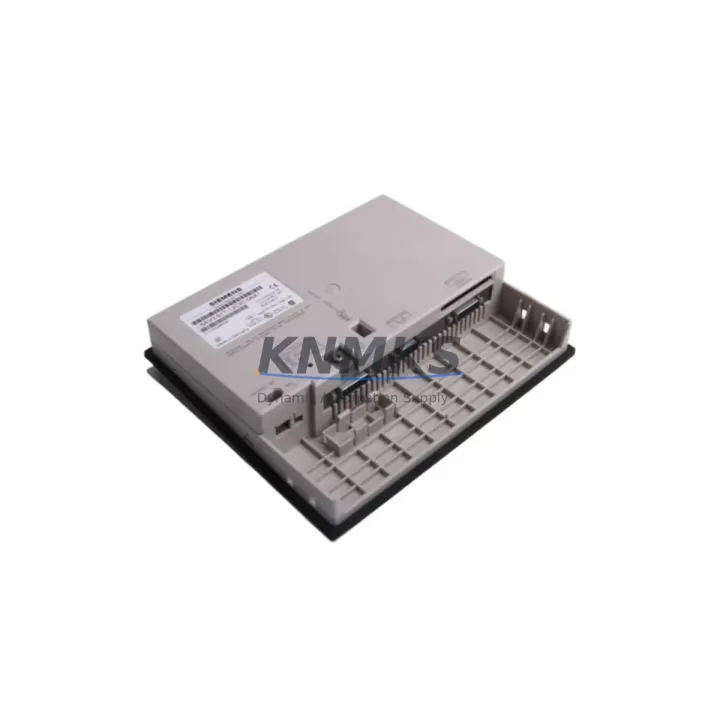
Overview
Siemens 6AV3617-1JC30-0AX1 Migration-Ready HMI Panel: Legacy System Migration and Compatible Upgrade
The Siemens 6AV3617-1JC30-0AX1 is a SIMATIC OP17 operator panel engineered for direct integration into legacy SIMATIC S5 and early SIMATIC S7 control environments. As production lines built around discontinued HMI platforms face increasing maintenance pressure, the 6AV3617-1JC30-0AX1 provides a verified, migration-ready replacement path that preserves existing MPI and PROFIBUS DP communication links, minimizes rewiring effort, and protects the investment in original PLC program logic. Each unit is pre-shipment tested, backed by a support terms confirmed by quotation, and dispatched from multi-region stock to support emergency replacement and planned retrofit schedules alike.
Facilities operating aging SIMATIC OP7 or OP17 panels frequently encounter screen degradation, keypad failure, and communication faults that cannot be resolved through field repair. The 6AV3617-1JC30-0AX1 addresses these failure modes with a form-factor-compatible replacement that fits the original panel cutout, reuses the existing 24 VDC supply wiring, and connects directly to the MPI port on SIMATIC S7-300 and S7-400 CPUs without protocol conversion hardware. Before installation, engineers should confirm the MPI bus address assignment in the replacement panel matches the address previously held by the outgoing unit, as address conflicts will prevent the CPU from establishing communication and may trigger watchdog faults in the control program.
Terminal wiring verification is a critical pre-commissioning step. The 6AV3617-1JC30-0AX1 uses a 9-pin Sub-D connector for MPI/PROFIBUS DP and a separate terminal block for the 24 VDC supply. Technicians should measure supply voltage at the terminal block under load before powering the panel, as voltage drops below 20.4 VDC can cause intermittent display faults or communication resets. Where the original installation used a SIMATIC S5 with a CP 521 SI serial interface, a protocol gateway or a SIMATIC S7 CPU migration — such as moving to a CPU 315-2 DP or CPU 317-2 DP — will be required to maintain HMI connectivity, and the ProTool or WinCC flexible project must be recompiled and downloaded to the replacement panel before startup.
Firmware version compatibility should be confirmed prior to project transfer. The 6AV3617-1JC30-0AX1 supports ProTool V6.0 SP2 and later project versions. Projects originally created for earlier OP17 firmware revisions may require a project conversion step in ProTool before the download can proceed. Where the control cabinet also houses a SIMATIC S7-300 rack with a CP 342-5 PROFIBUS DP communications processor, the DP slave address configured in the HW Config must align with the panel’s configured DP address to avoid bus initialization errors on startup.
Migration Compatibility Table
| Parameter | Details |
|---|---|
| SKU / Part Number | 6AV3617-1JC30-0AX1 |
| Series | SIMATIC OP17 (SIMATIC HMI Operator Panel Series) |
| Direct Replacement For | SIMATIC OP17, OP7 (with project adaptation) |
| Communication Interface | MPI, PROFIBUS DP (9-pin Sub-D) |
| Supply Voltage | 24 VDC (20.4–28.8 VDC operating range) |
| Compatible PLCs | SIMATIC S7-300, S7-400; S5 via gateway |
| Engineering Software | ProTool V6.0 SP2+, WinCC flexible (with conversion) |
| Panel Cutout Compatibility | Form-factor compatible with original OP17 cutout |
| Installation Space | Confirm cabinet depth ≥ 60 mm behind panel face |
| Retrofit Recommendation | Verify MPI address, supply voltage, and firmware version before commissioning |
| Pre-Shipment Testing | Yes — functional and communication test performed |
| Support terms | 12 Months |
Retrofit Planning for Existing Automation Systems
A complete OP17 retrofit typically involves more than a panel swap. In a standard SIMATIC S7-300 control cabinet, the 6AV3617-1JC30-0AX1 shares the MPI bus with the CPU and may coexist with a SIMATIC S7-300 CPU 315-2 DP, a CP 343-1 Ethernet communications module, and one or more SM 321 digital input modules or SM 331 analog input modules mounted on the same rack. Engineers planning the retrofit should document the existing rack slot assignments and I/O module addresses before any hardware is removed, as these addresses are referenced directly in the PLC program and must remain consistent after the upgrade.
Where the control system includes a SIMATIC ET 200S distributed I/O station connected via PROFIBUS DP, the DP master configuration in HW Config must be exported and preserved before the CPU is replaced or the rack is modified. The 6AV3617-1JC30-0AX1 does not participate in the DP master configuration directly, but any changes to the CPU or CP modules on the same rack can affect the DP master system and cause I/O faults if the configuration is not correctly restored after the retrofit.
For cabinets where the original HMI was connected via a PC Adapter USB or MPI/DP programming cable to a SIMATIC S7-300 CPU, the same cable can be reused for the initial project download to the 6AV3617-1JC30-0AX1, provided the cable driver version is compatible with the engineering workstation’s operating system. After the project download, the programming cable should be disconnected and the panel should be verified to communicate autonomously with the CPU over the MPI bus before the cabinet is returned to service.
Power supply capacity is a frequently overlooked constraint in HMI retrofit projects. The 6AV3617-1JC30-0AX1 draws up to 0.8 A at 24 VDC. Where the existing SITOP PSU100S or equivalent 24 VDC power supply is already loaded near its rated output, adding the replacement panel without first auditing the total load may cause supply voltage to drop below the panel’s minimum operating threshold. A load audit covering all 24 VDC consumers in the cabinet — including solenoid valves, signal lamps, and relay coils — should be completed before the retrofit is finalized.
Downtime Control During System Migration
Minimizing unplanned downtime during an OP17 replacement requires a structured pre-outage preparation sequence. Before the maintenance window opens, the existing ProTool or WinCC flexible project should be backed up from the outgoing panel using the project upload function, and the PLC program should be uploaded from the CPU and archived with a timestamp. This ensures that if the replacement panel or the project download encounters an error, the original configuration can be restored without relying on documentation alone.
During the physical swap, the MPI bus should be terminated correctly at both ends of the network. Removing the outgoing panel without checking termination resistor status can leave the MPI bus improperly terminated, causing communication errors on other nodes — including the programming interface — that may be misdiagnosed as CPU faults. The 6AV3617-1JC30-0AX1 includes an integrated bus termination switch; its position should be set to match the network topology before the panel is powered.
After the project download is complete and the panel displays the correct startup screen, a functional verification sequence should be performed before the line is returned to automatic mode. This includes confirming that all HMI screen navigation functions correctly, that alarm messages are received and acknowledged as expected, and that any setpoint or recipe values displayed on the panel match the values held in the CPU data blocks. Where the original system used password-protected screens, the access level configuration in the replacement project should be verified against the original before operators resume normal use.
For facilities with strict change management requirements, the 6AV3617-1JC30-0AX1 supports a staged commissioning approach: the panel can be configured and tested on a bench setup connected to a spare CPU or a SIMATIC S7 PLCSIM instance before the maintenance window, reducing the time the production line is offline to the physical installation and final communication verification steps only.
Retrofit Support FAQ
Q1: Is the 6AV3617-1JC30-0AX1 a direct drop-in replacement for the original SIMATIC OP17?
Yes. The 6AV3617-1JC30-0AX1 is form-factor compatible with the original OP17 panel cutout and uses the same MPI/PROFIBUS DP interface. The existing ProTool project can be downloaded directly to the replacement panel after confirming firmware version compatibility. No hardware modifications to the control cabinet are required in most standard installations.
Q2: What wiring checks are required before powering the replacement panel?
Verify that the 24 VDC supply at the panel terminal block is within the 20.4–28.8 VDC operating range under load. Confirm the MPI bus address on the replacement panel matches the address previously assigned to the outgoing unit. Check that the MPI cable is correctly seated in the 9-pin Sub-D connector and that bus termination is correctly configured for the network topology.
Q3: Has the unit been tested before shipment, and what support terms is provided?
Every 6AV3617-1JC30-0AX1 unit undergoes a pre-shipment functional and communication test before dispatch. The unit is covered by a support terms confirmed by quotation from the date of shipment. In-stock units are available for same-day or next-business-day dispatch to support emergency replacement requirements.
Q4: Can this panel be used with a SIMATIC S5 PLC without replacing the controller?
Direct MPI connection to a SIMATIC S5 CPU is not supported, as S5 controllers use a different communication architecture. For S5-based systems, a protocol gateway or a parallel CPU migration to SIMATIC S7 is recommended. Where a full CPU migration is planned, the 6AV3617-1JC30-0AX1 can be commissioned on the new S7 platform while the S5 system remains in service, allowing the HMI migration to be completed and verified before the PLC cutover takes place.
© 2026 KNMKS. All rights reserved.
Original Source: https://knmks.com
Contact: admin@knmks.com | +86 18359268345
Product Identification
- Brand / Ecosystem
-
Siemens
Siemens - Model / Series
-
6AV3617-1JC30-0AX1
SIMATIC Series - Product Family
- HMI & Displays
- Availability Status
- Available on request after model and quantity confirmation
- Inquiry Type
- B2B RFQ, replacement inquiry and project spare-part request
- Pre-Quote Check
- Exact SKU, brand, series, quantity, nameplate photos and destination country are checked before quotation
System Path
Where this product fits in the KNMKS automation structure.
Specification & Inquiry Focus
- Display range
- Operator panels and touch screens
- Common needs
- Screen size, interface and version matching
- Project support
- Retrofit, spare unit and panel replacement
Buyer Confirmation
Information KNMKS checks before replying.
- Exact model
- 6AV3617-1JC30-0AX1
- Brand / ecosystem
- Siemens
- Product family
- HMI & Displays
- Application note
- Replacement, maintenance, project build or spare-part list
- Useful photos
- Nameplate, installed unit, cabinet layout or connector side
- Delivery details
- Quantity, destination country and target schedule
Document Support
Files and notes can be confirmed during quotation.
- Product photos or nameplate confirmation when available
- Packing and delivery notes before quotation confirmation
- Support scope and delivery terms confirmed per inquiry
- Export document coordination for qualified B2B requests
Inquiry Support
- Panel size and interface confirmation
- Replacement unit inquiry for discontinued HMIs
- Protective packaging for display shipment
What to Send Us
- Brand and exact model number: Siemens 6AV3617-1JC30-0AX1
- Quantity and required delivery time
- Application, replacement requirement or nameplate photo
- Destination country and shipping preference
RFQ Preparation
This is a product inquiry page built for RFQ communication.
Fast Model Check
Send this model to KNMKS for confirmation.
Include quantity, destination country and photos if this is a maintenance replacement. The inquiry will be saved with a reference number after submission.
Brand & Compatibility Note
KNMKS displays automation product information for well-known industrial brand ecosystems and compatible replacement references. Brand names are used for product identification and compatibility reference only; final availability and commercial terms are confirmed per quotation.
 Manufacturing
 Machine Tools
 Packaging
 Energy & Power



 PLCs & Controllers
 Servo Systems
 Variable Frequency Drives
 Sensors