
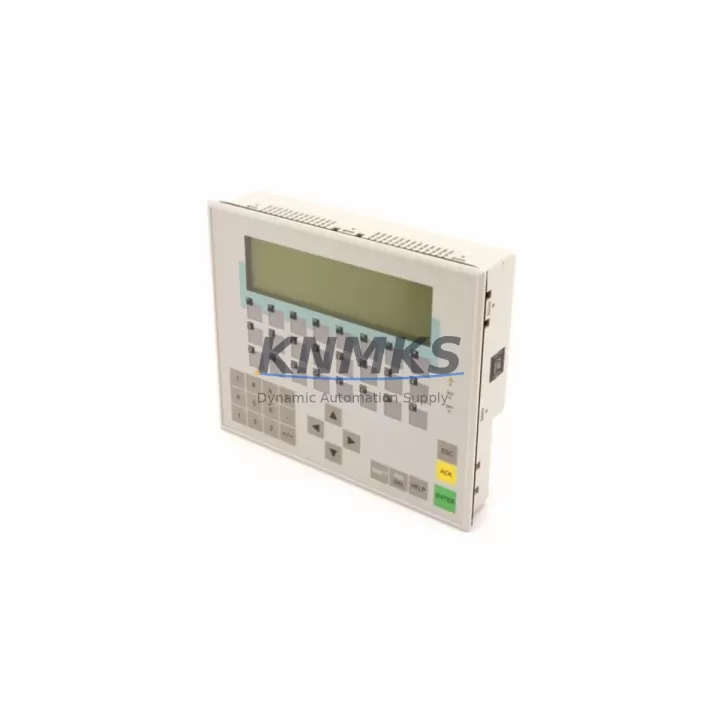
Overview
Siemens 6AV3617-1JC00-0AX1 Migration-Ready HMI for Legacy Control Systems
The Siemens 6AV3617-1JC00-0AX1 is a proven migration-ready HMI operator panel engineered to replace end-of-life SIMATIC OP17 units in legacy SIMATIC S5 and early SIMATIC S7 control environments. As Siemens progressively phases out the original OP17 product line, facilities running aging DCS and PLC architectures face increasing pressure to source verified replacement panels that maintain full MPI and PROFIBUS DP communication compatibility without requiring wholesale reprogramming of existing control logic. The 6AV3617-1JC00-0AX1 addresses this challenge directly, offering a drop-in upgrade path that preserves operator screen layouts, alarm configurations, and tag assignments from the original OP17 project files.
Designed for industrial environments where control continuity is non-negotiable, this panel supports direct connection to SIMATIC S7-300 and S7-400 controllers via MPI or PROFIBUS DP at standard baud rates. Engineers migrating from legacy SIMATIC S5 systems using CP 5431 FMS/DP communication cards will find the 6AV3617-1JC00-0AX1 compatible with updated ProTool project migration workflows, significantly reducing the engineering hours required to bring a modernized HMI online. The panel’s 24 VDC power supply input aligns with standard control cabinet power rails, and its compact form factor fits standard DIN-rail enclosures and panel cutouts previously occupied by the OP17, eliminating the need for mechanical rework in most retrofit scenarios.
Before commissioning, engineers should verify the existing MPI network segment address assignments to avoid conflicts with other nodes such as SIMATIC S7-315 or S7-416 CPUs, CP 342-5 PROFIBUS communication processors, or co-installed SIMATIC OP7 and OP27 panels sharing the same MPI bus. Terminal wiring should be confirmed against the original OP17 connection diagram, paying particular attention to the 9-pin Sub-D MPI/PROFIBUS connector pinout and the 24 VDC supply polarity. Where the original installation used a SIMATIC PC Adapter USB or MPI adapter for programming, the same interface remains compatible with STEP 7 and WinCC flexible for project download to the 6AV3617-1JC00-0AX1.
For facilities undertaking broader control cabinet upgrades — such as replacing SIMATIC S5-115U or S5-135U PLCs with modern S7-300 or S7-1500 controllers — the 6AV3617-1JC00-0AX1 serves as a stable interim HMI that bridges the gap between legacy operator interfaces and fully modernized SCADA architectures. In these multi-phase retrofit projects, it is common to simultaneously replace the SIMATIC IM 308-C interface module, update the ET 200M distributed I/O rack, and reconfigure the CP 343-1 Ethernet communication module, all while keeping the HMI layer operational to maintain operator visibility during the transition. The 6AV3617-1JC00-0AX1 supports this phased approach by remaining functional across both old and new controller generations during the cutover window.
Migration Compatibility Table
| Parameter | Original: SIMATIC OP17 | Replacement: 6AV3617-1JC00-0AX1 |
|---|---|---|
| Communication Interface | MPI / PROFIBUS DP (9-pin Sub-D) | MPI / PROFIBUS DP (9-pin Sub-D) — Direct compatible |
| Power Supply | 24 VDC (18–30 VDC range) | 24 VDC (18–30 VDC range) — No rewiring required |
| Display | STN LCD, 4-line text | STN LCD, 4-line text — Identical operator layout |
| Panel Cutout | Standard OP17 cutout dimensions | Compatible cutout — No mechanical modification |
| Project Migration | ProTool V6.x project files | ProTool migration supported; WinCC flexible compatible |
| Compatible Controllers | S5-115U, S5-135U, S7-300, S7-400 | S7-300, S7-400, S7-1500 (via MPI/PROFIBUS) |
| Firmware Version | OP17 V4.x | Verify firmware via ProTool before download |
| Installation Environment | IP65 front panel, panel mount | IP65 front panel, panel mount — Direct fit |
| Commissioning Tool | STEP 7 / PC Adapter MPI | STEP 7 / PC Adapter USB / WinCC flexible |
| Support terms | End-of-life / No support | support terms confirmed by quotation | Pre-shipment tested |
Retrofit Planning for Existing Automation Systems
A successful retrofit using the 6AV3617-1JC00-0AX1 requires a structured pre-installation audit of the existing control cabinet. Begin by documenting the current MPI network topology, including all node addresses assigned to the S7-300 CPU, any co-installed CP 342-5 PROFIBUS DP communication processors, and adjacent SIMATIC OP7 panels that share the MPI segment. Confirm that the replacement panel’s MPI address does not conflict with existing nodes before powering the new unit.
Power supply capacity is a critical checkpoint. The control cabinet’s 24 VDC rail — typically sourced from a SITOP PSU100S or equivalent regulated power supply — must have sufficient residual capacity to support the 6AV3617-1JC00-0AX1 alongside other loads such as the ET 200M I/O rack, signal isolators, and relay output modules. A load calculation review is recommended before installation, particularly in cabinets where the original SITOP unit was sized tightly for the legacy OP17 and associated I/O.
For facilities also upgrading their distributed I/O infrastructure, the 6AV3617-1JC00-0AX1 integrates cleanly into environments where ET 200M IM 153-2 interface modules are being replaced with ET 200SP IM 155-6 PN ST units. In these scenarios, the HMI panel continues to communicate via MPI while the I/O layer migrates to PROFINET, allowing a staged cutover that avoids simultaneous changes to both the HMI and I/O layers. Similarly, where CP 343-1 Lean Ethernet modules are being introduced to enable remote SCADA connectivity, the 6AV3617-1JC00-0AX1 maintains local operator control independently of the Ethernet layer, providing a fallback interface during network commissioning.
Wiring adaptation should be completed with the cabinet de-energized. The 9-pin Sub-D MPI connector from the original OP17 installation can typically be reused without modification. Confirm cable shielding continuity and verify that the PROFIBUS termination resistors at the segment endpoints remain correctly configured after the panel swap. Where the original installation used a dedicated programming cable such as the PC Adapter USB (6ES7972-0CB20-0XA0), retain this cable for the initial project download and functional verification of the replacement panel.
Downtime Control During System Migration
Minimizing production downtime during an HMI panel replacement requires a disciplined pre-cutover preparation sequence. Before removing the original SIMATIC OP17, create a full backup of the existing ProTool project file and store it on a secure engineering workstation. Verify that the project file opens correctly in ProTool V6.x or WinCC flexible and that all screen objects, tag connections, and alarm messages are intact. This backup serves as the recovery baseline if the replacement panel requires project adjustments during commissioning.
Schedule the physical panel swap during a planned maintenance window, ideally during a shift changeover or scheduled production stop. The mechanical replacement of the 6AV3617-1JC00-0AX1 into the existing panel cutout typically requires less than 30 minutes when the MPI cable and power connections are pre-labeled and the replacement unit has been pre-configured with the correct MPI node address. Pre-loading the ProTool project onto the replacement panel in the workshop before installation further reduces on-site commissioning time.
After installation, perform a structured functional verification: confirm MPI communication link establishment between the panel and the S7-300 or S7-400 CPU, verify that all operator screens display correctly and that tag values update in real time, and test alarm acknowledgment sequences to confirm that the control logic response to operator inputs is unchanged. Where the original system included interlocks driven by HMI tag writes — such as motor start/stop commands or setpoint adjustments — verify each interlock path before returning the system to production. Document the commissioning results and retain the pre-shipment test certificate supplied with the 6AV3617-1JC00-0AX1 as part of the site modification record.
Retrofit Support FAQ
Q: Can the 6AV3617-1JC00-0AX1 directly replace a SIMATIC OP17 without hardware modification?
A: Yes. The 6AV3617-1JC00-0AX1 shares the same panel cutout dimensions, 24 VDC power input, and 9-pin Sub-D MPI/PROFIBUS connector as the original OP17. In most installations, the replacement is mechanical and electrical drop-in, requiring only a project download via ProTool or WinCC flexible before returning to service.
Q: Is the existing ProTool OP17 project file compatible with the replacement panel?
A: ProTool project files created for the OP17 can be migrated to the 6AV3617-1JC00-0AX1 using the ProTool migration wizard. Screen layouts, tag assignments, and alarm configurations are preserved in most cases. A full functional test after project download is recommended to confirm all screen objects and tag connections are operating correctly.
Q: What pre-shipment testing is performed on the 6AV3617-1JC00-0AX1?
A: Each unit undergoes power-on functional verification, display and keypad operation testing, and MPI communication interface validation before dispatch. A test certificate is included with shipment. The unit is covered by a support terms confirmed by quotation from the date of delivery, with in-stock availability supporting rapid global dispatch for emergency replacement requirements.
Q: What is the lead time and stock availability for the 6AV3617-1JC00-0AX1?
A: The 6AV3617-1JC00-0AX1 is maintained availability confirmed by RFQ for immediate dispatch. Standard international shipping timelines apply depending on destination. For urgent replacement requirements, contact the sales team directly to confirm current stock levels and expedited shipping options.
© 2026 KNMKS. All rights reserved.
Original Source: https://knmks.com
Contact: admin@knmks.com | +86 18359268345
Product Identification
- Brand / Ecosystem
-
Siemens
Siemens - Model / Series
-
6AV3617-1JC00-0AX1
SIMATIC Series - Product Family
- HMI & Displays
- Availability Status
- Available on request after model and quantity confirmation
- Inquiry Type
- B2B RFQ, replacement inquiry and project spare-part request
- Pre-Quote Check
- Exact SKU, brand, series, quantity, nameplate photos and destination country are checked before quotation
System Path
Where this product fits in the KNMKS automation structure.
Specification & Inquiry Focus
- Display range
- Operator panels and touch screens
- Common needs
- Screen size, interface and version matching
- Project support
- Retrofit, spare unit and panel replacement
Buyer Confirmation
Information KNMKS checks before replying.
- Exact model
- 6AV3617-1JC00-0AX1
- Brand / ecosystem
- Siemens
- Product family
- HMI & Displays
- Application note
- Replacement, maintenance, project build or spare-part list
- Useful photos
- Nameplate, installed unit, cabinet layout or connector side
- Delivery details
- Quantity, destination country and target schedule
Document Support
Files and notes can be confirmed during quotation.
- Product photos or nameplate confirmation when available
- Packing and delivery notes before quotation confirmation
- Support scope and delivery terms confirmed per inquiry
- Export document coordination for qualified B2B requests
Inquiry Support
- Panel size and interface confirmation
- Replacement unit inquiry for discontinued HMIs
- Protective packaging for display shipment
What to Send Us
- Brand and exact model number: Siemens 6AV3617-1JC00-0AX1
- Quantity and required delivery time
- Application, replacement requirement or nameplate photo
- Destination country and shipping preference
RFQ Preparation
This is a product inquiry page built for RFQ communication.
Fast Model Check
Send this model to KNMKS for confirmation.
Include quantity, destination country and photos if this is a maintenance replacement. The inquiry will be saved with a reference number after submission.
Brand & Compatibility Note
KNMKS displays automation product information for well-known industrial brand ecosystems and compatible replacement references. Brand names are used for product identification and compatibility reference only; final availability and commercial terms are confirmed per quotation.
 Manufacturing
 Machine Tools
 Packaging
 Energy & Power



 PLCs & Controllers
 Servo Systems
 Variable Frequency Drives
 Sensors