
Overview
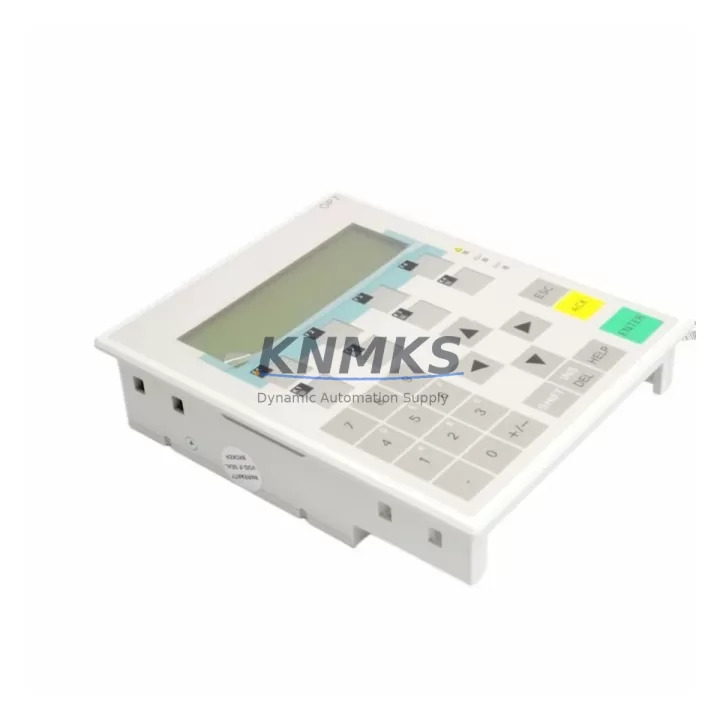
Siemens 6AV3607-1JC20-0AX1 Migration-Ready HMI Panel: Legacy System Retrofit & Upgrade
The Siemens 6AV3607-1JC20-0AX1 is a SIMATIC OP7 operator panel engineered for demanding industrial environments where legacy HMI infrastructure must be preserved, extended, or systematically replaced. As production lines built around S7-300 and S7-400 PLCs approach end-of-service milestones, the 6AV3607-1JC20-0AX1 remains a critical interface component for facilities that cannot afford full-platform migrations. This unit supports MPI communication natively, enabling direct integration with existing SIMATIC controller backplanes without protocol conversion hardware or additional gateway modules.
For maintenance engineers managing discontinued panel replacements, the 6AV3607-1JC20-0AX1 offers a verified drop-in form factor compatible with standard DIN rail and panel-cutout installations. Before commissioning, engineers should confirm power supply capacity — the OP7 operates on 24 V DC and draws up to 1.5 A under full backlight load. Terminal wiring must be validated against the original cabinet layout, particularly the MPI bus connector pinout (9-pin Sub-D) and the 24 V DC supply terminals. Where the original panel was wired with shielded MPI cables, the same cable routing and termination resistors should be retained to prevent bus reflection errors during startup.
When replacing a failed or obsolete OP7 in an active S7-300 rack, the module address assignment must be confirmed in STEP 7 or TIA Portal before the new panel is powered on. Mismatched MPI addresses are the most common cause of communication failure during HMI swap-outs. The replacement panel ships with factory-default MPI address 1; this must be reconfigured to match the original project settings before the first connection attempt. HMI screen projects compiled for the original 6AV3607-1JC20-0AX1 are directly transferable via the MPI interface or PC adapter cable — no screen redesign is required for like-for-like replacements.
In control cabinet upgrade scenarios where the 6AV3607-1JC20-0AX1 is being integrated alongside newer components, installation space must be measured carefully. The OP7 panel cutout dimension is 196 mm × 140 mm; cabinets previously housing smaller text-display panels may require cutout modification. Where the existing cabinet also contains a SIMATIC S7-300 CPU module, a CP 343-1 Ethernet communication processor, or a SM 321 digital input module, the physical arrangement of the backplane and cable routing should be planned before the retrofit begins to avoid signal interference and maintain adequate ventilation clearance.
For facilities migrating from older SIMATIC S5 systems to S7-300 platforms, the 6AV3607-1JC20-0AX1 serves as a stable HMI anchor during phased migration. The OP7 can be commissioned against the new S7-300 CPU while legacy I/O wiring is progressively re-terminated to ET 200 distributed I/O stations. This approach allows production to continue on partial automation while the migration is validated section by section. Firmware compatibility should be verified prior to project download — the OP7 supports ProTool configuration software, and project files must be compiled against the correct firmware version installed on the physical unit.
Downtime risk during HMI replacement is significantly reduced when a pre-configured spare unit is available on-site. Each 6AV3607-1JC20-0AX1 supplied by KNMKS undergoes pre-shipment functional testing, including power-on verification, display backlight check, keypad response validation, and MPI communication handshake confirmation. Units are shipped with a support terms confirmed by quotation covering manufacturing defects and communication interface failures. Inventory availability is maintained to support urgent replacement orders with short lead times.
Migration Compatibility Table
| Parameter | Specification / Recommendation |
|---|---|
| SKU | 6AV3607-1JC20-0AX1 |
| Series | SIMATIC OP7 (HMI Operator Panel) |
| Compatible Controllers | SIMATIC S7-300, S7-400 (MPI); S5 via protocol converter |
| Communication Interface | MPI (9-pin Sub-D); RS-422/485 compatible |
| Power Supply | 24 V DC, max 1.5 A — verify cabinet PSU capacity before installation |
| Panel Cutout | 196 mm × 140 mm — confirm cabinet cutout before ordering |
| Configuration Software | ProTool (legacy); verify firmware version before project download |
| MPI Address (Default) | Address 1 — must be reconfigured to match original project |
| Replacement Scope | Like-for-like OP7 swap; screen project transfer via MPI or PC adapter |
| Commissioning Focus | MPI address, firmware version, terminal wiring, bus termination resistors |
| Support terms | 12 months — manufacturing defects and communication interface failures |
| Pre-Shipment Testing | Power-on, display, keypad, MPI handshake — all units tested before dispatch |
Retrofit Planning for Existing Automation Systems
A successful retrofit involving the 6AV3607-1JC20-0AX1 typically requires coordination across several interdependent components. The SIMATIC S7-300 CPU (such as a CPU 315-2 DP or CPU 317-2 PN/DP) forms the control backbone; its MPI port must be accessible and correctly terminated for the OP7 to establish communication. Where the control cabinet also houses a SITOP PSU power supply module, engineers should verify that the combined current draw of the CPU, I/O modules, and the replacement OP7 panel does not exceed the PSU’s rated output — particularly in cabinets where additional SM 331 analog input modules or SM 332 analog output modules have been added over time.
In distributed control architectures, the 6AV3607-1JC20-0AX1 may operate alongside ET 200M remote I/O stations connected via PROFIBUS DP. In these configurations, the MPI segment carrying the OP7 must be kept electrically isolated from the PROFIBUS segment to prevent bus conflicts. A CP 342-5 PROFIBUS communication processor or a dedicated IM 153-1 interface module may already be present in the rack; their presence does not affect OP7 MPI communication but must be accounted for in the rack slot assignment and power budget calculation.
For facilities that also operate SIMATIC HMI TP177 or OP177 panels on newer lines, the 6AV3607-1JC20-0AX1 retrofit provides an opportunity to standardize spare parts inventory across both legacy and current-generation HMI platforms. Maintaining a mixed inventory of OP7 and TP177 units allows maintenance teams to cover both older S7-300 MPI-only installations and newer Ethernet-connected control stations without sourcing delays.
Downtime Control During System Migration
Minimizing production downtime during an OP7 replacement requires a structured pre-migration checklist. Before the existing panel is removed, the current HMI project file should be backed up from the panel memory using a PC adapter cable and ProTool software. This backup preserves all screen configurations, alarm messages, recipe data, and communication parameters — eliminating the risk of project loss if the original panel fails completely before the backup is completed.
The replacement 6AV3607-1JC20-0AX1 should be pre-configured off-line: MPI address set, project downloaded, and communication verified against a test PLC before the unit is transported to the production floor. This off-line preparation reduces on-site commissioning time to a panel swap and final communication check — typically achievable within a single maintenance window. Where the original PLC program contains HMI-linked data blocks or screen-triggered function calls, these should be reviewed in STEP 7 to confirm that no program modifications are required for the replacement panel to operate correctly.
Field commissioning should follow a defined sequence: power off the cabinet, remove the failed panel, install the replacement unit, reconnect MPI and power terminals, restore cabinet power, and verify MPI communication status on the CPU diagnostic LED before enabling production. This sequence protects the original PLC program logic and maintains field control continuity throughout the replacement process.
Retrofit Support FAQ
Q1: Is the 6AV3607-1JC20-0AX1 a direct replacement for other SIMATIC OP7 variants?
Yes. The 6AV3607-1JC20-0AX1 is a standard SIMATIC OP7 variant with MPI interface. It is compatible with other OP7 configurations sharing the same panel cutout and MPI communication protocol. Verify the firmware version and ProTool project compatibility before downloading the existing screen project to the replacement unit.
Q2: What wiring checks are required before powering on the replacement panel?
Confirm 24 V DC supply polarity and voltage at the panel terminals before connection. Verify MPI cable continuity and bus termination resistor status at both ends of the MPI segment. Ensure the MPI address on the replacement panel is set to match the original project configuration before the first power-on.
Q3: Does the unit ship tested, and what does the support terms confirmed by quotation cover?
Yes. Every 6AV3607-1JC20-0AX1 supplied by KNMKS is tested prior to shipment: power-on verification, display backlight, keypad response, and MPI communication handshake. The support terms confirmed by quotation cover manufacturing defects and communication interface failures under normal industrial operating conditions.
Q4: What is the typical lead time, and is stock available for urgent replacement orders?
KNMKS maintains inventory of the 6AV3607-1JC20-0AX1 to support urgent replacement requirements. Contact admin@knmks.com or +86 18359268345 for current stock status and expedited shipping options. Standard orders are processed and dispatched within the same business day where stock is confirmed available.
© 2026 KNMKS. All rights reserved.
Original Source: https://knmks.com
Contact: admin@knmks.com | +86 18359268345
Product Identification
- Brand / Ecosystem
-
Siemens
Siemens - Model / Series
-
6AV3607-1JC20-0AX1
SIMATIC Series - Product Family
- HMI & Displays
- Availability Status
- Available on request after model and quantity confirmation
- Inquiry Type
- B2B RFQ, replacement inquiry and project spare-part request
- Pre-Quote Check
- Exact SKU, brand, series, quantity, nameplate photos and destination country are checked before quotation
System Path
Where this product fits in the KNMKS automation structure.
Specification & Inquiry Focus
- Display range
- Operator panels and touch screens
- Common needs
- Screen size, interface and version matching
- Project support
- Retrofit, spare unit and panel replacement
Buyer Confirmation
Information KNMKS checks before replying.
- Exact model
- 6AV3607-1JC20-0AX1
- Brand / ecosystem
- Siemens
- Product family
- HMI & Displays
- Application note
- Replacement, maintenance, project build or spare-part list
- Useful photos
- Nameplate, installed unit, cabinet layout or connector side
- Delivery details
- Quantity, destination country and target schedule
Document Support
Files and notes can be confirmed during quotation.
- Product photos or nameplate confirmation when available
- Packing and delivery notes before quotation confirmation
- Support scope and delivery terms confirmed per inquiry
- Export document coordination for qualified B2B requests
Inquiry Support
- Panel size and interface confirmation
- Replacement unit inquiry for discontinued HMIs
- Protective packaging for display shipment
What to Send Us
- Brand and exact model number: Siemens 6AV3607-1JC20-0AX1
- Quantity and required delivery time
- Application, replacement requirement or nameplate photo
- Destination country and shipping preference
RFQ Preparation
This is a product inquiry page built for RFQ communication.
Fast Model Check
Send this model to KNMKS for confirmation.
Include quantity, destination country and photos if this is a maintenance replacement. The inquiry will be saved with a reference number after submission.
Brand & Compatibility Note
KNMKS displays automation product information for well-known industrial brand ecosystems and compatible replacement references. Brand names are used for product identification and compatibility reference only; final availability and commercial terms are confirmed per quotation.
 Manufacturing
 Machine Tools
 Packaging
 Energy & Power



 PLCs & Controllers
 Servo Systems
 Variable Frequency Drives
 Sensors