
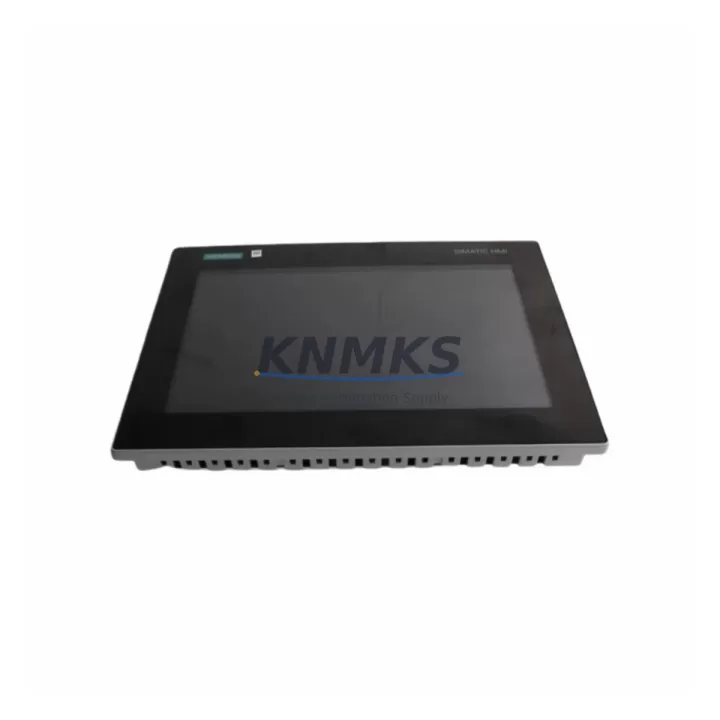
Overview
Siemens 6AV2128-3QB06-0AX1 Migration-Ready HMI Panel: Legacy System Upgrade & Retrofit Solution
The Siemens 6AV2128-3QB06-0AX1 is a 15″ SIMATIC HMI Unified Comfort Panel engineered for seamless integration into existing SIMATIC S7-300, S7-400, and S7-1500 control architectures. As legacy Comfort Panel and Multi Panel series units reach end-of-life, the 6AV2128-3QB06-0AX1 provides a validated migration path that preserves existing HMI project logic, minimizes panel cutout modifications, and maintains continuity across PROFINET and MPI/PROFIBUS communication links. Whether you are replacing a discontinued TP1500 Comfort or upgrading a control cabinet originally built around an older MP 377 15″ Touch, this unit delivers the processing headroom and protocol flexibility required for modern industrial environments.
Migration Compatibility Table
| Parameter | Details |
|---|---|
| Replaces / Upgrades From | SIMATIC TP1500 Comfort (6AV2124-0QC02-0AX1), MP 377 15″ Touch, TP 1500 Basic |
| Display Size | 15.4″ Widescreen TFT, 1280 × 800 px |
| Panel Cutout Compatibility | Verify cutout dimensions before installation; adapter frames may be required for older MP 377 cutouts |
| Communication Interfaces | PROFINET (2× RJ45), USB 2.0 (2×), SD card slot; MPI/PROFIBUS via CM 1542-5 adapter |
| Controller Compatibility | SIMATIC S7-300, S7-400, S7-1200, S7-1500, WinCC Runtime |
| Engineering Software | TIA Portal V16 and above; project migration from WinCC flexible via migration wizard |
| Power Supply | 24 V DC (20.4–28.8 V), max. 60 W — verify existing PSU capacity before retrofit |
| Mounting | Panel flush-mount; IP65 front protection |
| Firmware | Pre-loaded; confirm TIA Portal compatibility version prior to project download |
| Support terms | support terms confirmed by quotation — tested and verified before shipment |
Retrofit Planning for Existing Automation Systems
A successful retrofit of the 6AV2128-3QB06-0AX1 into a legacy control cabinet begins well before the panel arrives on site. Engineers should first audit the existing 24 V DC power rail to confirm the SITOP PSU or equivalent power supply can sustain the additional 60 W load alongside co-located components such as the SIMATIC S7-300 CPU 315-2 PN/DP and any active ET 200SP distributed I/O stations. Terminal block wiring for the 24 V supply and PE ground must be re-verified against the original cabinet drawings, as older installations sometimes share a common 0 V rail with signal circuits — a practice that can introduce noise into the new panel’s touch interface.
On the communication side, sites still running MPI or PROFIBUS DP topologies will need to evaluate whether a CM 1542-5 communications module or a dedicated PROFIBUS CP adapter is already present in the S7-300 rack. If the legacy HMI was connected via a direct MPI cable, the migration to PROFINET requires assigning a valid IP address to the 6AV2128-3QB06-0AX1 and updating the controller’s hardware configuration in TIA Portal. For plants that also operate SIMATIC ET 200M remote I/O racks on PROFIBUS, the transition plan should account for the IM 153-2 interface module addressing so that I/O channel assignments remain consistent after the HMI changeover.
Cabinet space is another critical variable. The 6AV2128-3QB06-0AX1 uses a standard Unified Comfort Panel form factor, but older control cabinets designed around the MP 377 15″ Touch may have a slightly different cutout profile. Measuring the existing aperture and comparing it against the Unified Comfort Panel mounting template before ordering prevents costly on-site rework. Where the cutout is undersized, a stainless steel adapter frame resolves the gap without requiring sheet metal modification. Depth clearance behind the panel must also accommodate the rear connector block and any USB programming cables used during commissioning with a SIMATIC S7-USB PC adapter or PROFINET-capable laptop interface.
For sites that include a SIMATIC S7-1500 CPU with integrated PROFINET IO controller functionality, the retrofit is more straightforward: the 6AV2128-3QB06-0AX1 connects directly to the onboard PROFINET port, and the TIA Portal project can be migrated from WinCC flexible using the built-in migration wizard. Screen layouts, tag assignments, alarm classes, and recipe structures are carried over automatically in most cases, though custom scripts and VB-based functions require manual review and adaptation to the Unified Comfort Panel scripting environment.
Downtime Control During System Migration
Minimizing production downtime during an HMI panel swap requires a structured pre-commissioning approach. Before the scheduled maintenance window, the full TIA Portal project — including all HMI screens, tag tables, alarm configurations, and communication settings — should be compiled, simulated offline, and stored on a verified SD card or USB drive. This allows the replacement 6AV2128-3QB06-0AX1 to be loaded and tested on a bench setup against a spare S7-1500 or S7-300 CPU before it ever enters the production environment.
During the actual panel swap, the sequence should follow a defined lockout/tagout procedure: isolate the 24 V supply to the existing HMI, disconnect the PROFINET or MPI cable, remove the legacy panel from the cutout, install the 6AV2128-3QB06-0AX1, reconnect communications, restore power, and initiate the project download. With a pre-loaded SD card, the entire physical swap and initial boot sequence can be completed in under 30 minutes for a straightforward PROFINET-connected installation.
Post-installation verification should include confirming that all PLC data tags are updating correctly on the new panel, that alarm acknowledgment functions are operating as expected, and that any recipe or batch data stored on the legacy panel has been transferred to the new unit’s SD card or to a WinCC server if the site uses centralized data management. Keeping the original panel on-site and powered down — but intact — for the first 48 hours of production operation provides a rapid fallback option if an unexpected screen logic issue is discovered during live operation.
Retrofit Support FAQ
Q: Is the 6AV2128-3QB06-0AX1 a direct drop-in replacement for the SIMATIC TP1500 Comfort (6AV2124-0QC02-0AX1)?
A: The Unified Comfort Panel shares the same 15″ display class and PROFINET connectivity as the TP1500 Comfort, making it the recommended upgrade path. Panel cutout dimensions are compatible in most standard enclosures, though we recommend verifying the mounting template against your existing aperture. TIA Portal project migration from the TP1500 Comfort is supported via the integrated migration tool.
Q: Can this panel communicate with a legacy S7-300 CPU over MPI or PROFIBUS?
A: The 6AV2128-3QB06-0AX1 does not include a native MPI/PROFIBUS port. Sites with MPI-only controllers should add a CM 1542-5 PROFIBUS communications module to the S7-300 rack and connect the panel via PROFINET, or use a PROFIBUS-to-PROFINET gateway. We can advise on the appropriate adapter based on your existing rack configuration.
Q: What pre-shipment testing is performed on this unit?
A: Every 6AV2128-3QB06-0AX1 unit undergoes power-on functional verification, display uniformity check, touch calibration test, and communication port continuity verification before dispatch. Units are shipped with a support terms confirmed by quotation covering manufacturing defects and functional failures under normal operating conditions.
Q: How quickly can this unit be sourced, and is stock available?
A: We maintain in-stock inventory of the 6AV2128-3QB06-0AX1 to support urgent retrofit and breakdown replacement scenarios. Standard lead time from order confirmation to dispatch is 1–3 business days for stocked units. Contact our team at admin@knmks.com or +86 18359268345 to confirm current availability and arrange expedited shipping if required.
© 2026 KNMKS. All rights reserved.
Original Source: https://knmks.com
Contact: admin@knmks.com | +86 18359268345
Product Identification
- Brand / Ecosystem
-
Siemens
Siemens - Model / Series
-
6AV2128-3QB06-0AX1
SIMATIC Series - Product Family
- HMI & Displays
- Availability Status
- Available on request after model and quantity confirmation
- Inquiry Type
- B2B RFQ, replacement inquiry and project spare-part request
- Pre-Quote Check
- Exact SKU, brand, series, quantity, nameplate photos and destination country are checked before quotation
System Path
Where this product fits in the KNMKS automation structure.
Specification & Inquiry Focus
- Display range
- Operator panels and touch screens
- Common needs
- Screen size, interface and version matching
- Project support
- Retrofit, spare unit and panel replacement
Buyer Confirmation
Information KNMKS checks before replying.
- Exact model
- 6AV2128-3QB06-0AX1
- Brand / ecosystem
- Siemens
- Product family
- HMI & Displays
- Application note
- Replacement, maintenance, project build or spare-part list
- Useful photos
- Nameplate, installed unit, cabinet layout or connector side
- Delivery details
- Quantity, destination country and target schedule
Document Support
Files and notes can be confirmed during quotation.
- Product photos or nameplate confirmation when available
- Packing and delivery notes before quotation confirmation
- Support scope and delivery terms confirmed per inquiry
- Export document coordination for qualified B2B requests
Inquiry Support
- Panel size and interface confirmation
- Replacement unit inquiry for discontinued HMIs
- Protective packaging for display shipment
What to Send Us
- Brand and exact model number: Siemens 6AV2128-3QB06-0AX1
- Quantity and required delivery time
- Application, replacement requirement or nameplate photo
- Destination country and shipping preference
RFQ Preparation
This is a product inquiry page built for RFQ communication.
Fast Model Check
Send this model to KNMKS for confirmation.
Include quantity, destination country and photos if this is a maintenance replacement. The inquiry will be saved with a reference number after submission.
Brand & Compatibility Note
KNMKS displays automation product information for well-known industrial brand ecosystems and compatible replacement references. Brand names are used for product identification and compatibility reference only; final availability and commercial terms are confirmed per quotation.
 Manufacturing
 Machine Tools
 Packaging
 Energy & Power



 PLCs & Controllers
 Servo Systems
 Variable Frequency Drives
 Sensors